Read the statement by Michael Teeuw here.
MMM-CalendarExt3Agenda
-
@BKeyport said in MMM-CalendarExt3Agenda:
eventTransformer: (ev) => {
if (ev.title.search(“⚾”) > -1)
ev.title = ev.title.replace(“⚾”,“”);
return ev
},so, lets make a little node script to test outside the transform
xxx.js
let title= " put in your chars"
console.log(title.replace(“… etc”,“”)
save and then run
node xxx.js
then u can play with it
til you get what you expect -
@sdetweil Found it, ended up being a special char, likely a tab or something stupid. cut and paste saves the day.
-
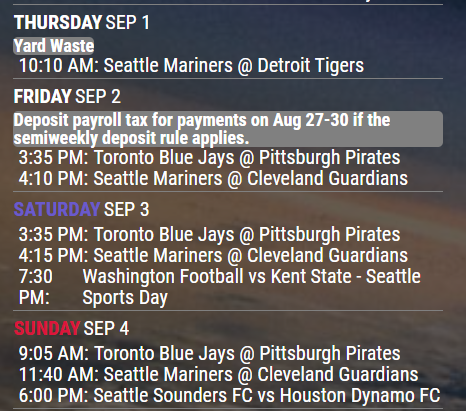
Three things I wanna change that I can’t figure out.
- I would like the all day events that don’t wrap (“Yard Waste”) to stretch across the window (grey bar).
- I would like times to not wrap.
- I would like times to right align, so that the events are in a nice straight line.
custom CSS and screenshot attached. I’m in top_center.
Thanks!
/* offset top center to fit for large right and small left */ .region.top.center { left: 62%; transform: translateX(-50%); text-align:center; } /* CalendarExt3Agenda */ /* Set CX3a to size, etc. */ .CX3A { font-size: 20px; min-width: 300px; max-width: 430px; max-height: 900px; overflow-y: unset; text-align: left; position: relative; color: white; } /* Hide useless descriptions, you wanna know, load your calendar */ .CX3A .event .description { display: none; } /* Hide useless locations, you wanna know, load your calendar */ .CX3A .event .location { display: none; } /* Set up custom full day look */ .CX3A .cellBody .fullday .event { color: var(--calendarColor); background-color: gray; max-width: 100%; padding: 0px 0px; } /* make fullday events overflow onto next line */ .CX3A .cellBody .fullday .event .title { color: inherit; overflow: unset; white-space: unset; text-overflow: unset; } /* Add the icon to full day events .CX3A .cellBody .fullday .event .headline { display: inline-block; } */ /* get rid of the icon for blanks */ .CX3A .event .headline .symbol.noSymbol::after { content: ''; } /* fullday keep the times hidden */ .CX3A .cellBody .fullday .event .headline .time { display: none; } /* Change the dash to a colon, get rid of spare space */ .CX3A .event .startTime::after { content: ':'; } /* Adjust time space */ .CX3A .event .time { font-size: unset; } /* Remove End time */ .CX3A .event .endTime { display: none; } /* Adjust how tall app is */ .CX3A .agenda { position: relative; max-height: 900px; overflow-y: hidden; } /* Fade eliminator */ .CX3A .agenda::after { position: absolute; bottom: 0; left: 0; height: 20%; width: 100%; content: ' '; background-image: unset; } -
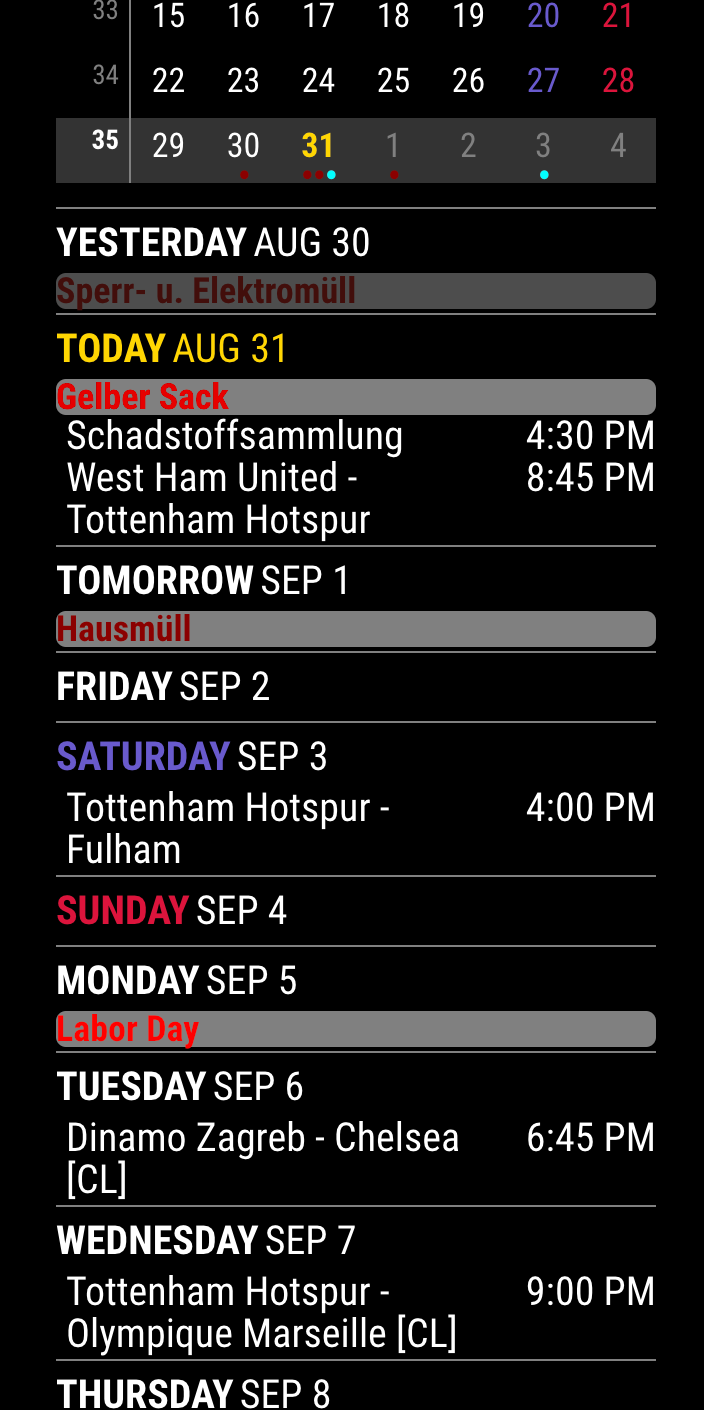
Append below into your custom.css
.CX3A { width: 300px; /* to test text-wrapping */ } .CX3A .cellBody .fullday .event { width: 100%; } .CX3A .event .startTime::after { content: ''; } .CX3A .event .title { order: 1; width: 180px; /* Adjust for your region width. Here I am using fixed value to make things simple */ flex-grow: 1; } .CX3A .event .symbol { order: 1; } .CX3A .event .time.startTime { order: 2; width: 90px; /* Adjust for your region width. Here I am using fixed value to make things simple */ text-align: right; } .CX3A .event .headline { justify-content: space-between; } -
@MMRIZE nearly perfect. Thanks! (I’m tweaking minor things from this)
-
Hi to all !
I just installed the module MMM-CalendarExt3Agenda which looks like very good but i’m lost in the config file ! i have an error.
Here is my setup :
I’ve done 2 tests of config.js:
TEST1 :
config.js with
{
module: “MMM-CalendarExt3Agenda”,
position: “top_left”,
},Result : TEST OK, the module is shown.
TEST2 :
When I add t config.js{
module: “MMM-CalendarExt3Agenda”,
position: “top_left”,
title: “My Agenda”,
config: {
instanceId: “basicCalendar”,
locale: ‘de-DE’,
firstDayOfWeek: 1,
startDayIndex: -1,
endDayIndex: 10,
calendarSet: [‘us_holiday’,],
}
},/* default/calendar module configuration */
{
module: “calendar”,
position: “top_left”,
config: {
broadcastPastEvents: true, // <= IMPORTANT to see past events
calendars: [
{
url: “webcal://www.calendarlabs.com/ical-calendar/ics/76/US_Holidays.ics”,
name: “us_holiday”, // <-- specify calendar name
color: “skyblue”, // <-- if you don’t want to get color, just remove this line.
broadcastPastEvents: true, // <-- need to broadcast past events
maximalNumberOfDays: 30, // <-- how old events would be broadcasted
maximumEntries: 100, // <-- assign enough number to prevent truncating new events by old events.
symbol: ‘camera’, // <-- when you want to display simbol. If you don’t want, just set assymbol:[],
},RESULT : error (black screen) and when i do a tail -50 /home/pi/.pm2/logs/MagicMirror-error.log I don’t see nothing special
Can someone help please?
-
@hogedir
I cleaned your config to test.- Your quotation mark and double quotation mark seem not standard ASCII code. (It sometimes happens when you copy the codes from Text Editor, which is not for coding.)
- The last bracket
]for calendars and}of module config seem missing but I think it was just a mistake when you posted the code here.
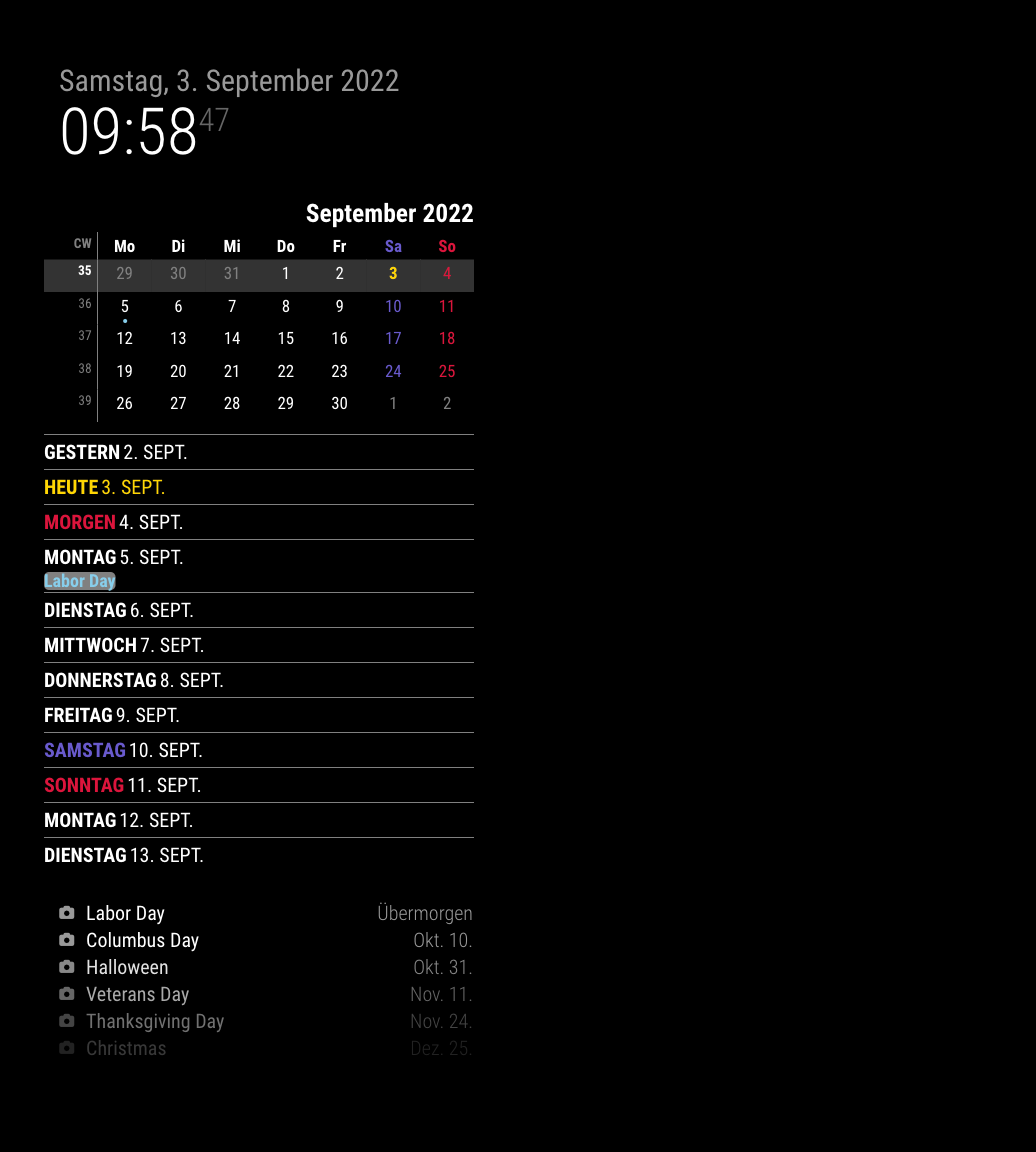
Anyway, after cleaning, it works for me.
{
  module: "MMM-CalendarExt3Agenda",
  position: 'top_left',
  title: 'My Agenda',
  config: {
    instanceId: 'basicCalendar',
    locale: 'de-DE',
    firstDayOfWeek: 1,
    startDayIndex: -1,
    endDayIndex: 10,
    calendarSet: ['us_holiday'],
  }
},

{
  module: 'calendar',
  position: 'top_left',
  config: {
    broadcastPastEvents: true,
    calendars: [
    {
      url: 'webcal://www.calendarlabs.com/ical-calendar/ics/76/US_Holidays.ics',
      name: 'us_holiday',
      color: 'skyblue',
      broadcastPastEvents: true,
      maximalNumberOfDays: 30,
      maximumEntries: 100,
      symbol: 'camera',
      },
    ]
  }
},
-
@MMRIZE the quotation marks will get mangled if not wrapped in a code block. the forum code treats it as document text
if u edit it, it’s correct but copy paste from here produces wird type quotes…
-
@MMRIZE thank you very much !
Now i have an issue. I try to connect a FRAMAGENDA calendar to your super module.
Framagenda is a nextcloud like agenda. So, it needs an authentification (it’s not a direct .ics).
Here is the config.js with the calendar and MMM-calendarextAgenda module config :
{
			module: "calendar",
			position: "top_left",
		config: {
		broadcastPastEvents: true, // <= IMPORTANT to see past events
		calendars: [
			{
			url: "https://framagenda.org/remote.php/dav/calendars/calendar_1/test",
			auth: {
			    user: 'myuser28632HG4',
			    pass: 'HDDBG5nSvdjgBVFBVDFFV',
			    method: 'basic',
			      },
			name: "test", // <-- specify calendar name
			color: "skyblue", // <-- if you don't want to get color, just remove this line.
        broadcastPastEvents: true, // <-- need to broadcast past events
        maximalNumberOfDays: 30, // <-- how old events would be broadcasted
        maximumEntries: 100, // <-- assign enough number to prevent truncating new events by old events.
        symbol:[],
			},

		]
			}
	},

	{
  module: "MMM-CalendarExt3Agenda",
  position: "top_left",
  title: "My Agenda",
  config: {
    instanceId: "basicCalendar",
    locale: 'FR',
    firstDayOfWeek: 1,
    startDayIndex: -1,
		endDayIndex: 10,
    calendarSet: [''],
  }
  },
Result : the module works now but there is not Appointment showed, nothing is get from my framagenda calendar.
Where can i see why it doesn’t dump my calendar ? a log file ?
-
@hogedir please put your config info in a code block
paste
select the text you just pasted
and pish the button on the top , looks like this
</> -
I have the connection now after multiple tests to understand the issue.
but i think I found a bug in your module @MMRIZE.
If I connect to a very simple calendar with 5 appoinments => result : it shows the calendar in the MM without any problem.
If i connect to the same calendar but imported with much more information in it (i dumped my other calendar to it which doesn’t work with your module) => it shows NO APPOINTMENT AVAILABLE.
It’s possible the french accent we use in france could be the source of the problem, Or too much info in the ics broke the connection?
The special caracter like , : ! are ok ? or long sentence ? in the title of the appointment ?
other question : what are the others symbols than camera ?
How it works to affect the correct symbol to the right appointment? I don’t understand this feature.==>>Where can i see the log file about your module especially please?
thanks a lot
-
@hogedir Try setting the max entries for your calendar higher than the default of 100.
-
@Wenike My max is set to 20, so I doubt that’s the issue. Here’s mine that works great - with events for weeks (because I follow sports)
module: "calendar", // Built in
//position: "top_right",
config: {
	broadcastEvents: true,
	broadcastPastEvents: false,
	fetchInterval: 30000,
	maximumEntries: 20,
(Calendars follow)

(cut)

module: "MMM-CalendarExt3Agenda", // https://github.com/MMRIZE/MMM-CalendarExt3Agenda
position: "top_center",
config: {
	showMiniMonthCalendar: false,
	instanceId: "basicCalendar",
	firstDayOfWeek: 0,
	startDayIndex: 0,
	endDayIndex: 99,
	minimalDaysOfNewYear: 1,
	animationSpeed: 0,
	useSymbol: false,
	useWeather: false,
	waitFetch: 0,
	eventTransformer: (ev) => {
		if (ev.title.search("⚾") > -1)
		ev.title = ev.title.replace("⚾️ ","");
		return ev
	},
},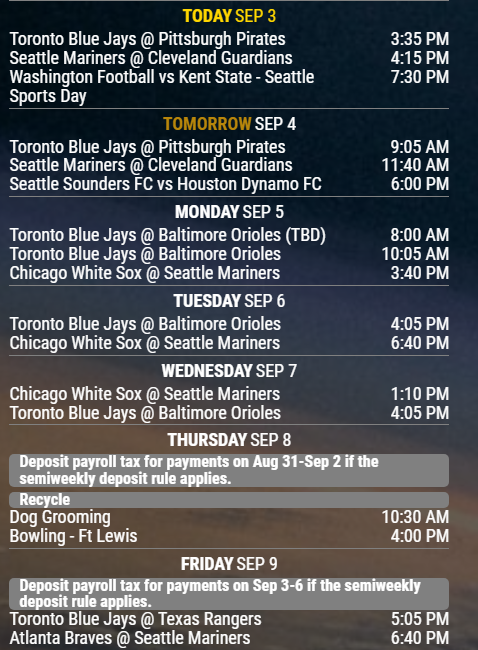
@hogedir - please post your configuration and screenshots like this. You can blur if needed. Alternatively, if you want a daily repeating event for testing, feel free to use my test calendar - I’ll give you the iCal address in private.
-
@BKeyport I introduced a bug in 2.20.
maximumentries includes those in the past incorrectly
you can set it differently for each cal, but if u don’t then the module level value will be used.
the bug is fixed in 2.21 coming oct 1.
-
@sdetweil really? I haven’t noticed. As you can see, I’ve got plenty of events…
good to know, though.
-
@BKeyport really trouble with past events getting counted
-
I’ve change it from 100 to 100000 and now its works,
my calendar is showed now. thanks a lot for your reactivity guys, perfect answer.two other questions : this parameter symbol: ‘camera’ maybe be other value than ‘camera’? I did not understood why camera was by default… is there a list of other symbol values?
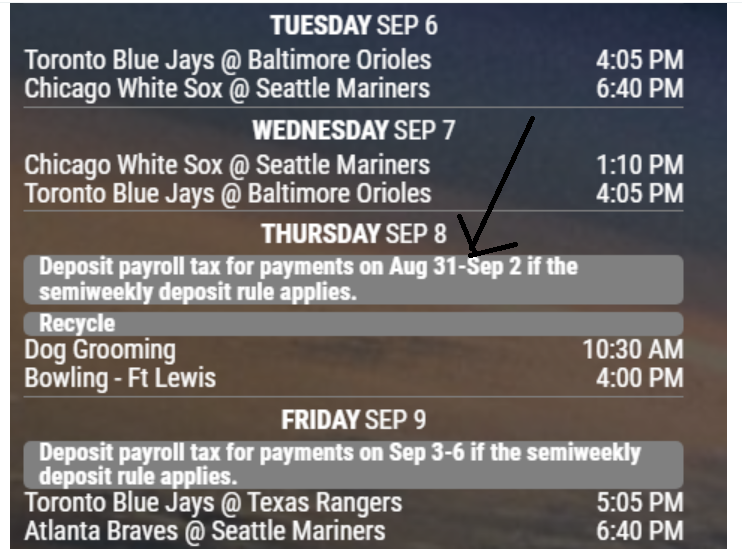
other question : I want to extend the text limit showing because it’s looks like limited for the events that not have a eaxct duration like 10:00-12:00
like you have here in your screen :
Thanks.
-
@hogedir The event you point to is generated by the IRS, and is a full day event. the text is theirs.
Here’s my CSS, fully commented for you to borrow:
/* CalendarExt3Agenda */
/* Set CX3a to size, etc. */
.CX3A {
	font-size: 18px;
	min-width: 440px;
	max-width: 440px;
	max-height: 900px;
	overflow-y: unset;
	text-align: left;
	position: relative;
	color: var(--color-text);
	--todayColor: DarkSlateGrey;
	--saturdayColor : orange;
	--sundayColor: darkGoldenRod;
}

/* Hide useless descriptions, you wanna know, load your calendar */
.CX3A .event .description {
	display: none;
}

/* Hide useless locations, you wanna know, load your calendar */
.CX3A .event .location {
	display: none;
}

/* Set up custom full day look */
.CX3A .cellBody .fullday .event {
	color: var(--calendarColor);
	background-color: var(--oppositeColor);
	max-width: 100%;
	padding: 0px 10px;
	width: 100%;
}

/* make fullday events overflow onto next line */
.CX3A .cellBody .fullday .event .title {
	color: inherit;
	overflow: unset;
	white-space: unset;
	text-overflow: unset;
}

/* Add the icon to full day events */
.CX3A .cellBody .fullday .event .headline {
	display: inline-block;
}

/* get rid of the icon for blanks	*/
.CX3A .event .headline .symbol {
  display: none;
}

/* fullday keep the times hidden */
.CX3A .cellBody .fullday .event .headline .time {
	display: none;
}

/* Start Time Adjustments */
.CX3A .event .time.startTime {
	order: 2;
	width: 90px;
	text-align: right;
}

/* Stretch title to left justify and organize */
.CX3A .event .title {
	flex-grow: 1;
	color: var(--calendarColor);
}

/* change date header to center & change color */
.CX3A .agenda .cellHeader {
	justify-content: center;
	color: var(--text-color);
}

.CX3A .agenda .cellDay {
	color: var(--text-color);
}

/* get rid of spare space & dash */
.CX3A .event .startTime::after {
	content: '';
}

/* Adjust time space */
.CX3A .event .time {
	font-size: unset;
 }

/* Remove End time */
.CX3A .event .endTime {
	display: none;
}

/* Adjust how tall app is */
.CX3A .agenda {
	position: relative;
	max-height: 900px;
	overflow-y: hidden;
}

/* Fade adjustments */
.CX3A .agenda::after {
	position: absolute;
	bottom: 0;
	left: 0;
	height: 6%;
	width: 100%;
	content: '';
	background-image: unset;
}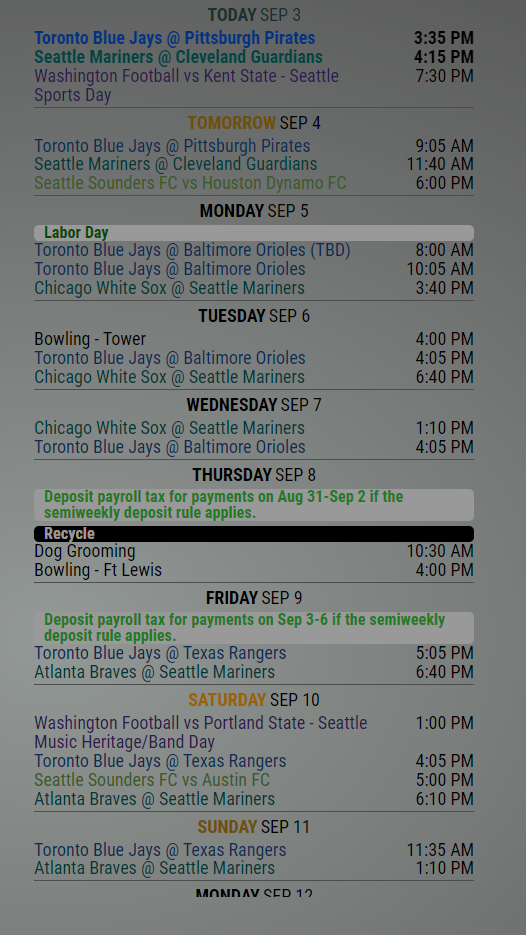
(shading due to developer console)I decided to change it up, this is what it looks like now.
color of events is set by the calendar functionality, thusly, background is via CSS:
	url: "http://cal.events/VReW45.ics",
	name: "Seahawks",
	color: "#002244",
The “E” in “Javascript” stands for “Easy”
-
@MMRIZE said in MMM-CalendarExt3:
Small news.
Now it could get the events fromrandomBrainstormer/MMM-GoogleCalendarmodule also.Are you planning on adding this to Agenda? I could use this.
-
@BKeyport already applied.

Hello! It looks like you're interested in this conversation, but you don't have an account yet.
Getting fed up of having to scroll through the same posts each visit? When you register for an account, you'll always come back to exactly where you were before, and choose to be notified of new replies (either via email, or push notification). You'll also be able to save bookmarks and upvote posts to show your appreciation to other community members.
With your input, this post could be even better 💗
Register Login