MagicMirror Forum
    • Recent
    • Tags
    • Unsolved
    • Solved
    • MagicMirror² Repository
    • Documentation
    • 3rd-Party-Modules
    • Donate
    • Discord
    • Register
    • Login
    A New Chapter for MagicMirror: The Community Takes the Lead
    Read the statement by Michael Teeuw here.

    Go East, young icon!

    Scheduled Pinned Locked Moved Solved Troubleshooting
    22 Posts 5 Posters 16.8k Views 6 Watching
    Loading More Posts
    • Oldest to Newest
    • Newest to Oldest
    • Most Votes
    Reply
    • Reply as topic
    Log in to reply
    This topic has been deleted. Only users with topic management privileges can see it.
    • Mykle1M Offline
      Mykle1 Project Sponsor Module Developer @tosti007
      last edited by

      @tosti007 said in Go East, young icon!:

      Note: I am currently on mobile so have no way of testing it. If it doesn’t work then let me know and i will search another solution (and I will be confused since I am pretty sure this works)

      I tried this after going the custom.css route and it did not work.

      Thank you for your suggestion

      Create a working config
      How to add modules

      1 Reply Last reply Reply Quote 0
      • Mykle1M Offline
        Mykle1 Project Sponsor Module Developer @strawberry 3.141
        last edited by Mykle1

        @strawberry-3.141 said in Go East, young icon!:

        you can achieve this without modifying the code

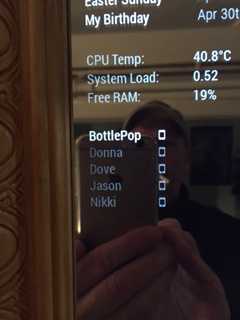
        Strawberry-3.141 deserves an award. He went above and beyond in helping me customize the NetworkScanner module for me. Apparently, he is a genius, and willing to work well past midnight to help someone (me) with their MM. You have my highest praise.

        All credit for this custom.css goes to Strawberry-3.141
        }
        .MMM-NetworkScanner .fa-ul {
        margin-left: 2px; /* This aligned NetworkScanner to the left margin /
        width: 130px; /
        If you remove this line it will be the same width as the widest module in the region, this can lead to a big gap, thats why i limited it to 130px if you add devices with longer names you might want to increase this value */
        }

        .MMM-NetworkScanner .fa-li {
        position: relative; /* This put the icon on the right side */
        float: right;
        left: initial;
        }
        0_1487212483120_IMG_1749.JPG

        I dreamed it. He made it happen.

        Create a working config
        How to add modules

        slametpsS 1 Reply Last reply Reply Quote 0
        • slametpsS Offline
          slametps @Mykle1
          last edited by

          @Mykle1 said in Go East, young icon!:

          .MMM-NetworkScanner .fa-ul {
          margin-left: 2px; /* This aligned NetworkScanner to the left margin /
          width: 130px; / If you remove this line it will be the same width as the widest module in the region, this can lead to a big gap, thats why i limited it to 130px if you add devices with longer names you might want to increase this value /
          }
          .MMM-NetworkScanner .fa-li {
          position: relative; /
          This put the icon on the right side */
          float: right;
          left: initial;
          }

          @strawberry-3-141 : How to make icon on the left, but without margin?

          regards,

          Slamet PS

          Mykle1M strawberry 3.141S 2 Replies Last reply Reply Quote 0
          • Mykle1M Offline
            Mykle1 Project Sponsor Module Developer @slametps
            last edited by

            @slametps said in Go East, young icon!:

            How to make icon on the left, but without margin?

            The icon is on the left by default

            Create a working config
            How to add modules

            1 Reply Last reply Reply Quote 0
            • strawberry 3.141S Offline
              strawberry 3.141 Project Sponsor Module Developer @slametps
              last edited by

              @slametps the space on the left ogf the icon or the space between the icon and the name?

              Please create a github issue if you need help, so I can keep track

              slametpsS 1 Reply Last reply Reply Quote 0
              • slametpsS Offline
                slametps @strawberry 3.141
                last edited by

                @strawberry-3.141 : the space on the left of the icon. How to remove it?

                regards,

                Slamet PS

                Mykle1M 1 Reply Last reply Reply Quote 0
                • Mykle1M Offline
                  Mykle1 Project Sponsor Module Developer @slametps
                  last edited by Mykle1

                  @slametps said in Go East, young icon!:

                  the space on the left of the icon. How to remove it?

                  Strawberry helped me with this. I’m not trying to answer for him, but while you’re waiting, this is what he did for me.

                  Add this to your custon.css file.

                  .MMM-NetworkScanner .fa-ul {
                    margin-left: 0px; 
                  }
                  

                  /* This aligned NetworkScanner to the left margin. Thanks to Strawberry-3.141 */

                  Create a working config
                  How to add modules

                  slametpsS 1 Reply Last reply Reply Quote 0
                  • slametpsS Offline
                    slametps @Mykle1
                    last edited by

                    @Mykle1 said in Go East, young icon!:

                    @slametps said in Go East, young icon!:

                    the space on the left of the icon. How to remove it?

                    Strawberry helped me with this. I’m not trying to answer for him, but while you’re waiting, this is what he did for me.

                    Add this to your custon.css file.

                    .MMM-NetworkScanner .fa-ul {
                      margin-left: 0px; 
                    }
                    

                    /* This aligned NetworkScanner to the left margin. Thanks to Strawberry-3.141 */

                    I’m using this on my custom.css, but still no luck.

                    .MMM-NetworkScanner .fa-ul {
                      margin-left: 1px;
                    }
                    

                    the icon still has space I mention earlier.

                    regards,

                    Slamet PS

                    strawberry 3.141S 1 Reply Last reply Reply Quote 0
                    • strawberry 3.141S Offline
                      strawberry 3.141 Project Sponsor Module Developer @slametps
                      last edited by

                      @slametps for me this works

                      .MMM-NetworkScanner .fa-ul {
                          margin-left: 35px;
                      }
                      

                      Please create a github issue if you need help, so I can keep track

                      slametpsS 1 Reply Last reply Reply Quote 0
                      • slametpsS Offline
                        slametps @strawberry 3.141
                        last edited by slametps

                        @strawberry-3.141 said in Go East, young icon!:

                        @slametps for me this works

                        .MMM-NetworkScanner .fa-ul {
                            margin-left: 35px;
                        }
                        

                        this style will cause the icon has a left-margin about 35px. what I want is the icon is left-aligned without a margin, and set margin-left to 0 or 1px is not working as expected.

                        regards,

                        Slamet PS

                        strawberry 3.141S 1 Reply Last reply Reply Quote 0
                        • strawberry 3.141S Offline
                          strawberry 3.141 Project Sponsor Module Developer @slametps
                          last edited by

                          @slametps can you share a screenshot? for me its aligned to the left

                          Please create a github issue if you need help, so I can keep track

                          slametpsS 1 Reply Last reply Reply Quote 0
                          • slametpsS Offline
                            slametps @strawberry 3.141
                            last edited by

                            @strawberry-3.141 said in Go East, young icon!:

                            @slametps can you share a screenshot? for me its aligned to the left
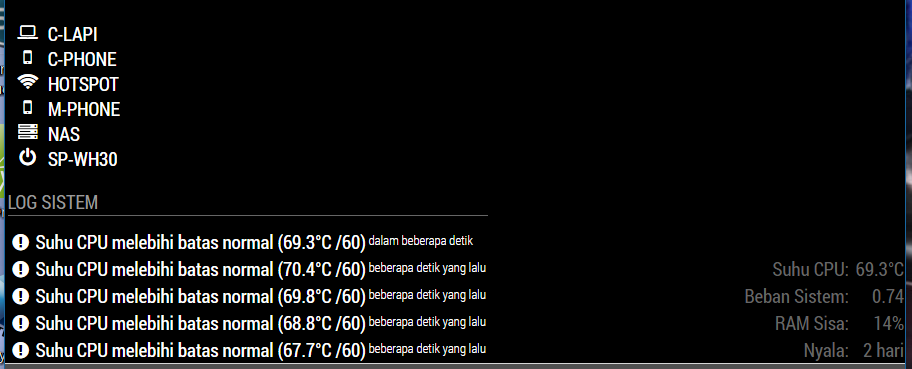
                            0_1488845973500_MM-network_scanner-align_left.jpg

                            using following css:

                            .MMM-NetworkScanner .fa-ul {
                              margin-left: 0px; /* This aligned NetworkScanner to the left margin */
                              width: 35 px; /* If you remove this line it will be the same width as the widest module in the region, this can lead to a big gap, thats why i limited it to 130px if you add devices with longer names you might want to increase this value */
                            }
                            
                            .MMM-NetworkScanner .fa-li {
                              position: relative; /* This put the icon on the right side */
                              float: left;
                              left: initial;
                              margin-left: 0px;
                            }
                            

                            There are spaces between icon in NetworkScanner module and the left-edge. Is it possible to make it full left-aligned?

                            regards,

                            Slamet PS

                            strawberry 3.141S 1 Reply Last reply Reply Quote 0
                            • strawberry 3.141S Offline
                              strawberry 3.141 Project Sponsor Module Developer @slametps
                              last edited by

                              @slametps replace your rules with

                              .MMM-NetworkScanner .fa-ul {
                                  margin-left: 35px;
                              }
                              
                              .MMM-NetworkScanner .fa-li {
                                  left: -35px;
                                  text-align: initial;
                              }
                              

                              Please create a github issue if you need help, so I can keep track

                              slametpsS 1 Reply Last reply Reply Quote 0
                              • slametpsS Offline
                                slametps @strawberry 3.141
                                last edited by

                                @strawberry-3.141 said in Go East, young icon!:

                                .MMM-NetworkScanner .fa-ul {
                                margin-left: 35px;
                                }

                                .MMM-NetworkScanner .fa-li {
                                left: -35px;
                                text-align: initial;
                                }

                                Yap, this works. Thx a lot, @strawberry-3-141.

                                regards,

                                Slamet PS

                                1 Reply Last reply Reply Quote 0
                                • KimzerK Offline
                                  Kimzer
                                  last edited by

                                  How do i change the color of the names?

                                  Mykle1M 1 Reply Last reply Reply Quote 0
                                  • Mykle1M Offline
                                    Mykle1 Project Sponsor Module Developer @Kimzer
                                    last edited by Mykle1

                                    @Kimzer said in Go East, young icon!:

                                    How do i change the color of the names?

                                    In custom.css:

                                    .MMM-NetworkScanner {
                                      width: 175px;  /* should control width of entire module */
                                      color: #62FF00;  /* This may change the color of the icons, too */
                                    }
                                    

                                    Create a working config
                                    How to add modules

                                    KimzerK 1 Reply Last reply Reply Quote 1
                                    • KimzerK Offline
                                      Kimzer @Mykle1
                                      last edited by

                                      @Mykle1 Figured it out. But thanks ;)

                                      1 Reply Last reply Reply Quote 1

                                      Hello! It looks like you're interested in this conversation, but you don't have an account yet.

                                      Getting fed up of having to scroll through the same posts each visit? When you register for an account, you'll always come back to exactly where you were before, and choose to be notified of new replies (either via email, or push notification). You'll also be able to save bookmarks and upvote posts to show your appreciation to other community members.

                                      With your input, this post could be even better 💗

                                      Register Login

                                      • 1
                                      • 2
                                      • 3 / 2
                                      • First post
                                        Last post
                                      Enjoying MagicMirror? Please consider a donation!
                                      MagicMirror created by Michael Teeuw.
                                      Forum managed by Sam, technical setup by Karsten.
                                      This forum is using NodeBB as its core | Contributors
                                      Contact | Privacy Policy


