MagicMirror Forum
    • Recent
    • Tags
    • Unsolved
    • Solved
    • MagicMirror² Repository
    • Documentation
    • 3rd-Party-Modules
    • Donate
    • Discord
    • Register
    • Login
    A New Chapter for MagicMirror: The Community Takes the Lead
    Read the statement by Michael Teeuw here.

    cannot get Raspberry pi 2 to run

    Scheduled Pinned Locked Moved Solved Troubleshooting
    39 Posts 2 Posters 15.0k Views 2 Watching
    Loading More Posts
    • Oldest to Newest
    • Newest to Oldest
    • Most Votes
    Reply
    • Reply as topic
    Log in to reply
    This topic has been deleted. Only users with topic management privileges can see it.
    • T Offline
      theaddies @sdetweil
      last edited by

      @sdetweil for which chromium or which chromium-browswer I get nothing returned.

      S 1 Reply Last reply Reply Quote 0
      • S Offline
        sdetweil @theaddies
        last edited by sdetweil

        @theaddies interesting, log says one of them got installed

        Unpacking chromium-browser (92.0.4515.98~buster-rpt2)

        note u had an extra w in the text on last message

        browswer
        pm2 setup for autostart having trouble…

        you do

        pm2 autostart
        and it gives you the command to execute to make that happen

        then it says it can’t find the systemd init system to update, after it just said that is the one to use…
        will have to research and debug

        Sam

        How to add modules

        learning how to use browser developers window for css changes

        T 1 Reply Last reply Reply Quote 0
        • T Offline
          theaddies @sdetweil
          last edited by theaddies

          @sdetweil

          
          pi@raspberrypi:~/MagicMirror $ ./run-start.sh
          [07.04.2023 22:00.28.274] [LOG] Starting MagicMirror: v2.23.0
          [07.04.2023 22:00.28.488] [LOG] Loading config ...
          [07.04.2023 22:00.28.652] [DEBUG] config template file not exists, no envsubst
          [07.04.2023 22:00.28.853] [LOG] Loading module helpers ...
          [07.04.2023 22:00.28.933] [LOG] No helper found for module: alert.
          [07.04.2023 22:00.29.513] [LOG] Initializing new module helper ...
          [07.04.2023 22:00.29.565] [LOG] Module helper loaded: updatenotification
          [07.04.2023 22:00.29.597] [LOG] No helper found for module: clock.
          [07.04.2023 22:00.29.659] [WARN]  No /home/pi/MagicMirror/js/../modules/calendar_monthly/calendar_monthly.js found for module: calendar_monthly.
          [07.04.2023 22:00.29.722] [LOG] No helper found for module: calendar_monthly.
          [07.04.2023 22:00.41.528] [LOG] Initializing new module helper ...
          [07.04.2023 22:00.41.561] [LOG] Module helper loaded: calendar
          [07.04.2023 22:00.41.616] [WARN]  No /home/pi/MagicMirror/js/../modules/random_quotes/random_quotes.js found for module: random_quotes.
          [07.04.2023 22:00.41.664] [LOG] No helper found for module: random_quotes.
          [07.04.2023 22:00.41.707] [LOG] No helper found for module: weather.
          [07.04.2023 22:00.42.663] [LOG] Initializing new module helper ...
          [07.04.2023 22:00.42.687] [LOG] Module helper loaded: newsfeed
          [07.04.2023 22:00.42.732] [WARN]  No /home/pi/MagicMirror/js/../modules/MMM-Snow/MMM-Snow.js found for module: MMM-Snow.
          [07.04.2023 22:00.42.749] [LOG] No helper found for module: MMM-Snow.
          [07.04.2023 22:00.42.786] [WARN]  No /home/pi/MagicMirror/js/../modules/MMM-Unsplash/MMM-Unsplash.js found for module: MMM-Unsplash.
          [07.04.2023 22:00.42.814] [LOG] No helper found for module: MMM-Unsplash.
          [07.04.2023 22:00.42.841] [LOG] All module helpers loaded.
          [07.04.2023 22:00.43.422] [LOG] Starting server on port 8080 ...
          [07.04.2023 22:00.44.420] [LOG] Server started ...
          [07.04.2023 22:00.44.470] [LOG] Connecting socket for: updatenotification
          [07.04.2023 22:00.44.531] [LOG] Starting module helper: updatenotification
          [07.04.2023 22:00.44.568] [LOG] Connecting socket for: calendar
          [07.04.2023 22:00.44.598] [LOG] Starting node helper for: calendar
          [07.04.2023 22:00.44.642] [LOG] Connecting socket for: newsfeed
          [07.04.2023 22:00.44.672] [LOG] Starting node helper for: newsfeed
          [07.04.2023 22:00.44.709] [LOG] Sockets connected & modules started ...
          [07.04.2023 22:00.44.744] [LOG]
          Ready to go! Please point your browser to: http://localhost:8080
          Starting chromium browser now, have patience, it takes a minute


          The screen for the raspberry pi is blank. this output is from ssh.

          I just typed it again and now I get
          /usr/bin/chromium-broswer

          sorry about that.

          S 1 Reply Last reply Reply Quote 0
          • S Offline
            sdetweil @theaddies
            last edited by

            @theaddies screen black, yes, takes long time

            increase swap space helps some

            use Midori browser helps some more (have to install Midori, and set an env variable, see doc )

            Sam

            How to add modules

            learning how to use browser developers window for css changes

            T 1 Reply Last reply Reply Quote 0
            • T Offline
              theaddies @sdetweil
              last edited by theaddies

              @sdetweil The screen has been black for an hour. When i reboot, the first thing I see is the MagicMirror logo. That is different than before. Before it booted into the raspian desktop and then the magicmirror loaded. It did take a while. Now, as I said above, I see the MagicMirror logo it seems to be loading and then the screen goes blank. It does not come back. ssh works, but the keyboard and mouse on the pi itself will not wake it up.

              I did see the correct screen after I ran the command below, but I can’t do that now.

              DISPLAY=:0 npm start
              
              S 4 Replies Last reply Reply Quote 0
              • S Offline
                sdetweil @theaddies
                last edited by

                @theaddies pm2 is not working for autostart for some reason

                Sam

                How to add modules

                learning how to use browser developers window for css changes

                T 1 Reply Last reply Reply Quote 0
                • S Offline
                  sdetweil @theaddies
                  last edited by

                  @theaddies reboot, then run the fixuppm2 script from my scripts page…

                  let me know

                  Sam

                  How to add modules

                  learning how to use browser developers window for css changes

                  1 Reply Last reply Reply Quote 0
                  • S Offline
                    sdetweil @theaddies
                    last edited by sdetweil

                    @theaddies ok, I was able to reproduce the problem

                    after reboot do this

                    pm2 startup

                    it will return a command to execute

                    copy paste that command and hit enter

                    it worked for me to manually enter the command

                    i opened this issue in pm2
                    https://github.com/Unitech/pm2/issues/5582

                    Sam

                    How to add modules

                    learning how to use browser developers window for css changes

                    1 Reply Last reply Reply Quote 0
                    • S Offline
                      sdetweil @theaddies
                      last edited by

                      @theaddies i updated the install script to fail if the system is bullseye and this is an armv6l device

                      Sam

                      How to add modules

                      learning how to use browser developers window for css changes

                      1 Reply Last reply Reply Quote 0
                      • T Offline
                        theaddies @sdetweil
                        last edited by

                        @sdetweil I cannot get the pi to display anything via hdmi. my only access to it now is via ssh.

                        S 1 Reply Last reply Reply Quote 0
                        • S Offline
                          sdetweil @theaddies
                          last edited by sdetweil

                          @theaddies eh? not even the desktop?

                          I installed fresh on my pi0w, (all via ssh) and after fixing the pm2 issue it autostarts mm as expected

                          Sam

                          How to add modules

                          learning how to use browser developers window for css changes

                          T 1 Reply Last reply Reply Quote 0
                          • T Offline
                            theaddies @sdetweil
                            last edited by

                            @sdetweil I just followed the procedure on a pi4 and everything worked great.

                            S 1 Reply Last reply Reply Quote 0
                            • S Offline
                              sdetweil @theaddies
                              last edited by

                              @theaddies cool

                              my pi0w test

                              flash sd card with legacy full desktop, 32gb sd card
                              edit the wap_supplicant file to enable wifi
                              boot
                              auto run update
                              enable ssh
                              change machine name (add a 0) (have others running on the network , pi3, pi4, pi42…)

                              reboot

                              logon via ssh

                              paste my install script url
                              run
                              select yes to pm2
                              select yes to screen saver off

                              pm2 install failed
                              fixuppm2 script failed

                              reboot

                              logon via ssh
                              run the pm2 startup command
                              copy/paste the output to execute pm2 setup again
                              worked this time
                              run fixuppm2 to add mm as an app…

                              mm starts

                              reboot

                              mm starts

                              Sam

                              How to add modules

                              learning how to use browser developers window for css changes

                              T 1 Reply Last reply Reply Quote 0
                              • T Offline
                                theaddies @sdetweil
                                last edited by theaddies

                                @sdetweil I am loathed to start the pi2 over again for the fourth time. here is what I have right now. I think I got MagicMirror and mm removed from the pm2. I installed mm when I thought things were not working.
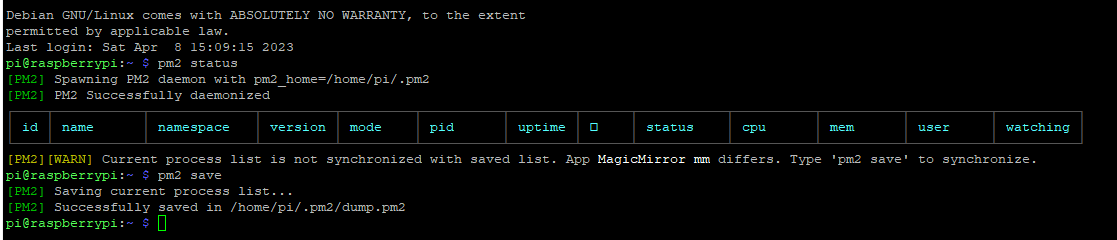
                                41751be5-514e-4c1e-a149-5a6cfe629561-image.png

                                The HDMI output still does not work. I was thinking now I would run the pm2 startup command although I am sure I already did it and then I would run fixuppm2.

                                T 1 Reply Last reply Reply Quote 0
                                • T Offline
                                  theaddies @theaddies
                                  last edited by

                                  @theaddies a72ca281-0f6c-46d7-acb0-844afd32caca-image.png

                                  S 1 Reply Last reply Reply Quote 0
                                  • S Offline
                                    sdetweil @theaddies
                                    last edited by

                                    @theaddies yes, it says spawining, so pm2 is not set to autostart

                                    do

                                    pm2 startup
                                    

                                    it will output a command string, copy paste that command string (last line) and hit enter,
                                    DO NOT USE MINE BELOW

                                    pi@raspberrypi0:~ $ pm2 startup
                                    [PM2] Init System found: systemd
                                    [PM2] To setup the Startup Script, copy/paste the following command:
                                    sudo env PATH=$PATH:/usr/local/bin /usr/local/lib/node_modules/pm2/bin/pm2 startup systemd -u pi --hp /home/pi
                                    

                                    note the error in your post of running my fixuppm2 script
                                    init system not found

                                    THAT is the problem… for some reason it cannot figure out HOW to do the correct startup stuff…
                                    BUT it just said what type to use…

                                    Sam

                                    How to add modules

                                    learning how to use browser developers window for css changes

                                    T 1 Reply Last reply Reply Quote 0
                                    • T Offline
                                      theaddies @sdetweil
                                      last edited by

                                      @sdetweil OK So I went ahead and did the whole thing over again for the fourth time with the exact method you outlined. It works. It would be nice to somehow let the next poor sod who wants to waste 2 days of their life of the right way to do this on a pi2.

                                      S 1 Reply Last reply Reply Quote 0
                                      • S Offline
                                        sdetweil @theaddies
                                        last edited by

                                        @theaddies I am trying to get a fix for pm2. not our code, so nothing we can force

                                        glad u got it working

                                        Sam

                                        How to add modules

                                        learning how to use browser developers window for css changes

                                        1 Reply Last reply Reply Quote 0

                                        Hello! It looks like you're interested in this conversation, but you don't have an account yet.

                                        Getting fed up of having to scroll through the same posts each visit? When you register for an account, you'll always come back to exactly where you were before, and choose to be notified of new replies (either via email, or push notification). You'll also be able to save bookmarks and upvote posts to show your appreciation to other community members.

                                        With your input, this post could be even better 💗

                                        Register Login

                                        • 1
                                        • 2
                                        • 2 / 2
                                        • First post
                                          Last post
                                        Enjoying MagicMirror? Please consider a donation!
                                        MagicMirror created by Michael Teeuw.
                                        Forum managed by Sam, technical setup by Karsten.
                                        This forum is using NodeBB as its core | Contributors
                                        Contact | Privacy Policy