MagicMirror Forum
    • Recent
    • Tags
    • Unsolved
    • Solved
    • MagicMirror² Repository
    • Documentation
    • 3rd-Party-Modules
    • Donate
    • Discord
    • Register
    • Login
    A New Chapter for MagicMirror: The Community Takes the Lead
    Read the statement by Michael Teeuw here.

    [INFO] Be careful to use iCal sample of config.js

    Scheduled Pinned Locked Moved Forum
    26 Posts 5 Posters 11.0k Views 6 Watching
    Loading More Posts
    • Oldest to Newest
    • Newest to Oldest
    • Most Votes
    Reply
    • Reply as topic
    Log in to reply
    This topic has been deleted. Only users with topic management privileges can see it.
    • M Offline
      MMRIZE
      last edited by MMRIZE

      Dear community,
      Recently I got a message from CalendarLabs, who is providing ical of MM’s default config.js.sample. They had some problem from too many/frequent request from MM (because it is included in config.js.sample)

      Around three thousand MagicMirror systems are making a huge amount of requests, impacting our service (similar to DDoS). Some IPs even send more than 20 requests per minute.

      Also, Most of them using an old version of the ics URL, which will be phased out from 30th July.

      So, all the subscribers should get their unique URL for their applications(so that they won’t get blocked for exceeding the limits of 36 requests per day for holiday calendars).

      Also, they should visit the ical page after creating a free login, if they want to get notified when they exceed the limit or there is any update related to the ics they are using (the subscriber ID get associated with the logged-in users when it is within same user session)

      Any ics subscriber exceeding the request limit will receive notifications on their calendar from 30th July.
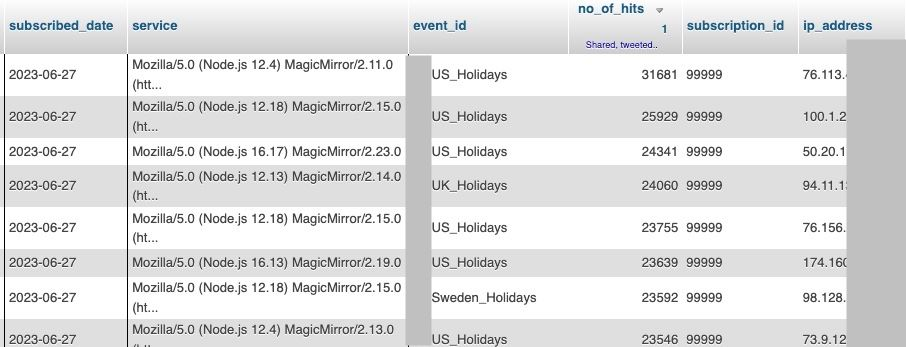
      41085cc3-35f3-43c4-acae-0cb947373163-image.png

      Not to request too many times/frequently. It consumes others’ resources.
      I think 30 mins or a few hours is enough to reveal updates. Really do you guys need real-time updates?(Especially for holiday? it will not be changed in a day. :D )

      S mumblebajM 2 Replies Last reply Reply Quote 2
      • S Do not disturb
        sdetweil @MMRIZE
        last edited by sdetweil

        @MMRIZE I created issue

        https://github.com/MichMich/MagicMirror/issues/3138 to track this

        I see you opened pr
        https://github.com/MichMich/MagicMirror/issues/3137

        Sam

        How to add modules

        learning how to use browser developers window for css changes

        ankonaskiff17A 1 Reply Last reply Reply Quote 0
        • mumblebajM Offline
          mumblebaj Module Developer @MMRIZE
          last edited by

          @MMRIZE I grab mine off Office Holidays in case somebody is looking for an alternative.

          Check out my modules at: https://github.com/mumblebaj?tab=repositories
          Check my blog-post: https://mumblebaj.xyz/
          Check my MM Container: https://hub.docker.com/repository/docker/mumblebaj/magicmirror/general

          1 Reply Last reply Reply Quote 0
          • ankonaskiff17A Offline
            ankonaskiff17 @sdetweil
            last edited by ankonaskiff17

            @sdetweil Where are you correcting this?
            Reason I ask is because the default in Calender.js is set to 5 minutes and if you don’t change it in config.js doesn’t it fall back to the module default values?

            It is likely most MM builders do very little to config.js regarding the calendar. When they do initial install of MM, the basic calendar module is loaded, calendar.js is just chugging along updating every 5 minutes out of sight.

            S 2 Replies Last reply Reply Quote 0
            • S Do not disturb
              sdetweil @ankonaskiff17
              last edited by

              @ankonaskiff17 yes, we will adjust timing for Saturday release to 7 days. I think we are trying to add interval by calendar {url}, instead of one setting for all calendars in this config instance.

              Sam

              How to add modules

              learning how to use browser developers window for css changes

              1 Reply Last reply Reply Quote 0
              • S Do not disturb
                sdetweil @ankonaskiff17
                last edited by

                @ankonaskiff17 good point on the default setting

                Sam

                How to add modules

                learning how to use browser developers window for css changes

                ankonaskiff17A 1 Reply Last reply Reply Quote 0
                • ankonaskiff17A Offline
                  ankonaskiff17 @sdetweil
                  last edited by

                  @sdetweil I went back and looked at an older MM thats been running quite some time to see if I somehow would have missed that setting because, being a holiday calendar it doesn’t change, period. Some things change such as Easter but annually. I’ve run into that update issue on other modules such as weather.

                  I saw that item posted on forum and first thing I did was look at my config.js file and nothing related to updates so immediately went to the module file and there it was, 5 minute update interval.

                  More like as more and more Magic Mirrors got built the upate requests were going up with each mirror. and since when a given mirror’s 5 minute cycle would time out I can imagine they were getting slammed.

                  M 1 Reply Last reply Reply Quote 0
                  • M Offline
                    MMRIZE @ankonaskiff17
                    last edited by MMRIZE

                    I think default 5 min is not so burden really (even with 3000 mirrors do so synchronously)
                    But a few cases definitely are misconfigured even unintentionally. Some people might make confusion, for example they thought 60 * 60 means 1 hour, but it is 3.6 seconds and it would probably make around 20 calls per minute.

                    BKeyportB 1 Reply Last reply Reply Quote 0
                    • BKeyportB Offline
                      BKeyport Module Developer @MMRIZE
                      last edited by BKeyport

                      @MMRIZE It could also be with as many MM systems out there a simple timing issue. every 5 minutes, bam 3000 systems flood CL with requests. Maybe start changing default to once a week on holiday calendar at most.

                      The "E" in "Javascript" stands for "Easy"

                      ankonaskiff17A 1 Reply Last reply Reply Quote 0
                      • ankonaskiff17A Offline
                        ankonaskiff17 @BKeyport
                        last edited by

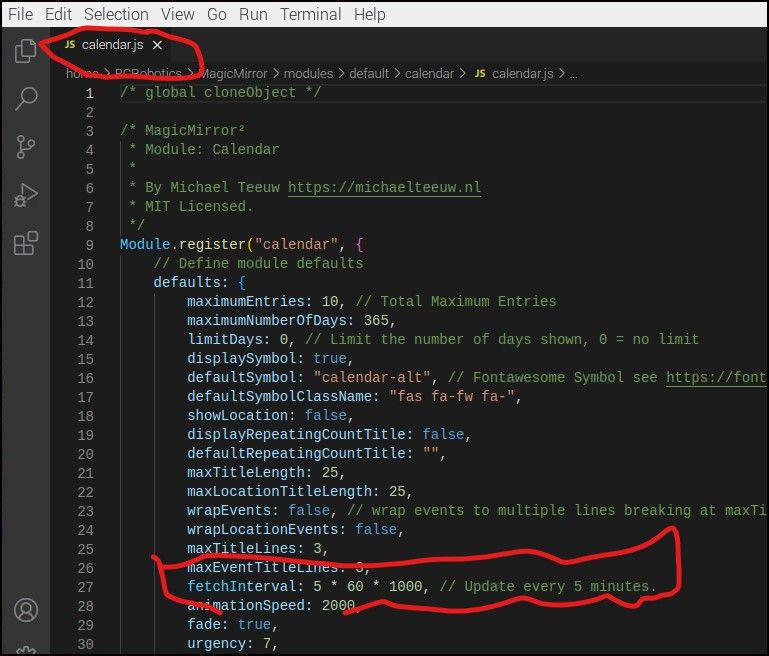
                        @BKeyport @MMRIZE I think the problem is that calendar.js default fetch interval is set to 5 minutes.
                        When you set about to build a MM and you install the core system, Calendar.js fetchinterval is set to 5 minutes by default.

                        If I install MM AND I’m content with the presentation of the calendar AS IS and do nothing at all, calendar.js is going to reach for an update every 5 minutes.
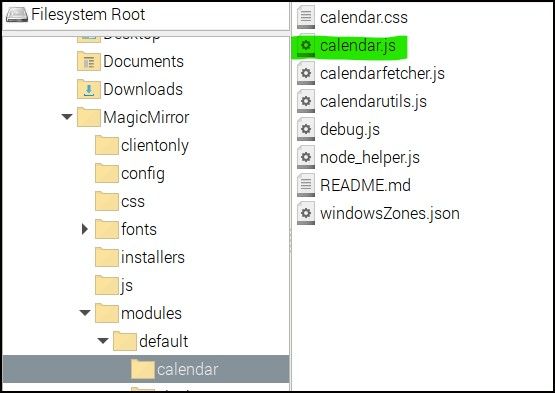
                        Calendarjs1.jpg

                        5Minutes.jpg

                        BKeyportB S 2 Replies Last reply Reply Quote 0
                        • BKeyportB Offline
                          BKeyport Module Developer @ankonaskiff17
                          last edited by BKeyport

                          @ankonaskiff17 … ahh, good point, forgot the fetch interval is not per item. Hey, @sdetweil - it’s your baby, you want to add a fetchInterval override variable per calendar, and default in the sample config.js to once a week or more for the holidays calendar? This would solve the issue CL is having with at least new installs…

                          As for the old ones, could we check to see if CL 's holiday calendar is being used, and inform or force an override for fetchInterval to solve for most?

                          (Just did a check and I’m not using CL’s holiday calendar, so whew)

                          The "E" in "Javascript" stands for "Easy"

                          1 Reply Last reply Reply Quote 0
                          • S Do not disturb
                            sdetweil @ankonaskiff17
                            last edited by

                            @ankonaskiff17 we are changing the default to days I think. this for es u to make it faster if u want

                            I think the minimum should be 5 minutes

                            Sam

                            How to add modules

                            learning how to use browser developers window for css changes

                            ankonaskiff17A 1 Reply Last reply Reply Quote 0
                            • ankonaskiff17A Offline
                              ankonaskiff17 @sdetweil
                              last edited by

                              @sdetweil Back when I first started messing with MM’s the calendar module was faulting out towards the end of that calendar year and it turned out that however many I had set as how many to show, say for example 5 holidays but at some point there were not 5 holidays left in the year but CL had not yet published the next years calandar.

                              My config.js is wanting 5 holes it needed to fill, there weren’t 5 holidays left so down it would go.

                              That calendar, because it is US Holidays, behaves like a photograph. It is static. There is no need to have it looking for changes like a volatile personal calendar that is going to change continuously.

                              US Holidays you could have a fetchInterval: ONCE EVERY 3 MONTHS and it would still be overkill. Some of your religious holidays like Easter float around because they aren’t date oriented. But even it has been calculated in advance
                              It doesn’t require the same level of refreshing as where someone is pulling in their personal Google or Outlook calendar where things like doctors appointments, dinner dates will change quite rapidly…

                              S 1 Reply Last reply Reply Quote 0
                              • S Do not disturb
                                sdetweil @ankonaskiff17
                                last edited by

                                @ankonaskiff17 this issue with refresh rate per calendar is because you can do

                                		{
                                			module: "calendar",
                                			header: "US Holidays",
                                			position: "top_left",
                                			config: {
                                                                 updateInterval:  7*24*60*60*1000  // 7days
                                				coloredSymbol:true,
                                				calendars: [
                                					{
                                
                                					symbol: 'calendar',
                                					//symbolClassName: "fas fa-fw fa-",
                                					color: 'pink',
                                						url: "webcal://www.calendarlabs.com/ical-calendar/ics/76/US_Holidays.ics",
                                						name:"holidays"
                                					},
                                                                        {
                                						url: "some otherr url ",
                                					},
                                                                        {
                                						url: "some otherr url  again",
                                					}
                                				]
                                			}
                                		},
                                

                                and ALL those calendars get the SAME/ONLY refresh rate
                                so currently u would have to do

                                		{
                                			module: "calendar",
                                			header: "US Holidays",
                                			position: "top_left",
                                			config: {
                                                                 updateInterval:  7*24*60*60*1000  // 7days
                                				coloredSymbol:true,
                                				calendars: [
                                					{
                                
                                					symbol: 'calendar',
                                					//symbolClassName: "fas fa-fw fa-",
                                					color: 'pink',
                                						url: "webcal://www.calendarlabs.com/ical-calendar/ics/76/US_Holidays.ics",
                                						name:"holidays"
                                					}
                                                                ]
                                                        }
                                              },
                                		{
                                			module: "calendar",
                                			header: "US Holidays",
                                			position: "top_left",
                                			config: {
                                                                 updateInterval: 6*60*60*1000  // 6 hours
                                				coloredSymbol:true,
                                				calendars: [
                                					{
                                						url: "some other url ",
                                					},
                                                                ]
                                                         }
                                               }, 
                                		{
                                			module: "calendar",
                                			header: "US Holidays",
                                			position: "top_left",
                                			config: {
                                                                 updateInterval:  1*60*60*1000  // 1 hour
                                				coloredSymbol:true,
                                				calendars: [
                                					{
                                						url: "some other url again"
                                					},
                                                                ]
                                                         }
                                                 }
                                

                                now you have three separate lists, not merged

                                Sam

                                How to add modules

                                learning how to use browser developers window for css changes

                                ankonaskiff17A 1 Reply Last reply Reply Quote 0
                                • ankonaskiff17A Offline
                                  ankonaskiff17 @sdetweil
                                  last edited by

                                  @sdetweil I had used a second calendar module to pull in my personal calendar information and was using the ical link that you can get off of Google if I remember correctly.
                                  Sort of along the lines of using multiple weather modules for daily and hourly.

                                  Then Google did something that broke the module. I fought with it for a while, gave up and have never tried to get it back running again.

                                  S 1 Reply Last reply Reply Quote 0
                                  • S Do not disturb
                                    sdetweil @ankonaskiff17
                                    last edited by

                                    @ankonaskiff17 google changed their url content a while back, so u had to go get it again

                                    Sam

                                    How to add modules

                                    learning how to use browser developers window for css changes

                                    ankonaskiff17A 2 Replies Last reply Reply Quote 0
                                    • ankonaskiff17A Offline
                                      ankonaskiff17 @sdetweil
                                      last edited by

                                      @sdetweil My issue was a bit more complicated.
                                      My PRIMARY calendar is my phone but it is Samsungs built in calendar not Google calendar
                                      I was hopping in and out Samsung, Google and Outlook although I don’t remember the sequence of hops.
                                      I was dumbfounded that it even worked at the time.
                                      One of those things where only so many minutes in the day so it was relegated to back burner status.

                                      1 Reply Last reply Reply Quote 0
                                      • ankonaskiff17A Offline
                                        ankonaskiff17 @sdetweil
                                        last edited by

                                        @sdetweil That was a good memory jogger because I had completely forgotten about the broken calendar issue.
                                        I suspect I will go with a second calendar module like before

                                        S 1 Reply Last reply Reply Quote 0
                                        • S Do not disturb
                                          sdetweil @ankonaskiff17
                                          last edited by sdetweil

                                          @ankonaskiff17 we are adding interval by url too

                                                  { 
                                                     fetchInterval:
                                                      url: 
                                                 }
                                          

                                          Sam

                                          How to add modules

                                          learning how to use browser developers window for css changes

                                          ankonaskiff17A 2 Replies Last reply Reply Quote 0
                                          • ankonaskiff17A Offline
                                            ankonaskiff17 @sdetweil
                                            last edited by

                                            @sdetweil Any functional difference between updateInterval and fetchInterval

                                            1 Reply Last reply Reply Quote 0

                                            Hello! It looks like you're interested in this conversation, but you don't have an account yet.

                                            Getting fed up of having to scroll through the same posts each visit? When you register for an account, you'll always come back to exactly where you were before, and choose to be notified of new replies (either via email, or push notification). You'll also be able to save bookmarks and upvote posts to show your appreciation to other community members.

                                            With your input, this post could be even better 💗

                                            Register Login

                                            • 1
                                            • 2
                                            • 1 / 2
                                            • First post
                                              Last post
                                            Enjoying MagicMirror? Please consider a donation!
                                            MagicMirror created by Michael Teeuw.
                                            Forum managed by Sam, technical setup by Karsten.
                                            This forum is using NodeBB as its core | Contributors
                                            Contact | Privacy Policy


