MagicMirror Forum
    • Recent
    • Tags
    • Unsolved
    • Solved
    • MagicMirror² Repository
    • Documentation
    • 3rd-Party-Modules
    • Donate
    • Discord
    • Register
    • Login
    A New Chapter for MagicMirror: The Community Takes the Lead
    Read the statement by Michael Teeuw here.

    My SmartDisplay

    Scheduled Pinned Locked Moved Show your Mirror
    12 Posts 8 Posters 8.2k Views 11 Watching
    Loading More Posts
    • Oldest to Newest
    • Newest to Oldest
    • Most Votes
    Reply
    • Reply as topic
    Log in to reply
    This topic has been deleted. Only users with topic management privileges can see it.
    • B Offline
      Bense
      last edited by

      1_defaced (Groß).jpg 2_defaced (Groß).jpg

      Hi,
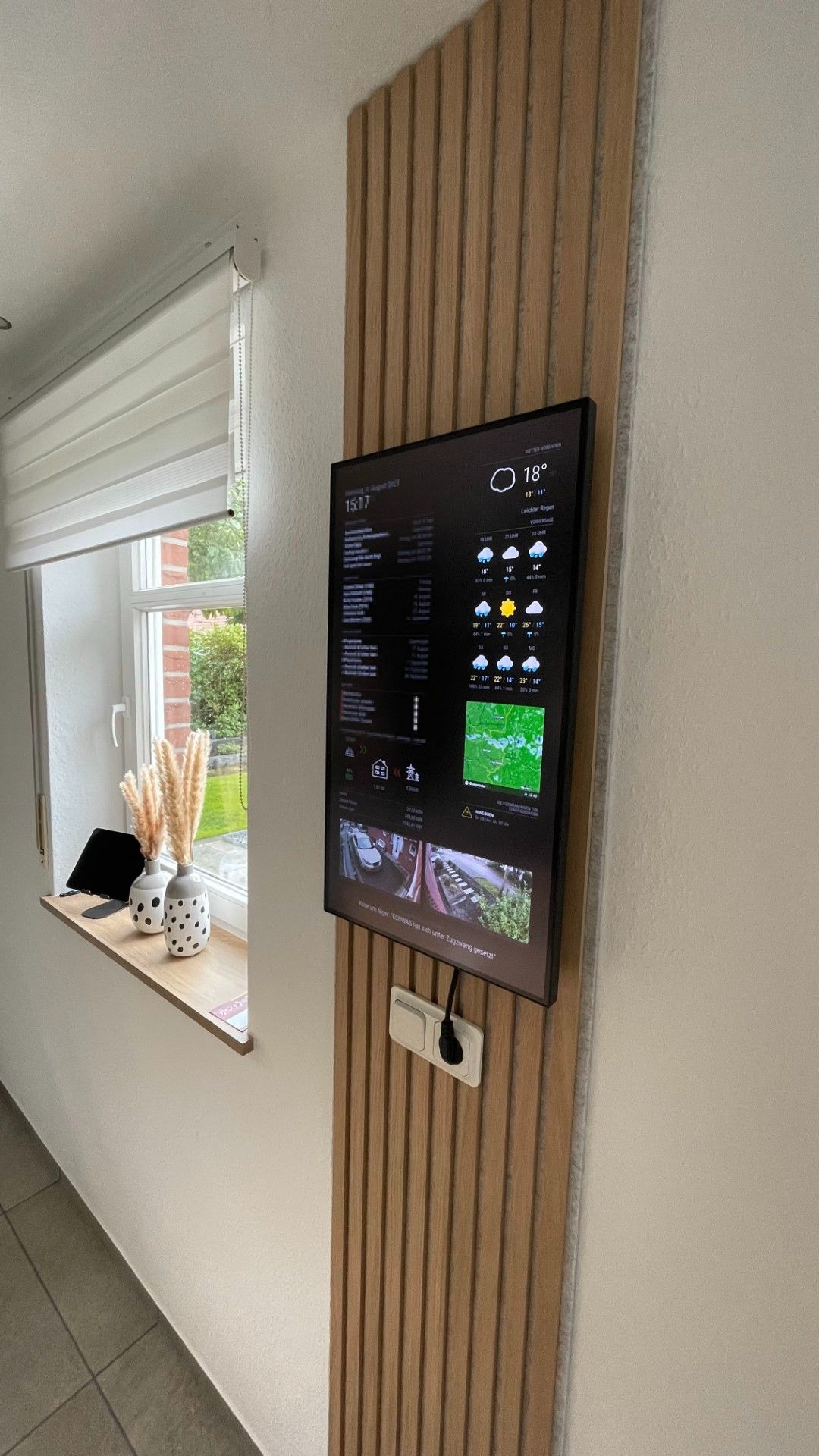
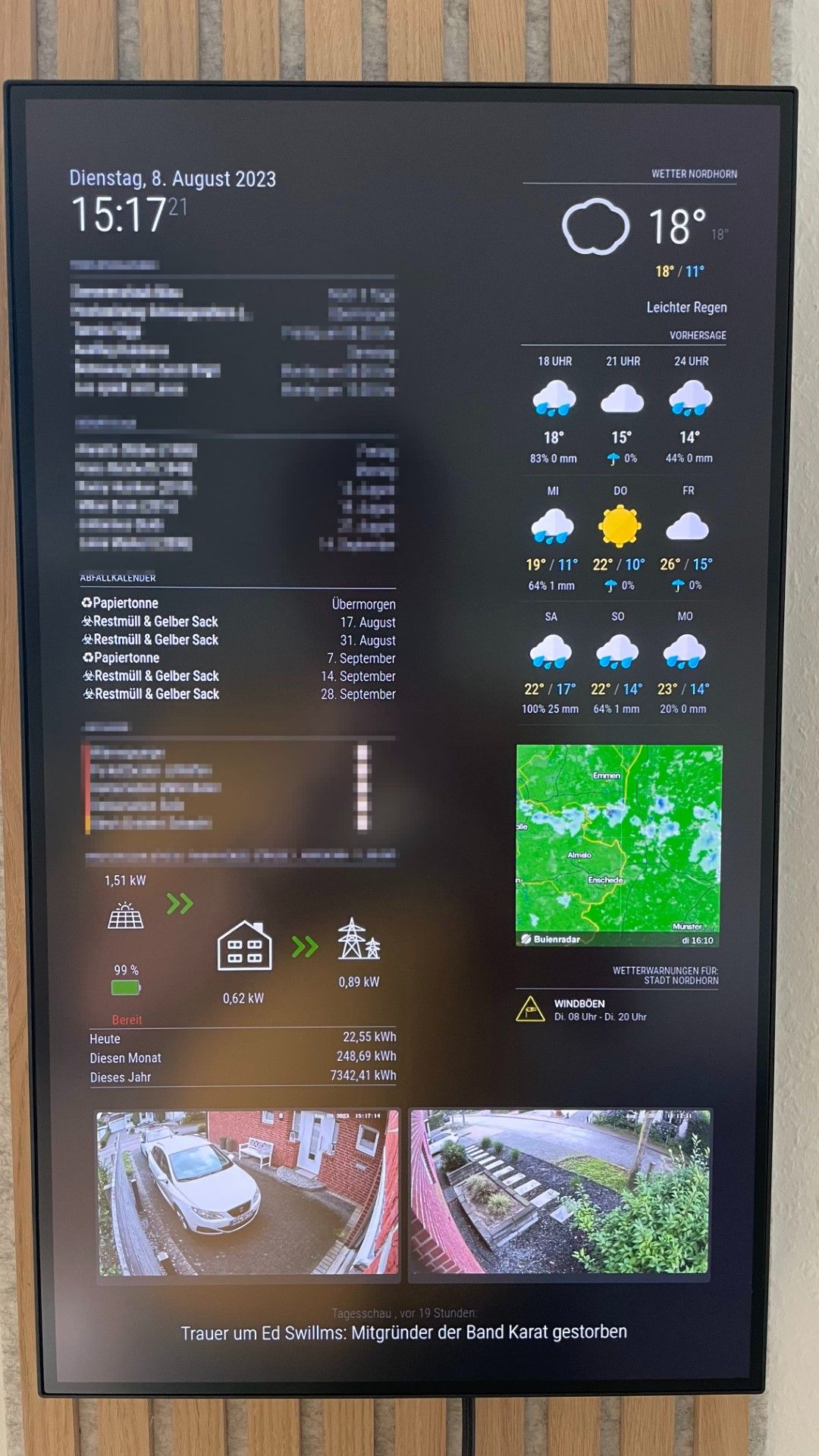
      this forum has inspired me to build a SmartDisplay for our family based on the MagicMirror. I use the following modules:

      • Default Clock
      • Default Calendar1_defaced.jpg
      • MMM-Todoist
      • MMM-SolarEdge
      • MMM-SynologySurveillance
      • MMM-OpenWeatherMapForecast
      • MMM-Buienradar
      • MMM-DWD-WarnWeather

      The Screen is a Lenovo ThinkVision P27h-20

      JalibuJ M 2 Replies Last reply Reply Quote 5
      • JalibuJ Offline
        Jalibu Module Developer @Bense
        last edited by

        @Bense cool!
        Does the screen allow you to power the Raspi via USB or how do you manage that?

        B 1 Reply Last reply Reply Quote 0
        • B Offline
          Bense @Jalibu
          last edited by

          @Jalibu
          Yep, the screen supplies power to the Raspi. So I only need one cable to the screen.
          I just see your Rain Map module, I have installed it directly. Looks very good!

          C 1 Reply Last reply Reply Quote 0
          • C Offline
            Chazzer @Bense
            last edited by

            @Bense Looks really good. :-) Thanks for sharing.
            Also wanted to use the weather app.
            I’ve also been working on my own MM for a few days.
            Do you have any idea why the weather app MMM-OpenWeatherMapForecast does not load?
            Default weather with the Api works.
            The latest MM version also works.
            Do you know if it is related to the module width?

            C B 2 Replies Last reply Reply Quote 0
            • C Offline
              Chazzer @Chazzer
              last edited by

              @Chazzer said in My SmartDisplay:

              MMM-OpenWeatherMapForecast

              Kannst du mal dein Modul aus der Config für openweathermap posten.
              mein Modul lädt nicht

              1 Reply Last reply Reply Quote 0
              • S Offline
                Socrates
                last edited by

                Where are u hiding your RPI?

                1 Reply Last reply Reply Quote 0
                • M Offline
                  Michelle.H2020 @Bense
                  last edited by

                  @Bense

                  Can you tell me how you get 4 modules on the right side without overlap?

                  1 Reply Last reply Reply Quote 0
                  • B Offline
                    bebetter14 @Chazzer
                    last edited by

                    @Chazzer Did you ever find out why OpenWeather wasnt working? I have a very similar issue.

                    S R 3 Replies Last reply Reply Quote 0
                    • S Do not disturb
                      sdetweil @bebetter14
                      last edited by

                      @bebetter14 usually it’s the wrong key for the configuration

                      Sam

                      How to add modules

                      learning how to use browser developers window for css changes

                      1 Reply Last reply Reply Quote 0
                      • R Offline
                        RobertV 0 @bebetter14
                        last edited by

                        @bebetter14 me too having problem

                        1 Reply Last reply Reply Quote 0
                        • S Do not disturb
                          sdetweil @bebetter14
                          last edited by

                          @bebetter14 open the developers window, ctrl-shift-i on the browser keyboard, select the console tab and put weath in the filter field to see messages from the weather module.

                          pretty sure the error is 401, unauthorized

                          Sam

                          How to add modules

                          learning how to use browser developers window for css changes

                          B 1 Reply Last reply Reply Quote 0
                          • B Offline
                            bebetter14 @sdetweil
                            last edited by

                            @sdetweil Thank you Sam for the assitance once again! You are correct there was an error. I tried to copy the sample config and replaced my API Key from Openweather and entered in my lat and long.

                            {
                              module: "MMM-OpenWeatherMapForecast",
                              header: "Weather",
                              position: "top_right",
                              classes: "default everyone",
                              disabled: false,
                              config: {
                                apikey: "SUPER SECRET!!!",
                                latitude: "51.506130",
                                longitude: "-0.090270",      
                                iconset: "4c",
                                concise: false,
                                forecastLayout: "table"
                              }
                            },
                            

                            The error Im getting is saying Verify styleshhet URLs, Affected Resource Localhost/:0

                            The weird thing I can use the API key for the default weather map no problem. Maybe I’m entering it in in the wrong format. Your help is much appreciated!

                            1 Reply Last reply Reply Quote 0

                            Hello! It looks like you're interested in this conversation, but you don't have an account yet.

                            Getting fed up of having to scroll through the same posts each visit? When you register for an account, you'll always come back to exactly where you were before, and choose to be notified of new replies (either via email, or push notification). You'll also be able to save bookmarks and upvote posts to show your appreciation to other community members.

                            With your input, this post could be even better 💗

                            Register Login

                            • 1 / 1
                            • First post
                              Last post
                            Enjoying MagicMirror? Please consider a donation!
                            MagicMirror created by Michael Teeuw.
                            Forum managed by Sam, technical setup by Karsten.
                            This forum is using NodeBB as its core | Contributors
                            Contact | Privacy Policy