Read the statement by Michael Teeuw here.
Update is not working..I need help please
-
@sdetweil it is still the same problem…
-
@Stoffbeuteluwe can you show me the output of
git status git pull -
patrickhahn@Mac-mini MM % git status On branch master Your branch is up to date with 'origin/master'. Untracked files: (use "git add <file>..." to include in what will be committed) css/icons/ new_package.json run-start.sh nothing added to commit but untracked files present (use "git add" to track) patrickhahn@Mac-mini MM % git pull Already up to date. patrickhahn@Mac-mini MM % patrickhahn@Mac-mini MM % git status On branch master Your branch is up to date with 'origin/master'. Untracked files: (use "git add <file>..." to include in what will be committed) css/icons/ new_package.json run-start.sh nothing added to commit but untracked files present (use "git add" to track) patrickhahn@Mac-mini MM % -
@Stoffbeuteluwe ok, next, lets check the version of the code, should be 2.25.0
cd ~/MagicMirror grep version package.json -
Last login: Thu Oct 12 16:43:21 on ttys000 patrickhahn@Mac-mini ~ % cd MM patrickhahn@Mac-mini MM % grep version package.json "version": "2.25.0", patrickhahn@Mac-mini MM % -
@Stoffbeuteluwe and
node -v, npm -v
if node v18 or v20 then
cd ~/MagicMirror rm -rf node_modules rm package-lock.json npm run install-mm -
@sdetweil
I have installed the newest version of node the 20patrickhahn@Mac-mini MM % node-v zsh: command not found: node-v patrickhahn@Mac-mini MM % npm-v zsh: command not found: npm-v patrickhahn@Mac-mini MM % rm -rf node_modules patrickhahn@Mac-mini MM % rm package-lock.json patrickhahn@Mac-mini MM % npm run install-mm > magicmirror@2.25.0 install-mm > npm install --no-audit --no-fund --no-update-notifier --only=prod --omit=dev npm WARN config only Use `--omit=dev` to omit dev dependencies from the install. > magicmirror@2.25.0 postinstall > npm run install-vendor && npm run install-fonts && echo "MagicMirror² installation finished successfully! > " > magicmirror@2.25.0 install-vendor > echo "Installing vendor files ... > " && cd vendor && npm install --loglevel=error --no-audit --no-fund --no-update-notifier Installing vendor files ... up to date in 106ms > magicmirror@2.25.0 install-fonts > echo "Installing fonts ... > " && cd fonts && npm install --loglevel=error --no-audit --no-fund --no-update-notifier Installing fonts ... up to date in 100ms MagicMirror² installation finished successfully! > magicmirror@2.25.0 prepare > [ -f node_modules/.bin/husky ] && husky install || echo no husky installed. no husky installed. added 334 packages in 33s patrickhahn@Mac-mini MM % -
I think I have to live without MMM-MyCalendar and try the default calendar
without MMM-MyCalender module …the Mirror works fine
-
@Stoffbeuteluwe but u can fix mycalendar
see the output of npm start
it’s likely the node-fetch lib we removed
just add it back.in the module folder
see
https://forum.magicmirror.builders/topic/15778/fix-for-black-screen-in-2-16-and-laterfor how to update the module
-
i have installed fetch and digest-fetch but it won’t start
Last login: Thu Oct 12 18:10:21 on ttys000 patrickhahn@Mac-mini ~ % cd MM patrickhahn@Mac-mini MM % npm start > magicmirror@2.25.0 start > DISPLAY="${DISPLAY:=:0}" ./node_modules/.bin/electron js/electron.js [12.10.2023 18:13.01.206] [LOG] Starting MagicMirror: v2.25.0 [12.10.2023 18:13.01.207] [LOG] Loading config ... [12.10.2023 18:13.01.207] [DEBUG] config template file not exists, no envsubst [12.10.2023 18:13.01.208] [LOG] Loading module helpers ... [12.10.2023 18:13.01.208] [LOG] No helper found for module: alert. [12.10.2023 18:13.01.232] [LOG] Initializing new module helper ... [12.10.2023 18:13.01.233] [LOG] Module helper loaded: MMM-Remote-Control [12.10.2023 18:13.01.233] [LOG] Initializing new module helper ... [12.10.2023 18:13.01.233] [LOG] Module helper loaded: updatenotification [12.10.2023 18:13.01.233] [LOG] No helper found for module: MMM-Snow. [12.10.2023 18:13.01.233] [LOG] No helper found for module: MMM-MyWordClock. [12.10.2023 18:13.01.233] [LOG] No helper found for module: clock. [12.10.2023 18:13.01.233] [LOG] No helper found for module: calendar_monthly. [12.10.2023 18:13.01.251] [LOG] Initializing new module helper ... [12.10.2023 18:13.01.251] [LOG] Module helper loaded: calendar [12.10.2023 18:13.01.252] [ERROR] (node:2102) UnhandledPromiseRejectionWarning: Error: Cannot find module 'fetch' Require stack: - /Users/patrickhahn/MM/modules/MMM-MyCalendar/calendarfetcher.js - /Users/patrickhahn/MM/modules/MMM-MyCalendar/node_helper.js - /Users/patrickhahn/MM/js/app.js - /Users/patrickhahn/MM/js/electron.js - /Users/patrickhahn/MM/node_modules/electron/dist/Electron.app/Contents/Resources/default_app.asar/main.js - at node:internal/modules/cjs/loader:1084:15 at Function.<anonymous> (node:electron/js2c/browser_init:2:117576) at Module._resolveFilename (/Users/patrickhahn/MM/node_modules/module-alias/index.js:49:29) at node:internal/modules/cjs/loader:929:27 at Function._load (node:electron/js2c/asar_bundle:2:13327) at Module.require (node:internal/modules/cjs/loader:1150:19) at require (node:internal/modules/cjs/helpers:110:18) at Object.<anonymous> (/Users/patrickhahn/MM/modules/MMM-MyCalendar/calendarfetcher.js:11:15) at Module._compile (node:internal/modules/cjs/loader:1271:14) at Object..js (node:internal/modules/cjs/loader:1326:10) at Module.load (node:internal/modules/cjs/loader:1126:32) at node:internal/modules/cjs/loader:967:12 at Function._load (node:electron/js2c/asar_bundle:2:13327) at Module.require (node:internal/modules/cjs/loader:1150:19) at require (node:internal/modules/cjs/helpers:110:18) at Object.<anonymous> (/Users/patrickhahn/MM/modules/MMM-MyCalendar/node_helper.js:8:25) (Use `Electron --trace-warnings ...` to show where the warning was created) [12.10.2023 18:13.01.252] [ERROR] (node:2102) UnhandledPromiseRejectionWarning: Unhandled promise rejection. This error originated either by throwing inside of an async function without a catch block, or by rejecting a promise which was not handled with .catch(). To terminate the node process on unhandled promise rejection, use the CLI flag `--unhandled-rejections=strict` (see https://nodejs.org/api/cli.html#cli_unhandled_rejections_mode). (rejection id: 1) 2023-10-12 18:13:01.270 Electron[2102:3348103] WARNING: Secure coding is not enabled for restorable state! Enable secure coding by implementing NSApplicationDelegate.applicationSupportsSecureRestorableState: and returning YES. ^C/Users/patrickhahn/MM/node_modules/electron/dist/Electron.app/Contents/MacOS/Electron exited with signal SIGINT patrickhahn@Mac-mini MM % cd modules patrickhahn@Mac-mini modules % cd MMM-MyCalendar patrickhahn@Mac-mini MMM-MyCalendar % ls package.json ls: package.json: No such file or directory patrickhahn@Mac-mini MMM-MyCalendar % npm init -y Wrote to /Users/patrickhahn/MM/modules/MMM-MyCalendar/package.json: { "name": "mmm-mycalendar", "version": "1.0.0", "description": "This calendar module is functionally the same as the default calendar app, however its presentation is different.", "main": "MMM-MyCalendar.js", "scripts": { "test": "echo \"Error: no test specified\" && exit 1" }, "keywords": [], "author": "", "license": "ISC" } patrickhahn@Mac-mini MMM-MyCalendar % npm install fetch added 6 packages, and audited 7 packages in 2s found 0 vulnerabilities patrickhahn@Mac-mini MMM-MyCalendar % cd patrickhahn@Mac-mini ~ % cd MM patrickhahn@Mac-mini MM % npm start > magicmirror@2.25.0 start > DISPLAY="${DISPLAY:=:0}" ./node_modules/.bin/electron js/electron.js [12.10.2023 18:14.34.291] [LOG] Starting MagicMirror: v2.25.0 [12.10.2023 18:14.34.292] [LOG] Loading config ... [12.10.2023 18:14.34.292] [DEBUG] config template file not exists, no envsubst [12.10.2023 18:14.34.293] [LOG] Loading module helpers ... [12.10.2023 18:14.34.293] [LOG] No helper found for module: alert. [12.10.2023 18:14.34.317] [LOG] Initializing new module helper ... [12.10.2023 18:14.34.317] [LOG] Module helper loaded: MMM-Remote-Control [12.10.2023 18:14.34.318] [LOG] Initializing new module helper ... [12.10.2023 18:14.34.318] [LOG] Module helper loaded: updatenotification [12.10.2023 18:14.34.318] [LOG] No helper found for module: MMM-Snow. [12.10.2023 18:14.34.318] [LOG] No helper found for module: MMM-MyWordClock. [12.10.2023 18:14.34.318] [LOG] No helper found for module: clock. [12.10.2023 18:14.34.318] [LOG] No helper found for module: calendar_monthly. [12.10.2023 18:14.34.336] [LOG] Initializing new module helper ... [12.10.2023 18:14.34.336] [LOG] Module helper loaded: calendar [12.10.2023 18:14.34.339] [ERROR] (node:2138) UnhandledPromiseRejectionWarning: Error: Cannot find module 'digest-fetch' Require stack: - /Users/patrickhahn/MM/modules/MMM-MyCalendar/calendarfetcher.js - /Users/patrickhahn/MM/modules/MMM-MyCalendar/node_helper.js - /Users/patrickhahn/MM/js/app.js - /Users/patrickhahn/MM/js/electron.js - /Users/patrickhahn/MM/node_modules/electron/dist/Electron.app/Contents/Resources/default_app.asar/main.js - at node:internal/modules/cjs/loader:1084:15 at Function.<anonymous> (node:electron/js2c/browser_init:2:117576) at Module._resolveFilename (/Users/patrickhahn/MM/node_modules/module-alias/index.js:49:29) at node:internal/modules/cjs/loader:929:27 at Function._load (node:electron/js2c/asar_bundle:2:13327) at Module.require (node:internal/modules/cjs/loader:1150:19) at require (node:internal/modules/cjs/helpers:110:18) at Object.<anonymous> (/Users/patrickhahn/MM/modules/MMM-MyCalendar/calendarfetcher.js:12:16) at Module._compile (node:internal/modules/cjs/loader:1271:14) at Object..js (node:internal/modules/cjs/loader:1326:10) at Module.load (node:internal/modules/cjs/loader:1126:32) at node:internal/modules/cjs/loader:967:12 at Function._load (node:electron/js2c/asar_bundle:2:13327) at Module.require (node:internal/modules/cjs/loader:1150:19) at require (node:internal/modules/cjs/helpers:110:18) at Object.<anonymous> (/Users/patrickhahn/MM/modules/MMM-MyCalendar/node_helper.js:8:25) (Use `Electron --trace-warnings ...` to show where the warning was created) [12.10.2023 18:14.34.339] [ERROR] (node:2138) UnhandledPromiseRejectionWarning: Unhandled promise rejection. This error originated either by throwing inside of an async function without a catch block, or by rejecting a promise which was not handled with .catch(). To terminate the node process on unhandled promise rejection, use the CLI flag `--unhandled-rejections=strict` (see https://nodejs.org/api/cli.html#cli_unhandled_rejections_mode). (rejection id: 1) 2023-10-12 18:14:34.356 Electron[2138:3349277] WARNING: Secure coding is not enabled for restorable state! Enable secure coding by implementing NSApplicationDelegate.applicationSupportsSecureRestorableState: and returning YES. ^C/Users/patrickhahn/MM/node_modules/electron/dist/Electron.app/Contents/MacOS/Electron exited with signal SIGINT patrickhahn@Mac-mini MM % cd modules patrickhahn@Mac-mini modules % cd MMM-MyCalendar patrickhahn@Mac-mini MMM-MyCalendar % npm init -y Wrote to /Users/patrickhahn/MM/modules/MMM-MyCalendar/package.json: { "name": "mmm-mycalendar", "version": "1.0.0", "description": "This calendar module is functionally the same as the default calendar app, however its presentation is different.", "main": "MMM-MyCalendar.js", "scripts": { "test": "echo \"Error: no test specified\" && exit 1" }, "keywords": [], "author": "", "license": "ISC", "dependencies": { "fetch": "^1.1.0" }, "devDependencies": {} } patrickhahn@Mac-mini MMM-MyCalendar % npm install digest-fetch added 8 packages, and audited 15 packages in 2s found 0 vulnerabilities patrickhahn@Mac-mini MMM-MyCalendar % cd patrickhahn@Mac-mini ~ % cd MM patrickhahn@Mac-mini MM % npm start > magicmirror@2.25.0 start > DISPLAY="${DISPLAY:=:0}" ./node_modules/.bin/electron js/electron.js [12.10.2023 18:16.37.004] [LOG] Starting MagicMirror: v2.25.0 [12.10.2023 18:16.37.005] [LOG] Loading config ... [12.10.2023 18:16.37.005] [DEBUG] config template file not exists, no envsubst [12.10.2023 18:16.37.006] [LOG] Loading module helpers ... [12.10.2023 18:16.37.006] [LOG] No helper found for module: alert. [12.10.2023 18:16.37.030] [LOG] Initializing new module helper ... [12.10.2023 18:16.37.030] [LOG] Module helper loaded: MMM-Remote-Control [12.10.2023 18:16.37.031] [LOG] Initializing new module helper ... [12.10.2023 18:16.37.031] [LOG] Module helper loaded: updatenotification [12.10.2023 18:16.37.031] [LOG] No helper found for module: MMM-Snow. [12.10.2023 18:16.37.031] [LOG] No helper found for module: MMM-MyWordClock. [12.10.2023 18:16.37.031] [LOG] No helper found for module: clock. [12.10.2023 18:16.37.031] [LOG] No helper found for module: calendar_monthly. [12.10.2023 18:16.37.049] [LOG] Initializing new module helper ... [12.10.2023 18:16.37.049] [LOG] Module helper loaded: calendar [12.10.2023 18:16.37.060] [ERROR] (node:2177) UnhandledPromiseRejectionWarning: Error [ERR_REQUIRE_ESM]: require() of ES Module /Users/patrickhahn/MM/modules/MMM-MyCalendar/node_modules/digest-fetch/digest-fetch-src.js from /Users/patrickhahn/MM/modules/MMM-MyCalendar/calendarfetcher.js not supported. Instead change the require of digest-fetch-src.js in /Users/patrickhahn/MM/modules/MMM-MyCalendar/calendarfetcher.js to a dynamic import() which is available in all CommonJS modules. at Function._load (node:electron/js2c/asar_bundle:2:13327) at Object.<anonymous> (/Users/patrickhahn/MM/modules/MMM-MyCalendar/calendarfetcher.js:12:16) at Function._load (node:electron/js2c/asar_bundle:2:13327) at Object.<anonymous> (/Users/patrickhahn/MM/modules/MMM-MyCalendar/node_helper.js:8:25) at Function._load (node:electron/js2c/asar_bundle:2:13327) at loadModule (/Users/patrickhahn/MM/js/app.js:180:19) at loadModules (/Users/patrickhahn/MM/js/app.js:210:10) at async App.start (/Users/patrickhahn/MM/js/app.js:258:3) (Use `Electron --trace-warnings ...` to show where the warning was created) [12.10.2023 18:16.37.060] [ERROR] (node:2177) UnhandledPromiseRejectionWarning: Unhandled promise rejection. This error originated either by throwing inside of an async function without a catch block, or by rejecting a promise which was not handled with .catch(). To terminate the node process on unhandled promise rejection, use the CLI flag `--unhandled-rejections=strict` (see https://nodejs.org/api/cli.html#cli_unhandled_rejections_mode). (rejection id: 1) 2023-10-12 18:16:37.079 Electron[2177:3350680] WARNING: Secure coding is not enabled for restorable state! Enable secure coding by implementing NSApplicationDelegate.applicationSupportsSecureRestorableState: and returning YES. -
@Stoffbeuteluwe the default digest-fetch expects a different runtime…
they say to do this in the module folder
npm install digest-fetch@v2 node-fetch@v2 -
@Stoffbeuteluwe Seems like you may have installed the wrong version of digest-fetch. You have a later version than what the module handles looks like to me. Not sure what version the module requires.
Check out my modules at: https://github.com/mumblebaj?tab=repositories
Check my blog-post: https://mumblebaj.xyz/
Check my MM Container: https://hub.docker.com/repository/docker/mumblebaj/magicmirror/general -
Yeah Yeah it works …a big THANK YOU to you
without you guys I wouldn’t have made it:clapping_hands: :grinning_face_with_big_eyes: -
@Stoffbeuteluwe awesome!! thanks for the feedback
-
@sdetweil
Hello, I was happy a little too early…the mirror starts but the calendar module says loading now
Do you have an idea what could be causing this?
I haven’t changed the config.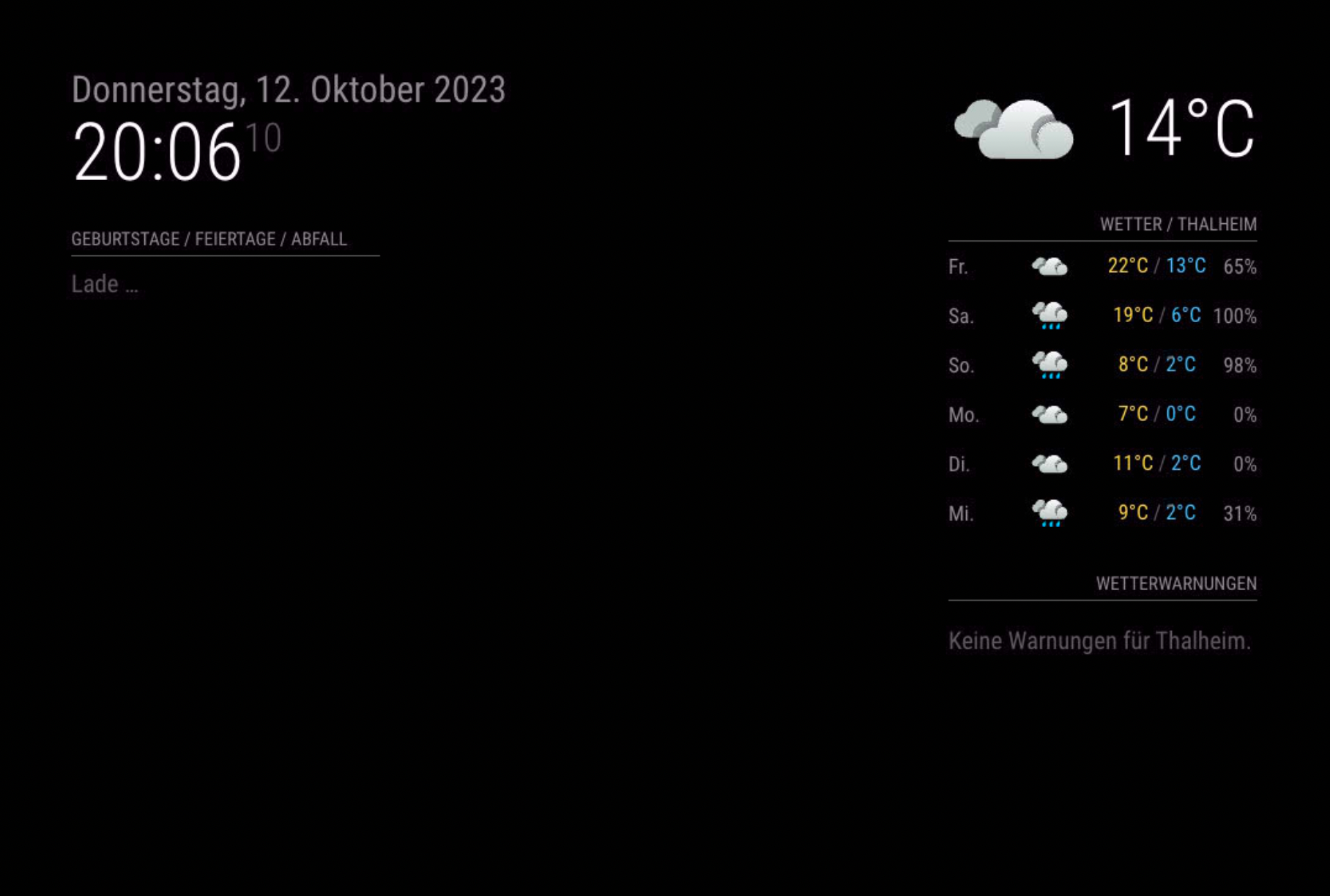
Last login: Thu Oct 12 20:53:00 on ttys000 patrickhahn@Mac-mini ~ % cd MM patrickhahn@Mac-mini MM % npm start > magicmirror@2.25.0 start > DISPLAY="${DISPLAY:=:0}" ./node_modules/.bin/electron js/electron.js [12.10.2023 20:59.23.100] [LOG] Starting MagicMirror: v2.25.0 [12.10.2023 20:59.23.101] [LOG] Loading config ... [12.10.2023 20:59.23.101] [DEBUG] config template file not exists, no envsubst [12.10.2023 20:59.23.102] [LOG] Loading module helpers ... [12.10.2023 20:59.23.102] [LOG] No helper found for module: alert. [12.10.2023 20:59.23.127] [LOG] Initializing new module helper ... [12.10.2023 20:59.23.127] [LOG] Module helper loaded: MMM-Remote-Control [12.10.2023 20:59.23.129] [LOG] Initializing new module helper ... [12.10.2023 20:59.23.129] [LOG] Module helper loaded: updatenotification [12.10.2023 20:59.23.129] [LOG] No helper found for module: MMM-Snow. [12.10.2023 20:59.23.129] [LOG] No helper found for module: MMM-MyWordClock. [12.10.2023 20:59.23.129] [LOG] No helper found for module: clock. [12.10.2023 20:59.23.129] [LOG] No helper found for module: calendar_monthly. [12.10.2023 20:59.23.148] [LOG] Initializing new module helper ... [12.10.2023 20:59.23.148] [LOG] Module helper loaded: calendar [12.10.2023 20:59.23.157] [LOG] Initializing new module helper ... [12.10.2023 20:59.23.157] [LOG] Module helper loaded: MMM-MyCalendar [12.10.2023 20:59.23.157] [LOG] No helper found for module: compliments. [12.10.2023 20:59.23.162] [LOG] Initializing new module helper ... [12.10.2023 20:59.23.162] [LOG] Module helper loaded: MMM-OpenWeatherForecast [12.10.2023 20:59.23.162] [WARN] No /Users/patrickhahn/MM/js/../modules/weatherforecast/weatherforecast.js found for module: weatherforecast. [12.10.2023 20:59.23.162] [LOG] No helper found for module: weatherforecast. [12.10.2023 20:59.23.166] [LOG] Initializing new module helper ... [12.10.2023 20:59.23.166] [LOG] Module helper loaded: MMM-DWD-WarnWeather [12.10.2023 20:59.23.178] [LOG] Module helper loaded: MMM-Sonos [12.10.2023 20:59.23.254] [LOG] Initializing new module helper ... [12.10.2023 20:59.23.254] [LOG] Module helper loaded: MMM-TelegramBot [12.10.2023 20:59.23.283] [LOG] Initializing new module helper ... [12.10.2023 20:59.23.283] [LOG] Module helper loaded: MMM-AlexaControl [12.10.2023 20:59.23.314] [LOG] Initializing new module helper ... [12.10.2023 20:59.23.314] [LOG] Module helper loaded: MMM-DWD-Pollen [12.10.2023 20:59.23.314] [LOG] Initializing new module helper ... [12.10.2023 20:59.23.314] [LOG] Check MagicMirror² version for node helper 'MMM-Fuel' - Minimum version: 2.15.0 - Current version: 2.25.0 [12.10.2023 20:59.23.314] [LOG] Version is ok! [12.10.2023 20:59.23.314] [LOG] Module helper loaded: MMM-Fuel [12.10.2023 20:59.23.325] [LOG] Initializing new module helper ... [12.10.2023 20:59.23.325] [LOG] Module helper loaded: newsfeed [12.10.2023 20:59.23.325] [LOG] No helper found for module: helloworld. [12.10.2023 20:59.23.366] [LOG] Initializing new module helper ... [12.10.2023 20:59.23.366] [LOG] Module helper loaded: MMM-Tado [12.10.2023 20:59.23.367] [LOG] No helper found for module: MMM-YouTube. [12.10.2023 20:59.23.367] [LOG] No helper found for module: MMM-EasyBack. [12.10.2023 20:59.23.394] [LOG] Initializing new module helper ... [12.10.2023 20:59.23.394] [LOG] Module helper loaded: MMM-ImagesPhotos [12.10.2023 20:59.23.395] [LOG] No helper found for module: MMM-EasyPix. [12.10.2023 20:59.23.395] [LOG] No helper found for module: MMM-EyeCandy. [12.10.2023 20:59.23.395] [LOG] No helper found for module: MMM-SimpleLogo. [12.10.2023 20:59.23.395] [LOG] No helper found for module: MMM-RandomPhoto. [12.10.2023 20:59.23.423] [LOG] Initializing new module helper ... [12.10.2023 20:59.23.423] [LOG] Module helper loaded: MMM-Lunartic [12.10.2023 20:59.23.451] [LOG] Initializing new module helper ... [12.10.2023 20:59.23.451] [LOG] Module helper loaded: MMM-Lunartic2 [12.10.2023 20:59.23.451] [LOG] No helper found for module: MMM-Globe. [12.10.2023 20:59.23.451] [LOG] No helper found for module: MMM-Globe2. [12.10.2023 20:59.23.477] [LOG] Initializing new module helper ... [12.10.2023 20:59.23.477] [LOG] Module helper loaded: MMM-EARTH [12.10.2023 20:59.23.478] [LOG] No helper found for module: MMM-EarthWinds. [12.10.2023 20:59.23.480] [LOG] Initializing new module helper ... [12.10.2023 20:59.23.480] [LOG] Module helper loaded: MMM-MyWastePickup [12.10.2023 20:59.23.508] [LOG] Initializing new module helper ... [12.10.2023 20:59.23.508] [LOG] Module helper loaded: MMM-COVID19-Inc [12.10.2023 20:59.23.538] [LOG] Initializing new module helper ... [12.10.2023 20:59.23.538] [LOG] Module helper loaded: MMM-Todoist [12.10.2023 20:59.23.538] [LOG] No helper found for module: MMM-Gastzugang. [12.10.2023 20:59.23.541] [LOG] Initializing new module helper ... [12.10.2023 20:59.23.542] [LOG] Module helper loaded: mmm-hue-lights [12.10.2023 20:59.23.542] [LOG] No helper found for module: MMM-HolidayLights. [12.10.2023 20:59.23.569] [LOG] Initializing new module helper ... [12.10.2023 20:59.23.569] [LOG] Module helper loaded: MMM-MyStandings [12.10.2023 20:59.23.570] [LOG] Initializing new module helper ... [12.10.2023 20:59.23.570] [LOG] Module helper loaded: MMM-MyScoreboard [12.10.2023 20:59.23.570] [LOG] No helper found for module: clock2. [12.10.2023 20:59.23.570] [LOG] No helper found for module: clock3. [12.10.2023 20:59.23.570] [LOG] No helper found for module: MMM-Xmas. [12.10.2023 20:59.23.570] [WARN] No /Users/patrickhahn/MM/js/../modules/MMM-Snake/MMM-Snake.js found for module: MMM-Snake. [12.10.2023 20:59.23.570] [LOG] No helper found for module: MMM-Snake. [12.10.2023 20:59.23.570] [LOG] Initializing new module helper ... [12.10.2023 20:59.23.570] [LOG] Module helper loaded: MMM-Fitbit2 [12.10.2023 20:59.23.574] [LOG] Initializing new module helper ... [12.10.2023 20:59.23.574] [LOG] Module helper loaded: MMM-SoccerLiveScore [12.10.2023 20:59.23.600] [LOG] Initializing new module helper ... [12.10.2023 20:59.23.600] [LOG] Module helper loaded: MMM-COVID19-SPARKLINE [12.10.2023 20:59.23.641] [LOG] Initializing new module helper ... [12.10.2023 20:59.23.641] [LOG] Module helper loaded: MMM-rfacts [12.10.2023 20:59.23.654] [LOG] Initializing new module helper ... [12.10.2023 20:59.23.655] [LOG] Module helper loaded: MMM-Screencast [12.10.2023 20:59.23.655] [LOG] All module helpers loaded. [12.10.2023 20:59.23.655] [LOG] Starting server on port 8080 ... [12.10.2023 20:59.23.655] [WARN] You're using a full whitelist configuration to allow for all IPs [12.10.2023 20:59.23.657] [LOG] Server started ... [12.10.2023 20:59.23.657] [LOG] Connecting socket for: MMM-Remote-Control [12.10.2023 20:59.23.657] [LOG] Starting node helper for: MMM-Remote-Control [12.10.2023 20:59.23.661] [LOG] Connecting socket for: updatenotification [12.10.2023 20:59.23.661] [LOG] Starting module helper: updatenotification [12.10.2023 20:59.23.661] [LOG] Connecting socket for: calendar [12.10.2023 20:59.23.661] [LOG] Starting node helper for: calendar [12.10.2023 20:59.23.661] [LOG] Connecting socket for: MMM-MyCalendar [12.10.2023 20:59.23.661] [LOG] Starting node helper for: MMM-MyCalendar [12.10.2023 20:59.23.661] [LOG] Connecting socket for: MMM-OpenWeatherForecast [12.10.2023 20:59.23.661] [LOG] ====================== Starting node_helper for module [MMM-OpenWeatherForecast] [12.10.2023 20:59.23.661] [LOG] Connecting socket for: MMM-DWD-WarnWeather [12.10.2023 20:59.23.661] [LOG] MMM-DWD-WarnWeather helper started... [12.10.2023 20:59.23.661] [LOG] Connecting socket for: MMM-Sonos [12.10.2023 20:59.23.661] [LOG] Starting module helper: MMM-Sonos [12.10.2023 20:59.23.661] [LOG] Connecting socket for: MMM-TelegramBot [12.10.2023 20:59.23.661] [LOG] Connecting socket for: MMM-AlexaControl [12.10.2023 20:59.23.661] [LOG] MMM-AlexaControl helper, started... [12.10.2023 20:59.23.661] [LOG] Connecting socket for: MMM-DWD-Pollen [12.10.2023 20:59.23.661] [LOG] MMM-DWD-Pollen helper started ... [12.10.2023 20:59.23.661] [LOG] Connecting socket for: MMM-Fuel [12.10.2023 20:59.23.661] [LOG] Starting module helper: MMM-Fuel [12.10.2023 20:59.23.661] [LOG] Connecting socket for: newsfeed [12.10.2023 20:59.23.662] [LOG] Starting node helper for: newsfeed [12.10.2023 20:59.23.662] [LOG] Connecting socket for: MMM-Tado [12.10.2023 20:59.23.662] [LOG] Connecting socket for: MMM-ImagesPhotos [12.10.2023 20:59.23.662] [LOG] Starting node helper for: MMM-ImagesPhotos [12.10.2023 20:59.23.662] [LOG] Connecting socket for: MMM-Lunartic [12.10.2023 20:59.23.662] [LOG] Starting node_helper for: MMM-Lunartic [12.10.2023 20:59.23.662] [LOG] Connecting socket for: MMM-Lunartic2 [12.10.2023 20:59.23.662] [LOG] Starting node_helper for: MMM-Lunartic2 [12.10.2023 20:59.23.662] [LOG] Connecting socket for: MMM-EARTH [12.10.2023 20:59.23.662] [LOG] Starting module: MMM-EARTH [12.10.2023 20:59.23.662] [LOG] Connecting socket for: MMM-MyWastePickup [12.10.2023 20:59.23.662] [LOG] Starting node_helper for module: MMM-MyWastePickup [12.10.2023 20:59.23.662] [LOG] Connecting socket for: MMM-COVID19-Inc [12.10.2023 20:59.23.662] [LOG] Starting node helper for: MMM-COVID19-Inc [12.10.2023 20:59.23.662] [LOG] Connecting socket for: MMM-Todoist [12.10.2023 20:59.23.662] [LOG] Starting node helper for: MMM-Todoist [12.10.2023 20:59.23.662] [LOG] Connecting socket for: mmm-hue-lights [12.10.2023 20:59.23.662] [LOG] Starting node_helper for module [mmm-hue-lights] [12.10.2023 20:59.23.662] [LOG] Connecting socket for: MMM-MyStandings [12.10.2023 20:59.23.662] [LOG] MMM-MyStandings helper started ... [12.10.2023 20:59.23.662] [LOG] Connecting socket for: MMM-MyScoreboard [12.10.2023 20:59.23.662] [LOG] Starting node_helper for module [MMM-MyScoreboard] [12.10.2023 20:59.23.695] [LOG] Connecting socket for: MMM-Fitbit2 [12.10.2023 20:59.23.695] [LOG] Starting module helper: MMM-Fitbit2 [12.10.2023 20:59.23.695] [LOG] Connecting socket for: MMM-SoccerLiveScore [12.10.2023 20:59.23.695] [LOG] Starting node helper for: MMM-SoccerLiveScore [12.10.2023 20:59.23.695] [LOG] Connecting socket for: MMM-COVID19-SPARKLINE [12.10.2023 20:59.23.696] [LOG] Starting node helper for: MMM-COVID19-SPARKLINE [12.10.2023 20:59.23.696] [LOG] Connecting socket for: MMM-rfacts [12.10.2023 20:59.23.696] [LOG] Starting module: MMM-rfacts [12.10.2023 20:59.23.696] [LOG] Connecting socket for: MMM-Screencast [12.10.2023 20:59.23.696] [LOG] Sockets connected & modules started ... 2023-10-12 20:59:23.714 Electron[13999:65212] WARNING: Secure coding is not enabled for restorable state! Enable secure coding by implementing NSApplicationDelegate.applicationSupportsSecureRestorableState: and returning YES. [12.10.2023 20:59.23.716] [LOG] Launching application. [12.10.2023 20:59.23.889] [ERROR] ERROR! Could not find main module js file for MMM-Lunartic1 [12.10.2023 20:59.25.230] [LOG] Create new calendarfetcher for url: http://p126-caldav.icloud.com/published/2/MjAwMTgyNjQ0NTIwMDE4Mp2LsX_-xfYBCZZDkkcAhmo7RzjFf-TUZWLk0TuOam3UYf6_Am2G7toTrvToJiYzhItBQd6YHovaHHc7VaXkBx4 - Interval: 3600000 [12.10.2023 20:59.25.244] [LOG] Create new calendarfetcher for url: http://p126-caldav.icloud.com/published/2/MjAwMTgyNjQ0NTIwMDE4Mp2LsX_-xfYBCZZDkkcAhmpj-F2SettLCAt0Uv_YZaqGwSNCegMcedybfhqOCaZ6b0DxoMXJSOezr1VmZHWy9-U - Interval: 3600000 [12.10.2023 20:59.25.245] [LOG] Create new calendarfetcher for url: http://p126-caldav.icloud.com/published/2/MjAwMTgyNjQ0NTIwMDE4Mp2LsX_-xfYBCZZDkkcAhmo1PgYX3cXsO3IVusWJ4iKzb4xm1PfKu7EKUkJ-O4aQPdZpBXeb7r60PaikWG0Kp4A - Interval: 3600000 [12.10.2023 20:59.25.245] [LOG] Create new calendarfetcher for url: http://p126-caldav.icloud.com/published/2/MjAwMTgyNjQ0NTIwMDE4Mp2LsX_-xfYBCZZDkkcAhmo7RzjFf-TUZWLk0TuOam3UYf6_Am2G7toTrvToJiYzhItBQd6YHovaHHc7VaXkBx4 - Interval: 300000 [12.10.2023 20:59.25.245] [ERROR] Whoops! There was an uncaught exception... [12.10.2023 20:59.25.245] [ERROR] TypeError: fetch is not a function at fetchCalendar (/Users/patrickhahn/MM/modules/MMM-MyCalendar/calendarfetcher.js:62:14) at CalendarFetcher.startFetch (/Users/patrickhahn/MM/modules/MMM-MyCalendar/calendarfetcher.js:110:3) at Class.createFetcher (/Users/patrickhahn/MM/modules/MMM-MyCalendar/node_helper.js:73:11) at Class.socketNotificationReceived (/Users/patrickhahn/MM/modules/MMM-MyCalendar/node_helper.js:21:9) at Socket.<anonymous> (/Users/patrickhahn/MM/js/node_helper.js:104:11) at Socket.emit (node:events:513:28) at Socket.emitUntyped (/Users/patrickhahn/MM/node_modules/socket.io/dist/typed-events.js:69:22) at /Users/patrickhahn/MM/node_modules/socket.io/dist/socket.js:704:39 at processTicksAndRejections (node:internal/process/task_queues:77:11) [12.10.2023 20:59.25.245] [ERROR] MagicMirror² will not quit, but it might be a good idea to check why this happened. Maybe no internet connection? [12.10.2023 20:59.25.245] [ERROR] If you think this really is an issue, please open an issue on GitHub: https://github.com/MichMich/MagicMirror/issues [12.10.2023 20:59.25.245] [LOG] Create new calendarfetcher for url: http://p126-caldav.icloud.com/published/2/MjAwMTgyNjQ0NTIwMDE4Mp2LsX_-xfYBCZZDkkcAhmpj-F2SettLCAt0Uv_YZaqGwSNCegMcedybfhqOCaZ6b0DxoMXJSOezr1VmZHWy9-U - Interval: 300000 [12.10.2023 20:59.25.245] [ERROR] Whoops! There was an uncaught exception... [12.10.2023 20:59.25.246] [ERROR] TypeError: fetch is not a function at fetchCalendar (/Users/patrickhahn/MM/modules/MMM-MyCalendar/calendarfetcher.js:62:14) at CalendarFetcher.startFetch (/Users/patrickhahn/MM/modules/MMM-MyCalendar/calendarfetcher.js:110:3) at Class.createFetcher (/Users/patrickhahn/MM/modules/MMM-MyCalendar/node_helper.js:73:11) at Class.socketNotificationReceived (/Users/patrickhahn/MM/modules/MMM-MyCalendar/node_helper.js:21:9) at Socket.<anonymous> (/Users/patrickhahn/MM/js/node_helper.js:104:11) at Socket.emit (node:events:513:28) at Socket.emitUntyped (/Users/patrickhahn/MM/node_modules/socket.io/dist/typed-events.js:69:22) at /Users/patrickhahn/MM/node_modules/socket.io/dist/socket.js:704:39 at processTicksAndRejections (node:internal/process/task_queues:77:11) [12.10.2023 20:59.25.246] [ERROR] MagicMirror² will not quit, but it might be a good idea to check why this happened. Maybe no internet connection? [12.10.2023 20:59.25.246] [ERROR] If you think this really is an issue, please open an issue on GitHub: https://github.com/MichMich/MagicMirror/issues [12.10.2023 20:59.25.246] [LOG] Create new calendarfetcher for url: http://p126-caldav.icloud.com/published/2/MjAwMTgyNjQ0NTIwMDE4Mp2LsX_-xfYBCZZDkkcAhmo1PgYX3cXsO3IVusWJ4iKzb4xm1PfKu7EKUkJ-O4aQPdZpBXeb7r60PaikWG0Kp4A - Interval: 300000 [12.10.2023 20:59.25.246] [ERROR] Whoops! There was an uncaught exception... [12.10.2023 20:59.25.246] [ERROR] TypeError: fetch is not a function at fetchCalendar (/Users/patrickhahn/MM/modules/MMM-MyCalendar/calendarfetcher.js:62:14) at CalendarFetcher.startFetch (/Users/patrickhahn/MM/modules/MMM-MyCalendar/calendarfetcher.js:110:3) at Class.createFetcher (/Users/patrickhahn/MM/modules/MMM-MyCalendar/node_helper.js:73:11) at Class.socketNotificationReceived (/Users/patrickhahn/MM/modules/MMM-MyCalendar/node_helper.js:21:9) at Socket.<anonymous> (/Users/patrickhahn/MM/js/node_helper.js:104:11) at Socket.emit (node:events:513:28) at Socket.emitUntyped (/Users/patrickhahn/MM/node_modules/socket.io/dist/typed-events.js:69:22) at /Users/patrickhahn/MM/node_modules/socket.io/dist/socket.js:704:39 at processTicksAndRejections (node:internal/process/task_queues:77:11) -
@Stoffbeuteluwe show the output from where we have npm start so we can see what the messages are
-
Last login: Thu Oct 12 20:53:00 on ttys000 patrickhahn@Mac-mini ~ % cd MM patrickhahn@Mac-mini MM % npm start > magicmirror@2.25.0 start > DISPLAY="${DISPLAY:=:0}" ./node_modules/.bin/electron js/electron.js [12.10.2023 20:59.23.100] [LOG] Starting MagicMirror: v2.25.0 [12.10.2023 20:59.23.101] [LOG] Loading config ... [12.10.2023 20:59.23.101] [DEBUG] config template file not exists, no envsubst [12.10.2023 20:59.23.102] [LOG] Loading module helpers ... [12.10.2023 20:59.23.102] [LOG] No helper found for module: alert. [12.10.2023 20:59.23.127] [LOG] Initializing new module helper ... [12.10.2023 20:59.23.127] [LOG] Module helper loaded: MMM-Remote-Control [12.10.2023 20:59.23.129] [LOG] Initializing new module helper ... [12.10.2023 20:59.23.129] [LOG] Module helper loaded: updatenotification [12.10.2023 20:59.23.129] [LOG] No helper found for module: MMM-Snow. [12.10.2023 20:59.23.129] [LOG] No helper found for module: MMM-MyWordClock. [12.10.2023 20:59.23.129] [LOG] No helper found for module: clock. [12.10.2023 20:59.23.129] [LOG] No helper found for module: calendar_monthly. [12.10.2023 20:59.23.148] [LOG] Initializing new module helper ... [12.10.2023 20:59.23.148] [LOG] Module helper loaded: calendar [12.10.2023 20:59.23.157] [LOG] Initializing new module helper ... [12.10.2023 20:59.23.157] [LOG] Module helper loaded: MMM-MyCalendar [12.10.2023 20:59.23.157] [LOG] No helper found for module: compliments. [12.10.2023 20:59.23.162] [LOG] Initializing new module helper ... [12.10.2023 20:59.23.162] [LOG] Module helper loaded: MMM-OpenWeatherForecast [12.10.2023 20:59.23.162] [WARN] No /Users/patrickhahn/MM/js/../modules/weatherforecast/weatherforecast.js found for module: weatherforecast. [12.10.2023 20:59.23.162] [LOG] No helper found for module: weatherforecast. [12.10.2023 20:59.23.166] [LOG] Initializing new module helper ... [12.10.2023 20:59.23.166] [LOG] Module helper loaded: MMM-DWD-WarnWeather [12.10.2023 20:59.23.178] [LOG] Module helper loaded: MMM-Sonos [12.10.2023 20:59.23.254] [LOG] Initializing new module helper ... [12.10.2023 20:59.23.254] [LOG] Module helper loaded: MMM-TelegramBot [12.10.2023 20:59.23.283] [LOG] Initializing new module helper ... [12.10.2023 20:59.23.283] [LOG] Module helper loaded: MMM-AlexaControl [12.10.2023 20:59.23.314] [LOG] Initializing new module helper ... [12.10.2023 20:59.23.314] [LOG] Module helper loaded: MMM-DWD-Pollen [12.10.2023 20:59.23.314] [LOG] Initializing new module helper ... [12.10.2023 20:59.23.314] [LOG] Check MagicMirror² version for node helper 'MMM-Fuel' - Minimum version: 2.15.0 - Current version: 2.25.0 [12.10.2023 20:59.23.314] [LOG] Version is ok! [12.10.2023 20:59.23.314] [LOG] Module helper loaded: MMM-Fuel [12.10.2023 20:59.23.325] [LOG] Initializing new module helper ... [12.10.2023 20:59.23.325] [LOG] Module helper loaded: newsfeed [12.10.2023 20:59.23.325] [LOG] No helper found for module: helloworld. [12.10.2023 20:59.23.366] [LOG] Initializing new module helper ... [12.10.2023 20:59.23.366] [LOG] Module helper loaded: MMM-Tado [12.10.2023 20:59.23.367] [LOG] No helper found for module: MMM-YouTube. [12.10.2023 20:59.23.367] [LOG] No helper found for module: MMM-EasyBack. [12.10.2023 20:59.23.394] [LOG] Initializing new module helper ... [12.10.2023 20:59.23.394] [LOG] Module helper loaded: MMM-ImagesPhotos [12.10.2023 20:59.23.395] [LOG] No helper found for module: MMM-EasyPix. [12.10.2023 20:59.23.395] [LOG] No helper found for module: MMM-EyeCandy. [12.10.2023 20:59.23.395] [LOG] No helper found for module: MMM-SimpleLogo. [12.10.2023 20:59.23.395] [LOG] No helper found for module: MMM-RandomPhoto. [12.10.2023 20:59.23.423] [LOG] Initializing new module helper ... [12.10.2023 20:59.23.423] [LOG] Module helper loaded: MMM-Lunartic [12.10.2023 20:59.23.451] [LOG] Initializing new module helper ... [12.10.2023 20:59.23.451] [LOG] Module helper loaded: MMM-Lunartic2 [12.10.2023 20:59.23.451] [LOG] No helper found for module: MMM-Globe. [12.10.2023 20:59.23.451] [LOG] No helper found for module: MMM-Globe2. [12.10.2023 20:59.23.477] [LOG] Initializing new module helper ... [12.10.2023 20:59.23.477] [LOG] Module helper loaded: MMM-EARTH [12.10.2023 20:59.23.478] [LOG] No helper found for module: MMM-EarthWinds. [12.10.2023 20:59.23.480] [LOG] Initializing new module helper ... [12.10.2023 20:59.23.480] [LOG] Module helper loaded: MMM-MyWastePickup [12.10.2023 20:59.23.508] [LOG] Initializing new module helper ... [12.10.2023 20:59.23.508] [LOG] Module helper loaded: MMM-COVID19-Inc [12.10.2023 20:59.23.538] [LOG] Initializing new module helper ... [12.10.2023 20:59.23.538] [LOG] Module helper loaded: MMM-Todoist [12.10.2023 20:59.23.538] [LOG] No helper found for module: MMM-Gastzugang. [12.10.2023 20:59.23.541] [LOG] Initializing new module helper ... [12.10.2023 20:59.23.542] [LOG] Module helper loaded: mmm-hue-lights [12.10.2023 20:59.23.542] [LOG] No helper found for module: MMM-HolidayLights. [12.10.2023 20:59.23.569] [LOG] Initializing new module helper ... [12.10.2023 20:59.23.569] [LOG] Module helper loaded: MMM-MyStandings [12.10.2023 20:59.23.570] [LOG] Initializing new module helper ... [12.10.2023 20:59.23.570] [LOG] Module helper loaded: MMM-MyScoreboard [12.10.2023 20:59.23.570] [LOG] No helper found for module: clock2. [12.10.2023 20:59.23.570] [LOG] No helper found for module: clock3. [12.10.2023 20:59.23.570] [LOG] No helper found for module: MMM-Xmas. [12.10.2023 20:59.23.570] [WARN] No /Users/patrickhahn/MM/js/../modules/MMM-Snake/MMM-Snake.js found for module: MMM-Snake. [12.10.2023 20:59.23.570] [LOG] No helper found for module: MMM-Snake. [12.10.2023 20:59.23.570] [LOG] Initializing new module helper ... [12.10.2023 20:59.23.570] [LOG] Module helper loaded: MMM-Fitbit2 [12.10.2023 20:59.23.574] [LOG] Initializing new module helper ... [12.10.2023 20:59.23.574] [LOG] Module helper loaded: MMM-SoccerLiveScore [12.10.2023 20:59.23.600] [LOG] Initializing new module helper ... [12.10.2023 20:59.23.600] [LOG] Module helper loaded: MMM-COVID19-SPARKLINE [12.10.2023 20:59.23.641] [LOG] Initializing new module helper ... [12.10.2023 20:59.23.641] [LOG] Module helper loaded: MMM-rfacts [12.10.2023 20:59.23.654] [LOG] Initializing new module helper ... [12.10.2023 20:59.23.655] [LOG] Module helper loaded: MMM-Screencast [12.10.2023 20:59.23.655] [LOG] All module helpers loaded. [12.10.2023 20:59.23.655] [LOG] Starting server on port 8080 ... [12.10.2023 20:59.23.655] [WARN] You're using a full whitelist configuration to allow for all IPs [12.10.2023 20:59.23.657] [LOG] Server started ... [12.10.2023 20:59.23.657] [LOG] Connecting socket for: MMM-Remote-Control [12.10.2023 20:59.23.657] [LOG] Starting node helper for: MMM-Remote-Control [12.10.2023 20:59.23.661] [LOG] Connecting socket for: updatenotification [12.10.2023 20:59.23.661] [LOG] Starting module helper: updatenotification [12.10.2023 20:59.23.661] [LOG] Connecting socket for: calendar [12.10.2023 20:59.23.661] [LOG] Starting node helper for: calendar [12.10.2023 20:59.23.661] [LOG] Connecting socket for: MMM-MyCalendar [12.10.2023 20:59.23.661] [LOG] Starting node helper for: MMM-MyCalendar [12.10.2023 20:59.23.661] [LOG] Connecting socket for: MMM-OpenWeatherForecast [12.10.2023 20:59.23.661] [LOG] ====================== Starting node_helper for module [MMM-OpenWeatherForecast] [12.10.2023 20:59.23.661] [LOG] Connecting socket for: MMM-DWD-WarnWeather [12.10.2023 20:59.23.661] [LOG] MMM-DWD-WarnWeather helper started... [12.10.2023 20:59.23.661] [LOG] Connecting socket for: MMM-Sonos [12.10.2023 20:59.23.661] [LOG] Starting module helper: MMM-Sonos [12.10.2023 20:59.23.661] [LOG] Connecting socket for: MMM-TelegramBot [12.10.2023 20:59.23.661] [LOG] Connecting socket for: MMM-AlexaControl [12.10.2023 20:59.23.661] [LOG] MMM-AlexaControl helper, started... [12.10.2023 20:59.23.661] [LOG] Connecting socket for: MMM-DWD-Pollen [12.10.2023 20:59.23.661] [LOG] MMM-DWD-Pollen helper started ... [12.10.2023 20:59.23.661] [LOG] Connecting socket for: MMM-Fuel [12.10.2023 20:59.23.661] [LOG] Starting module helper: MMM-Fuel [12.10.2023 20:59.23.661] [LOG] Connecting socket for: newsfeed [12.10.2023 20:59.23.662] [LOG] Starting node helper for: newsfeed [12.10.2023 20:59.23.662] [LOG] Connecting socket for: MMM-Tado [12.10.2023 20:59.23.662] [LOG] Connecting socket for: MMM-ImagesPhotos [12.10.2023 20:59.23.662] [LOG] Starting node helper for: MMM-ImagesPhotos [12.10.2023 20:59.23.662] [LOG] Connecting socket for: MMM-Lunartic [12.10.2023 20:59.23.662] [LOG] Starting node_helper for: MMM-Lunartic [12.10.2023 20:59.23.662] [LOG] Connecting socket for: MMM-Lunartic2 [12.10.2023 20:59.23.662] [LOG] Starting node_helper for: MMM-Lunartic2 [12.10.2023 20:59.23.662] [LOG] Connecting socket for: MMM-EARTH [12.10.2023 20:59.23.662] [LOG] Starting module: MMM-EARTH [12.10.2023 20:59.23.662] [LOG] Connecting socket for: MMM-MyWastePickup [12.10.2023 20:59.23.662] [LOG] Starting node_helper for module: MMM-MyWastePickup [12.10.2023 20:59.23.662] [LOG] Connecting socket for: MMM-COVID19-Inc [12.10.2023 20:59.23.662] [LOG] Starting node helper for: MMM-COVID19-Inc [12.10.2023 20:59.23.662] [LOG] Connecting socket for: MMM-Todoist [12.10.2023 20:59.23.662] [LOG] Starting node helper for: MMM-Todoist [12.10.2023 20:59.23.662] [LOG] Connecting socket for: mmm-hue-lights [12.10.2023 20:59.23.662] [LOG] Starting node_helper for module [mmm-hue-lights] [12.10.2023 20:59.23.662] [LOG] Connecting socket for: MMM-MyStandings [12.10.2023 20:59.23.662] [LOG] MMM-MyStandings helper started ... [12.10.2023 20:59.23.662] [LOG] Connecting socket for: MMM-MyScoreboard [12.10.2023 20:59.23.662] [LOG] Starting node_helper for module [MMM-MyScoreboard] [12.10.2023 20:59.23.695] [LOG] Connecting socket for: MMM-Fitbit2 [12.10.2023 20:59.23.695] [LOG] Starting module helper: MMM-Fitbit2 [12.10.2023 20:59.23.695] [LOG] Connecting socket for: MMM-SoccerLiveScore [12.10.2023 20:59.23.695] [LOG] Starting node helper for: MMM-SoccerLiveScore [12.10.2023 20:59.23.695] [LOG] Connecting socket for: MMM-COVID19-SPARKLINE [12.10.2023 20:59.23.696] [LOG] Starting node helper for: MMM-COVID19-SPARKLINE [12.10.2023 20:59.23.696] [LOG] Connecting socket for: MMM-rfacts [12.10.2023 20:59.23.696] [LOG] Starting module: MMM-rfacts [12.10.2023 20:59.23.696] [LOG] Connecting socket for: MMM-Screencast [12.10.2023 20:59.23.696] [LOG] Sockets connected & modules started ... 2023-10-12 20:59:23.714 Electron[13999:65212] WARNING: Secure coding is not enabled for restorable state! Enable secure coding by implementing NSApplicationDelegate.applicationSupportsSecureRestorableState: and returning YES. [12.10.2023 20:59.23.716] [LOG] Launching application. [12.10.2023 20:59.23.889] [ERROR] ERROR! Could not find main module js file for MMM-Lunartic1 [12.10.2023 20:59.25.230] [LOG] Create new calendarfetcher for url: http://p126-caldav.icloud.com/published/2/MjAwMTgyNjQ0NTIwMDE4Mp2LsX_-xfYBCZZDkkcAhmo7RzjFf-TUZWLk0TuOam3UYf6_Am2G7toTrvToJiYzhItBQd6YHovaHHc7VaXkBx4 - Interval: 3600000 [12.10.2023 20:59.25.244] [LOG] Create new calendarfetcher for url: http://p126-caldav.icloud.com/published/2/MjAwMTgyNjQ0NTIwMDE4Mp2LsX_-xfYBCZZDkkcAhmpj-F2SettLCAt0Uv_YZaqGwSNCegMcedybfhqOCaZ6b0DxoMXJSOezr1VmZHWy9-U - Interval: 3600000 [12.10.2023 20:59.25.245] [LOG] Create new calendarfetcher for url: http://p126-caldav.icloud.com/published/2/MjAwMTgyNjQ0NTIwMDE4Mp2LsX_-xfYBCZZDkkcAhmo1PgYX3cXsO3IVusWJ4iKzb4xm1PfKu7EKUkJ-O4aQPdZpBXeb7r60PaikWG0Kp4A - Interval: 3600000 [12.10.2023 20:59.25.245] [LOG] Create new calendarfetcher for url: http://p126-caldav.icloud.com/published/2/MjAwMTgyNjQ0NTIwMDE4Mp2LsX_-xfYBCZZDkkcAhmo7RzjFf-TUZWLk0TuOam3UYf6_Am2G7toTrvToJiYzhItBQd6YHovaHHc7VaXkBx4 - Interval: 300000 [12.10.2023 20:59.25.245] [ERROR] Whoops! There was an uncaught exception... [12.10.2023 20:59.25.245] [ERROR] TypeError: fetch is not a function at fetchCalendar (/Users/patrickhahn/MM/modules/MMM-MyCalendar/calendarfetcher.js:62:14) at CalendarFetcher.startFetch (/Users/patrickhahn/MM/modules/MMM-MyCalendar/calendarfetcher.js:110:3) at Class.createFetcher (/Users/patrickhahn/MM/modules/MMM-MyCalendar/node_helper.js:73:11) at Class.socketNotificationReceived (/Users/patrickhahn/MM/modules/MMM-MyCalendar/node_helper.js:21:9) at Socket.<anonymous> (/Users/patrickhahn/MM/js/node_helper.js:104:11) at Socket.emit (node:events:513:28) at Socket.emitUntyped (/Users/patrickhahn/MM/node_modules/socket.io/dist/typed-events.js:69:22) at /Users/patrickhahn/MM/node_modules/socket.io/dist/socket.js:704:39 at processTicksAndRejections (node:internal/process/task_queues:77:11) [12.10.2023 20:59.25.245] [ERROR] MagicMirror² will not quit, but it might be a good idea to check why this happened. Maybe no internet connection? [12.10.2023 20:59.25.245] [ERROR] If you think this really is an issue, please open an issue on GitHub: https://github.com/MichMich/MagicMirror/issues [12.10.2023 20:59.25.245] [LOG] Create new calendarfetcher for url: http://p126-caldav.icloud.com/published/2/MjAwMTgyNjQ0NTIwMDE4Mp2LsX_-xfYBCZZDkkcAhmpj-F2SettLCAt0Uv_YZaqGwSNCegMcedybfhqOCaZ6b0DxoMXJSOezr1VmZHWy9-U - Interval: 300000 [12.10.2023 20:59.25.245] [ERROR] Whoops! There was an uncaught exception... [12.10.2023 20:59.25.246] [ERROR] TypeError: fetch is not a function at fetchCalendar (/Users/patrickhahn/MM/modules/MMM-MyCalendar/calendarfetcher.js:62:14) at CalendarFetcher.startFetch (/Users/patrickhahn/MM/modules/MMM-MyCalendar/calendarfetcher.js:110:3) at Class.createFetcher (/Users/patrickhahn/MM/modules/MMM-MyCalendar/node_helper.js:73:11) at Class.socketNotificationReceived (/Users/patrickhahn/MM/modules/MMM-MyCalendar/node_helper.js:21:9) at Socket.<anonymous> (/Users/patrickhahn/MM/js/node_helper.js:104:11) at Socket.emit (node:events:513:28) at Socket.emitUntyped (/Users/patrickhahn/MM/node_modules/socket.io/dist/typed-events.js:69:22) at /Users/patrickhahn/MM/node_modules/socket.io/dist/socket.js:704:39 at processTicksAndRejections (node:internal/process/task_queues:77:11) [12.10.2023 20:59.25.246] [ERROR] MagicMirror² will not quit, but it might be a good idea to check why this happened. Maybe no internet connection? [12.10.2023 20:59.25.246] [ERROR] If you think this really is an issue, please open an issue on GitHub: https://github.com/MichMich/MagicMirror/issues [12.10.2023 20:59.25.246] [LOG] Create new calendarfetcher for url: http://p126-caldav.icloud.com/published/2/MjAwMTgyNjQ0NTIwMDE4Mp2LsX_-xfYBCZZDkkcAhmo1PgYX3cXsO3IVusWJ4iKzb4xm1PfKu7EKUkJ-O4aQPdZpBXeb7r60PaikWG0Kp4A - Interval: 300000 [12.10.2023 20:59.25.246] [ERROR] Whoops! There was an uncaught exception... [12.10.2023 20:59.25.246] [ERROR] TypeError: fetch is not a function at fetchCalendar (/Users/patrickhahn/MM/modules/MMM-MyCalendar/calendarfetcher.js:62:14) at CalendarFetcher.startFetch (/Users/patrickhahn/MM/modules/MMM-MyCalendar/calendarfetcher.js:110:3) at Class.createFetcher (/Users/patrickhahn/MM/modules/MMM-MyCalendar/node_helper.js:73:11) at Class.socketNotificationReceived (/Users/patrickhahn/MM/modules/MMM-MyCalendar/node_helper.js:21:9) at Socket.<anonymous> (/Users/patrickhahn/MM/js/node_helper.js:104:11) at Socket.emit (node:events:513:28) at Socket.emitUntyped (/Users/patrickhahn/MM/node_modules/socket.io/dist/typed-events.js:69:22) at /Users/patrickhahn/MM/node_modules/socket.io/dist/socket.js:704:39 at processTicksAndRejections (node:internal/process/task_queues:77:11) -
@Stoffbeuteluwe said in Update is not working..I need help please:
20:59.25.245] [ERROR] TypeError: fetch is not a function
at fetchCalendar (/Users/patrickhahn/MM/modules/MMM-MyCalendar/calendarfetcher.js:62:14)don’t know why.
-
@sdetweil
Anyway, thank you very much for your help
greetings from Germany -
@sdetweil
the solution is to change the line 11 an 12 of calendarfetcher.js to this …/*const fetch = require("fetch");*/ /*const digest = require("digest-fetch");*/now it works :folded_hands: :smiling_face_with_sunglasses:


Hello! It looks like you're interested in this conversation, but you don't have an account yet.
Getting fed up of having to scroll through the same posts each visit? When you register for an account, you'll always come back to exactly where you were before, and choose to be notified of new replies (either via email, or push notification). You'll also be able to save bookmarks and upvote posts to show your appreciation to other community members.
With your input, this post could be even better 💗
Register Login