MagicMirror Forum
    • Recent
    • Tags
    • Unsolved
    • Solved
    • MagicMirror² Repository
    • Documentation
    • 3rd-Party-Modules
    • Donate
    • Discord
    • Register
    • Login
    A New Chapter for MagicMirror: The Community Takes the Lead
    Read the statement by Michael Teeuw here.

    27" Kitchen Dashboard

    Scheduled Pinned Locked Moved Show your Mirror
    15 Posts 9 Posters 10.5k Views 10 Watching
    Loading More Posts
    • Oldest to Newest
    • Newest to Oldest
    • Most Votes
    Reply
    • Reply as topic
    Log in to reply
    This topic has been deleted. Only users with topic management privileges can see it.
    • J Offline
      jconno03
      last edited by

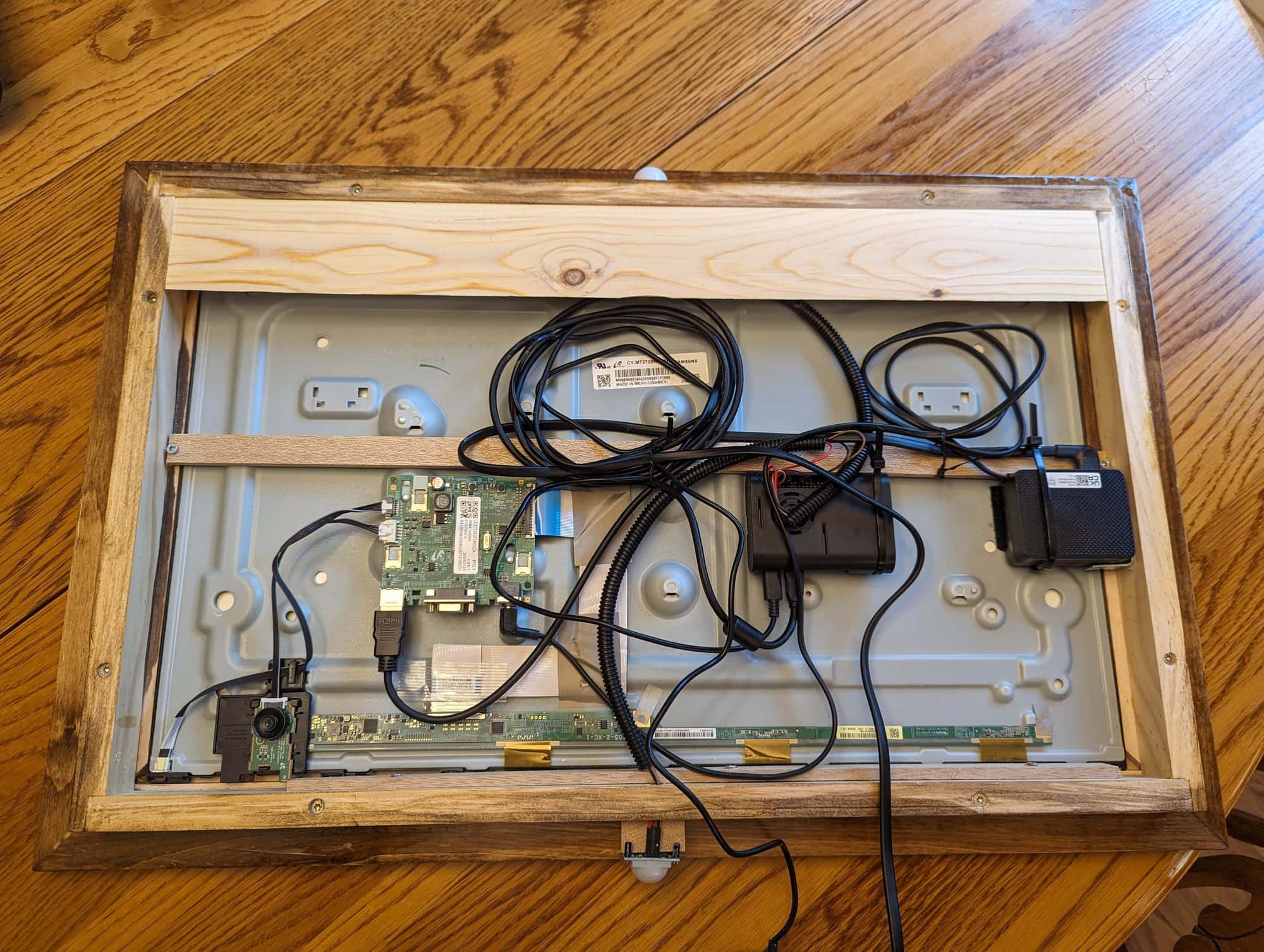
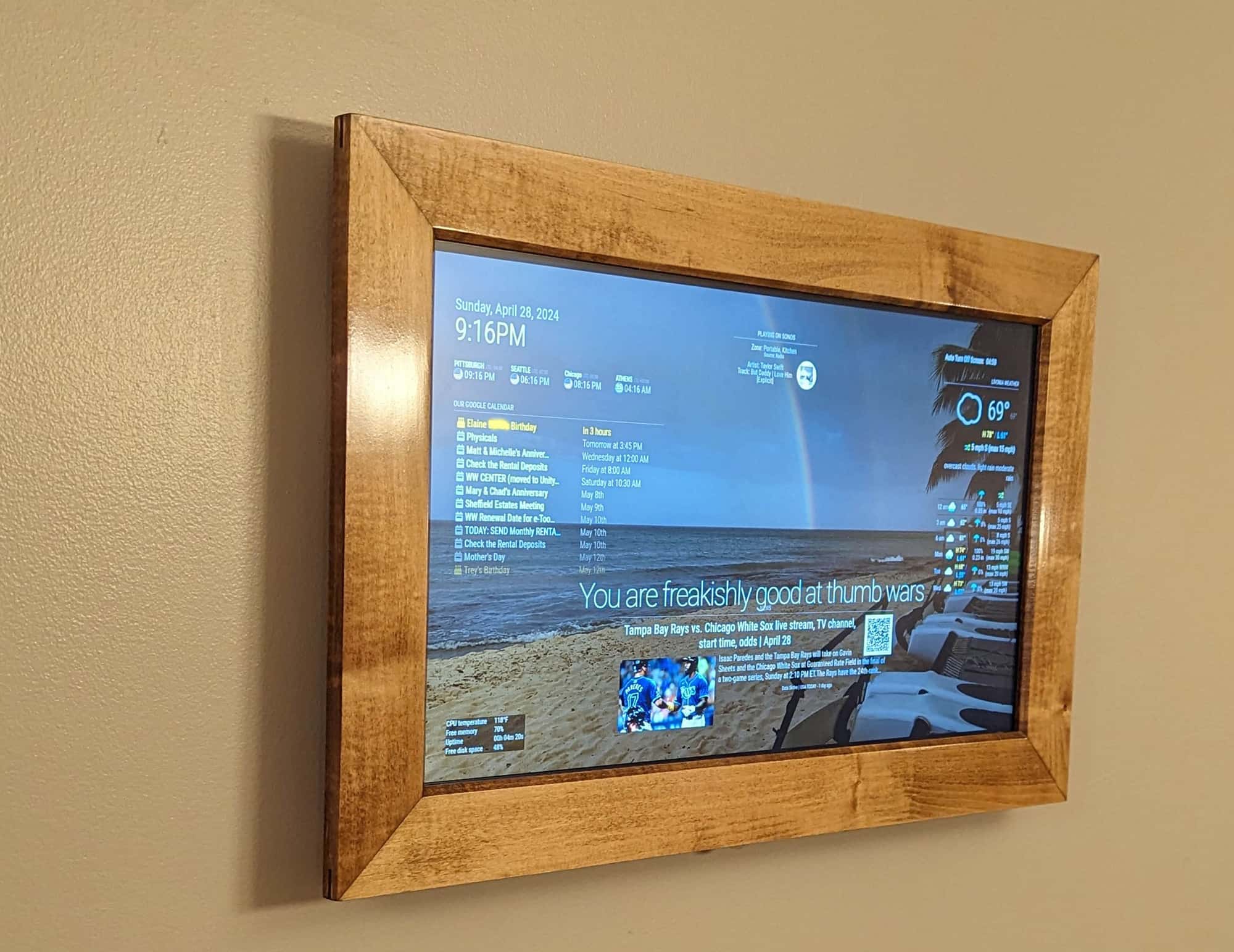
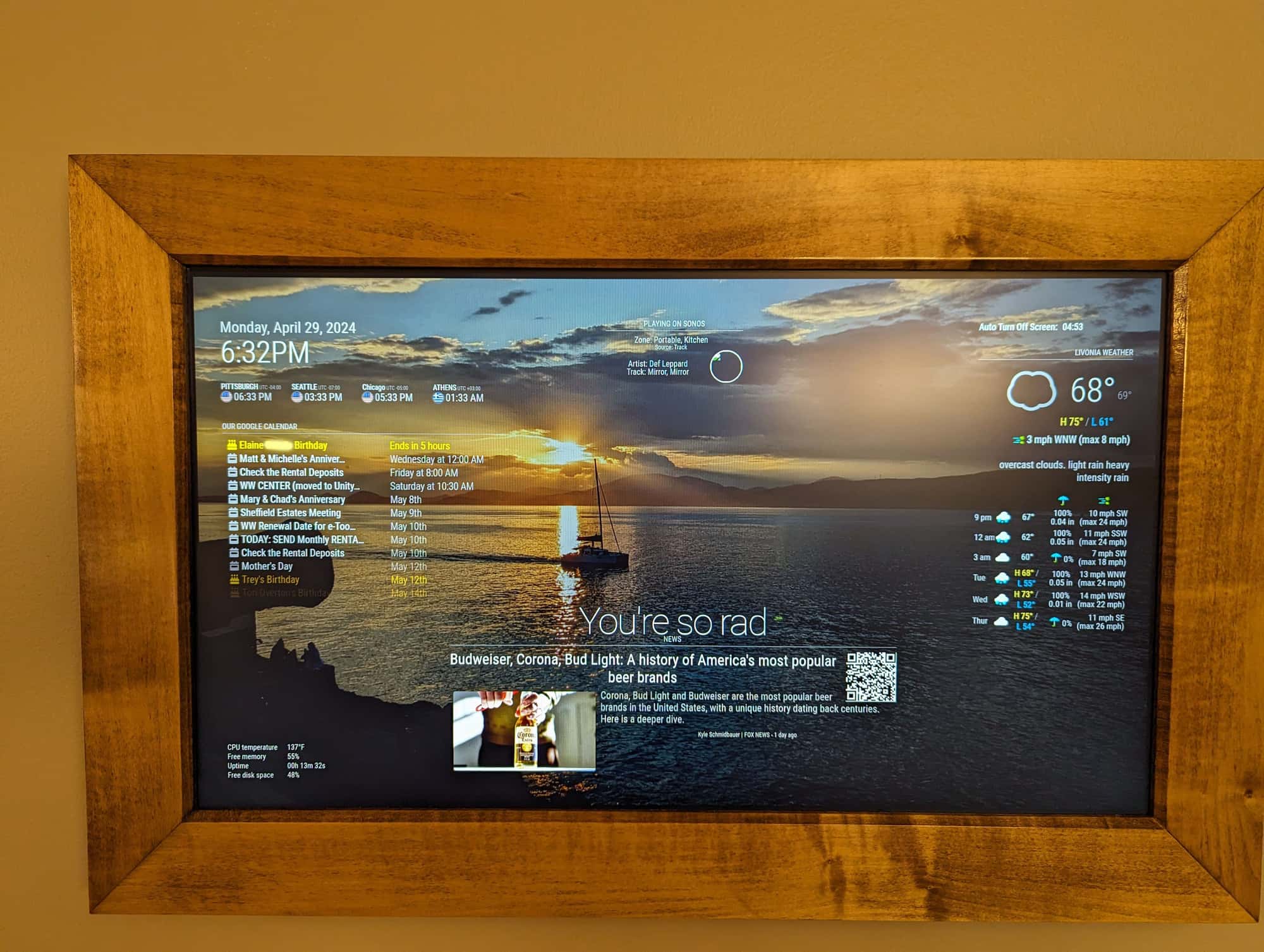
      My first MagicMirror is a family dashboard for our kitchen area. I used a Samsung 27” monitor which has a thin profile and fits easily into a wooden frame. The frame is cut from maple to fit the monitor.

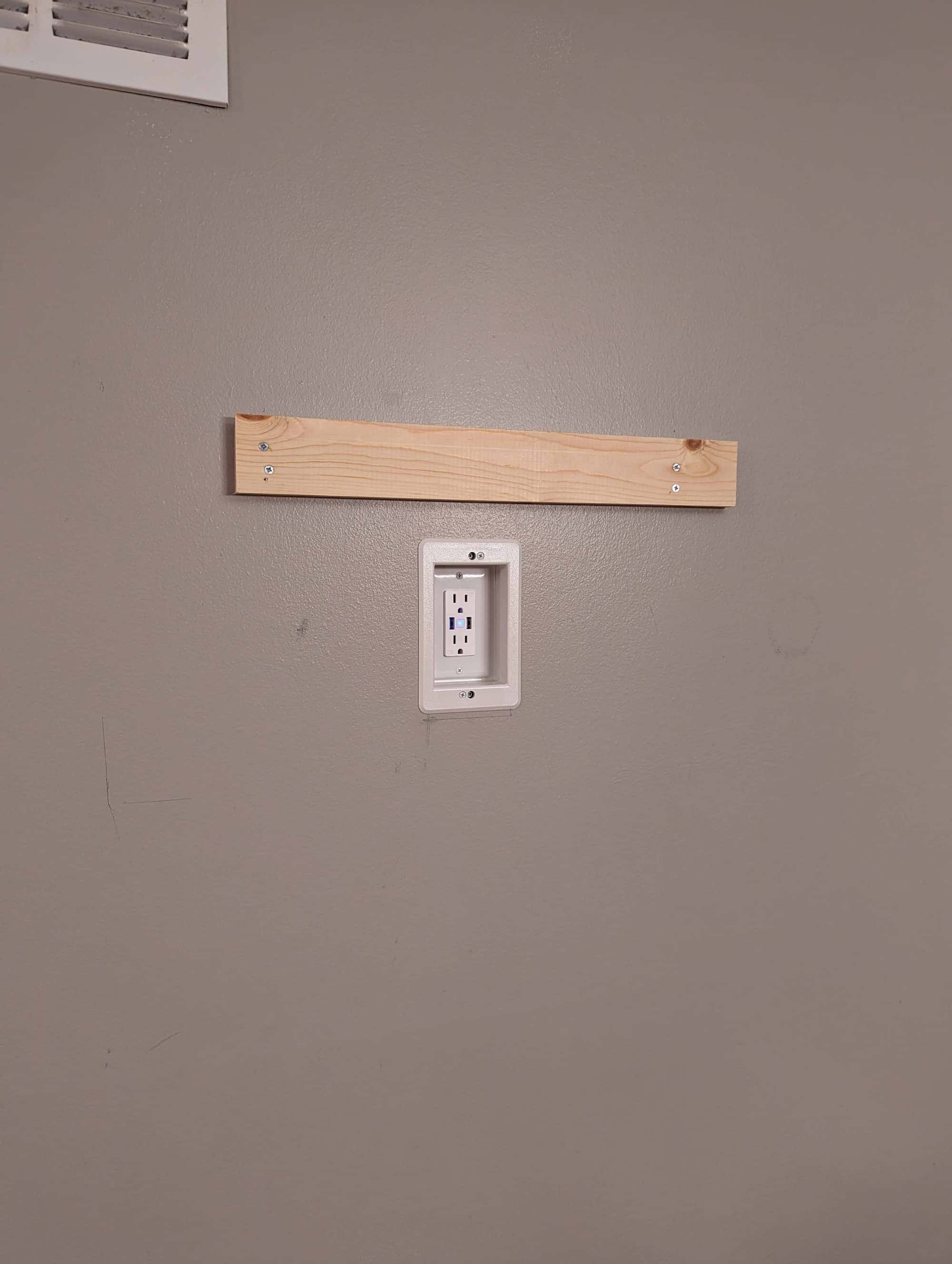
      The Dashboard is powered with an Alexa-enabled smart outlet installed in a recessed box, attached to the wall with a French cleat.

      We are thrilled with the results.

      Modules used:

      • clock
      • compliments
      • MMM-Remote-Control
      • MMM-ModuleScheduler
      • MMM-AlexaControl
      • MMM-Pir
      • MMM-Worldclock
      • MMM-GoogleCalendar
      • MMM-Sonos
      • MMM-GooglePhotos
      • MMM-OpenWeatherMapForecast
      • MMM-NewsAPI
      • MMM-SystemMonitor
      • MMM-WiFiPassword (not shown)

      Hardware:

      • Raspberry Pi 4
      • Samsung 27" T35F monitor
      • HC-SR501 PIR Infrared Sensor
      • DAOKI Light Sensor
      • ELEGRP USB Outlet Receptacle, 3-Port USB C Wall Outlet
      • Arlington DVFR1W-1 Recessed Electrical/Outlet Mounting Box

      Features

      • 27 -inch monitor
      • PIR sensor to turn off the screen when the room is empty
      • Alexa integration to turn mirror on/off, using MMM-Remote-Control to shutdown the Raspberry Pi and then the smart outlet to turn off the monitor.
      • Rotates wallpaper thru personal photos
      • Light sensor runs as separate from the Magic Mirror framework with a custom Python script to dim the monitor in the evening

      The Build
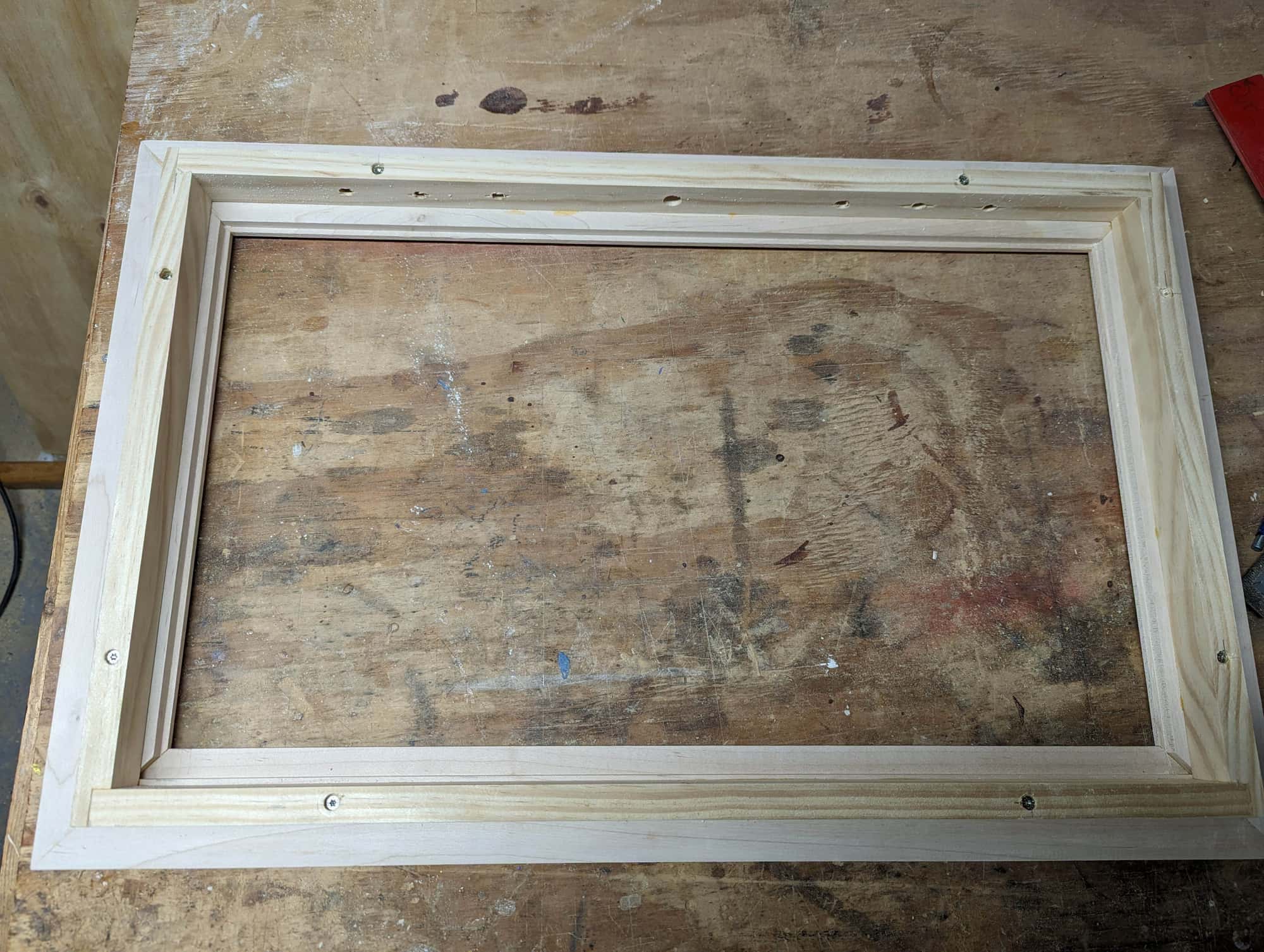
      3f40839b-58f3-41bb-a6c2-b665a836a7a4-build1.jpg

      2c9c4d66-b81a-41ec-b5fe-1e2b4a8de859-build2.jpg

      The wall with a french cleat
      6163d748-6528-4ae1-b914-ab8b44c6d8f7-build3.jpg

      The Dashboard
      9fe0dd9b-e565-493e-ab91-ba84fbc15e72-Mirror1a.jpg

      05cec45f-27cf-4aac-ae70-d40372ad1f17-mirror2.jpg

      S I R S 4 Replies Last reply Reply Quote 17
      • S Offline
        sdetweil @jconno03
        last edited by

        @jconno03 fabulous!!!

        Sam

        How to add modules

        learning how to use browser developers window for css changes

        1 Reply Last reply Reply Quote 2
        • I Offline
          IPfreely @jconno03
          last edited by

          @jconno03 This is fantastic! I am about to get started building a screen for our family kitchen. I hadn’t thought of putting a frame around the screen, but that would be a nice touch to match our cabinets.
          Thanks for listing the materials and modules. I just discovered MM this week so am eager to get started!

          1 Reply Last reply Reply Quote 1
          • R Offline
            rts58 @jconno03
            last edited by

            @jconno03 Awesome!

            1 Reply Last reply Reply Quote 0
            • J Offline
              JeanMichelC
              last edited by

              This is really cool, great work. Any chance you can post the code. I can’t get AlexaControl to work for some reason.

              S J 2 Replies Last reply Reply Quote 0
              • S Offline
                sdetweil @JeanMichelC
                last edited by

                @JeanMichelC said in 27" Kitchen Dashboard:

                I can’t get AlexaControl to work for some reason.

                can u look at the messages at MM startup, it should give you messages about listening on ports for the AlexaControl devices…

                and SOME alexas cannot find the AC devices… my echo 1 can, my echo show 5(v1) cannot

                Sam

                How to add modules

                learning how to use browser developers window for css changes

                J 1 Reply Last reply Reply Quote 0
                • J Offline
                  JeanMichelC @sdetweil
                  last edited by

                  @sdetweil Thanks for the tip, I’ll check

                  S 1 Reply Last reply Reply Quote 0
                  • S Offline
                    sdetweil @JeanMichelC
                    last edited by

                    @JeanMichelC we should take this to a new topic

                    what features do you have enabled in AC?

                    Sam

                    How to add modules

                    learning how to use browser developers window for css changes

                    1 Reply Last reply Reply Quote 0
                    • C Offline
                      cyberphox
                      last edited by

                      this is how it’s done! nice job!

                      Full time Dad, DJ and entertainer and lover of technology.

                      1 Reply Last reply Reply Quote 0
                      • J Offline
                        jconno03 @JeanMichelC
                        last edited by

                        @JeanMichelC

                        Here is my Alexa configuration. I am have an Echo Show 5 and an Echo Input. My feeling is that verbally asking Alexa to scan for new devices works better than attempting to scan from the app. Works flawlessly for me.

                        		module: 'MMM-AlexaControl',
                        		position: 'middle_center',
                        		config:{
                        			image: false,
                        			deviceName: "Mirror",
                        			pm2ProcessName: "MagicMirror",
                        			vcgencmd: "wlr-randr",
                        			},
                        
                        1 Reply Last reply Reply Quote 0
                        • R Offline
                          r3zi3lr
                          last edited by

                          Awesome MagicMirror setup.

                          Any chance of looking at the config.js, please?

                          J 1 Reply Last reply Reply Quote 1
                          • R Offline
                            rmonkey
                            last edited by

                            Aboslutely outstanding!

                            I did a similar build (down to the recessed outlet and french cleat).

                            I used a PiZero2 to keep things as thin as possible, but I see your build uses a full-sized Pi and looks great – the thickness looks prportionate.

                            I bet your guests say ‘whoa!’ everytime they see it.

                            1 Reply Last reply Reply Quote 0
                            • S Offline
                              sheptastic @jconno03
                              last edited by

                              @jconno03, Nice build? How did you get the Worldclock times to align in a row (horizontally) instead of the default vertical orientation?

                              J 1 Reply Last reply Reply Quote 0
                              • J Offline
                                jconno03 @sheptastic
                                last edited by

                                @sheptastic
                                Custom CSS which I think I took from another person’s post in this forum. Here are my entries…

                                /* Worldclock **/
                                /
                                Arrange clocks horizontally /
                                .MMM-Worldclock .worldtime {
                                display: flex;
                                flex-direction: row;
                                }
                                .MMM-Worldclock .world{
                                width: 140px;
                                }
                                .MMM-Worldclock .world-0{ /
                                1st clock = UTC clock */
                                width: 140px;
                                font-size:100%;
                                }

                                /* Time title font color and size */
                                .MMM-Worldclock .zone {
                                font-size: calc(var(–font-size) - 6px);
                                color: var(–color-text-bright);
                                }

                                /* Hide time difference to UTC */
                                MMM-Worldclock .gap {
                                font-size: 1px;
                                color: transparent;
                                }

                                1 Reply Last reply Reply Quote 0
                                • J Offline
                                  jconno03 @r3zi3lr
                                  last edited by

                                  @r3zi3lr If there is something specific you are looking for please let me know. I have added more features and the config is large

                                  1 Reply Last reply Reply Quote 0

                                  Hello! It looks like you're interested in this conversation, but you don't have an account yet.

                                  Getting fed up of having to scroll through the same posts each visit? When you register for an account, you'll always come back to exactly where you were before, and choose to be notified of new replies (either via email, or push notification). You'll also be able to save bookmarks and upvote posts to show your appreciation to other community members.

                                  With your input, this post could be even better 💗

                                  Register Login

                                  • 1 / 1
                                  • First post
                                    Last post
                                  Enjoying MagicMirror? Please consider a donation!
                                  MagicMirror created by Michael Teeuw.
                                  Forum managed by Sam, technical setup by Karsten.
                                  This forum is using NodeBB as its core | Contributors
                                  Contact | Privacy Policy