MagicMirror Forum
    • Recent
    • Tags
    • Unsolved
    • Solved
    • MagicMirror² Repository
    • Documentation
    • 3rd-Party-Modules
    • Donate
    • Discord
    • Register
    • Login
    A New Chapter for MagicMirror: The Community Takes the Lead
    Read the statement by Michael Teeuw here.

    MM always black screen with cursor

    Scheduled Pinned Locked Moved Solved Troubleshooting
    20 Posts 2 Posters 4.3k Views 2 Watching
    Loading More Posts
    • Oldest to Newest
    • Newest to Oldest
    • Most Votes
    Reply
    • Reply as topic
    Log in to reply
    This topic has been deleted. Only users with topic management privileges can see it.
    • S Offline
      sdetweil @nowayto
      last edited by

      @nowayto i would wait a little longer, web app not open yet

      or npm start dev, in the dev window select the console tab

      see if there is an error displayed

      Sam

      How to add modules

      learning how to use browser developers window for css changes

      N 1 Reply Last reply Reply Quote 0
      • N Offline
        nowayto @sdetweil
        last edited by

        After 1 millions of tests and trying… now it works.
        It seems it start to work using “raspbian bookworm 32bit legacy”.
        I tried with the non-legacy too and it didn’t work.
        Is that possible?
        I’m asking that because I know my 3 model A+ is 64bit capable.
        Honestly, without your advice… I’ll never though it could be the OS.
        Thank you a lot, now I’ll start a new chapter: the configuration

        S 2 Replies Last reply Reply Quote 0
        • S Offline
          sdetweil @nowayto
          last edited by

          @nowayto i think 64 bit is ok, IF you have the physical memory
          3A doesnt

          Sam

          How to add modules

          learning how to use browser developers window for css changes

          1 Reply Last reply Reply Quote 0
          • S sdetweil has marked this topic as solved on
          • S Offline
            sdetweil @nowayto
            last edited by sdetweil

            @nowayto configuration, try my MMM-Config module. also supports installing modules

            https://github.com/sdetweil/MMM-Config

            Sam

            How to add modules

            learning how to use browser developers window for css changes

            N 1 Reply Last reply Reply Quote 0
            • N Offline
              nowayto @sdetweil
              last edited by

              @sdetweil
              very interesting. I’ve installed it, but I can’t access to webpanel.
              Tried with:
              http://IP:PORT/configure
              http://LOCALHOST:PORT/configure
              no access.
              tried with standard 8080 and another port chosen by me.
              computer IP is whitelisted, and clearly on same network.
              config check is OK

              ~/MagicMirror/config $ npm run config:check

              magicmirror@2.30.0 config:check
              node js/check_config.js
              [2025-02-26 15:19:04.776] [INFO] Checking config file /home/PINAME/MagicM irror/config/config.js …
              [2025-02-26 15:19:04.960] [INFO] Your configuration file doesn’t contain syntax errors :)
              [2025-02-26 15:19:04.962] [INFO] Checking modules structure configuration …
              [2025-02-26 15:19:05.229] [INFO] Your modules structure configuration doesn’t c ontain errors :)

              Another little issues: sometimes I got black screen with cursor after “npm run start”
              I have to restart it in order to making it work

              S 1 Reply Last reply Reply Quote 0
              • S Offline
                sdetweil @nowayto
                last edited by

                @nowayto did you add my module to config.js

                {
                        module:"MMM-Config",
                        position:"....one_of the positions",
                         config:{
                          }
                },
                

                Sam

                How to add modules

                learning how to use browser developers window for css changes

                S N 2 Replies Last reply Reply Quote 0
                • S Offline
                  sdetweil @sdetweil
                  last edited by

                  @nowayto

                  on the startup, can you show the output of
                  npm run start

                  also show output of
                  free -m

                  Sam

                  How to add modules

                  learning how to use browser developers window for css changes

                  N 1 Reply Last reply Reply Quote 0
                  • N Offline
                    nowayto @sdetweil
                    last edited by

                    @sdetweil
                    Yes i did and the config checker gave me the OK

                    this is the startup
                    npm run start

                    magicmirror@2.30.0 start
                    npm run start:x11

                    magicmirror@2.30.0 start:x11
                    DISPLAY=“${DISPLAY:=:0}” ./node_modules/.bin/electron js/electron.js

                    [2025-02-26 15:00:59.702] [LOG] Starting MagicMirror: v2.30.0
                    [2025-02-26 15:01:01.515] [LOG] Loading config …
                    [2025-02-26 15:01:01.525] [LOG] config template file not exists, no envsubst
                    [2025-02-26 15:01:10.865] [INFO] Checking config file /home/MYRASPBERRYNAME/MagicM irror/config/config.js …
                    [2025-02-26 15:01:11.018] [INFO] Your configuration file doesn’t contain syntax errors :)
                    [2025-02-26 15:01:11.020] [INFO] Checking modules structure configuration …
                    [2025-02-26 15:01:11.253] [INFO] Your modules structure configuration doesn’t c ontain errors :)
                    [2025-02-26 15:01:12.473] [LOG] Loading module helpers …
                    [2025-02-26 15:01:12.480] [LOG] No helper found for module: alert.

                    S 1 Reply Last reply Reply Quote 0
                    • N Offline
                      nowayto @sdetweil
                      last edited by

                      @sdetweil
                      free -m
                      total used free shared buff/cache available
                      Mem: 426 180 91 81 155 112
                      Swap: 1023 225 798

                      1 Reply Last reply Reply Quote 0
                      • S Offline
                        sdetweil @nowayto
                        last edited by sdetweil

                        @nowayto more log info, i dont see info for mmm-config

                        Sam

                        How to add modules

                        learning how to use browser developers window for css changes

                        N 1 Reply Last reply Reply Quote 0
                        • N Offline
                          nowayto @sdetweil
                          last edited by

                          @sdetweil

                          npm run start

                          magicmirror@2.30.0 start
                          npm run start:x11

                          magicmirror@2.30.0 start:x11
                          DISPLAY=“${DISPLAY:=:0}” ./node_modules/.bin/electron js/electron.js

                          [2025-02-26 15:00:59.702] [LOG] Starting MagicMirror: v2.30.0
                          [2025-02-26 15:01:01.515] [LOG] Loading config …
                          [2025-02-26 15:01:01.525] [LOG] config template file not exists, no envsubst
                          [2025-02-26 15:01:10.865] [INFO] Checking config file /home/MYRASPBNAME/MagicM irror/config/config.js …
                          [2025-02-26 15:01:11.018] [INFO] Your configuration file doesn’t contain syntax errors :)
                          [2025-02-26 15:01:11.020] [INFO] Checking modules structure configuration …
                          [2025-02-26 15:01:11.253] [INFO] Your modules structure configuration doesn’t c ontain errors :)
                          [2025-02-26 15:01:12.473] [LOG] Loading module helpers …
                          [2025-02-26 15:01:12.480] [LOG] No helper found for module: alert.
                          [2025-02-26 15:01:12.519] [LOG] Initializing new module helper …
                          [2025-02-26 15:01:12.522] [LOG] Module helper loaded: updatenotification
                          [2025-02-26 15:01:12.525] [LOG] No helper found for module: clock.
                          [2025-02-26 15:01:13.000] [LOG] Initializing new module helper …
                          [2025-02-26 15:01:13.001] [LOG] Module helper loaded: calendar
                          [2025-02-26 15:01:13.005] [LOG] No helper found for module: compliments.
                          [2025-02-26 15:01:13.007] [LOG] No helper found for module: weather.
                          [2025-02-26 15:01:42.730] [LOG] Initializing new module helper …
                          [2025-02-26 15:01:42.732] [LOG] Module helper loaded: MMM-Wallpaper
                          [2025-02-26 15:01:43.127] [LOG] Initializing new module helper …
                          [2025-02-26 15:01:43.128] [LOG] Module helper loaded: MMM-Config
                          [2025-02-26 15:01:43.437] [LOG] Initializing new module helper …
                          [2025-02-26 15:01:43.438] [LOG] Module helper loaded: newsfeed
                          [2025-02-26 15:01:43.439] [LOG] All module helpers loaded.
                          [2025-02-26 15:01:43.455] [LOG] Starting server on port **** …
                          [2025-02-26 15:02:26.268] [LOG] Server started …
                          [2025-02-26 15:02:26.271] [LOG] Connecting socket for: updatenotification
                          [2025-02-26 15:02:26.288] [LOG] Starting module helper: updatenotification
                          [2025-02-26 15:02:26.290] [LOG] Connecting socket for: calendar
                          [2025-02-26 15:02:26.291] [LOG] Starting node helper for: calendar
                          [2025-02-26 15:02:26.293] [LOG] Connecting socket for: MMM-Wallpaper
                          [2025-02-26 15:02:26.295] [LOG] Starting node helper for: MMM-Wallpaper
                          [2025-02-26 15:02:26.306] [LOG] Connecting socket for: MMM-Config
                          [2025-02-26 15:02:27.236] [LOG] Connecting socket for: newsfeed
                          [2025-02-26 15:02:27.237] [LOG] Starting node helper for: newsfeed
                          [2025-02-26 15:02:27.258] [LOG] Sockets connected & modules started …
                          [2025-02-26 15:02:44.884] [LOG] Launching application.

                          S 1 Reply Last reply Reply Quote 0
                          • S Offline
                            sdetweil @nowayto
                            last edited by

                            @nowayto then you should be able to access the mmm-config urls

                            Sam

                            How to add modules

                            learning how to use browser developers window for css changes

                            N 2 Replies Last reply Reply Quote 0
                            • N Offline
                              nowayto @sdetweil
                              last edited by

                              @sdetweil

                              Exactly but I can’t access.
                              Now I’m trying give a whitelist complete access.

                              The only error I see is a GPU process error but I don’t think is connected to the web server.

                              [2025-02-26 22:43:49.784] [LOG] Launching application.
                              [7194:0226/224359.949078:ERROR:gpu_process_host.cc(1007)] GPU process exited unexpectedly: exit_code=512
                              [2025-02-26 22:44:42.117] [LOG]
                              [7194:0226/224442.468308:ERROR:gpu_process_host.cc(1007)] GPU process exited unexpectedly: exit_code=512
                              [7194:0226/224504.822973:ERROR:gpu_process_host.cc(1007)] GPU process exited unexpectedly: exit_code=512
                              [2025-02-26 22:45:56.193]
                              [INFO] System information:

                              SYSTEM: manufacturer: Raspberry Pi Foundation; model: Raspberry Pi 3 Model A Plus Rev 1.1; virtual: false

                              OS: platform: linux; distro: Raspbian GNU/Linux; release: 11; arch: arm; kernel: 6.1.21-v7+

                              VERSIONS: electron: 32.3.1; used node: 20.18.1; installed node: 20.18.1; npm: 10.8.2; pm2: 5.4.3

                              OTHER: timeZone: Europe/Rome; ELECTRON_ENABLE_GPU: undefined

                              [2025-02-26 22:45:56.931] [LOG] Create new calendarfetcher for url: https://ics.calendarlabs.com/76/****MYCAL***** - Interval: 604800000
                              [2025-02-26 22:45:57.049] [LOG] Create new newsfetcher for url: http://www.MYRSS**- Interval: 300000
                              [2025-02-26 22:45:57.118] [INFO] updatenotification: Updater Class Loaded!
                              [2025-02-26 22:45:57.123] [INFO] updatenotification: Checking PM2 using…
                              [2025-02-26 22:45:57.125] [INFO] updatenotification: [PM2] You are not using pm2
                              [2025-02-26 22:45:57.128] [INFO] Checking git for module: MMM-Wallpaper
                              [2025-02-26 22:45:57.591] [INFO] Checking git for module: MMM-Config
                              [2025-02-26 22:45:57.893] [INFO] Checking git for module: MagicMirror
                              [2025-02-26 22:45:58.426] [INFO] Calendar-Fetcher: Broadcasting 10 events from https://ics.calendarlabs.com*****MYCAL****.
                              [2025-02-26 22:45:58.443] [INFO] Newsfeed-Fetcher: Broadcasting 10 items.

                              1 Reply Last reply Reply Quote 0
                              • N Offline
                                nowayto @sdetweil
                                last edited by

                                @sdetweil
                                My fault. In config.js the adress was set in “localhost”… Sorry.
                                Now I set the IP and I granted the access

                                S 1 Reply Last reply Reply Quote 0
                                • S Offline
                                  sdetweil @nowayto
                                  last edited by sdetweil

                                  @nowayto yes, the doc mentions this, and if you had set

                                  showQR:true

                                  it would have displayed a message about localhost
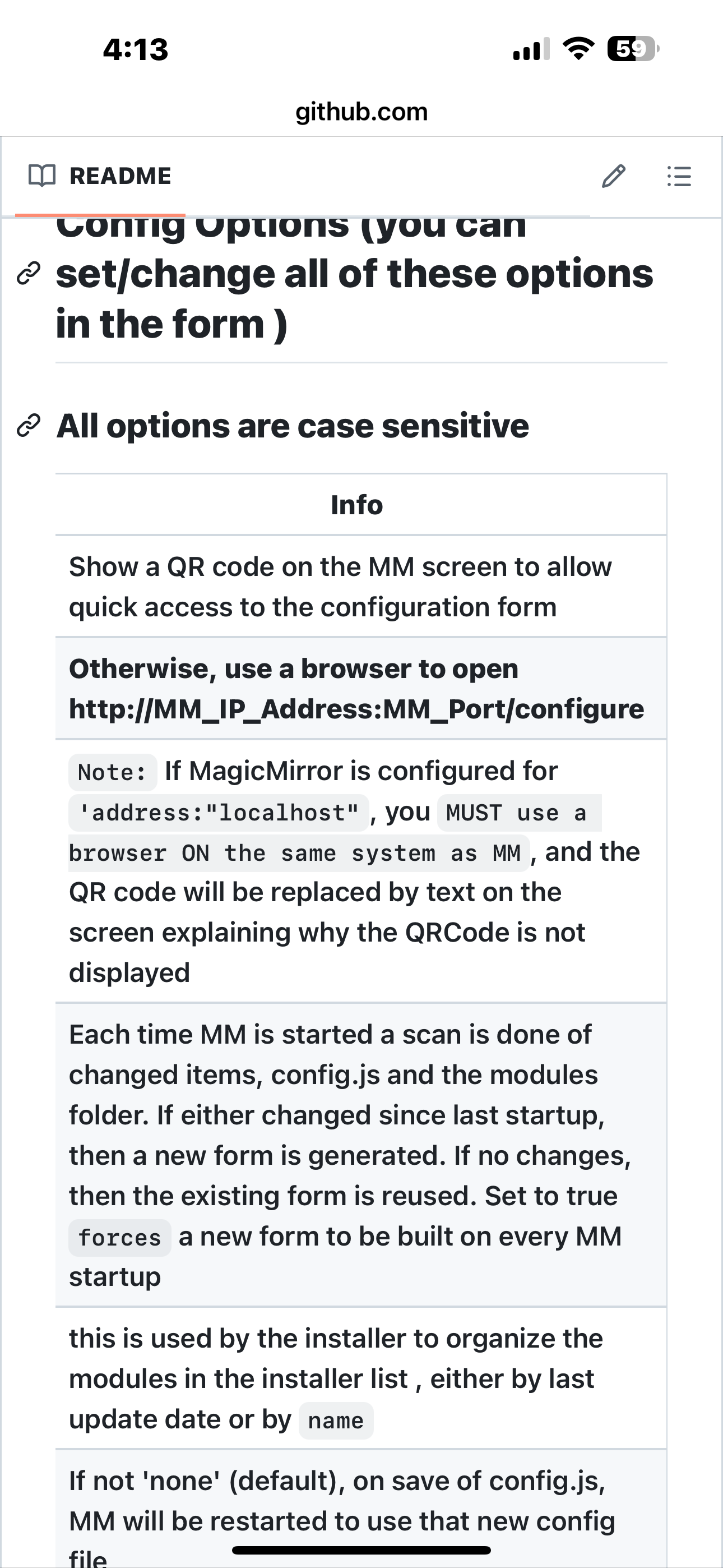
                                  IMG_0800.png

                                  Sam

                                  How to add modules

                                  learning how to use browser developers window for css changes

                                  1 Reply Last reply Reply Quote 0

                                  Hello! It looks like you're interested in this conversation, but you don't have an account yet.

                                  Getting fed up of having to scroll through the same posts each visit? When you register for an account, you'll always come back to exactly where you were before, and choose to be notified of new replies (either via email, or push notification). You'll also be able to save bookmarks and upvote posts to show your appreciation to other community members.

                                  With your input, this post could be even better 💗

                                  Register Login

                                  • 1 / 1
                                  • First post
                                    Last post
                                  Enjoying MagicMirror? Please consider a donation!
                                  MagicMirror created by Michael Teeuw.
                                  Forum managed by Sam, technical setup by Karsten.
                                  This forum is using NodeBB as its core | Contributors
                                  Contact | Privacy Policy