MagicMirror Forum
    • Recent
    • Tags
    • Unsolved
    • Solved
    • MagicMirror² Repository
    • Documentation
    • 3rd-Party-Modules
    • Donate
    • Discord
    • Register
    • Login
    A New Chapter for MagicMirror: The Community Takes the Lead
    Read the statement by Michael Teeuw here.

    Apply color to future events in CalendarExt3

    Scheduled Pinned Locked Moved Custom CSS
    22 Posts 2 Posters 275 Views 2 Watching
    Loading More Posts
    • Oldest to Newest
    • Newest to Oldest
    • Most Votes
    Reply
    • Reply as topic
    Log in to reply
    This topic has been deleted. Only users with topic management privileges can see it.
    • K Offline
      kkmirr04 @sdetweil
      last edited by

      @sdetweil Here is the events with the calendar
      cal2.png

      Remove the calendar sets and then run npm install again? I did see there is an update for my NPM - should i do that update too?
      npm.jpg

      I also just noticed theres an error with CalExt3 when I close MM
      calext3 error.png

      S 3 Replies Last reply Reply Quote 0
      • S Do not disturb
        sdetweil @kkmirr04
        last edited by

        @kkmirr04 thanks. I will try to test this out in a little bit

        No, ignore the npm message

        Yes, we found a bug in MagicMirror when looking for module updates. No harm done

        Sam

        How to add modules

        learning how to use browser developers window for css changes

        1 Reply Last reply Reply Quote 0
        • S Do not disturb
          sdetweil @kkmirr04
          last edited by

          @kristjanesperanto

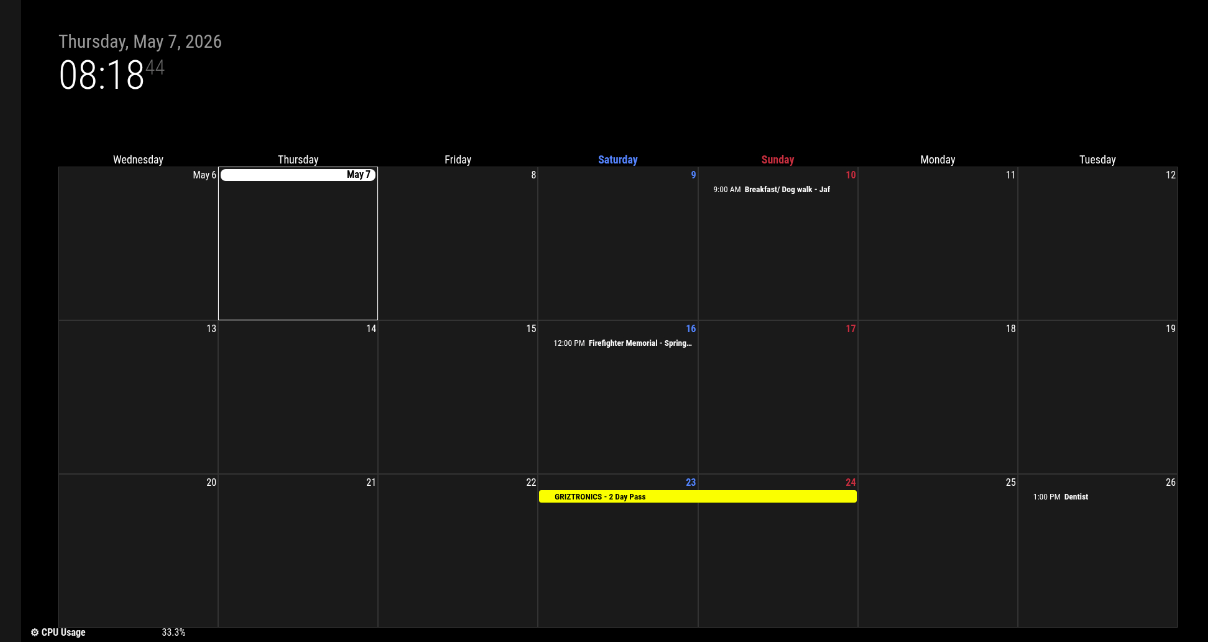
          can you explain this? the default cal shows colored, but Ext3 does not

          I can duplicate, text not colored in Ext3

          Screenshot at 2026-05-04 17-31-42.png

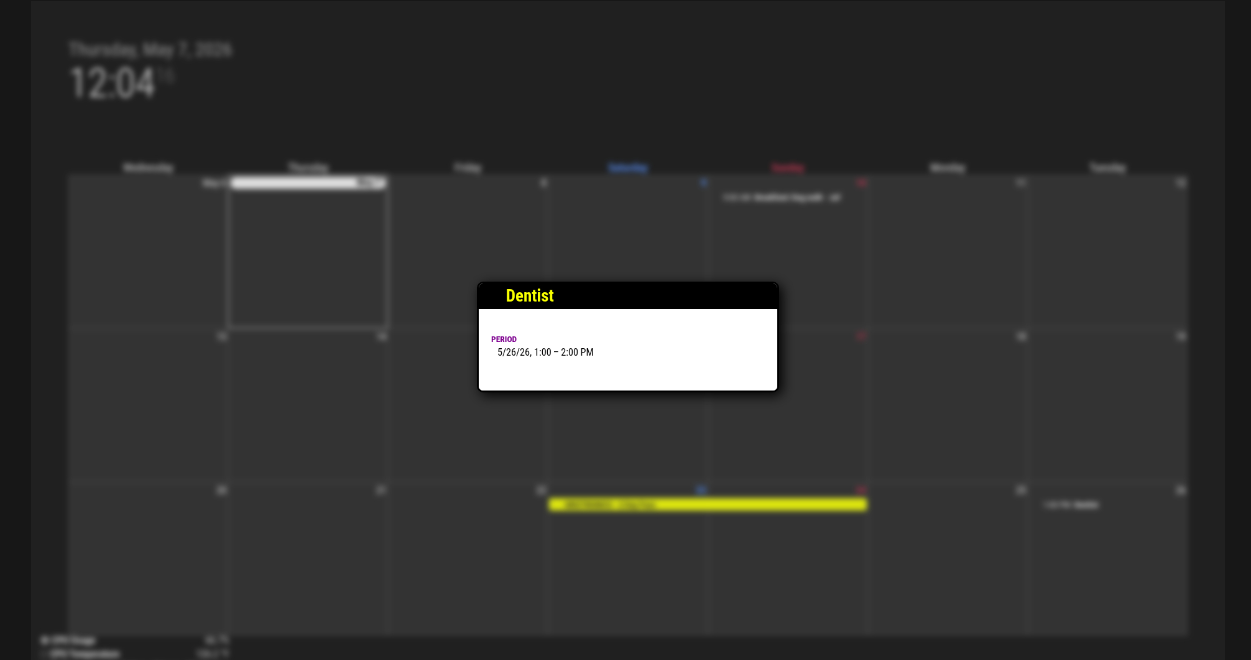
          but pop is all colored.

          Screenshot at 2026-05-04 17-31-49.png

          Sam

          How to add modules

          learning how to use browser developers window for css changes

          1 Reply Last reply Reply Quote 0
          • S Do not disturb
            sdetweil @kkmirr04
            last edited by

            @kkmirr04 on your second cal instance not showing

            can you show the config, xxx out the cal url…

            I am using pages, with ext3 on diff and cal on diff without problem… (except for ext3 color)

            Sam

            How to add modules

            learning how to use browser developers window for css changes

            K 1 Reply Last reply Reply Quote 0
            • K Offline
              kkmirr04 @sdetweil
              last edited by

              @sdetweil I think I might’ve just found its related to the month / week views of Ext3…

              This is how I have it now:

              {
              			module: "calendar",
              			classes: "page0",
              			header: "What's Poppin'",
              			position: "top_right",
              			config: {
              			   colored: true,
              				calendars: [
              					{
              						name: "xx_cal",
              						color: 'yellow',
              						fetchInterval: 7 * 24 * 60 * 60 * 1000,
              						symbol: "calendar-check-o",
              						url: "basic.ics"
              						
              					},
              				{
              						name: "yy_cal",
              						color: 'green',
              						fetchInterval: 7 * 24 * 60 * 60 * 1000,
              						symbol: "calendar-check-o",
              						url: "webcal"
              					},
              				
              				],
              			    
              			}
              		},
              

              When I separate them to two instances, this is the code I have:

              {
              			module: "calendar",
              			classes: "page0",
              			header: "XX Calendar'",
              			position: "top_right",
              			config: {
              			   colored: true,
              				calendars: [
              					{
              						name: "xx_cal",
              						color: 'yellow',
              						fetchInterval: 7 * 24 * 60 * 60 * 1000,
              						symbol: "calendar-check-o",
              						url: "basic.ics"
              						
              					},
              
              					],
              				}
              			},
              {
              			module: "calendar",
              			classes: "page0",
              			header: "YY Calendar'",
              			position: "top_right",
              			config: {
              			   colored: true,
              				calendars: [
              					{
              					name: "yy_cal",
              						color: 'green',
              						fetchInterval: 7 * 24 * 60 * 60 * 1000,
              						symbol: "calendar-check-o",
              						url: "webcal"
              					},
              				
              				],
              			    
              			}
              		},
              

              And without the Pages module, I do get both to load
              3.jpg

              I went to add Pages back in with the two calendar instance configuration and have EXT3 on week mode, the second calendar stream does not load
              4.jpg
              And still no color on calendar view on the second page
              5.png

              But then if I switch to month mode in EXT3 streams are loading in and some colors work - but there’s still two events (from the XX calendar) that loaded but did not get color applied.
              6.png

              As I’ve been messing with it, sometimes on the first run it will load both calendar streams when its in week mode, but it usually doesn’t load it after it runs once. Sometimes in month mode, it still doesn’t load the second calendar, so its not 100% accurate

              S 1 Reply Last reply Reply Quote 0
              • S Do not disturb
                sdetweil @kkmirr04
                last edited by

                @kkmirr04 interesting.

                Also, you are using an old term , colored
                We’ve update to coloredText, symbol,
                There should have been a message in the console output at MagicMirror startup

                pm2 logs —lines=xxx
                xxx is the number of most recent lines in the output, default 15

                I saw that when I was testing yesterday

                When you get the not displayed, can you
                Open the developers console

                On the MagicMirror screen, ctrl-shift-I
                Select the console tab and scroll around for errors(red text usually)

                When one script has a fault in a browser, others will be impacted
                Modules are all script

                Sam

                How to add modules

                learning how to use browser developers window for css changes

                K 1 Reply Last reply Reply Quote 0
                • K Offline
                  kkmirr04 @sdetweil
                  last edited by

                  @sdetweil I’ll keep messing with coloredText, so far everything is staying white when I use that. Here is the errors I’m seeing

                  7.png

                  S 1 Reply Last reply Reply Quote 0
                  • S Do not disturb
                    sdetweil @kkmirr04
                    last edited by

                    @kkmirr04 custom.css not loaded just means there isn’t one. (The default as MagicMirror installed)
                    If you had used the scripted install it would have created an empty one so this error wouldn’t be there

                    There is the colored vs coloredText, coloredSymbol warning

                    No Obvious other errors in that part

                    Calendar sorting events=0, means there weren’t any?

                    Just for testing, if you disable pages and ext3
                    ( add disabled:true, after the module:line)
                    Do both instances of calendar draw and with color?

                    If yes, then set disabled false on ext3

                    Sam

                    How to add modules

                    learning how to use browser developers window for css changes

                    K 1 Reply Last reply Reply Quote 0
                    • K Offline
                      kkmirr04 @sdetweil
                      last edited by

                      @sdetweil with both disabled it did draw both instances with color
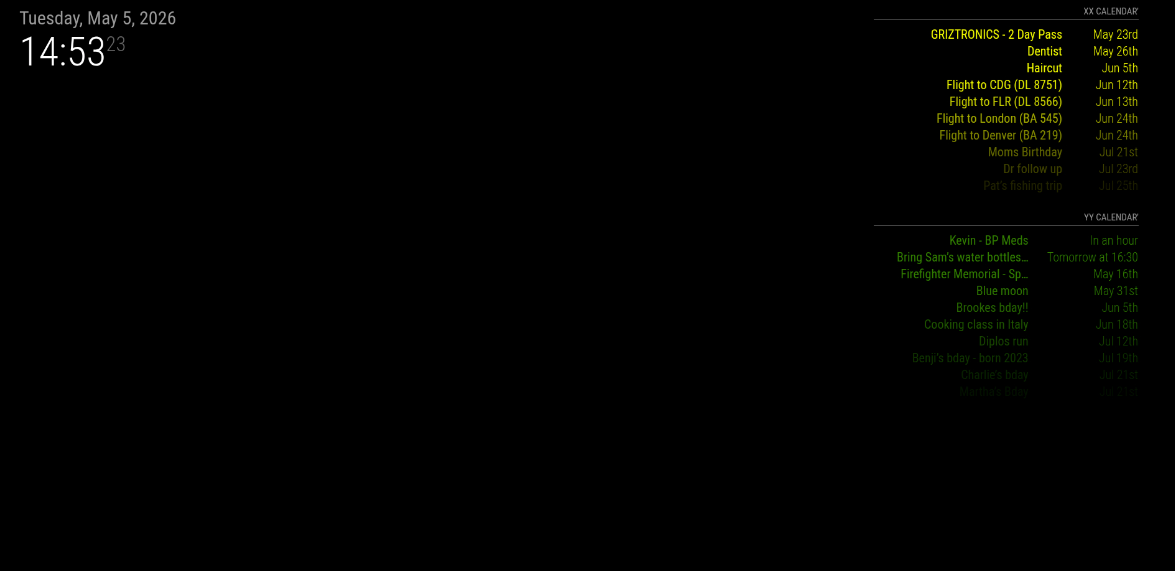
                      8.png

                      Then turning EXT3 back on I’ve got no color on any events again
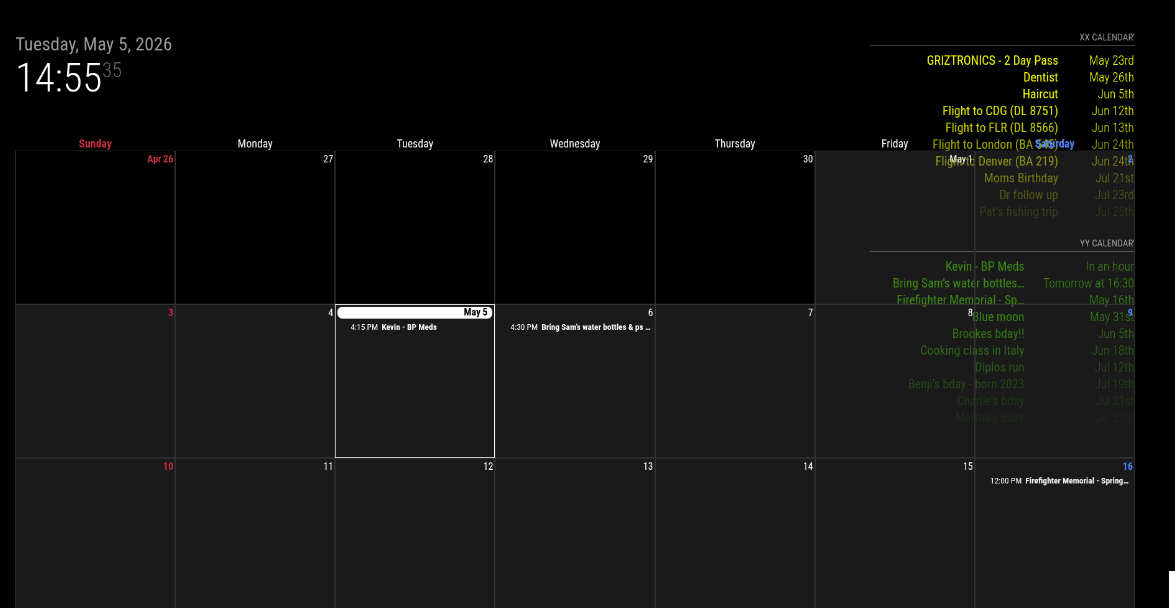
                      9.png

                      S 1 Reply Last reply Reply Quote 0
                      • S Do not disturb
                        sdetweil @kkmirr04
                        last edited by

                        @kkmirr04 that’s ext3 not showing color

                        In the off chance of some module install fluke
                        Delete the Mmm-CalendarExt3 folder
                        Then git clone
                        And npm install in the folder created by clone

                        Then restart MagicMirror

                        Sam

                        How to add modules

                        learning how to use browser developers window for css changes

                        1 Reply Last reply Reply Quote 0

                        Hello! It looks like you're interested in this conversation, but you don't have an account yet.

                        Getting fed up of having to scroll through the same posts each visit? When you register for an account, you'll always come back to exactly where you were before, and choose to be notified of new replies (either via email, or push notification). You'll also be able to save bookmarks and upvote posts to show your appreciation to other community members.

                        With your input, this post could be even better 💗

                        Register Login

                        • 1
                        • 2
                        • 2 / 2
                        • First post
                          Last post
                        Enjoying MagicMirror? Please consider a donation!
                        MagicMirror created by Michael Teeuw.
                        Forum managed by Sam, technical setup by Karsten.
                        This forum is using NodeBB as its core | Contributors
                        Contact | Privacy Policy