Read the statement by Michael Teeuw here.
Weatherunderground - currently - hourly - daily - configurable
-
Did you ever update both the MagicMirror and MMM-WunderGround to the latest versions? The weather-icons-wind.css are now part of the MM standard install.
-
@RedNax It works now hahaha I feel like an idiot. I had updated MMM-WunderGround like a million times but for some reason never once thought to update the MM its self. But thank you for the help!
-
Hi all,
first thanks for this great module. I have an issue to Display the time an days in one orientation.
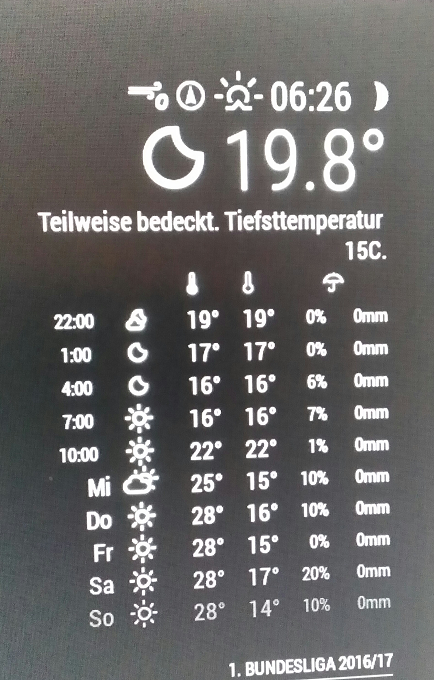
Can i Change the Orientation of the first column to flush right?
Thanks
Daniel -
@ostfilinchen Thanks!
Slight oversight on my part when i added the horizontal layout. Now fixed. Please update MMM-WunderGround.
-
Gettin’ the black screen as well…
I’ve gone to the “post that may assist me” but I can’t seem to find anything from it. When looking at the console tab when F12 is pressed, it has stopped after 3 lines at the “Load script: modules/MMM-WunderGround//MMM-WunderGround.js” Opening that file it has the defaults for the api and pws blank. ok.Looking at the module coding…
var config = {
port: 8080,language: 'en', timeFormat: 12, units: 'imperial', modules: [ { module: 'MMM-WunderGround', position: 'top_right', config: { apikey: 'NUMBERS', pws: 'CO/Denver', hourly: '1', fctext: '1', fcdaycount: "5", fcdaystart: "0", hourlyinterval: "3", hourlycount: "2", } }, ]};
I can’t seem to find what is wrong. Are you able to spot my error or suggest some help?
-
@Crispis I’m not sure, but I think you may not need the comma after the ending curly bracket if you only have 1 item in modules. (3rd line from the bottom) I think that might be why config: { } doesn’t get an ending comma.
-
Everything seems correct in your config. What worked for me was updating the Magic Mirror itself and then it started working. If that doesn’t do it let me know and I could try to see what else I did.
-
Did an update with:
cd ~\MagicMirror
git pull
and then removed the “,” … still getting the black screen.When I remove THIS particular module from my whole set, the mirror works fine. I’m not sure whats wrong in that section.
-
@Crispis Can you post your full config.js please? (if the above is just truncated) I’m wondering if there’s something just before the MMM-Wunderground module that’s causing you grief.
-
Are you sure that CO/Denver is correct?
-
@chrisfoerg I am not sure if CO/Denver is correct. I thought it was the “STATE/CITY” and Denver happens to be very close to me so I went with that initially. It wasn’t working with the “IUTRETCH” or “NY/New_York” inputs either.
@Shockwave I already began to…start…I tried to call up the file through 192.XXX/config/config.js but that gives me a file to save, which then I can’t open as it continues to prompt the save file. When I drop it into notepad, its…word wrap made it too difficult to read and the line was not gonna happen. I’ve got… the entire config.js that I guess I could e-mail? I don’t think attaching it to this would be a good move? Better yet…what is the correct method for acquiring/posting the full config.js?
-
@Crispis
CO/Denver should be okay as that’s the same format I’m using for one of my entries which is AZ/Yuma. You could also try an airport identifier such as KDEN for Denver International.As for saving the file, I assume you’re copying and pasting from Putty? Does turning off word wrap make it any better? Could you copy from putty and paste it in here as a code block?
-
@shockwave When it comes to saving the file, I open up a file and type in the ip address then /config/config.js …I’m not too sure what Putty is… Turning off word wrap just makes the data appear on two lines but for 100 yards. It doesn’t clean things up. Have not tried the KDEN but I’ll give it a go when I’m home!
-
@Shockwave Here is my current full config.js -minus the API keys. Gives me the black screen for some reason…
/* Magic Mirror Config Sample
*- By Michael Teeuw http://michaelteeuw.nl
- MIT Licensed.
*/
var config = {
port: 8080,language: 'en', timeFormat: 12, units: 'imperial', modules: [ { module: 'alert', }, { module: 'clock', position: 'top_left' }, { module: 'calendar', header: 'US Holidays', position: 'top_left', config: { maximumEntries: '3', calendars: [ { symbol: 'calendar-check-o ', url: 'webcal://www.calendarlabs.com/templates/ical/US-Holidays.ics' } ] } }, { module: 'compliments', position: 'bottom_bar', config: { updateInterval: '1800000', compliments: { morning: [ 'What a beautiful morning!', 'Enjoy your day!', 'Good Morning!', 'How was your sleep?' ], afternoon: [ 'Hey good lookin!', 'Looking good today!', 'You\'re doing great!', 'Looking good!' ], evening: [ 'Wow, you look great!', 'You look nice!' ] } } }, { module: 'currentweather', header: 'Firestone, CO', position: 'top_right', config: { initialLoadDelay: '100', location: 'Firestone', locationID: '5577008', appid: '###' } }, { module: 'weatherforecast', position: 'top_right', header: 'Weather Forecast', config: { location: 'Firestone, CO', locationID: '', //ID from http://www.openweathermap.org appid: '###' } }, { module: 'MMM-WunderGround', position: 'top_right', header: 'WEATHER TIME', config: { apikey: '###', pws: 'KDEN', lang: 'NL', fctext: '1', fcdaycount: '5', fcdaystart: '0', hourly: '1', hourlyinterval: '3', hourlycount: '2', } }, ]};
/*************** DO NOT EDIT THE LINE BELOW ***************/
if (typeof module !== ‘undefined’) {module.exports = config;} -
@Crispis Thanks for posting it. I think you’re missing a comma after appid in the weatherforecast and currentweather modules. Being at the end that may not be it, I seem to have instances where they aren’t on the last line either.
You said it works without the Wunderground module, correct? Could it be setting the language to Dutch without having Dutch selected in the International Settings within raspi-config? It sure looks okay unless there’s a hidden symbol in there. How are you editing it on the mirror?
Here’s mine if you want to try.
{ module: 'MMM-WunderGround', position: 'top_right', header: 'Ankeny Weather', config: { apikey: 'api key here', pws: 'KIKV', hourly: '0', fcdaycount: '7', fade: 'false', fadePoint: '1', alerttime: 10000, UseCardinals: 1, roundTmpDecs: 1, } }, -
@Shockwave Copied yours exactly and I’m still gettin’ that black screen of death! I’m editing on the pi/mirror itself with the terminal+keyboard. Tried CO/Denver and NY/New_York… nothing. I’m not too sure… I’ll try to “reinstall everything” from step one and see if that fixes it.
-
Honestly not too sure what I did… I mean I just re-cloned things in the module folder and now things are working. …So I guess if someone is having problems, simply start over from the beginning and try again?? No…idea… Anyways thanks for your help!
-
So I just updated both my Raspberry pi, MagicMirror software, and MMM-Wunderground. The module still works but the moon phases icon is now a blank “image missing” box. Strangely, I can see the moon image just fine on a computer by going to the MagicmirroIP:8080 and viewing the magicmirror sofware from there. Any suggestions?
-
@lsfourwheeler
I’m facing the same problem. Module is working and up-to-date, but moon phase icon is just showing the “image missing” box. Did you find any solution? -
@eppzenberg
Yes, I found out this issue actually happened because of the MagicMirror Update. Make sure that after you run the “git pull” command you also run the “npm install” command. This fixed my issue. I hope that helps.
Hello! It looks like you're interested in this conversation, but you don't have an account yet.
Getting fed up of having to scroll through the same posts each visit? When you register for an account, you'll always come back to exactly where you were before, and choose to be notified of new replies (either via email, or push notification). You'll also be able to save bookmarks and upvote posts to show your appreciation to other community members.
With your input, this post could be even better 💗
Register Login