Read the statement by Michael Teeuw here.
Cowboysdude's Mirror
-
@cowboysdude said in Cowboysdude's Mirror:
…I realize most here aren’t American but I’d really enjoy the NFL scores on mine as well… when I get time I’ll look at it…
As a fellow USA resident and die hard Cowboys fan, I am eagerly awaiting news on your NFL module. I’m hoping to use it as a roadmap to also display current team news. As my wife is a die hard Redskins fan, (I know, I know), I’m hoping to tie face recognition in so it shows me Cowboys stuff and shows her Redskins stuff.
-
@Requiemm said in Cowboysdude's Mirror:
@cowboysdude said in Cowboysdude's Mirror:
…I realize most here aren’t American but I’d really enjoy the NFL scores on mine as well… when I get time I’ll look at it…
As a fellow USA resident and die hard Cowboys fan, I am eagerly awaiting news on your NFL module. I’m hoping to use it as a roadmap to also display current team news. As my wife is a die hard Redskins fan, (I know, I know), I’m hoping to tie face recognition in so it shows me Cowboys stuff and shows her Redskins stuff.
I’m just starting on it. :) I like your face recognition idea!!! Awesome!
-
Because of the light sensitivity of the PIR module cannot put it behind the mirror… :( BUT you can replace it with a NOIR camera behind the glass to get the same thing!!! SO that’s my next move.
The mirror build is all done. I used real 1/4" glass mirror and built the frame from mahogany with a white trim on the front… very pleased with it.
-
My mirror has come a long way since it’s first build… it’s now voice activated… with newer modules like MMM-NFL module… wunderground weather module… quotes module… all this possible by really awesome users!!
So my mirror is because of the people that work really hard to bring this stuff to the public and it’s much appreciated!! It’s really awesome that you can customize something for you instead of having to deal with what people sell you and having to live with something that works but doesn’t totally do what you want it to.
Thank you all for ALL your hard work!!!
-
@cowboysdude said in Cowboysdude's Mirror:
@Mitchfarino said in Cowboysdude's Mirror:
ultrasonic sensors
I just got my PIR motion sensor and VIOLA it works… sleeps after so many seconds but once it detects movement it comes right back on! I run it through crontab…
if you want a copy of what I’m using for motion sensor I’ll share…I put them in the root and create a crontab to run pir.py and the rest is history… remember to chmod all three files… if you really wanted you could combine all three into one and instead of calling the off and on sh files you could just tell it to run the command from the py file… I will do that soon, just tired out today …work.
I have an Amazon Alexa sitting in my livingroom LOL BUT from what I’ve seen it’s a great option!
Do you have a video of yours working with voice recognition?
Could you share your motion sensor files? I’ve been away for the summer holidays with the family, so looking to get back in to things now that they’re going back to school!
-
@Mitchfarino I will post it later tonight. The mirror working that is and I’ll post the voice git hub info as well. I didn’t do the software strawberry did. But it’s working great
-
Here is the voice module I am using…
https://github.com/fewieden/MMM-voice
Here’s a link to a very small video testing it!
-
@cowboysdude Looks great!
I need to get back in to things now, and get mine built!!
-
@Mitchfarino said in Cowboysdude's Mirror:
@cowboysdude Looks great!
I need to get back in to things now, and get mine built!!
Thank you!! Post pics for us!
-
Hi @cowboysdude,
i have an issue with the MMM-Voice-Module. I had install all with the dependencies.sh. The Installscript says i must use mic 1 in the config.js. But it doesn’t work. The Module in the Mirror says: Initialize… and then ERROR. What can i do to resolve the Problem?
Regards, Daniel
-
@ostfilinchen said in Cowboysdude's Mirror:
ERROR
Run the mirror in dev mode
npm start dev
Then see what errors you’re getting :)
-
@cowboysdude Hi! would you mind helping me to install/debug your module please? i am not able to make it work even tho i followed your instructions :( thx if you can do this favor.
let me know what should i share (command to run etc) to make it easy to “debug” -
@bibi said in Cowboysdude's Mirror:
@cowboysdude Hi! would you mind helping me to install/debug your module please? i am not able to make it work even tho i followed your instructions :( thx if you can do this favor.
let me know what should i share (command to run etc) to make it easy to “debug”Sure I will help you all I can :)
-
@cowboysdude oh that’s really really awesome!
so what i have done is git Pir-Sensor & wiringPi into root? =>

edit with nano pir.py =>
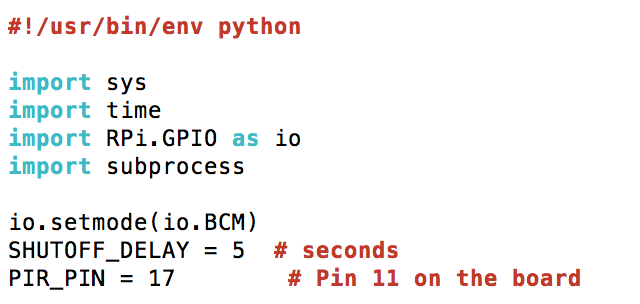
chmod all 3 files at pi@raspberrypi:~ $
and crontab also at pi@raspberrypi:~ $
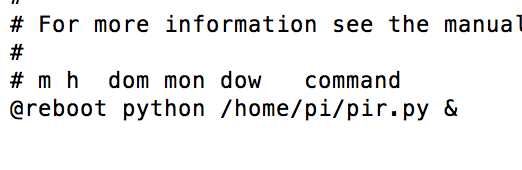
the jumper on PIR sensor in on H and the knobs are both set at minimum level
-
First make sure your wiring is correct… use the pin in the pir.py…
Then…
I put the pir.py and both sh files in the pi root directly
pi/pir.py
pi/monitor_off.sh
pi/monitor_on.shsudo chmod +x pir.py
sudo chmod +x monitor_off.sh
sudo chmod +x monitor_on.sh
Then…
sudo crontab -e
On the last line enter:
@reboot python /home/pi/pir.py &
Hit CRTL-O to save then exit
Reboot your pi
-
This post is deleted! -
@cowboysdude that’s exactly what i did all 3 files are located in Pi home directory as well as wiringPi.
sudo chmod there too & crontab too…
but not working… there should be something else.
i try to run your .sh file so the outcome is that monitor_off file works well but the monitor_on file displays the following message:

would you mind to share with me YOUR following files plssssss =>

thx you! -
@bibi go here:
https://github.com/cowboysdude/Pir-Sensor
download the monitor_on.sh and try running it again.
-
@cowboysdude Apperently i could get ride off this xset message now the monitor is turning on but the screen stays black… screensaver issue maybe.
-
@bibi said in Cowboysdude's Mirror:
@cowboysdude Apperently i could get ride off this xset message now the monitor is turning on but the screen stays black… screensaver issue maybe.
Yes that’s why I gave you the new one to try… I believe you’re having a screen saver issue.
The way I handled mine was to install xscreensaver and disable it :)

Hello! It looks like you're interested in this conversation, but you don't have an account yet.
Getting fed up of having to scroll through the same posts each visit? When you register for an account, you'll always come back to exactly where you were before, and choose to be notified of new replies (either via email, or push notification). You'll also be able to save bookmarks and upvote posts to show your appreciation to other community members.
With your input, this post could be even better 💗
Register Login