MagicMirror Forum
    • Recent
    • Tags
    • Unsolved
    • Solved
    • MagicMirror² Repository
    • Documentation
    • 3rd-Party-Modules
    • Donate
    • Discord
    • Register
    • Login
    A New Chapter for MagicMirror: The Community Takes the Lead
    Read the statement by Michael Teeuw here.

    Cowboysdude's Mirror

    Scheduled Pinned Locked Moved Show your Mirror
    49 Posts 9 Posters 57.1k Views 9 Watching
    Loading More Posts
    • Oldest to Newest
    • Newest to Oldest
    • Most Votes
    Reply
    • Reply as topic
    Log in to reply
    This topic has been deleted. Only users with topic management privileges can see it.
    • MitchfarinoM Offline
      Mitchfarino Module Developer @cowboysdude
      last edited by

      @cowboysdude Looks great!

      I need to get back in to things now, and get mine built!!

      cowboysdudeC 1 Reply Last reply Reply Quote 1
      • cowboysdudeC Offline
        cowboysdude Module Developer @Mitchfarino
        last edited by

        @Mitchfarino said in Cowboysdude's Mirror:

        @cowboysdude Looks great!

        I need to get back in to things now, and get mine built!!

        Thank you!! Post pics for us!

        1 Reply Last reply Reply Quote 0
        • O Offline
          ostfilinchen
          last edited by

          Hi @cowboysdude,

          i have an issue with the MMM-Voice-Module. I had install all with the dependencies.sh. The Installscript says i must use mic 1 in the config.js. But it doesn’t work. The Module in the Mirror says: Initialize… and then ERROR. What can i do to resolve the Problem?

          Regards, Daniel

          cowboysdudeC 1 Reply Last reply Reply Quote 0
          • cowboysdudeC Offline
            cowboysdude Module Developer @ostfilinchen
            last edited by

            @ostfilinchen said in Cowboysdude's Mirror:

            ERROR

            Run the mirror in dev mode

            npm start dev

            Then see what errors you’re getting :)

            1 Reply Last reply Reply Quote 0
            • B Offline
              bibi
              last edited by bibi

              @cowboysdude Hi! would you mind helping me to install/debug your module please? i am not able to make it work even tho i followed your instructions :( thx if you can do this favor.
              let me know what should i share (command to run etc) to make it easy to “debug”

              cowboysdudeC 1 Reply Last reply Reply Quote 0
              • cowboysdudeC Offline
                cowboysdude Module Developer @bibi
                last edited by

                @bibi said in Cowboysdude's Mirror:

                @cowboysdude Hi! would you mind helping me to install/debug your module please? i am not able to make it work even tho i followed your instructions :( thx if you can do this favor.
                let me know what should i share (command to run etc) to make it easy to “debug”

                Sure I will help you all I can :)

                B 1 Reply Last reply Reply Quote 0
                • B Offline
                  bibi @cowboysdude
                  last edited by

                  @cowboysdude oh that’s really really awesome!
                  so what i have done is git Pir-Sensor & wiringPi into root? =>

                  0_1477847789347_Capture d’écran 2016-10-30 à 18.15.31.png

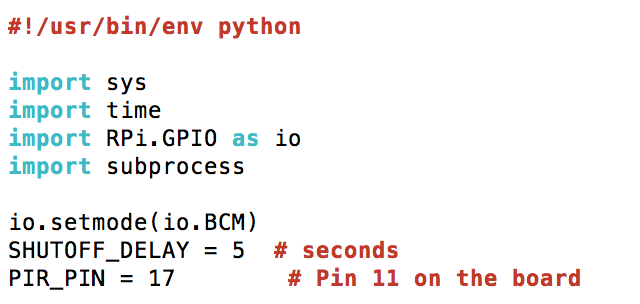
                  edit with nano pir.py =>
                  0_1477847957260_Capture d’écran 2016-10-30 à 18.18.45.png

                  chmod all 3 files at pi@raspberrypi:~ $

                  and crontab also at pi@raspberrypi:~ $
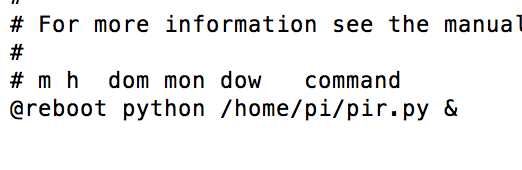
                  0_1477848117253_Capture d’écran 2016-10-30 à 18.21.35.png

                  the jumper on PIR sensor in on H and the knobs are both set at minimum level

                  1 Reply Last reply Reply Quote 0
                  • cowboysdudeC Offline
                    cowboysdude Module Developer
                    last edited by cowboysdude

                    First make sure your wiring is correct… use the pin in the pir.py…

                    Then…

                    I put the pir.py and both sh files in the pi root directly

                    pi/pir.py
                    pi/monitor_off.sh
                    pi/monitor_on.sh

                    sudo chmod +x pir.py

                    sudo chmod +x monitor_off.sh

                    sudo chmod +x monitor_on.sh

                    Then…

                    sudo crontab -e

                    On the last line enter:

                    @reboot python /home/pi/pir.py &

                    Hit CRTL-O to save then exit

                    Reboot your pi

                    B 2 Replies Last reply Reply Quote 0
                    • B Offline
                      bibi @cowboysdude
                      last edited by bibi

                      This post is deleted!
                      1 Reply Last reply Reply Quote 0
                      • B Offline
                        bibi @cowboysdude
                        last edited by bibi

                        @cowboysdude that’s exactly what i did all 3 files are located in Pi home directory as well as wiringPi.
                        sudo chmod there too & crontab too…
                        but not working… there should be something else.
                        i try to run your .sh file so the outcome is that monitor_off file works well but the monitor_on file displays the following message:

                        0_1477938102221_Capture d’écran 2016-10-31 à 19.19.42.png
                        would you mind to share with me YOUR following files plssssss =>

                        0_1477938144578_Capture d’écran 2016-10-31 à 19.20.01.png
                        thx you!

                        cowboysdudeC 1 Reply Last reply Reply Quote 0
                        • cowboysdudeC Offline
                          cowboysdude Module Developer @bibi
                          last edited by

                          @bibi go here:

                          https://github.com/cowboysdude/Pir-Sensor

                          download the monitor_on.sh and try running it again.

                          B 1 Reply Last reply Reply Quote 0
                          • B Offline
                            bibi @cowboysdude
                            last edited by bibi

                            @cowboysdude Apperently i could get ride off this xset message now the monitor is turning on but the screen stays black… screensaver issue maybe.

                            cowboysdudeC 1 Reply Last reply Reply Quote 0
                            • cowboysdudeC Offline
                              cowboysdude Module Developer @bibi
                              last edited by

                              @bibi said in Cowboysdude's Mirror:

                              @cowboysdude Apperently i could get ride off this xset message now the monitor is turning on but the screen stays black… screensaver issue maybe.

                              Yes that’s why I gave you the new one to try… I believe you’re having a screen saver issue.

                              The way I handled mine was to install xscreensaver and disable it :)

                              B 1 Reply Last reply Reply Quote 0
                              • B Offline
                                bibi @cowboysdude
                                last edited by bibi

                                @cowboysdude aha ok I will check install xscreensaver this evening. Any specific options or settings that I should apply?

                                cowboysdudeC bheplerB 2 Replies Last reply Reply Quote 0
                                • cowboysdudeC Offline
                                  cowboysdude Module Developer @bibi
                                  last edited by

                                  @bibi said in Cowboysdude's Mirror:

                                  @cowboysdude aha ok I will check install xscreensaver this evening. Any specific options or settings that I should apply?

                                  Yes “Disable” :)

                                  1 Reply Last reply Reply Quote 0
                                  • bheplerB Offline
                                    bhepler Module Developer @bibi
                                    last edited by

                                    @bibi This thread may help you.

                                    1 Reply Last reply Reply Quote 0
                                    • B Offline
                                      bibi
                                      last edited by bibi

                                      @cowboysdude @bhepler Thx for spending time to help me. i understand if you can’t help anymore.
                                      but here my update : i installed Xscreensaver and disabled it but it’s working. the monitor switches off with /opt/vc/bin/tvservice -o properly but with
                                      /opt/vc/bin/tvservice -p the screen stays black (backlight)
                                      just for info im doing all this via SSH… maybe something to do with X forwarding and this message : xset: unable to open display “”…

                                      Edit: i have found a command that allows to bring back the screen ! sudo chvt 9 && sudo chvt 7. :)))
                                      i have to check out how to implement this in an elegant way

                                      cowboysdudeC 1 Reply Last reply Reply Quote 0
                                      • cowboysdudeC Offline
                                        cowboysdude Module Developer @bibi
                                        last edited by

                                        @bibi said in Cowboysdude's Mirror:

                                        sudo chvt 9 && sudo chvt 7

                                        Open up the monitor_on.sh and delete everything add:

                                        sudo chvt 9 && sudo chvt 7

                                        Save it and that should work for you :)

                                        B 1 Reply Last reply Reply Quote 0
                                        • B Offline
                                          bibi @cowboysdude
                                          last edited by

                                          @cowboysdude said in Cowboysdude's Mirror:

                                          @bibi said in Cowboysdude's Mirror:

                                          sudo chvt 9 && sudo chvt 7

                                          Open up the monitor_on.sh and delete everything add:

                                          sudo chvt 9 && sudo chvt 7

                                          Save it and that should work for you :)

                                          yep that’s exactly what i wanted to later today :))
                                          nevertheless, I found on the forum another way to avoid using sudo… i assume it’s better practice but i am not able to confirm this.
                                          fyi:
                                          the link : https://forum.magicmirror.builders/topic/208/pir-sensor-put-your-mirror-to-sleep-if-not-used/64

                                          B 1 Reply Last reply Reply Quote 1
                                          • B Offline
                                            bibi @bibi
                                            last edited by

                                            @cowboysdude Cool! my modified .sh files are working well in interactive mode :) but… there is always a but lol, when .py file is run it switches well the screen off after the amount of time set and wakes up when hand is waved BUT suddently and without detection the screen wakes up again! this is really irrating… so close to my goal :(
                                            i believe it’s the physical settings on the sensor itself making this behavior… would you mind to send me a pic or tell me how your sensor is set? => jumper and the knobs? thx mate for this (i hope) final demand! :)))

                                            1 Reply Last reply Reply Quote 0

                                            Hello! It looks like you're interested in this conversation, but you don't have an account yet.

                                            Getting fed up of having to scroll through the same posts each visit? When you register for an account, you'll always come back to exactly where you were before, and choose to be notified of new replies (either via email, or push notification). You'll also be able to save bookmarks and upvote posts to show your appreciation to other community members.

                                            With your input, this post could be even better 💗

                                            Register Login

                                            • 1
                                            • 2
                                            • 3
                                            • 1 / 3
                                            • First post
                                              Last post
                                            Enjoying MagicMirror? Please consider a donation!
                                            MagicMirror created by Michael Teeuw.
                                            Forum managed by Sam, technical setup by Karsten.
                                            This forum is using NodeBB as its core | Contributors
                                            Contact | Privacy Policy