MagicMirror Forum
    • Recent
    • Tags
    • Unsolved
    • Solved
    • MagicMirror² Repository
    • Documentation
    • 3rd-Party-Modules
    • Donate
    • Discord
    • Register
    • Login
    A New Chapter for MagicMirror: The Community Takes the Lead
    Read the statement by Michael Teeuw here.

    Cowboysdude's Mirror

    Scheduled Pinned Locked Moved Show your Mirror
    49 Posts 9 Posters 61.8k Views 9 Watching
    Loading More Posts
    • Oldest to Newest
    • Newest to Oldest
    • Most Votes
    Reply
    • Reply as topic
    Log in to reply
    This topic has been deleted. Only users with topic management privileges can see it.
    • cowboysdudeC
      cowboysdude Module Developer
      last edited by cowboysdude

      First make sure your wiring is correct… use the pin in the pir.py…

      Then…

      I put the pir.py and both sh files in the pi root directly

      pi/pir.py
      pi/monitor_off.sh
      pi/monitor_on.sh

      sudo chmod +x pir.py

      sudo chmod +x monitor_off.sh

      sudo chmod +x monitor_on.sh

      Then…

      sudo crontab -e

      On the last line enter:

      @reboot python /home/pi/pir.py &

      Hit CRTL-O to save then exit

      Reboot your pi

      B 2 Replies Last reply
      Reply Quote 0
      • B
        bibi @cowboysdude
        last edited by bibi

        This post is deleted!
        1 Reply Last reply
        Reply Quote 0
        • B
          bibi @cowboysdude
          last edited by bibi

          @cowboysdude that’s exactly what i did all 3 files are located in Pi home directory as well as wiringPi.
          sudo chmod there too & crontab too…
          but not working… there should be something else.
          i try to run your .sh file so the outcome is that monitor_off file works well but the monitor_on file displays the following message:

          0_1477938102221_Capture d’écran 2016-10-31 à 19.19.42.png
          would you mind to share with me YOUR following files plssssss =>

          0_1477938144578_Capture d’écran 2016-10-31 à 19.20.01.png
          thx you!

          cowboysdudeC 1 Reply Last reply
          Reply Quote 0
          • cowboysdudeC
            cowboysdude Module Developer @bibi
            last edited by

            @bibi go here:

            https://github.com/cowboysdude/Pir-Sensor

            download the monitor_on.sh and try running it again.

            B 1 Reply Last reply
            Reply Quote 0
            • B
              bibi @cowboysdude
              last edited by bibi

              @cowboysdude Apperently i could get ride off this xset message now the monitor is turning on but the screen stays black… screensaver issue maybe.

              cowboysdudeC 1 Reply Last reply
              Reply Quote 0
              • cowboysdudeC
                cowboysdude Module Developer @bibi
                last edited by

                @bibi said in Cowboysdude's Mirror:

                @cowboysdude Apperently i could get ride off this xset message now the monitor is turning on but the screen stays black… screensaver issue maybe.

                Yes that’s why I gave you the new one to try… I believe you’re having a screen saver issue.

                The way I handled mine was to install xscreensaver and disable it :)

                B 1 Reply Last reply
                Reply Quote 0
                • B
                  bibi @cowboysdude
                  last edited by bibi

                  @cowboysdude aha ok I will check install xscreensaver this evening. Any specific options or settings that I should apply?

                  cowboysdudeC B 2 Replies Last reply
                  Reply Quote 0
                  • cowboysdudeC
                    cowboysdude Module Developer @bibi
                    last edited by

                    @bibi said in Cowboysdude's Mirror:

                    @cowboysdude aha ok I will check install xscreensaver this evening. Any specific options or settings that I should apply?

                    Yes “Disable” :)

                    1 Reply Last reply
                    Reply Quote 0
                    • B
                      bhepler Module Developer @bibi
                      last edited by

                      @bibi This thread may help you.

                      1 Reply Last reply
                      Reply Quote 0
                      • B
                        bibi
                        last edited by bibi

                        @cowboysdude @bhepler Thx for spending time to help me. i understand if you can’t help anymore.
                        but here my update : i installed Xscreensaver and disabled it but it’s working. the monitor switches off with /opt/vc/bin/tvservice -o properly but with
                        /opt/vc/bin/tvservice -p the screen stays black (backlight)
                        just for info im doing all this via SSH… maybe something to do with X forwarding and this message : xset: unable to open display “”…

                        Edit: i have found a command that allows to bring back the screen ! sudo chvt 9 && sudo chvt 7. :)))
                        i have to check out how to implement this in an elegant way

                        cowboysdudeC 1 Reply Last reply
                        Reply Quote 0
                        • cowboysdudeC
                          cowboysdude Module Developer @bibi
                          last edited by

                          @bibi said in Cowboysdude's Mirror:

                          sudo chvt 9 && sudo chvt 7

                          Open up the monitor_on.sh and delete everything add:

                          sudo chvt 9 && sudo chvt 7

                          Save it and that should work for you :)

                          B 1 Reply Last reply
                          Reply Quote 0
                          • B
                            bibi @cowboysdude
                            last edited by

                            @cowboysdude said in Cowboysdude's Mirror:

                            @bibi said in Cowboysdude's Mirror:

                            sudo chvt 9 && sudo chvt 7

                            Open up the monitor_on.sh and delete everything add:

                            sudo chvt 9 && sudo chvt 7

                            Save it and that should work for you :)

                            yep that’s exactly what i wanted to later today :))
                            nevertheless, I found on the forum another way to avoid using sudo… i assume it’s better practice but i am not able to confirm this.
                            fyi:
                            the link : https://forum.magicmirror.builders/topic/208/pir-sensor-put-your-mirror-to-sleep-if-not-used/64

                            B 1 Reply Last reply
                            Reply Quote 1
                            • B
                              bibi @bibi
                              last edited by

                              @cowboysdude Cool! my modified .sh files are working well in interactive mode :) but… there is always a but lol, when .py file is run it switches well the screen off after the amount of time set and wakes up when hand is waved BUT suddently and without detection the screen wakes up again! this is really irrating… so close to my goal :(
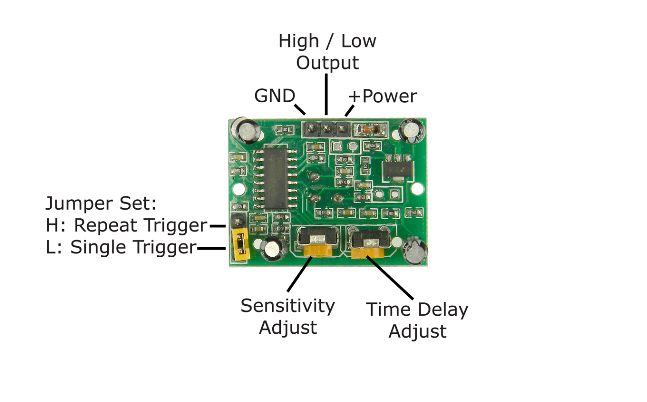
                              i believe it’s the physical settings on the sensor itself making this behavior… would you mind to send me a pic or tell me how your sensor is set? => jumper and the knobs? thx mate for this (i hope) final demand! :)))

                              1 Reply Last reply
                              Reply Quote 0
                              • cowboysdudeC
                                cowboysdude Module Developer
                                last edited by

                                Mine is set just like this right out of the box…

                                The sensitivity sensor is set to half way as is the Time Delay Adjust so what you do is turn it all the way to the right then back 1/2 turn on both :)

                                The Jumper is L Single trigger…

                                OH by the way PIR sensors and the Pi 3 sometimes don’t get along - if you’re having false triggers, make sure the PIR Sensor is far away from the Pi 3… So get it as far away as you can :) I would try that first before making anymore adjustments!
                                0_1478120770619_25xHk.png

                                B 1 Reply Last reply
                                Reply Quote 0
                                • B
                                  bibi @cowboysdude
                                  last edited by

                                  @cowboysdude oh so cool for sharing! let’s try this! wow that’s a thing i should have thought about before lol but currently i can’t put it too much far away as my cables are only few cm long…

                                  1 Reply Last reply
                                  Reply Quote 1

                                  Hello! It looks like you're interested in this conversation, but you don't have an account yet.

                                  Getting fed up of having to scroll through the same posts each visit? When you register for an account, you'll always come back to exactly where you were before, and choose to be notified of new replies (either via email, or push notification). You'll also be able to save bookmarks and upvote posts to show your appreciation to other community members.

                                  With your input, this post could be even better 💗

                                  Register Login

                                  • 1
                                  • 2
                                  • 3
                                  • 3 / 3
                                  • First post
                                    Last post
                                  Enjoying MagicMirror? Please consider a donation!
                                  MagicMirror created by Michael Teeuw.
                                  Forum managed by Sam, technical setup by Karsten.
                                  This forum is using NodeBB as its core | Contributors
                                  Contact | Privacy Policy