Read the statement by Michael Teeuw here.
MMM-Globe
-
hi@thgmirror
Thank you very much for you reply, I’ve checked with built in check but no errors …!!pi@raspberrypi:~/MagicMirror $ npm run config:check
magicmirror@2.15.0 config:check /home/pi/MagicMirror
node js/check_config.js[02.05.2021 12:20.01.503] [INFO] Checking file… /home/pi/MagicMirror/config/config.js
[02.05.2021 12:20.01.719] [INFO] Your configuration file doesn’t contain syntax errors :)
pi@raspberrypi:~/MagicMirror $ -
@damith did u do the npm install in the module folder after git clone?
if u look at the startup messages, where u start mm
npm start
or pm2 logs --lines=100you might see a message, module not found.
this is the number 1 clue you didn’t do the npm install -
hi @sdetweil
Thank you very much for your reply… you are the NUMBER ONE… it works fine… Thanks again.
i have done NPM INSTALL… its worked fine…:face_savoring_food: :face_savoring_food:
-
hi guys… my GLOBE is woking fine… but there is a problem with City NAMES, i won’t display…, config is ok… can anyone help me …?
{
module: ‘MMM-Globe’,
position: ‘lower_third’, // This can be any of the regions. Best results in lower_third
config: {
size:“x-large”, // Globe size. See configuration options below for more options
dayLength: 38, // (Optional) Rotation speed. See configuration options below
viewAngle: 15, // (Optional) Globe tilt. See configuration options below.
introLinesDuration: 2000,
receiveExternalLocations: 0,
locations: [
// Fill with location Objects if desired
// e.g.
{lat:37.77493,lng:-122.41942, label:“San Francisco”},
{lat:7.58403,lng:80.78798, label:“Sri Lanka”},
{lat:-23.5475,lng:-46.63611, label:“Sao Paulo”}// Individual values must be seperated by a comma. // You can look up the latitude and longitude for a specific location on Google Maps. ] } }, ] -
HI
here is my working config:
Greetings Torsten
{ module: 'MMM-Globe', position: 'fullscreen_below', // This can be any of the regions. Best results in lower_third config: { size:"medium", // Globe size. See configuration options below for more options dayLength: 43, // (Optional) Rotation speed. See configuration options below viewAngle: 15, // (Optional) Globe tilt. See configuration options below. locations: [ // Fill with location Objects if desired // e.g. // {lat:37.77493,lng:-122.41942, label: "San Francisco"}, // {lat:-23.5475,lng:-46.63611, label: "Sao Paulo"} // Individual values must be seperated by a comma. // You can look up the latitude and longitude for a specific location on Google Maps. {lat:49.6294791,lng:7.8252699, label: "Rockenhausen" }, {lat:40.7223507,lng:-73.9901943, label: "New York" }, {lat:36.1047739,lng:-115.1421297, label: "Las Vegas" }, {lat:13.7544142,lng:100.5020575, label: "Bangkok" }, ], }, }, -
Hi, may i ask if it is possible to change background to transparent ?
Thanks, -
in the beginning of this post from 2021, it was recommended NOT to use this with a raspberry pi
today, in 2024, I have a raspberry pi 5, does that matter? lolanyway, the left is on my pi 5 and the right is viewing it on a browser on my computer
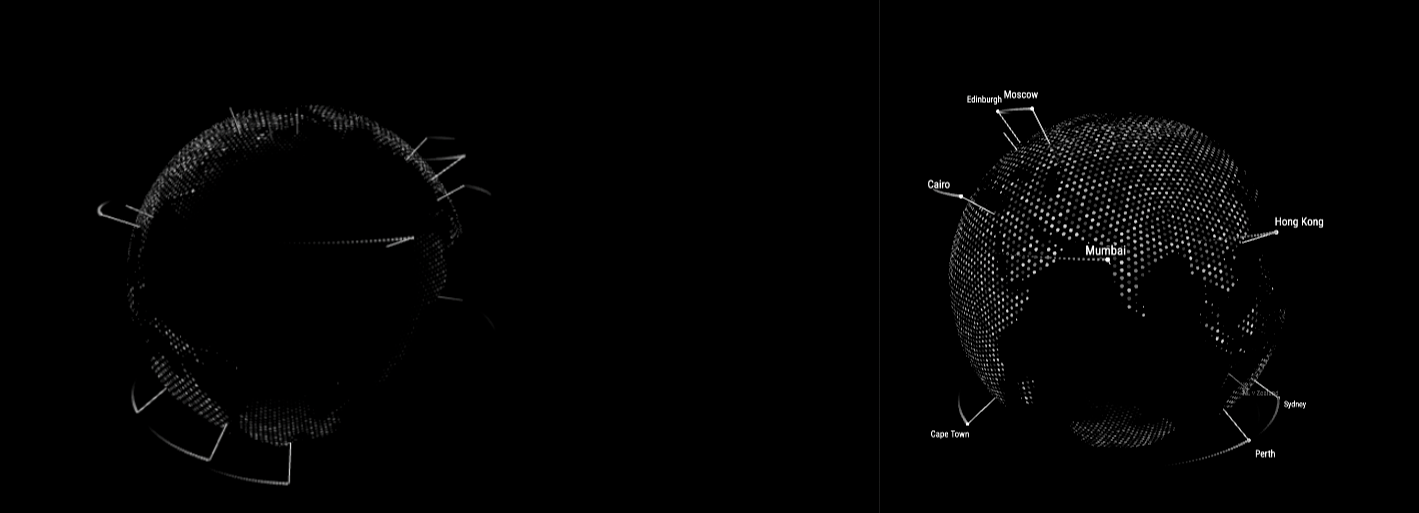
is there an update on a lite version?
-
@hiro-nguyen sure, css
google search css transparent background
-
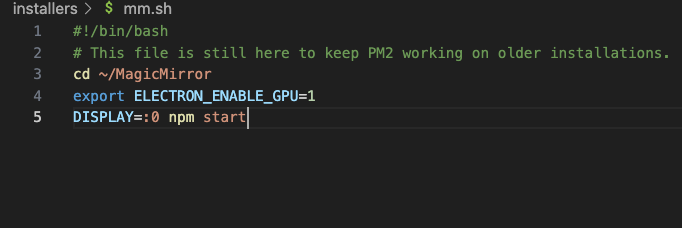
@greedyvegan you will need to enable the gpu in the system boot.txt
AND
tell MagicMirror electron to use it
export ELECTRON_ENABLE_GPU=1in the script before
npm startif you used my script to install MagicMirror , that is ~/MagicMirror/installers/mm.sh
-
-
@greedyvegan that pm2 error is usually caused by using sudo sometime when you shouldn’t
what happened before that? is that the first time w pm2
maybe
pm2 status
pm2 delete xxx
where xxx is the name or number on the MagicMirror linethen run my fixuppm2 script
pm2 seems fragile recently. not sure why
-
i accidently ran pm2 start instead of pm2 start mm
then it returned[PM2][ERROR] File ecosystem.config.js not found
then i ran pm2 start mm
then it returned[PM2][ERROR] Script not found: /home/thecastle/MagicMirror/mm
status

after pm2 delete 0

after pm2 save

update -
it’s currently running (it was always running, it just had a weird error)
and told me to copy/pastesudo env PATH=$PATH:/usr/local/bin /usr/local/lib/node_modules/pm2/bin/pm2 startup systemd -u pi --hp /home/pi
-
@greedyvegan yep, that’s why you run my script. lots of things to do
-
thank you very much!
Hello! It looks like you're interested in this conversation, but you don't have an account yet.
Getting fed up of having to scroll through the same posts each visit? When you register for an account, you'll always come back to exactly where you were before, and choose to be notified of new replies (either via email, or push notification). You'll also be able to save bookmarks and upvote posts to show your appreciation to other community members.
With your input, this post could be even better 💗
Register Login