MagicMirror Forum
    • Recent
    • Tags
    • Unsolved
    • Solved
    • MagicMirror² Repository
    • Documentation
    • 3rd-Party-Modules
    • Donate
    • Discord
    • Register
    • Login
    A New Chapter for MagicMirror: The Community Takes the Lead
    Read the statement by Michael Teeuw here.

    MMM-MyCommute

    Scheduled Pinned Locked Moved Transport
    286 Posts 80 Posters 655.3k Views 77 Watching
    Loading More Posts
    • Oldest to Newest
    • Newest to Oldest
    • Most Votes
    Reply
    • Reply as topic
    Log in to reply
    This topic has been deleted. Only users with topic management privileges can see it.
    • H Offline
      haroldgtv
      last edited by

      o… wauw… im really stupid.

      It is sunday i had the hideDays 0.6 line in the config file.

      After deleting it worked like a charm. The moment i posted the message , i have seen the mistake i made. sorry…

      Thanks for developing this great module !

      J 1 Reply Last reply Reply Quote 0
      • J Offline
        j.e.f.f Project Sponsor Module Developer @haroldgtv
        last edited by

        @haroldgtv thanks for the kind words! Glad you got it sorted out.

        1 Reply Last reply Reply Quote 0
        • pyrosmileyP Offline
          pyrosmiley
          last edited by

          I have kind of a weird question, but I haven’t had a chance to poke around and try for myself yet and I’m coming up on when I promised I’d have things done…

          Is it particularly possible to reverse the module? I’m assuming I’d need a second instance with the modified code, but I’d like travel times to various places in the morning, and then midday it would switch to the travel times back home from those same spots. In my mind it seems like it might be as simple as swapping the parameters in the getData (or equivalent) function for making the API call, but I’m not entirely sure.

          Does that seem about right? If it entails major code restructuring then I may just abort mission, but if not, that’d be a really cool feature to have since people are in and out of my house all over the day.

          J 1 Reply Last reply Reply Quote 0
          • J Offline
            j.e.f.f Project Sponsor Module Developer @pyrosmiley
            last edited by

            @pyrosmiley you can do this with two instances of the module (i.e.: make two configurations for MMM-MyCommute in your configure.js file), and then use built-in scheduling parameters to have one show in the morning and hide in the afternoon, and the second to hide in the morning and show in the afternoon. The first module will have your drive from home to work configured, for example, and the second will have the reverse configuration.

            Does that make sense?

            pyrosmileyP 1 Reply Last reply Reply Quote 0
            • pyrosmileyP Offline
              pyrosmiley @j.e.f.f
              last edited by

              @j.e.f.f Yeah, that makes sense, although won’t that only let me do it with a single destination? I have four I’m trying to track, so for the second instance I need to essentially have four origins and a single destination.

              J 1 Reply Last reply Reply Quote 0
              • J Offline
                j.e.f.f Project Sponsor Module Developer @pyrosmiley
                last edited by

                @pyrosmiley yeah it’s a little kloodgy, but you can get it to work by making five instances.

                1 Reply Last reply Reply Quote 1
                • C Offline
                  chassain 0
                  last edited by

                  Hi,

                  Sorry for english.
                  I can’t display icon of differents mode (driving, …) in my module. I can see just label and times. But it’s working well. I add a color but same problem. Thanks for help.

                  apikey: ‘API KEY’,
                  origin: ‘XXXX’,
                  startTime: ‘00:00’,
                  endTime: ‘23:59’,
                  hideDays: [],
                  showSummary: true,
                  colorCodeTravelTime: true,
                  moderateTimeThreshold: 1.1,
                  poorTimeThreshold: 1.3,
                  nextTransitVehicleDepartureFormat: “[next at] h:mm a”,
                  travelTimeFormat: “h [h] m [min]”,
                  travelTimeFormatTrim: “left”,
                  pollFrequency: 10 * 60 * 1000, //every ten minutes, in milliseconds
                  destinations: [
                  {
                  destination: ‘Avenue de la Tour Royale, 83000 Toulon’,
                  label: ‘Boulot’,
                  mode: ‘driving’,
                  waypoints: ‘83220 Le Pradet | Auberge Sainte Marguerite’
                  },
                  {
                  destination: ‘Gare de Toulon, 83000 Toulon’,
                  label: ‘Gare Toulon’,
                  mode: ‘driving’,
                  color: ‘#82E5AA’
                  },
                  {
                  destination: ‘Aéroport Marseille Provence’,
                  label: ‘Aéroport Marignane’,
                  mode: ‘driving’
                  },
                  {
                  destination: ‘31000 Toulouse’,
                  label: ‘Toulouse’,
                  mode: ‘driving’
                  },
                  {
                  destination: ‘33000 Bordeaux’,
                  label: ‘Bordeaux’,
                  mode: ‘driving’
                  }

                  J 1 Reply Last reply Reply Quote 0
                  • J Offline
                    j.e.f.f Project Sponsor Module Developer @chassain 0
                    last edited by

                    @chassain-0 Your config works for me, but since you pasted code in the body of the message I needed to correct all of the quotes and such. Hard to tell if it was that kind of an error.

                    Try this config and let me know if it works for you (I picked a hotel that was nearby your destinations as the origin)

                        {
                          module: "MMM-MyCommute",
                          position: "top_left",
                          header: "Traffic",
                          classes: "default everyone",
                          disabled: false,
                          config: {
                            apikey: "...",
                            origin: "La Villa Gallici - Hotel 5 étoiles - Aix en Pce",
                            startTime: "00:00",
                            endTime: "23:59",
                            hideDays: [],
                            showSummary: true,
                            colorCodeTravelTime: true,
                            moderateTimeThreshold: 1.1,
                            poorTimeThreshold: 1.3,
                            nextTransitVehicleDepartureFormat: "[next at] h:mm a",
                            travelTimeFormat: "h [h] m [min]",
                            travelTimeFormatTrim: "left",
                            pollFrequency: 10 * 60 * 1000, //every ten minutes, in milliseconds
                            destinations: [
                              {
                                destination: "Avenue de la Tour Royale, 83000 Toulon",
                                label: "Boulot",
                                mode: "driving",
                                waypoints: "83220 Le Pradet | Auberge Sainte Marguerite"
                              },
                              {
                                destination: "Gare de Toulon, 83000 Toulon",
                                label: "Gare Toulon",
                                mode: "transit",
                                color: "#82E5AA"
                              },
                              {
                                destination: "Aéroport Marseille Provence",
                                label: "Aéroport Marignane",
                                mode: "driving"
                              },
                              {
                                destination: "31000 Toulouse",
                                label: "Toulouse",
                                mode: "driving"
                              },
                              {
                                destination: "33000 Bordeaux",
                                label: "Bordeaux",
                                mode: "driving"
                              }
                            ]
                          }
                        },  
                    
                    C 1 Reply Last reply Reply Quote 0
                    • C Offline
                      chassain 0 @j.e.f.f
                      last edited by

                      @j.e.f.f thank you. But same problem with no icon. Maybe an error with apikey ?

                      J 1 Reply Last reply Reply Quote 0
                      • J Offline
                        j.e.f.f Project Sponsor Module Developer @chassain 0
                        last edited by

                        @chassain-0 Probably not… a bad api key would just limit the module’s functionality, but you should at least see an icon. Can you verify that you have the file icon_sprite.svg in your MMM-MyCommute directory?

                        C 1 Reply Last reply Reply Quote 0
                        • C Offline
                          chassain 0 @j.e.f.f
                          last edited by

                          @j.e.f.f yes I have and check

                          1 Reply Last reply Reply Quote 0
                          • richland007R Offline
                            richland007 @BanksyPaint
                            last edited by

                            @BanksyPaint @j.e.f.f
                            Hi there i am having the same exact issue with the MyCommute module.
                            It was working fine until i got the notification of the update than no more displaying of my commutes and i see a spike in cpu usage to almost 100% .
                            I have cheked my google API key and it is current … i did the git pull commant do update and it did not fix the issue … i npm unistalled it removed it completely went back and git clone again and npm install and still the same issue
                            Like i said it was working just fine before and nothing has changed on the MM config file other than adding a couple of new modules.
                            What do you think it is happening??
                            Any help will be greatly appreciated and it really is a great module

                            1 Reply Last reply Reply Quote 0
                            • richland007R Offline
                              richland007
                              last edited by

                              LOL never mind i got it… I am retarted :) :)
                              i was testing it on Saturday and Sunday so it was just not displaying since i still had the 0 and 6 hide days LOL
                              thank you
                              Great work

                              C 1 Reply Last reply Reply Quote 1
                              • C Offline
                                chassain 0 @richland007
                                last edited by

                                @richland007 ;)

                                1 Reply Last reply Reply Quote 0
                                • cruunnerrC Offline
                                  cruunnerr
                                  last edited by

                                  Hey,

                                  this is a great module. love it. but i got some issues by using the alternative routes.
                                  the “avoid” feature works, but it would be nice if i could see all available routes in one destination. With “available routes” i mean the alternative routes that google maps shows you normally.

                                  i tried like this:

                                  {
                                                          module: 'MMM-MyCommute',
                                                          position: 'top_left',
                                                          header: 'Verkehrslage',
                                                          classes: 'default everyone', 
                                                          config: {
                                                                  apikey: 'xxx_hide_xxx',
                                                                  origin: 'xxx_hide_xxx',  
                                                                 
                                                                 destinations: [
                                        {
                                          destination: 'xxx_hide_xxx',
                                          label: 'Arbeit',
                                          mode: 'driving',
                                          alternatives: 'true', // < thats what i mean!!!
                                          time: null
                                        },
                                        {
                                          destination: 'xxx_hide_xxx',
                                          label: 'Arbeit',
                                          mode: 'driving',
                                          avoid: 'highways',
                                          time: null
                                        },
                                        {
                                          destination: 'xxx_hide_xxx',
                                          label: 'xxx_hide_xxx',
                                          mode: 'driving',
                                          time: null
                                        },
                                      ]
                                     }
                                    },
                                  

                                  but it looks just like this:
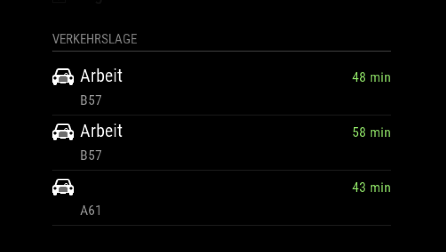
                                  0_1513888105763_Bildschirmfoto 2017-12-21 um 21.25.27.png

                                  any idea?

                                  strawberry 3.141S 1 Reply Last reply Reply Quote 0
                                  • strawberry 3.141S Offline
                                    strawberry 3.141 Project Sponsor Module Developer @cruunnerr
                                    last edited by

                                    @cruunnerr the readme says, that alternatives has to be used with showSummary: true otherwise it will not have an effect

                                    Please create a github issue if you need help, so I can keep track

                                    1 Reply Last reply Reply Quote 0
                                    • cruunnerrC Offline
                                      cruunnerr
                                      last edited by cruunnerr

                                      i thought it is set to “true” by default.

                                      i tried it like this, but still not working:

                                      {
                                              destination: 'xxx_hide_xxx',
                                              label: 'Arbeit',
                                              mode: 'driving',
                                              showSummary: 'true',
                                              alternatives: 'true',
                                              time: null
                                            },
                                      

                                      edit:
                                      still checked the “MMM-MyCommute.js”

                                      showSummary is true

                                      J 1 Reply Last reply Reply Quote 0
                                      • J Offline
                                        j.e.f.f Project Sponsor Module Developer @cruunnerr
                                        last edited by

                                        @cruunnerr make sure you’ve got your API key set correctly. Without it you’ll only get limited functionality. Make sure to set property name as apikey. Some people have tried to use api_key or apiKey, neither of which will work.

                                        1 Reply Last reply Reply Quote 0
                                        • cruunnerrC Offline
                                          cruunnerr
                                          last edited by cruunnerr

                                          its correct.

                                          intentionally i typed in a wrong apikey, what effects an error message when module loads up.

                                          its this format and its correct:

                                          apikey: 'ABCDabcd1234abcd5679',
                                          

                                          edit:

                                          i used the “standard api key” from google. there was also a “premium api key”, but this one i don’t need, right?

                                          to make sure that I express myself correctly… i want it to looks like this:

                                          alt text

                                          J 1 Reply Last reply Reply Quote 0
                                          • J Offline
                                            j.e.f.f Project Sponsor Module Developer @cruunnerr
                                            last edited by

                                            @cruunnerr standard API key is fine.

                                            I’m currently in the process of moving my family overseas, so I don’t have a lot of time to help troubleshoot this at the moment. Send me a private message with your complete config and i’ll try and troubleshoot it on my side when I get a few minutes.

                                            Might be a few days, please be patient :)

                                            1 Reply Last reply Reply Quote 0

                                            Hello! It looks like you're interested in this conversation, but you don't have an account yet.

                                            Getting fed up of having to scroll through the same posts each visit? When you register for an account, you'll always come back to exactly where you were before, and choose to be notified of new replies (either via email, or push notification). You'll also be able to save bookmarks and upvote posts to show your appreciation to other community members.

                                            With your input, this post could be even better 💗

                                            Register Login

                                            • 1
                                            • 2
                                            • 5
                                            • 6
                                            • 7
                                            • 8
                                            • 9
                                            • 14
                                            • 15
                                            • 7 / 15
                                            • First post
                                              Last post
                                            Enjoying MagicMirror? Please consider a donation!
                                            MagicMirror created by Michael Teeuw.
                                            Forum managed by Sam, technical setup by Karsten.
                                            This forum is using NodeBB as its core | Contributors
                                            Contact | Privacy Policy


