MagicMirror Forum
    • Recent
    • Tags
    • Unsolved
    • Solved
    • MagicMirror² Repository
    • Documentation
    • 3rd-Party-Modules
    • Donate
    • Discord
    • Register
    • Login
    A New Chapter for MagicMirror: The Community Takes the Lead
    Read the statement by Michael Teeuw here.

    MMM-MyCommute

    Scheduled Pinned Locked Moved Transport
    286 Posts 80 Posters 653.3k Views 77 Watching
    Loading More Posts
    • Oldest to Newest
    • Newest to Oldest
    • Most Votes
    Reply
    • Reply as topic
    Log in to reply
    This topic has been deleted. Only users with topic management privileges can see it.
    • J Offline
      j.e.f.f Project Sponsor Module Developer @Fonfon
      last edited by

      @Fonfon Glad it’s working for you now!

      1 Reply Last reply Reply Quote 0
      • L Offline
        leshark
        last edited by

        I love this module, it works really well! Is there any way that the journey time could be displayed in HH:MM format rather than just minutes? I’ve looked through the config and I can’t see a way to change this.

        Many thanks!

        J 1 Reply Last reply Reply Quote 0
        • J Offline
          j.e.f.f Project Sponsor Module Developer @leshark
          last edited by

          @leshark I made it explicitly just in minute to save space. Even a long commute of 1hr 30min can be expressed shorter as 90 min. If I enabled the change in format as you ask then I’ll need to dedicate more space to the time, which takes away from the label. I felt the label was more important.

          L 1 Reply Last reply Reply Quote 0
          • L Offline
            leshark @j.e.f.f
            last edited by

            @j.e.f.f Hi, thanks for the reply, I can see that makes sense now and can live with it in minutes! Some of my journeys are 400+ minutes and at 0600 in the morning it takes a moment to do the math :-).

            Cheers

            Craig

            J 1 Reply Last reply Reply Quote 0
            • F Offline
              Fonfon
              last edited by Fonfon

              This post is deleted!
              1 Reply Last reply Reply Quote 0
              • J Offline
                j.e.f.f Project Sponsor Module Developer @leshark
                last edited by

                @leshark I decided to throw in this feature. I didn’t change the CSS, so if you use a long formatting template, you run the risk of the label overlapping the travel time. I’ll leave that up to you to manage shortening your label. That said, there should be ample space for a format like 3h 45m.

                To get the update, navigate to your MMM-MyCommute and execute the following:

                git pull

                then:

                npm install

                After that you’ll be able to specify a travelTimeFormat configuration option. By default it will be m [min] (e.g. 87 min), but you can specify any format you wish. I’m using the moment-duration-format plugin for this (https://github.com/jsmreese/moment-duration-format).

                Note that this I’m using this plugin’s trim feature, which will omit unnecessary tokens. For example, if you specify a format of h[h] m[m] (e.g.: 1h 27m), but your travel time is less than an hour, only the minute portion will be displayed (e.g.: 36m instead of 0h 36m).

                Have fun!
                -Jeff

                L 1 Reply Last reply Reply Quote 1
                • L Offline
                  leshark @j.e.f.f
                  last edited by

                  @j.e.f.f Works like a charm! Thanks for the update :-)

                  1 Reply Last reply Reply Quote 0
                  • R Offline
                    RYANO
                    last edited by

                    Hi
                    How do get this work in New zealand, Sorry I am new to this and you module look great and I want to use it.

                    J 1 Reply Last reply Reply Quote 0
                    • J Offline
                      j.e.f.f Project Sponsor Module Developer @RYANO
                      last edited by

                      @RYANO Hey glad you like the module! There should be nothing special you need to do in order to get this to work in New Zealand. If regular Google maps works for you in your browser or on your phone, then this module should work just fine. Follow the installation instructions as per the Readme, and make sure you get a Google API key. Put your API key in the apikey field in the config. Put your home address as it would normally appear in Google maps as the origin in the config, and the destination address, again as it would normally appear in Google maps as the destination for each entry in your destinations array. Configure everything else to your preference.

                      1 Reply Last reply Reply Quote 0
                      • K Offline
                        kasperb
                        last edited by

                        @j-e-f-f Thanks for your module - it works great! I have one question: one of my trips involves using the light rail, however, the module list this as “(undefined)” opposed to the actual method of transportation. Do you have any suggestions how I could fix this?

                        K 1 Reply Last reply Reply Quote 0
                        • K Offline
                          kasperb @kasperb
                          last edited by

                          @j-e-f-f The issue was resolved after a git pull - thanks for the quick fix!

                          1 Reply Last reply Reply Quote 0
                          • lucallmonL Offline
                            lucallmon
                            last edited by

                            @j-e-f-f I haven’t come to this site for a while and wanted to know if you’ve worked out a way to have multiple stops and transportation modes in a single module. For instance, I’d like to see the total time it takes: Home to Metro station, Metro Station to Metro Station, Metro station to Work = total commute time. Is there a way to do this in a single module?

                            J 1 Reply Last reply Reply Quote 0
                            • J Offline
                              j.e.f.f Project Sponsor Module Developer @lucallmon
                              last edited by

                              @lucallmon The Google directions API doesn’t directly work that way. One API call requires an origin, a destination, and a single mode of transportation. It’s possible to specify explicit waypoints, but those are assumed to be part of the same mode of transportation. In theory it should be possible to do what you are asking by making multiple calls, with the destination of the first call being the origin of the next call (and so forth). I worry, though, that such an approach would make it more likely to exceed the daily request limit. Let me think about it and see if there is an effective way to manage that.

                              lucallmonL 1 Reply Last reply Reply Quote 0
                              • lucallmonL Offline
                                lucallmon @j.e.f.f
                                last edited by

                                @j.e.f.f Thanks Brother! Looking forward to hearing how it turns out.

                                1 Reply Last reply Reply Quote 0
                                • B Offline
                                  Binog
                                  last edited by

                                  Hey j.e.f.f.

                                  Thanks for this amazing module !
                                  I do have the problem that I use two modules of your commute. once in a while it worked fine, but then it stopped working. Thought something withe the googleAPIkeys was wrong,. now trying, if I cutout one commute, the other shows itself.

                                  Do I have to name MMM-MyCommute to MMM-MyCommute2 for the second one? And then, do I have to rename the js-file as well?

                                  Thx for helping !

                                  J 1 Reply Last reply Reply Quote 0
                                  • J Offline
                                    j.e.f.f Project Sponsor Module Developer @Binog
                                    last edited by

                                    @Binog This module is supposed to support multiple instances. Send me a message with your config and I’ll help you troubleshoot.

                                    1 Reply Last reply Reply Quote 0
                                    • schlachtkreuzer6S Offline
                                      schlachtkreuzer6
                                      last edited by schlachtkreuzer6

                                      This post is deleted!
                                      1 Reply Last reply Reply Quote 0
                                      • pjkoelemanP Offline
                                        pjkoeleman
                                        last edited by

                                        @j-e-f-f
                                        I have this module installed and having a question.
                                        I have formated the time as hh:mm, when the commute time is more than 59 minutes than there are two digits for the hours. When it is less than 60 minutes it only shows the minutes. See image.
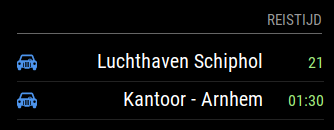
                                        0_1505650628087_2017-09-17.png

                                        My question is how can I force that the time format is using the leading “00:” when the time is lass than 60 minutes?

                                        In moment-duration-format there is an option, but I don not now how to implement this in my mirror, now its looking wierd !
                                        Tried to add the code in line 298 and 312 with {forceLength: true}, but that didn’t do the trick.
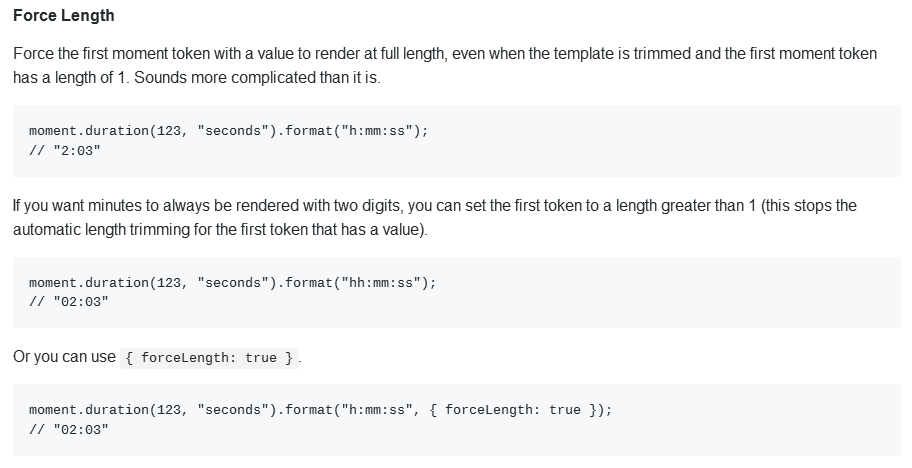
                                        0_1505650808735_Klembord-1.png

                                        Thanks in advance for your repley.

                                        J 1 Reply Last reply Reply Quote 0
                                        • schlachtkreuzer6S Offline
                                          schlachtkreuzer6
                                          last edited by

                                          Great Module thanks for developing! :)

                                          I got a question or more a request?

                                          Is there any way to enable start/endtime and hide days at the same time? So general the module is not shown weekends [0,6] and than starting Mondays with the destination A1 from 0715 to 0900 and B1 16:00 to 18:00 [2,3,4,5] . And tuesday A1 same (0717-0900) and B2 13:00 to 14:00 [1,3,4,5] Wed-Fri A1 continues.

                                          Many thanks for your help!

                                          strawberry 3.141S J 2 Replies Last reply Reply Quote 0
                                          • strawberry 3.141S Offline
                                            strawberry 3.141 Project Sponsor Module Developer @schlachtkreuzer6
                                            last edited by

                                            @schlachtkreuzer6 did you try to use module scheduler for it?

                                            Please create a github issue if you need help, so I can keep track

                                            schlachtkreuzer6S 1 Reply Last reply Reply Quote 0

                                            Hello! It looks like you're interested in this conversation, but you don't have an account yet.

                                            Getting fed up of having to scroll through the same posts each visit? When you register for an account, you'll always come back to exactly where you were before, and choose to be notified of new replies (either via email, or push notification). You'll also be able to save bookmarks and upvote posts to show your appreciation to other community members.

                                            With your input, this post could be even better 💗

                                            Register Login

                                            • 1
                                            • 2
                                            • 3
                                            • 4
                                            • 5
                                            • 6
                                            • 7
                                            • 8
                                            • 14
                                            • 15
                                            • 6 / 15
                                            • First post
                                              Last post
                                            Enjoying MagicMirror? Please consider a donation!
                                            MagicMirror created by Michael Teeuw.
                                            Forum managed by Sam, technical setup by Karsten.
                                            This forum is using NodeBB as its core | Contributors
                                            Contact | Privacy Policy