Read the statement by Michael Teeuw here.
MMM-MyWastePickup (Toronto waste collection schedule)
-
@j.e.f.f
Thanks for your answer. Yes, i already tried two instances but i wasnt satisfied with the overall look of it at the end.
Still a great module - but just not for my needs. -
Is it possible to use these nice symbols in my own ics calendar?
If so, where can I find the symbols?
Peter -
@Peter the symbols are contained in an icon sprite. Look for a file named
icon_sprite.svgin the module folder. -
Is there a reason why it used to display the next 2 dates and now it only displays 1?
-
@onetwankyfive it looks like the 2017 calendar has run out. I need to update the module with the 2018 calendar.
-
Hey jeff
I tried out your Module but it doesn’t work correctly for me.
Just showing up “loading…”

I changed your schedule.csv to match my collection schedule.
Calendar,WeekStarting,GreenBin,Garbage,Recycling,YardWaste, ChristmasTree
Thursday1,01/04/18,0,R,0,0,0
Thursday1,01/13/18,0,0,R,0,0
Thursday1,02/01/18,0,R,0,0,0
Thursday1,03/01/18,0,R,0,0,0
Thursday1,03/08/18,0,R,0,0,0
Thursday1,03/15/18,0,R,0,0,0
Thursday1,03/22/18,0,R,0,0,0
Thursday1,03/28/18,0,R,0,0,0
Thursday1,04/05/18,0,R,0,0,0
Thursday1,04/12/18,0,R,0,0,0
Thursday1,04/19/18,0,R,0,0,0
Thursday1,04/26/18,0,R,0,0,0
Thursday1,05/03/18,0,R,0,0,0
Thursday1,05/05/18,0,0,R,0,0
Thursday1,05/09/18,0,R,0,0,0
Thursday1,05/17/18,0,R,0,0,0
Thursday1,05/24/18,0,R,0,0,0
Thursday1,05/30/18,0,R,0,0,0
Thursday1,06/07/18,0,R,0,0,0
Thursday1,06/14/18,0,R,0,0,0
Thursday1,06/21/18,0,R,0,0,0
Thursday1,06/28/18,0,R,0,0,0
Thursday1,07/05/18,0,R,0,0,0
Thursday1,07/12/18,0,R,0,0,0
Thursday1,07/19/18,0,R,0,0,0
Thursday1,07/26/18,0,R,0,0,0
Thursday1,08/02/18,0,R,0,0,0
Thursday1,08/09/18,0,R,0,0,0
Thursday1,08/16/18,0,R,0,0,0
Thursday1,08/23/18,0,R,0,0,0
Thursday1,08/30/18,0,R,0,0,0
Thursday1,09/06/18,0,R,0,0,0
Thursday1,09/13/18,0,R,0,0,0
Thursday1,09/20/18,0,R,0,0,0
Thursday1,09/22/18,0,0,R,0,0
Thursday1,09/27/18,0,R,0,0,0
Thursday1,10/04/18,0,R,0,0,0
Thursday1,10/11/18,0,R,0,0,0
Thursday1,10/18/18,0,R,0,0,0
Thursday1,10/25/18,0,R,0,0,0
Thursday1,10/31/18,0,R,0,0,0
Thursday1,11/08/18,0,R,0,0,0
Thursday1,11/15/18,0,R,0,0,0
Thursday1,11/22/18,0,R,0,0,0
Thursday1,11/29/18,0,R,0,0,0
Thursday1,12/06/18,0,R,0,0,0
Thursday1,12/13/18,0,R,0,0,0
Thursday1,12/20/18,0,R,0,0,0
Thursday1,12/27/18,0,R,0,0,0
With this config:
{
		module: 'MMM-MyWastePickup',
		position: 'top_right',
		header: 'Entsorgungsplan',
			config: {
				collectionCalendar: 'Thursday1'
			}
		},
Is my language (german) the problem or should this work?
Regards -
@onetwankyfive I’ve updated the module with 2018’s schedule. You should be good to go now.
-
@kruemel said in MMM-MyWastePickup (Toronto waste collection schedule):
I changed your schedule.csv to match my collection schedule.
I’m trying to do the same thing myself for a spin off of this for my collection schedule here in the UK. I’m having the same issue as you at the moment. When I figure it out, I’ll post back here.
-
@kruemel I honestly have no idea why yours isn’t working. I thought it might be because you used a collection day name that’s not valid, but
Thursday1is in the list. I also thought maybe your date format didn’t match, but that seems to be fine too.Just to be sure, are you fully restarting Magic Mirror after these changes? The module only loads the schedule once at startup. Refreshing the browser won’t reload the schedule.
-
Yes i did.
Now i git pulled your latest relase.
Also tried npm install and got this:pi@mm:~/MagicMirror/modules/MMM-MyWastePickup $ npm install npm WARN mmmmywastepickup@1.0.0 No repository field.But, with your 2018, its working.
I will try again after this update and will report to you :-) -
@kruemel You can ignore that error message. It just means I’ve omitted some information from the package.json file, but none of what I’ve left out is critical to the operation of this module.
-
it works now.
Just your update and my svg file, and now it works…
i dont know why :D -
@kruemel For what it’s worth, I’ve just added official support for a custom schedule file. Check the README for instructions to do so. What you’ve done should and does work, but you risk having your schedule file overwritten if you update the module. With a quick tweak, you can have your schedule work within the new system and it won’t get overwritten when you update the module.
I just pushed v1.3 to GitHub a few moments ago, so you’ll need to pull again.
-
@j.e.f.f works as usual, thanks for your quick work :-)
-
@j.e.f.f i have one more thing (just a detail):
Week day shown correctly in german like “Donnerstag” but it shows “Tomorrow” instead of “Morgen”.
Maybe this will also be “Today” instead of “Heute” but that i will know tomorrow ;-)Regards
-
@kruemel This should be fixed now. Do a pull for v1.4. Also run
npm installas I updated Moment.js to resolve a security vulnerability. -
Yesterday, my pickup schedule looked like this:
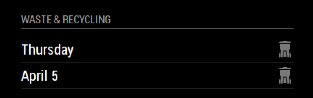
Today, it looks like this:
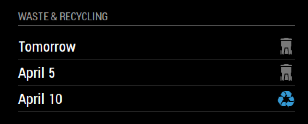
Is there a way to have it always display the next 3 events? My waste pickup is weekly, but recycling is every 2 weeks and I’d like to always see when the next recycling pickup is.
Thanks for another great module!
-
@twosquirrels Sure. I added a config parameter
weeksToDisplay. Do agit pullto update. Set it to3for your use. -
Wow, that was fast! Thanks!
I believe I have it setup right, but it looks like it’s giving me +1 than what I’m asking for, perhaps because it’s not including tomorrow?:
Setting ‘2’ gives me 3 total:

Setting ‘3’ gives me 4 total:

-
@twosquirrels No it’s correct. It’s 3 weeks by date – this will show any and all pickup dates between now and three weeks from now. Three weeks from today is April 18, which is why you’re seeing all pickup days between now and April 18.



Hello! It looks like you're interested in this conversation, but you don't have an account yet.
Getting fed up of having to scroll through the same posts each visit? When you register for an account, you'll always come back to exactly where you were before, and choose to be notified of new replies (either via email, or push notification). You'll also be able to save bookmarks and upvote posts to show your appreciation to other community members.
With your input, this post could be even better 💗
Register Login