Read the statement by Michael Teeuw here.
Complete Walkthrough - Install MagicMirror on a PC - Windows 7/10
-
@angeldchaveza .
im delete display of "matefits71 " error logs view0 info it worked if it ends with ok
1 verbose cli [
1 verbose cli ‘C:\Program Files\nodejs\node.exe’,
1 verbose cli ‘C:\Program Files\nodejs\node_modules\npm\bin\npm-cli.js’,
1 verbose cli ‘start’
1 verbose cli ]
2 info using npm@6.14.14
3 info using node@v14.17.5
4 verbose stack Error: missing script: start
4 verbose stack at run (C:\Program Files\nodejs\node_modules\npm\lib\run-script.js:155:19)
4 verbose stack at C:\Program Files\nodejs\node_modules\npm\lib\run-script.js:63:5
4 verbose stack at C:\Program Files\nodejs\node_modules\npm\node_modules\read-package-json\read-json.js:116:5
4 verbose stack at C:\Program Files\nodejs\node_modules\npm\node_modules\read-package-json\read-json.js:436:5
4 verbose stack at checkBinReferences_ (C:\Program Files\nodejs\node_modules\npm\node_modules\read-package-json\read-json.js:391:45)
4 verbose stack at final (C:\Program Files\nodejs\node_modules\npm\node_modules\read-package-json\read-json.js:434:3)
4 verbose stack at then (C:\Program Files\nodejs\node_modules\npm\node_modules\read-package-json\read-json.js:161:5)
4 verbose stack at C:\Program Files\nodejs\node_modules\npm\node_modules\read-package-json\read-json.js:382:12
4 verbose stack at C:\Program Files\nodejs\node_modules\npm\node_modules\graceful-fs\graceful-fs.js:123:16
4 verbose stack at FSReqCallback.readFileAfterClose [as oncomplete] (internal/fs/read_file_context.js:73:3)
5 verbose cwd C:\Users\Tecsis\MagicMirror
6 verbose Windows_NT 10.0.19041
7 verbose argv “C:\Program Files\nodejs\node.exe” “C:\Program Files\nodejs\node_modules\npm\bin\npm-cli.js” “start”
8 verbose node v14.17.5
9 verbose npm v6.14.14
10 error missing script: start
11 verbose exit [ 1, true ] -
@angeldchaveza u are on windows. there are extra steps for windows.
-
@sdetweil said in Complete Walkthrough - Install MagicMirror on a PC - Windows 7/10:
u are on windows. there are extra steps for windows
these were the steps i followed
-
@angeldchaveza yes, but they changed.
my link has the updated steps
-
"Installing fonts …
"MagicMirror installation finished successfully!magicmirror@2.16.0 prepare C:\Users\Tecsis\magicmirror
[ -f node_modules/.bin/husky ] && husky install || echo no husky installed.husky - Git hooks installed
npm WARN tsutils@3.21.0 requires a peer of typescript@>=2.8.0 || >= 3.2.0-dev || >= 3.3.0-dev || >= 3.4.0-dev || >= 3.5.0-dev || >= 3.6.0-dev || >= 3.6.0-beta || >= 3.7.0-dev || >= 3.7.0-beta but none is installed. You must install peer dependencies yourself.
npm WARN magicmirror@2.16.0 scripts[‘server’] should probably be scripts[‘start’].
npm WARN optional SKIPPING OPTIONAL DEPENDENCY: fsevents@2.3.2 (node_modules\fsevents):
npm WARN notsup SKIPPING OPTIONAL DEPENDENCY: Unsupported platform for fsevents@2.3.2: wanted {“os”:“darwin”,“arch”:“any”} (current: {“os”:“win32”,“arch”:“x64”})audited 923 packages in 21.766s
110 packages are looking for funding
runnpm fundfor detailsfound 0 vulnerabilities
Tecsis@DESKTOP-FGU3JGC MINGW64 ~/magicmirror (master)
$ npm start
npm ERR! missing script: startnpm ERR! A complete log of this run can be found in:
npm ERR! C:\Users\Tecsis\AppData\Roaming\npm-cache_logs\2021-09-02T02_53_44_514Z-debug.logTecsis@DESKTOP-FGU3JGC MINGW64 ~/magicmirror (master)
$ -
@angeldchaveza do NOT install under
MINGW64just straight windows
-
Hi, newby here… I have reinstaled MM in my win 10 laptop… It was working well until the reinstallation…
I am having an issue, i will try to translate it, cuz my cmd is in spanish…magicmirror@2.17.1 start
node_modules/.bin/electron js/electron.js“node_modules” doesn’t recognize it as an internal or external command,
program or file by executable lot.At the same time i have notice, that “.bin” folder doesn’t contain “electron js” folder inside…
I have had to install manually npm for fonts ans vendor’s folders…
Please, help me Obi Wan Kenobi…
-
@killk You have asked the same question in different posts a few times. This can be seen as spamming,
-
@mumblebaj oh sorry, i have to delete the other one… I didn’t know it.
-
@killk we are all volunteers here. more folks around in the evenings, weekends. but it’s all volunteer. no commitment to answer any question or solve any problem . asking in multiple places doesn’t get help any faster.
-
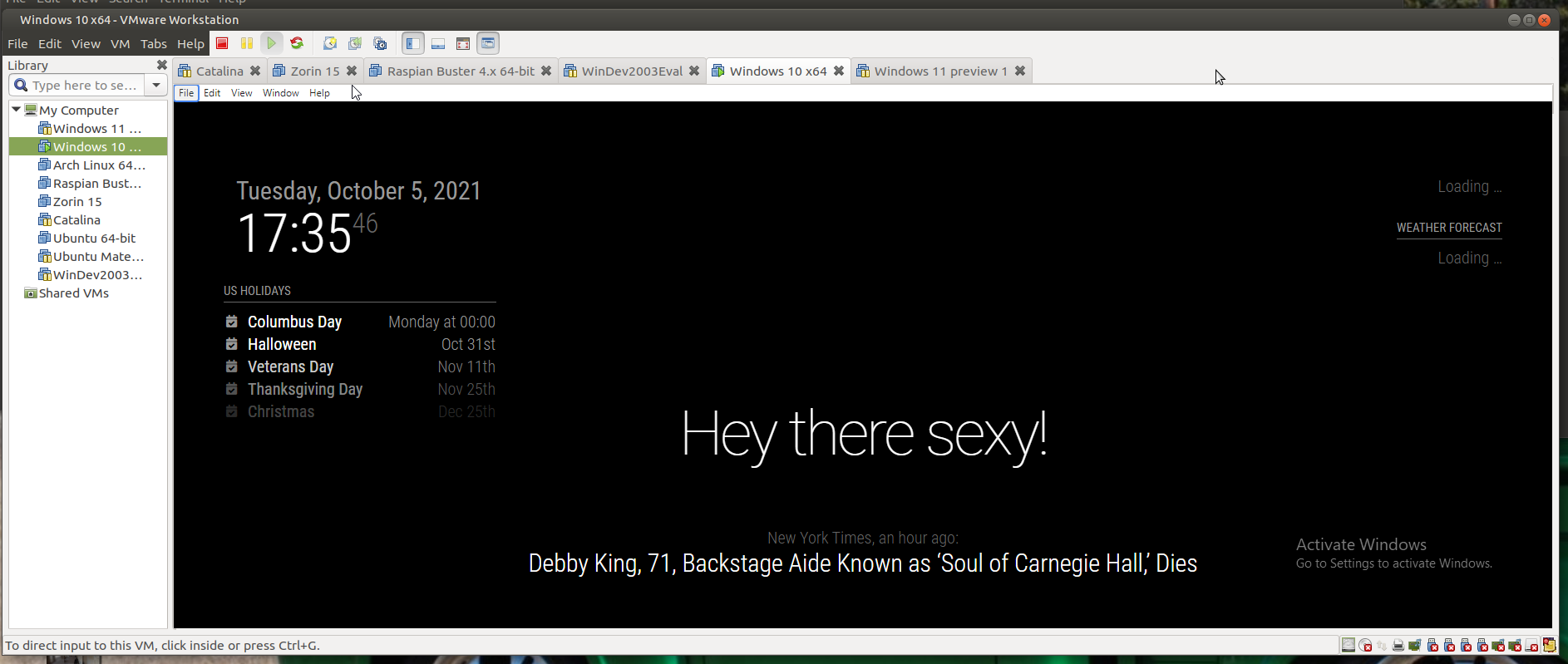
@killk I had no problem
Win 10, under Vmware
git clone
npm install
and in vendors and fonts
edit the package.json
copy the default config.js from the samplenpm start
-
@mykle1 how can i resolve this ?
‘DISPLAY’ is not recognized as an internal or external command,
operable program or batch file. -
-
@sdetweil no i see this
listen EACCES: permission denied 127.0.0.1:8080
can you help me fix it -
@mounir where do u see that?
u are installing in cmd terminal window, right?
not PowerShell -
@mounir yes in cmd
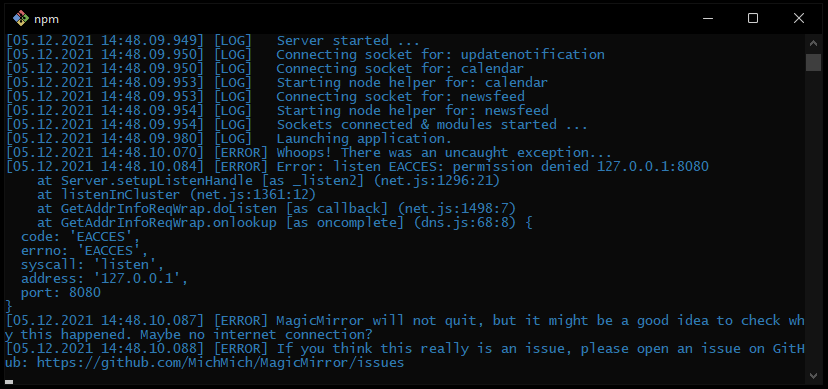
-
@mounir is this windows 10, or 11?
never seen this. installed on windows 11 last week to test
are u running any other web server apps?
-
@sdetweil i’m in windows 11 but there is no webserver running
-
@mounir read this
https://superuser.com/questions/1437780/how-to-fix-listen-eacces-permission-denied-on-any-port/1568476u can change the port in MagicMirror\config\config.js
-
@sdetweil thank you it works when i’m changing the port in the config.js

Hello! It looks like you're interested in this conversation, but you don't have an account yet.
Getting fed up of having to scroll through the same posts each visit? When you register for an account, you'll always come back to exactly where you were before, and choose to be notified of new replies (either via email, or push notification). You'll also be able to save bookmarks and upvote posts to show your appreciation to other community members.
With your input, this post could be even better 💗
Register Login