MagicMirror Forum
    • Recent
    • Tags
    • Unsolved
    • Solved
    • MagicMirror² Repository
    • Documentation
    • 3rd-Party-Modules
    • Donate
    • Discord
    • Register
    • Login
    A New Chapter for MagicMirror: The Community Takes the Lead
    Read the statement by Michael Teeuw here.

    MMM-DHT-Sensor - Get temperature & humidity values from a DHT sensor

    Scheduled Pinned Locked Moved Utilities
    22 Posts 9 Posters 17.2k Views 9 Watching
    Loading More Posts
    • Oldest to Newest
    • Newest to Oldest
    • Most Votes
    Reply
    • Reply as topic
    Log in to reply
    This topic has been deleted. Only users with topic management privileges can see it.
    • D Offline
      Dracarys
      last edited by Dracarys

      Hi,
      i get te notification that there is a new Version available. But if i go to ~/MagicMirror/modules/MMM-DHT-Sensor and do ‘git pull’ it says that the module is already up-to-date. What should i do?

      Cheers

      R 1 Reply Last reply Reply Quote 0
      • P Offline
        PaulB
        last edited by

        Cool module,

        i would like to know whether you have an idea to my following problem:

        I did everything as recommended. Unfortunately the module is not shown on the screen.
        I checked everything as well as if the DHT22 works.
        Everything runs fine, unfortunately :D

        R 1 Reply Last reply Reply Quote 0
        • R Offline
          ryck Module Developer @Dracarys
          last edited by

          @Dracarys I am not seeing any update notification at all… Do you still have the issue?

          1 Reply Last reply Reply Quote 0
          • R Offline
            ryck Module Developer @PaulB
            last edited by

            @PaulB Did you follow all the steps? Without logs is a little bit difficult to know what’s going on… Did you try to check if the sensor is working (like with a python script or something). It sound like a config.js issue…

            1 Reply Last reply Reply Quote 0
            • P Offline
              PaulB
              last edited by

              @ryck

              Thanks for your quick reply :
              I have checked the config file as well as the set up. Checking the sensor via the console works fine.

              My next steps are deleting the module and downloading it again. Following step by step your manual.

              I keep you updated :)

              1 Reply Last reply Reply Quote 0
              • P Offline
                PaulB
                last edited by

                @ryck

                I delete everything and set it up from scratch again.
                Unfortunately, as I start the MMM application your module is not shown on the screen. Do you have an idea where the problem is located?

                I used your config.js-example and just changed the Pinnumber from 2 to 4.

                Kind regards,
                Paul

                1 Reply Last reply Reply Quote 0
                • O Offline
                  Ogret
                  last edited by

                  @ryck

                  Thanks for the great works.

                  It’s possible to change the icons color of the temp and humidity?

                  Thanks for help.

                  BR

                  O 1 Reply Last reply Reply Quote 0
                  • O Offline
                    Ogret @Ogret
                    last edited by

                    @ryck

                    It’s done.

                    R 1 Reply Last reply Reply Quote 0
                    • R Offline
                      ryck Module Developer @Ogret
                      last edited by

                      @Ogret Sorry, I don’t have access to the mirror here, so I was waiting to get home today to reply to you. It’s just adding some code in the custom.css file with the right class, but seems like you already found how to do it!

                      Cheers,

                      1 Reply Last reply Reply Quote 0
                      • P Offline
                        PaulB
                        last edited by

                        Dear @ryck,

                        I have installed your module and it works up to the point, where it shows me that “no data is returned”.

                        I guess that my wiring is wrong.
                        What do you think?

                        R 1 Reply Last reply Reply Quote 0
                        • R Offline
                          ryck Module Developer @PaulB
                          last edited by

                          @PaulB Hi Paul

                          That happens sometime, it’s related to the way the raspberry pulls data from the sensor, but it should be OK on the next try. Just in case, put a quick updateInterval (like 1 * 60 *1000) and see what happens…

                          Also, you can try to get a read directly from the sensor, bypassing the MagicMirror. Just clone this (https://github.com/adafruit/Adafruit_Python_DHT) somewhere and edit and execute this (https://github.com/adafruit/Adafruit_Python_DHT/blob/master/examples/simpletest.py), ie, `python simpletest.py

                          Good luck!

                          1 Reply Last reply Reply Quote 0
                          • P Offline
                            PaulB
                            last edited by

                            @ryck
                            Thank you for your help! :)
                            Finally it works now.

                            By the way… the module looks pretty cool ;-)

                            R 1 Reply Last reply Reply Quote 0
                            • R Offline
                              ryck Module Developer @PaulB
                              last edited by

                              @PaulB Thank you!

                              1 Reply Last reply Reply Quote 0
                              • W Offline
                                weeee99
                                last edited by

                                ive managed to install the module however the reading show 0 degress and 0% humidity im using a DHT22 btw is this a hardware problem or what? the sensor’s pin 1(Vcc) and pin 4(GND) is connected to a external 3.3v powersouce meaning the pin 2(data) together with a 10k ohms resistor connected in pin 1 and 2 is the only pin connected to the PIs GPIO0_1517635952159_Screenshot (282).png

                                R 1 Reply Last reply Reply Quote 0
                                • P Offline
                                  PaulB
                                  last edited by

                                  @weee99,

                                  It looks like the module is working, so it has to be a problem with your pins.
                                  I would recommend to try it this way:
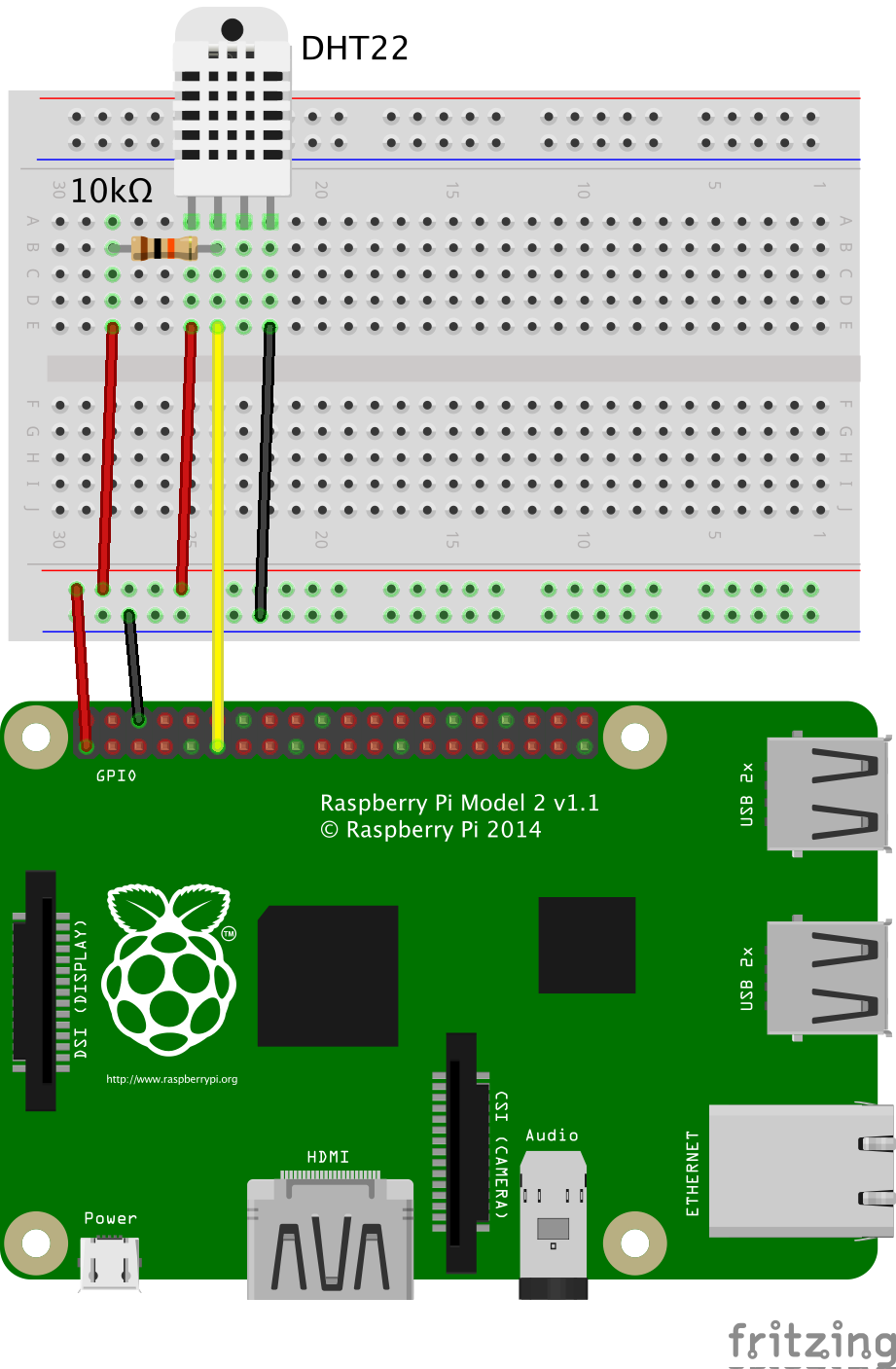
                                  0_1517662084599_n5px8e6humFHzOR4kvYF.png

                                  1 Reply Last reply Reply Quote 0
                                  • R Offline
                                    ryck Module Developer @weeee99
                                    last edited by

                                    @weeee99 Seems like the module is working… Have you tried to access the sensor directly? Look my previous post in this thread to know how to do it. Make sure that the pin in the correct one (GPIO and physical pins are not the same, so it can be a little bit confusing). Finally, the one I got (https://www.amazon.co.uk/gp/product/B01N6PB489/ref=oh_aui_search_detailpage?ie=UTF8&psc=1) is plug directly to the Pi, no breadboard / resistance required…

                                    1 Reply Last reply Reply Quote 0
                                    • M Offline
                                      Mo
                                      last edited by

                                      Hello ryck,

                                      I have a problem with using your module.

                                      When starting MagicMirror the module sometimes stays on “Recieving Sensor Data…” and doesnt actually read the sensor. In rare cases it works, but only once. The module doesnt read the temperature and humidity again and won’t update. I’ve already tried different Update intervals and delaying the initial load time.

                                      I’m having this problem since the last update of module. Any ideas?

                                      1 Reply Last reply Reply Quote -1
                                      • Z Offline
                                        Zoltan
                                        last edited by

                                        Hi
                                        I have the same problem. Sometimes it will start and show correctly and other times it will just show “Loading sensor data”. When it starts It will then update the values for a few times. It then freeze and just wont update again. It doesn’t disappear like it should for 1/3rd of a second to do the update anymore.

                                        1 Reply Last reply Reply Quote 0
                                        • BKeyportB Offline
                                          BKeyport Module Developer
                                          last edited by

                                          If the author ever comes back, I’ve made a couple of changes to the module that I’d love to see applied.

                                          Floating point trouble, (both temperature and humidity values are coming up as “xx.xxx9999999999”)

                                          I have a DHT22, but it did this with the DHT11 too, before I burned it up trying to move it from one board to another.

                                          This gives you the tens and rounds off the rest.

                                          // Convert C to F
                                          			if (this.config.units === "imperial") {
                                          				this.temperature = Math.round((data.temperature * 9/5 + 32)*10)/10;
                                          			} else {
                                          				this.temperature = data.temperature;
                                          			}
                                          			if (typeof this.temperature !== "undefined" && this.temperature !== null)  {
                                          				this.sendNotification("INDOOR_TEMPERATURE", this.temperature);
                                          			}
                                          			this.humidity = Math.round(data.humidity*10)/10;
                                          			if (typeof this.humidity !== "undefined" && this.humidity !== null)  {
                                          				this.sendNotification("INDOOR_HUMIDITY", this.humidity);
                                          			}
                                          			this.updateDom(this.config.animationSpeed);
                                          		}
                                          

                                          The "E" in "Javascript" stands for "Easy"

                                          1 Reply Last reply Reply Quote 0

                                          Hello! It looks like you're interested in this conversation, but you don't have an account yet.

                                          Getting fed up of having to scroll through the same posts each visit? When you register for an account, you'll always come back to exactly where you were before, and choose to be notified of new replies (either via email, or push notification). You'll also be able to save bookmarks and upvote posts to show your appreciation to other community members.

                                          With your input, this post could be even better 💗

                                          Register Login

                                          • 1
                                          • 2
                                          • 1 / 2
                                          • First post
                                            Last post
                                          Enjoying MagicMirror? Please consider a donation!
                                          MagicMirror created by Michael Teeuw.
                                          Forum managed by Sam, technical setup by Karsten.
                                          This forum is using NodeBB as its core | Contributors
                                          Contact | Privacy Policy