MagicMirror Forum
    • Recent
    • Tags
    • Unsolved
    • Solved
    • MagicMirror² Repository
    • Documentation
    • 3rd-Party-Modules
    • Donate
    • Discord
    • Register
    • Login
    A New Chapter for MagicMirror: The Community Takes the Lead
    Read the statement by Michael Teeuw here.

    How to add modules. For absolute beginners.

    Scheduled Pinned Locked Moved Troubleshooting
    91 Posts 16 Posters 147.1k Views 24 Watching
    Loading More Posts
    • Oldest to Newest
    • Newest to Oldest
    • Most Votes
    Reply
    • Reply as topic
    Log in to reply
    This topic has been deleted. Only users with topic management privileges can see it.
    • D Offline
      Dask
      last edited by

      First of all I would like to say thank you for the step by step tutorial. It helped me a lot and I can now install some MM modules.
      I do have a question though, I don’t really understand how to add dependencies. You say add it to the folder via the terminal??? I tried this on your PilotWX module but I don’t really know how to do it. I thought I did it eventually but nothing come up in my MM. I have also copied and pasted the other part into config.
      Any help would be appreciated.

      BKeyportB Mykle1M 2 Replies Last reply Reply Quote 0
      • BKeyportB Offline
        BKeyport Module Developer @Dask
        last edited by

        @Dask Dependencies are on a case by case basis. In many cases, it’s as simple as installing it into npm, by using npm install

        In some cases, however, there’s additional outside programs or such that’s not covered by the npm install method. I’ve yet to see a module that requires additional software not include an installer script to take care of that for you, generally the readme will tell you if that’s the case.

        Bottom line, follow the instructions in the readme.

        The "E" in "Javascript" stands for "Easy"

        1 Reply Last reply Reply Quote 2
        • D Offline
          Dask
          last edited by

          BKeyport
          Thank you for your reply. But I’m sorry to say I still don’t get it so let me explain my problem a little better.
          The module says “npm install in your ~/MagicMirror/modules/MMM-PilotWX directory.” How do I do this. I tried going into ~/MagicMirror/modules/MMM-PilotWX but that command is not recognised in the terminal. How do I get into the correct place to add npm install.
          Sorry if I am being stupid but this is all new to me.
          Thanks

          S BKeyportB Mykle1M 3 Replies Last reply Reply Quote 0
          • S Do not disturb
            sdetweil @Dask
            last edited by

            @Dask you should use a terminal window, and cd ~/MagicMirror/modules/??? where ??? is the module name

            and then type
            ``
            npm install

            ONLY of there is a file called package.json present in the module folder
            (npm install reads that file)
            
            and hit enter
            node and npm are installed system wide so there should be no problem

            Sam

            How to add modules

            learning how to use browser developers window for css changes

            1 Reply Last reply Reply Quote 0
            • BKeyportB Offline
              BKeyport Module Developer @Dask
              last edited by

              @Dask I’ll walk you through this one, same for most non-scripted modules:

              assuming MagicMirror is installed with defaults:

              1. go to your modules directory: cd ~/MagicMirror/modules/
              2. Clone the module to get it on your machine: git clone https://github.com/mykle1/MMM-PilotWX.git
              3. go to the module’s directory: cd MMM-PilotWX
              4. install the dependencies npm install
              5. configure, and restart magic mirror.

              Cheers.

              The "E" in "Javascript" stands for "Easy"

              1 Reply Last reply Reply Quote 0
              • Mykle1M Offline
                Mykle1 Project Sponsor Module Developer @Dask
                last edited by

                @Dask said in How to add modules. For absolute beginners.:

                First of all I would like to say thank you for the step by step tutorial. It helped me a lot and I can now install some MM modules.

                You’re welcome, mate.

                Create a working config
                How to add modules

                1 Reply Last reply Reply Quote 0
                • Mykle1M Offline
                  Mykle1 Project Sponsor Module Developer @Dask
                  last edited by Mykle1

                  @Dask

                  I haven’t touched MMM-PilotWX in some time so I loaded it up. All is well.

                  This would be your default config entry. Once you have it up an running you can make your changes.

                  {
                  	disabled: false,
                  	module: "MMM-PilotWX",
                  	position: "top_left",         // for mode: "Static",  bottom_bar for mode: "Rotating",
                  	config: {
                  		ICAO: "KJFK,EGLL,UUDD,EDDT,RJAA,ZBAA,LFPG,LIRF", // list of INTL ICAO's
                  		colorCode: "Alternative", // Standard or Alternative
                  		mode: "Static",           // Static (List) or Rotating (one by one)
                  		mostRecentPerStation: true,	//limits observations to 1 per station
                  		sym: "@",                 // @ or / (Separator for Wind speed and direction)
                  		tempUnits: "C",		   // C or F (F converted from C)
                  		measure: "SM",            // SM or KM (KM converted from SM data)
                  		time: "Local",            // Zulu or Local (observation time)
                  		maxWidth: "100%",         // 100% for mode: Rotating, approx 300px for mode: Static
                  		useAltHeader: true,	  // Use alternative header
                  		useHeader: false,
                  		header: "",
                  	}
                  },
                  

                  Create a working config
                  How to add modules

                  1 Reply Last reply Reply Quote 0
                  • D Offline
                    Dask
                    last edited by

                    Thank you all for the help. I am slowly getting it. Honest.

                    1 Reply Last reply Reply Quote 0
                    • D Offline
                      Dask
                      last edited by

                      Mykle! I have the PilotMX instlled and working on the bottom bar with my chosen 2 airports but it takes up the full width of the screen. Can I make it narrower. I changed the maxWidth to 300px but it is still all the way across.

                      BKeyportB 1 Reply Last reply Reply Quote 0
                      • BKeyportB Offline
                        BKeyport Module Developer @Dask
                        last edited by

                        @Dask bottom bar is designed to do exactly that. you’d be better to use bottom_left, bottom_right, or bottom_center (or is it middle, I don’t recall, I keep my config organized by the regions, so I get reminded when I redesign)

                        The "E" in "Javascript" stands for "Easy"

                        1 Reply Last reply Reply Quote 0
                        • T Offline
                          TheSij @Mykle1
                          last edited by

                          @Mykle1 - thanks for this guide. I promise I’ve studied it through and read the additional helpful comments that other contributors have made. However, I’ve having trouble adding the MMM-PrayerTime module to config.js. When I add the module and MM restarts, it shows blank and an error telling me to create a config file. Grateful for pointers on where I’m going wrong (please see code below. I’ve hidden any personal information). Thanks.

                          To note that without the entry to the MMM-PrayerTime module added to config.js Magic Mirror runs fine with the other modules.

                          modules: [
                          		{
                          			module: "alert",
                          		},
                          		{
                          			module: "updatenotification",
                          			position: "top_bar"
                          		},
                          		{
                          			module: "clock",
                          			position: "top_left"		
                          		},
                          		{
                          			module: "MMM-PrayerTime",
                          			position: "top_left",	// This can be any of the regions. Best result is in the top_left/top_right.
                          			config: {
                          				apiVersion: "1.0", // please, leave unchanged. reserved for future use.
                          				lat: xx.xxxxxxx, // latitude of your position (city)
                          				lon: -x.xxxxxxx, // longitude of your position (city)
                          				timezone: Europe/London, // please refer to http://php.net/manual/en/timezones.php
                          				timeFormat: 24,
                          				method: 5,
                          				playAdzan: ["fajr", "dhuhr", "asr", "maghrib", "isha"],
                          				notDisplayed: ["midnight", "sunset"],
                          				useUpdateInterval: true,
                          				updateInterval: 86400 * 1000, // How often do you want to fetch new praying time? (milliseconds)
                          				animationSpeed: 2.5 * 1000, // Speed of the update animation. (milliseconds)
                          				language: config.language,
                          				showAdzanAlert: true,
                          				showTomorrow: true,
                          				vertical: true, // set false for horizontal view
                          				alertTimer: 15000
                          			}
                          		},
                          		{
                          			module: "calendar",
                          			header: "UK Holidays",
                          			position: "top_left",
                          			config: {
                          				calendars: [
                          					{
                          						symbol: "calendar-check",
                          						url: "webcal://www.calendarlabs.com/ical-calendar/ics/75/UK_Holidays.ics"					}
                          				]
                          			}
                          		},
                          		{
                          			module: "currentweather",
                          			position: "top_right",
                          			config: {
                          				location: "London",
                          				locationID: "2643743", //ID from http://bulk.openweathermap.org/sample/city.list.json.gz; unzip the gz file and find your city
                          				appid: "xxxxxxxxxxxxxxxxxxxxxxxxxxxxx"
                          			}
                          		},
                          		{
                          			module: "weatherforecast",
                          			position: "top_right",
                          			header: "Weather Forecast",
                          			config: {
                          				location: "London",
                          				locationID: "2643743", //ID from http://bulk.openweathermap.org/sample/city.list.json.gz; unzip the gz file and find your city
                          				appid: "xxxxxxxxxxxxxxxxxxxxxxxxxxxxxx"
                          			}
                          		},
                          		{
                          			module: "newsfeed",
                          			position: "bottom_bar",
                          			config: {
                          				feeds: [
                          					{
                          						title: "New York Times",
                          						url: "https://rss.nytimes.com/services/xml/rss/nyt/HomePage.xml"
                          					},
                          					{
                          						title: "BBC World News",
                          						url: "http://feeds.bbci.co.uk/news/world/rss.xml"
                          					},
                          					{
                          						title: "Reddit",
                          						url: "https://www.reddit.com/r/worldnews/.rss"
                          					},
                          					{
                          						title: "Buzzfeed",
                          						url: "https://www.buzzfeed.com/world.xml"
                          					},
                          					{
                          						title: "Al Jazeera",
                          						url: "http://www.aljazeera.com/xml/rss/all.xml"
                          					}
                          
                          				],
                          				showSourceTitle: true,
                          				showPublishDate: true,
                          				broadcastNewsFeeds: true,
                          				broadcastNewsUpdates: true
                          			}
                          		},
                          	]
                          };
                          
                          S 1 Reply Last reply Reply Quote 0
                          • S Do not disturb
                            sdetweil @TheSij
                            last edited by

                            @TheSij ok, general rules for config values

                            thing to the right of :

                            if numeric or true/false
                            no quotes

                            otherwise quoted, single or double doesn’t matter as long as both ends are the same

                            exception here, if the string is config.something (yours has config.language)
                            then not quoted, as this means use the value of that item from this config

                            so, your timezone is text, but has no quotes.
                            I assume u xx the lat/long so we won’t know where u are

                            Sam

                            How to add modules

                            learning how to use browser developers window for css changes

                            T 1 Reply Last reply Reply Quote 1
                            • T Offline
                              TheSij @sdetweil
                              last edited by

                              @sdetweil. Thanks, Sam. That’s helpful to explain the general rules.

                              I’ve made a slight amendment - I figured that the timezone parameters was not correctly entered (see below - this time just showing the modules before and after). To answer your last point, I did remove the lat/lon values to hide my exact location (this time I’ve put in made-up numbers). With the slight amendment to the code, it’s still not working - do you think it’s the ‘timezone’ value that is causing the problem? I’ve not made any changes to the other modules.

                              {
                              			module: "weatherforecast",
                              			position: "top_right",
                              			header: "Weather Forecast",
                              			config: {
                              				location: "London",
                              				locationID: "2643743", //ID from http://bulk.openweathermap.org/sample/city.list.json.gz; unzip the gz file and find your city
                              				appid: "1ab234c567defgh89012ij34k56l78mn"
                              			}
                              		},
                              		{
                              			module: 'MMM-PrayerTime',
                              			position: 'top_left',	// This can be any of the regions. Best result is in the top_left/top_right.
                              			config: {
                              				apiVersion: '1.0', // please, leave unchanged. reserved for future use.
                              				lat: 12.3456789, // latitude of your position (city)
                              				lon: -0.1234567, // longitude of your position (city)
                              				timezone: date_default_timezone_set('Europe/London'), // please refer to http://php.net/manual/en/timezones.php
                              				timeFormat: 24,
                              				method: 5,
                              				playAdzan: ['fajr', 'dhuhr', 'asr', 'maghrib', 'isha'],
                              				notDisplayed: ['midnight', 'sunset'],
                              				useUpdateInterval: true,
                              				updateInterval: 86400 * 1000, // How often do you want to fetch new praying time? (milliseconds)
                              				animationSpeed: 2.5 * 1000, // Speed of the update animation. (milliseconds)
                              				language: config.language,
                              				showAdzanAlert: true,
                              				showTomorrow: true,
                              				vertical: true, // set false for horizontal view
                              				alertTimer: 15000
                              			}
                              		},
                              		{
                              			module: "newsfeed",
                              			position: "bottom_bar",
                              			config: {
                              				feeds: [
                              					{
                              						title: "New York Times",
                              						url: "https://rss.nytimes.com/services/xml/rss/nyt/HomePage.xml"
                              					},
                              					{
                              						title: "BBC World News",
                              						url: "http://feeds.bbci.co.uk/news/world/rss.xml"
                              					},
                              					{
                              						title: "Reddit",
                              						url: "https://www.reddit.com/r/worldnews/.rss"
                              					},
                              					{
                              						title: "Buzzfeed",
                              						url: "https://www.buzzfeed.com/world.xml"
                              					},
                              					{
                              						title: "Al Jazeera",
                              						url: "http://www.aljazeera.com/xml/rss/all.xml"
                              					}
                              
                              S 1 Reply Last reply Reply Quote 0
                              • S Do not disturb
                                sdetweil @TheSij
                                last edited by

                                @TheSij yes, still timezone., that syntax says call a function named date_default_timezone_set

                                but I don’t know where that would be.

                                just comment out that one line. add // at the start of the line

                                Sam

                                How to add modules

                                learning how to use browser developers window for css changes

                                T 1 Reply Last reply Reply Quote 0
                                • T Offline
                                  TheSij @sdetweil
                                  last edited by

                                  @sdetweil - thanks! Unfortunately, still no luck on adding // at the start of the line, or after ‘timezone:’. According to the module creator, the timezone is a required field. I went to the php website that the module creator refers to, but it just doesn’t make sense to me - the coding information on that website is vast and much too advanced for me. I may have to abandon my desire to add this particular module. :-(

                                  1 Reply Last reply Reply Quote 0
                                  • Mykle1M Offline
                                    Mykle1 Project Sponsor Module Developer
                                    last edited by Mykle1

                                    @TheSij said in How to add modules. For absolute beginners.:

                                    I may have to abandon my desire to add this particular module.

                                    Don’t give up! I just installed this to test it for you. I can see why it was confusing for you but it does work. Here is my config entry. Use it as a template for yours, replacing your info for mine. The following screenshot shows it working.
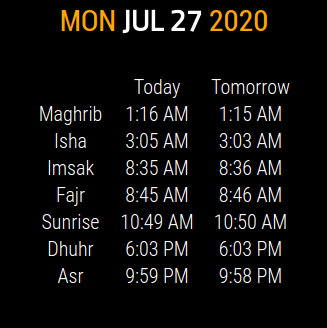
                                    Screenshot from 2020-07-27 17-02-42.png

                                    {
                                    		module: 'MMM-PrayerTime',
                                    		position: 'top_center',	// This can be any of the regions. Best result is in the top_left/top_right.
                                    		config: {
                                    			apiVersion: '1.0', // please, leave unchanged. reserved for future use.
                                    			lat: myLat, // latitude of your position (city)
                                    			lon: myLong, // longitude of your position (city)
                                    			timezone: 'Europe/London', // please refer to http://php.net/manual/en/timezones.php
                                    //			timeFormat: 24,
                                    			method: 5,
                                    			playAdzan: ['fajr', 'dhuhr', 'asr', 'maghrib', 'isha'],
                                    			notDisplayed: ['midnight', 'sunset'],
                                    			useUpdateInterval: true,
                                    			updateInterval: 86400 * 1000, // How often do you want to fetch new praying time? (milliseconds)
                                    			animationSpeed: 2.5 * 1000, // Speed of the update animation. (milliseconds)
                                    	//		language: config.language,
                                    			showAdzanAlert: true,
                                    			showTomorrow: true,
                                    			vertical: true, // set false for horizontal view
                                    			alertTimer: 15000
                                    		}
                                    	},
                                    

                                    Create a working config
                                    How to add modules

                                    S T 2 Replies Last reply Reply Quote 0
                                    • S Do not disturb
                                      sdetweil @Mykle1
                                      last edited by

                                      @Mykle1 thx!

                                      so the original problem was the timezone wasn’t quoted.

                                      Sam

                                      How to add modules

                                      learning how to use browser developers window for css changes

                                      Mykle1M 1 Reply Last reply Reply Quote 0
                                      • Mykle1M Offline
                                        Mykle1 Project Sponsor Module Developer @sdetweil
                                        last edited by Mykle1

                                        @sdetweil said in How to add modules. For absolute beginners.:

                                        so the original problem was the timezone wasn’t quoted.

                                        That and language: config.language, was causing an error. I simply commented it out and the module uses the config language by default. :-)

                                        Edit: Oh, and timeFormat: 24, in the module’s config entry, as well. Again, I commented it out as it was redundant.

                                        Create a working config
                                        How to add modules

                                        S 1 Reply Last reply Reply Quote 0
                                        • S Do not disturb
                                          sdetweil @Mykle1
                                          last edited by

                                          @Mykle1 yep, didn’t see that right… because the javascript source code processor is in the process of reading the config object definition

                                          var config= {
                                          

                                          the config object is not yet defined. so config.language cannot exist (yet)

                                          but the timeFormat can be present AND redundant and not cause a startup error

                                          Sam

                                          How to add modules

                                          learning how to use browser developers window for css changes

                                          1 Reply Last reply Reply Quote 0
                                          • T Offline
                                            TheSij @Mykle1
                                            last edited by

                                            @Mykle1 thanks to you and @sdetweil for helping me with this. It’s much appreciated. Deep down I’m reluctant to give up, because I don’t like quitting. I’ve literally just copied your config entry, and simply adding my own lat/lon figures. But now the MagicMirror shows up as a blank black screen and the window is named ‘Electron’, rather than ‘MagicMirror2’.

                                            I’m checking, double-checking and triple-checking and I can’t see where the discrepancy is compared to your entry. Could having too many modules be an issue? Can I also check - both of you have commented that the ‘timezone’ is causing an error, but your config entry doesn’t show that it’s commented out…?


                                            S 1 Reply Last reply Reply Quote 0

                                            Hello! It looks like you're interested in this conversation, but you don't have an account yet.

                                            Getting fed up of having to scroll through the same posts each visit? When you register for an account, you'll always come back to exactly where you were before, and choose to be notified of new replies (either via email, or push notification). You'll also be able to save bookmarks and upvote posts to show your appreciation to other community members.

                                            With your input, this post could be even better 💗

                                            Register Login

                                            • 1
                                            • 2
                                            • 3
                                            • 4
                                            • 5
                                            • 2 / 5
                                            • First post
                                              Last post
                                            Enjoying MagicMirror? Please consider a donation!
                                            MagicMirror created by Michael Teeuw.
                                            Forum managed by Sam, technical setup by Karsten.
                                            This forum is using NodeBB as its core | Contributors
                                            Contact | Privacy Policy