MagicMirror Forum
    • Recent
    • Tags
    • Unsolved
    • Solved
    • MagicMirror² Repository
    • Documentation
    • 3rd-Party-Modules
    • Donate
    • Discord
    • Register
    • Login
    A New Chapter for MagicMirror: The Community Takes the Lead
    Read the statement by Michael Teeuw here.

    How to add modules. For absolute beginners.

    Scheduled Pinned Locked Moved Troubleshooting
    91 Posts 16 Posters 147.2k Views 24 Watching
    Loading More Posts
    • Oldest to Newest
    • Newest to Oldest
    • Most Votes
    Reply
    • Reply as topic
    Log in to reply
    This topic has been deleted. Only users with topic management privileges can see it.
    • F Offline
      fsne04 @sdetweil
      last edited by fsne04

      @sdetweil
      This is my first time in a forum like this and I don’t actually know how to start a new topic…
      I tried ctl+shft+i on the Raspbian desktop, in the MM config file, in the File Manager and in Chromium, all without any response. I can’t get to the place you have in your screenshot.

      S 2 Replies Last reply Reply Quote 0
      • S Offline
        sdetweil @fsne04
        last edited by

        @fsne04 mm screen currently selected on the pi monitor, ctrl-shift-i (lower case I, not L)

        Sam

        How to add modules

        learning how to use browser developers window for css changes

        F 1 Reply Last reply Reply Quote 0
        • S Offline
          sdetweil @fsne04
          last edited by

          @fsne04 said in How to add modules. For absolute beginners.:

          this is my first time in a forum like this and I don’t actually know how to start a new topic…

          click the button that says ‘new topic’

          Sam

          How to add modules

          learning how to use browser developers window for css changes

          1 Reply Last reply Reply Quote 0
          • F Offline
            fsne04 @sdetweil
            last edited by

            @sdetweil
            Yeah, got there. so the Elements window is open now

            S 1 Reply Last reply Reply Quote 0
            • S Offline
              sdetweil @fsne04
              last edited by

              @fsne04 click the tab labeled ‘console’…

              Sam

              How to add modules

              learning how to use browser developers window for css changes

              F 1 Reply Last reply Reply Quote 0
              • F Offline
                fsne04 @sdetweil
                last edited by

                @sdetweil
                Ok, in Console. There is an “Electron” Security Warning in yellow about using insecure protocols, could that be it?

                S 1 Reply Last reply Reply Quote 0
                • S Offline
                  sdetweil @fsne04
                  last edited by sdetweil

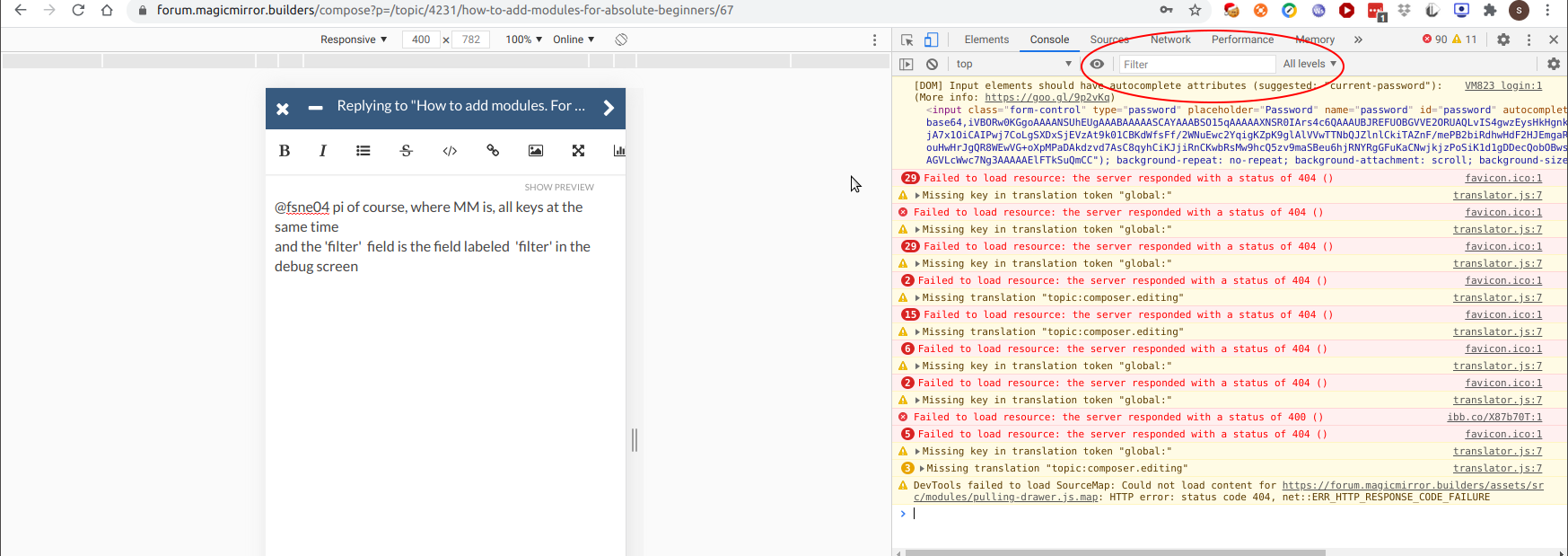
                  @fsne04 ignore the warning. put ‘cast’ in the filter field (no quotes)
                  the error may not be in the browser side of the module, but this is how you find out…

                  otherwise, u need to look in the console where u started MM, either npm start, or if using pm2, then pm2 logs --lines=??? where ??? is a number, default 15

                  Sam

                  How to add modules

                  learning how to use browser developers window for css changes

                  F 1 Reply Last reply Reply Quote 0
                  • F Offline
                    fsne04 @sdetweil
                    last edited by fsne04

                    @sdetweil
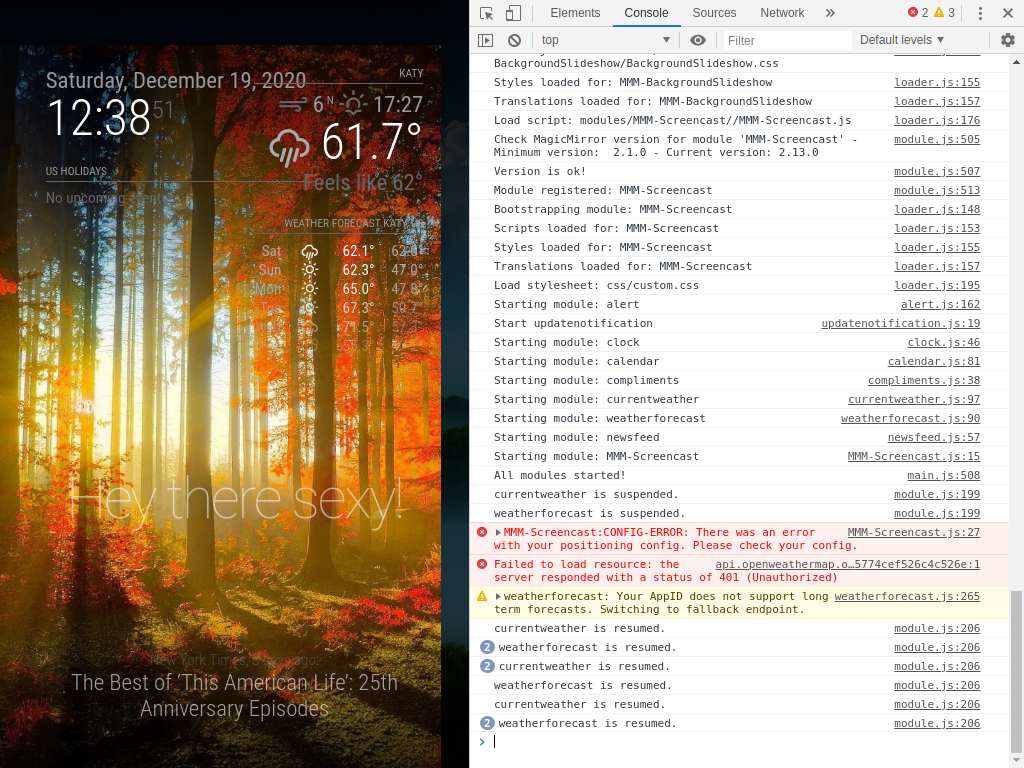
                    Found something on the bottom:
                    2020-12-19-123851_1024x768_scrot.png
                    an error with my positioning config. Is not possible to have 2 modules on the same position? I have the image app on fullscreen_bottom also

                    S A 3 Replies Last reply Reply Quote 0
                    • S Offline
                      sdetweil @fsne04
                      last edited by

                      @fsne04 ok, there u go!..

                      Sam

                      How to add modules

                      learning how to use browser developers window for css changes

                      1 Reply Last reply Reply Quote 0
                      • S Offline
                        sdetweil @fsne04
                        last edited by

                        @fsne04 said in How to add modules. For absolute beginners.:

                        an error with my positioning config. Is not possible to have 2 modules on the same position? I have the image app on fullscreen_bottom also

                        sorry, don’t know anything about the module itself… so , not sure what that means

                        Sam

                        How to add modules

                        learning how to use browser developers window for css changes

                        F 1 Reply Last reply Reply Quote 0
                        • F Offline
                          fsne04 @sdetweil
                          last edited by

                          @sdetweil
                          No worries, at least I know how to find errors now, Thanks! I guess I also have an issue with the weathermap setup, according to the error message below the screencast one.

                          S 1 Reply Last reply Reply Quote 0
                          • S Offline
                            sdetweil @fsne04
                            last edited by

                            @fsne04 weather u need to sign up and get an api token just for you…

                            Sam

                            How to add modules

                            learning how to use browser developers window for css changes

                            F 1 Reply Last reply Reply Quote 0
                            • F Offline
                              fsne04 @sdetweil
                              last edited by

                              @sdetweil
                              I did, maybe I did not copy it correctly. I will check.
                              So how do I start a new topic/question and get nice/helpful people like you to answer? I have a few questions on the Remote Control module configuration also.

                              S 1 Reply Last reply Reply Quote 0
                              • S Offline
                                sdetweil @fsne04
                                last edited by

                                @fsne04 see https://forum.magicmirror.builders/topic/4231/how-to-add-modules-for-absolute-beginners/73?page=8

                                Sam

                                How to add modules

                                learning how to use browser developers window for css changes

                                F 1 Reply Last reply Reply Quote 0
                                • F Offline
                                  fsne04 @sdetweil
                                  last edited by fsne04

                                  @sdetweil
                                  In the headder, I see: Unread, Recent, Tags, Unsolved, Solved, Users, Groups, Repository, Documents, Donate, Join Channel… I am sure it’s there, but I don’t see a New Topic, or create Topic button.

                                  Thank you for your help today, Sam! Greatly appreciate your time.
                                  Best regards,
                                  Frank

                                  S 1 Reply Last reply Reply Quote 0
                                  • S Offline
                                    sdetweil @fsne04
                                    last edited by

                                    @fsne04 when I push unread, I see
                                    Screenshot at 2020-12-19 13-21-32.png

                                    Sam

                                    How to add modules

                                    learning how to use browser developers window for css changes

                                    1 Reply Last reply Reply Quote 0
                                    • A Offline
                                      ashishtank Module Developer @fsne04
                                      last edited by ashishtank

                                      @fsne04 if you check the code of MMM-Screent cast @ https://github.com/kevinatown/MMM-Screencast/blob/master/constants.js then there is no position which supports fullscreen_below.

                                      you need to set one of the below value as per documentation of the module

                                      const POSITIONS = {
                                        bottomRight: 'bottomRight',
                                        bottomCenter: 'bottomCenter',
                                        bottomLeft: 'bottomLeft',
                                        center: 'center', 
                                        topRight: 'topRight',
                                        topCenter: 'topCenter',
                                        topLeft: 'topLeft',
                                        top_bar: 'topRight',
                                        top_left: 'topLeft',
                                        top_center: 'topCenter',
                                        top_right: 'topRight',
                                        upper_third: 'topRight',
                                        middle_center: 'center',
                                        lower_third: 'bottomCenter',
                                        bottom_left: 'bottomLeft',
                                        bottom_center: 'bottomCenter',
                                        bottom_right: 'bottomRight',
                                        bottom_bar: 'bottomCenter'
                                      };
                                      
                                      A 1 Reply Last reply Reply Quote 1
                                      • A Offline
                                        ashishtank Module Developer @ashishtank
                                        last edited by

                                        @fsne04 Here it checks for the position value (edited my answer above).

                                        7c8840e0-041d-40fb-bf8c-2bf5e47bef31-image.png

                                        8e2d4b3d-f498-4d22-9d7b-3c3649c4718b-image.png

                                        1 Reply Last reply Reply Quote 1
                                        • M Offline
                                          mishu28nmv
                                          last edited by

                                          Hello guys. Absolute beginner in coding. I would like to make my own module with Flight prices.
                                          As default I will have:

                                          token: "MyToken",
                                          api_host: "travelpayouts-travelpayouts-flight-data-v1.p.rapidapi.com",
                                          api_key: "MyApiKey"
                                          

                                          And as options I will have:

                                          origin: "AAA",//Airport 3-Letter code
                                          currency: "EUR",
                                          depart_date: "2022-06-12",//format YYYY-MM-DD
                                          return_date: "2022-06-19",//format YYYY-MM-DD
                                          destination: "BBB"//Airport 3-Letter code
                                          

                                          Is there anyone who can create a right code (module) for this situation? If this is too stupid to ask, or if this already exists, please let me know :(

                                          1 Reply Last reply Reply Quote 0
                                          • C Offline
                                            cgillinger
                                            last edited by

                                            Hi! I know this thread is quite old, but since I’m a complete noob, and I’ve followed the specific guide I didn’t want to spam the forum with a new thread.

                                            I’ve tried adding this basic module, but the effect is always that the MM wont start.

                                            I’m on Windows 10 (using a Surface Pro 4).
                                            I’m using Notepad++

                                            With the default installation, MM works using a browser.

                                            This is how my config looks after adding the Jeopardy module:

                                            81c1f17a-e2e3-47bd-81ba-ba733cfddc81-image.png

                                            This is the error output from CMD:

                                            9eac89f3-dc6e-447d-b649-aa7e8da9ac18-image.png

                                            What am I doing wrong?

                                            S 1 Reply Last reply Reply Quote 0

                                            Hello! It looks like you're interested in this conversation, but you don't have an account yet.

                                            Getting fed up of having to scroll through the same posts each visit? When you register for an account, you'll always come back to exactly where you were before, and choose to be notified of new replies (either via email, or push notification). You'll also be able to save bookmarks and upvote posts to show your appreciation to other community members.

                                            With your input, this post could be even better 💗

                                            Register Login

                                            • 1
                                            • 2
                                            • 3
                                            • 4
                                            • 5
                                            • 4 / 5
                                            • First post
                                              Last post
                                            Enjoying MagicMirror? Please consider a donation!
                                            MagicMirror created by Michael Teeuw.
                                            Forum managed by Sam, technical setup by Karsten.
                                            This forum is using NodeBB as its core | Contributors
                                            Contact | Privacy Policy