Read the statement by Michael Teeuw here.
MMM-NOAA - Another Weather Module
-
openweather is your problems ,ditch that api and create a free new one at darksky provider.Dont forget to Put your Lat and Long at config.
-
@mykle1 If I do the same for Greek translation will someone fix it for the module?
-
Yeah I’m sure ‘someone’ will fix it LOL
IF this is correct:
{
“Rise”:“Восход”,
“Set”:“Закат”,
“4 Day Forecast”:“Прогноз на 4 дня”,
“Monday”: “Понедельник”,
“Tuesday”: “Вторник”,
“Wednesday”: “Среда”,
“Thursday”: “Четверг”,
“Friday”: “Пятница”,
“Saturday”: “Суббота”,
“Sunday”: “Воскресенье”,
“Hours of Light”:“Длительность дня”,
“Last Updated”: “Последнее обновление”,
“Today”:“Сегодня”,
“Night”:“Ночь”,
“Mon”:“Пн”,
“Tue”:“Вт”,
“Wed”:“Ср”,
“Thu”:“Чт”,
“Fri”:“Пт”,
“Sat”:“Сб”,
“Sun”:“Вс”,
“No Wind”: “Штиль”,
“Humidity”: “Влажность”,
“Visibility”:“Видимость”,
“Pressure”:“Давление”,
“Excellent”:“Отлично”,
“Good”:“Хорошо”,
“Lightly Polluted”:“Легкие загрязнения”,
“Moderately Polluted”:“Умеренные загрязнения”,
“Heavily Polluted”:“Сильные загрязнения”,
“Forecast”:“Прогноз”
}I just added it to NOAA3… let me know if anything is wrong.
-
Here is the Greek translation. I also tried to make a pull request on github but I am not sure If I did it right since this is my first pull request. I hope someone will fix it :winking_face: :winking_face: :winking_face:
Thank you very much.{ “Rise”:"Ανατολή", “Set”:"Δύση", “4 Day Forecast”:"Πρόβλεψη 4 Ημερών", “Monday”:"Δευτέρα" “Tuesday”:"Τρίτη", “Wednesday”:"Τετάρτη", “Thursday”:"Πέμπτη", “Friday”:"Παρασκευή", “Saturday”:"Σάββατο", “Sunday”:"Κυριακή", “Hours of Light”:"Διάρκεια Ημέρας", “Last Updated”:"Τελευταία Ενημέρωση", “Today”:"Σήμερα" “Night”:"Νύχτα", “Mon":"Δευ", “Tue”:"Τρι" “Wed”:"Τετ", “Thu”:"Πεμ", “Fri”:"Παρ", “Sat”:"Σαβ", “Sun”:"Κυρ", “No Wind”:"'Οχι Άνεμος", “Humidity”:"Υγρασία", “Visibility”:"Ορατότητα", “Pressure”:"Πίεση" “Excellent”:"Έξοχος", “Good”:"Καλός", “Lightly Polluted”:"Ελαφριά Ρύπανση", “Moderately Polluted”:"Μέτρια Ρύπανση", “Heavily Polluted":"Βαριά Ρύπανση", “Forecast”:"Πρόβλεψη" } -
@cowboysdude I just noticed that you have made a small mistake in NOAA’s translations folder in github. You have named the Russian translation as Greek. Check it out when you have the time.
-
@anthony I added a gr.json file which should be the greek one :) Not sure how I could mix them up there is no ru.json so not sure how they got mixed up LOL
-
@cowboysdude I saw that you replaced the content of gr.json. So now you have to make a ru.json for the russian translation since you have it already. Thank you for merging the translation. Can’t wait to go home to test how it looks. Although the last 4 days the 4 day forecast is not showing any pictures. Do you have any idea what might be the problem? I have uninstall/reinstall the module, restart the MM and the pi several times but nothing.
-
@cowboysdude I made the update and nothing changed in the module’s language. Still in English. I changed the language in my config.js from “en” to “gr” but then only black screen when I restart MM. Am I doing something wrong or something in the translation is wrong?
-
@anthony run your mirror in dev mode - npm start dev and if there’s an error you’ll see it and it’ll name the module. Let me know what it says :) We’ll get it working!
-
@cowboysdude
Are these logs suspicious?:MMM-Remote-Control received a module notification: WEATHER from sender: MMM-NOAA3 module.js:154 clock received a module notification: WEATHER from sender: MMM-NOAA3 module.js:154 calendar received a module notification: WEATHER from sender: MMM-NOAA3 module.js:154 MMM-Cursor received a module notification: WEATHER from sender: MMM-NOAA3 module.js:154 MMM-SystemStats received a module notification: WEATHER from sender: MMM-NOAA3 module.js:154 MMM-horoscope received a module notification: WEATHER from sender: MMM-NOAA3 module.js:154 mmm-food2fork-recipes received a module notification: WEATHER from sender: MMM-NOAA3 module.js:154 MMM-MovieInfo received a module notification: WEATHER from sender: MMM-NOAA3 module.js:154 MMM-History received a module notification: WEATHER from sender: MMM-NOAA3 module.js:154 MMM-RadioDe received a module notification: WEATHER from sender: MMM-NOAA3I can’t see any errors except some electron warnings.
Electron Security Warning (Insecure Resources) This renderer process loads resources using insecure
    protocols.This exposes users of this app to unnecessary security risks.
    Consider loading the following resources over HTTPS or FTPS.
 - http://0.0.0.0:8080/css/main.css
- http://0.0.0.0:8080/fonts/roboto.css
- http://0.0.0.0:8080/socket.io/socket.io.js
- http://0.0.0.0:8080/vendor/node_modules/nunjucks/browser/nunjucks.min.js
- http://0.0.0.0:8080/js/defaults.js
- http://0.0.0.0:8080/config/config.js
- http://0.0.0.0:8080/vendor/vendor.js
- http://0.0.0.0:8080/modules/default/defaultmodules.js
- http://0.0.0.0:8080/js/logger.js
- http://0.0.0.0:8080/translations/translations.js
- http://0.0.0.0:8080/js/translator.js
- http://0.0.0.0:8080/js/class.js
- http://0.0.0.0:8080/js/module.js
- http://0.0.0.0:8080/js/loader.js
- http://0.0.0.0:8080/js/socketclient.js
- http://0.0.0.0:8080/js/main.js
- http://0.0.0.0:8080/fonts/node_modules/roboto-fontface/fonts/roboto-condensed/Roboto-Condensed-Regular.woff2
- http://0.0.0.0:8080/translations/en.json
- http://0.0.0.0:8080/translations/en.json
- http://0.0.0.0:8080/modules/MMM-pages//MMM-pages.js
- http://0.0.0.0:8080/modules/MMM-pages/pages.css
- http://0.0.0.0:8080/modules/MMM-Remote-Control//MMM-Remote-Control.js
- http://0.0.0.0:8080/modules/MMM-Remote-Control/remote-control.css
- http://0.0.0.0:8080/modules/MMM-page-indicator//MMM-page-indicator.js
- http://0.0.0.0:8080/vendor/node_modules/font-awesome/css/font-awesome.min.css
- http://0.0.0.0:8080/modules/MMM-page-indicator/page-indicators.css
- http://0.0.0.0:8080/modules/default/alert//alert.js
- http://0.0.0.0:8080/modules/default/alert/classie.js
- http://0.0.0.0:8080/modules/default/alert/modernizr.custom.js
- http://0.0.0.0:8080/modules/default/alert/notificationFx.js
- http://0.0.0.0:8080/modules/default/alert/ns-default.css


For more information and help, consult
https://electronjs.org/docs/tutorial/security.
 This warning will not show up
once the app is packaged.
Any help appreciated.
-
but I am getting this error when I run
pm2 logs mmand before I start MM:0|mm | TypeError: self.provider.getALERT is not a function 0|mm | at Class.getALERT (/home/pi/MagicMirror/modules/MMM-NOAA3/node_helper.js:118:23) 0|mm | at Timeout.self.updateInterval.setInterval [as _onTimeout] (/home/pi/MagicMirror/modules/MMM-NOAA3/node_helper.js:60:9) 0|mm | at ontimeout (timers.js:427:11) 0|mm | at tryOnTimeout (timers.js:289:5) 0|mm | at listOnTimeout (timers.js:252:5) 0|mm | at Timer.processTimers (timers.js:212:10) 0|mm | TypeError: self.provider.getALERT is not a function 0|mm | at Class.getALERT (/home/pi/MagicMirror/modules/MMM-NOAA3/node_helper.js:118:23) 0|mm | at Timeout.self.updateInterval.setInterval [as _onTimeout] (/home/pi/MagicMirror/modules/MMM-NOAA3/node_helper.js:60:9) 0|mm | at ontimeout (timers.js:427:11) 0|mm | at tryOnTimeout (timers.js:289:5) 0|mm | at listOnTimeout (timers.js:252:5) 0|mm | at Timer.processTimers (timers.js:212:10) 0|mm | ATTENTION: default value of option force_s3tc_enable overridden by environment. -
@anthony depends on weather provider for SOME reason darksky works the best…some of the others the info is slow and if you reload it will show the images…
-
@anthony said in MMM-NOAA - Another Weather Module:
getALERT
Yes I can the getAlert function is crashing on you…let me adjust it :)
I edited the node_helper…please try it and let me know :)
-
@cowboysdude
Hello. I did the update and it looks good but still no Greek translation. Everything is in English. If it is using my config.js for the language it is in english because if I turn it to Greek I get a black screen when I restart MM. And I am using Dark Sky as provider. -
OK did a quick fix for greek for NOAA3 and it works :) Just tested it…a git pull should fix it… there are two problems…
- I copied the greek translation from the forum and you can’t do that because it messes up the quotes…
- For SOME reason DarkSky doesn’t use GR for greek they us EL…so a temp fix was put into place :)
-
I have noticed that my module has started showing the incorrect weather temps and conditions, today it was showing 6C and Cloudy when I know its been 0C to 2C and Snowing. Having read through a lot of the posts on this thread I have been unable to resolve. Some of the weather conditions are near enough correct though, for example . .
Temp - Shows 6 - Actual 2
Humidity - Shows 55% - Actual 99%
Pressure - Shows 1011 - Actual 1011
Visability - Shows 8km - Actual 8.1km
Rise - Shows 7.05am - Actual 7.05 am
Set - Shows 5.35pm - Actual 5.34pm
Wind - Shows 2km - Actual 6kmUsing DarkSky and Airvisual, both making regular API calls, I have tried generating new keys, updating the module, updating MM version, I have also tried reinstalling both, verified and updated different long/lat coordinates to see if that makes any difference. . If I start MM in dev I see the following . .
Whoops! There was an uncaught exception...
TypeError: Cannot read property 'pollution' of undefined
    at Object.parseAIR (/home/pi/MagicMirror/modules/MMM-NOAA3/providers/ds.js:182:35)
    at Request._callback (/home/pi/MagicMirror/modules/MMM-NOAA3/providers/ds.js:174:28)
    at Request.self.callback (/home/pi/MagicMirror/modules/MMM-NOAA3/node_modules/request/request.js:185:22)
    at emitTwo (events.js:126:13)
    at Request.emit (events.js:214:7)
    at Request.<anonymous> (/home/pi/MagicMirror/modules/MMM-NOAA3/node_modules/request/request.js:1161:10)
    at emitOne (events.js:116:13)
    at Request.emit (events.js:211:7)
    at IncomingMessage.<anonymous> (/home/pi/MagicMirror/modules/MMM-NOAA3/node_modules/request/request.js:1083:12)
    at Object.onceWrapper (events.js:313:30)
pi@raspberrypi:~/MagicMirror/modules/MMM-NOAA3 $ git pull Already up-to-date. pi@raspberrypi:~/MagicMirror/modules/MMM-NOAA3 $Any ideas on what else to check? When I set this up a while ago it was working perfectly :-(
-
@cowboysdude
Sorry mate but still everything is in English. No Greek at all. Am I doing something wrong? -
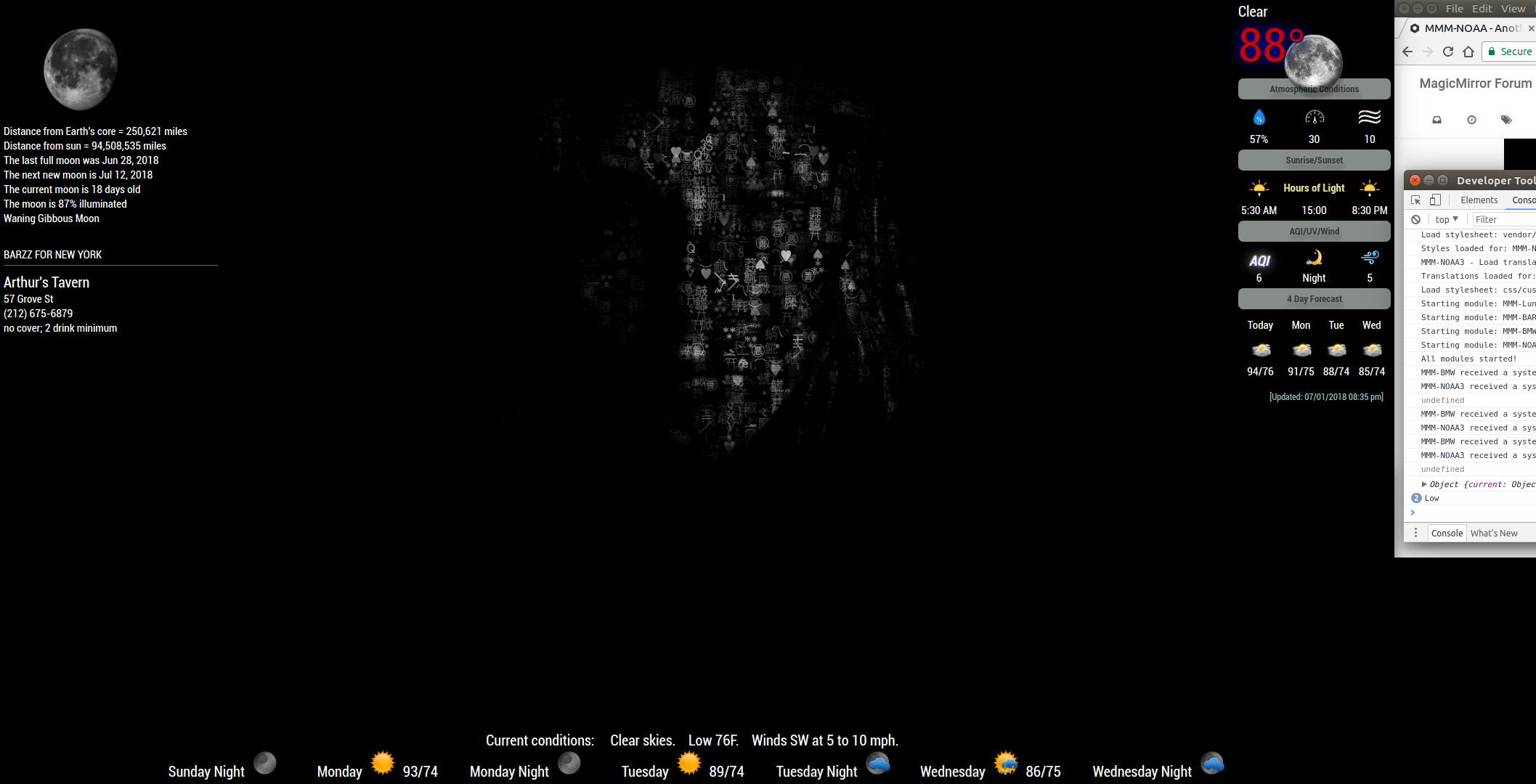
@nobita
I really like the way you are presenting information ! Great Job.
It is for the NOAA3 module on this picture
https://forum.magicmirror.builders/assets/uploads/files/1530492418205-edit.png
Would you be able to share you css ?Thanks a lot.
-
Guys are you having issues with this module constantly calling Darksky? even on default settings.
-
@cowboysdude
I think something is wrong with the module’s translation because when the language in my config.js isenthe module’s language is in English but when I change the language in my config.js ingrI get black blank screen. But if disable NOAA3 everything loads as they should. I hope this will help you to find the solution.

Hello! It looks like you're interested in this conversation, but you don't have an account yet.
Getting fed up of having to scroll through the same posts each visit? When you register for an account, you'll always come back to exactly where you were before, and choose to be notified of new replies (either via email, or push notification). You'll also be able to save bookmarks and upvote posts to show your appreciation to other community members.
With your input, this post could be even better 💗
Register Login