Read the statement by Michael Teeuw here.
MMM-Lunartic
-
@johans said in MMM-Lunartic:
correct me if i’m wrong!
You are correct, sir! Good catch! I’ll upload the update in a little while. sv translation is still not working.
nl translation is now added thanks to our friend, @johans. :thumbsup:
-
@johans said in MMM-Lunartic:
@mykle1 thanks for the update.
For next update, can you include nl-translations?
Here’s the dataDone!
Thank you for contributing the nl translation file.
-
@pr05t3n said in MMM-Lunartic:
Cant get the Swedish translation to show up despite language: “sv”, in config.js
Translation sv.json is present in MagicMirror/modules/MMM-Lunartic/translationsYes. I’m trying to correct that right now but for some reason the module does not like the sv translation file that I currently have. Can you take @Johans nl translation file below and substitute the sv translations for his nl entries? Then kindly post it here and I’ll get it working using your sv.json file. Many thanks!
Just the right side of the file. Not the English side.
{ "Distance from Earth's core = ": "Afstand vanaf middelpunt Aarde = ", "Distance from sun = ": "Afstand vanaf de Zon = ", "The next full moon is ": "Volgende Volle Maan is ", "The next new moon is ": "Volgende Nieuwe Maan is ", "The current moon is ": "De Huidige Maan is ", "The moon is ": "De Maan is ", "% illuminated": " % verlicht", " days old": " dagen oud", "New Moon Phase": "Nieuwe Maan Faze", "Waxing Crescent Moon": "Wassende Maancikkel", "First Quarter Half Moon": "Eerste kwartier Halve Maan", "Waxing Gibbous Moon": "Wassende Gibbous Maan", "Full Moon": "Volle Maan", "Waning Gibbous Moon": "Afnemende Gibbous Maan", "Third Quarter Half Moon": "Derde kwartie Halve Maan", "Waning Crescent Moon": "Afnemende Wassende Maan", "When the Moon hits your eye . . .": "Wanneer de Maan zichtbaar is . . ." } -
@mykle1 said in MMM-Lunartic:
Can you guys also give me these translations?
"New Moon - No visible moon": "Your translation here please",and
"The last full moon was ": "Your translation here please", -
Did some troubleshooting and determined that the sv.json translation file I have is in some way corrupted/not working. How did I determine this? I made a copy of @Johans nl.json translation file and renamed the copy to sv.json. I changed my config language to sv and the file loaded without a problem. So, as soon as @pr05t3n gives me the corrected file I requested above, I’ll add it to the repo.
-
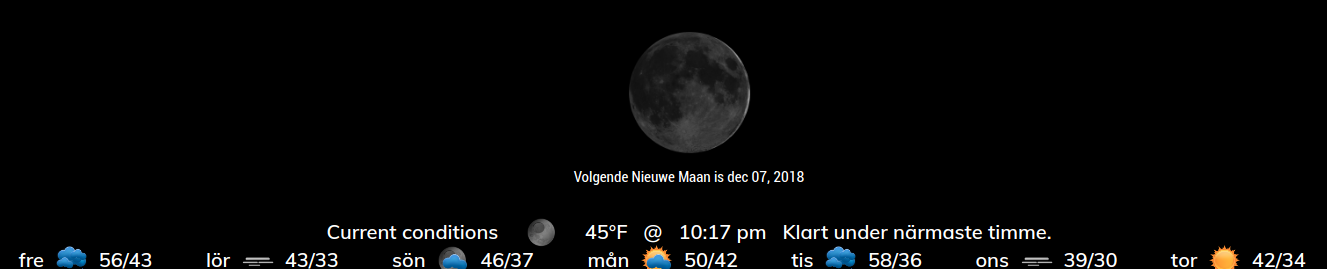
Oh cool. I never saw my weather module use another language! When I changed my config language to sv (using the copy mentioned in the previous post) I had both MMM-Lunartic and MMM-BMW-DS in nl. :-)
-
@mykle1 said in MMM-Lunartic:
"
nl translation“New Moon - No visible moon”: “Nieuwe Maan - Niet zichtbaar”,
"The last full moon was ": “Laatste volle Maan was”,Thanks for updating this nice module.
-
@johans said in MMM-Lunartic:
Thanks for updating this nice module.
You’re welcome, mate. Thanks for helping out. I’ll add these to the nl.json file tonight. Off to work! TGIF!
-
@mykle1
Partly working actually.
Månen är nu 2 dagar gammal correct
Månen är 4% illuminated(belyst) illuminated is wrong
Waxing crescent moon not ok
Distance from Earth`s core not ok
Distance from sun not ok
Nästa fullmåne är correct
Nästa nymåne är correct“New Moon - No visible moon”: “Nymåne - Ingen synlig måne”,
and
"The last full moon was ": “Sista fullmånen var”,
I Will come back with answer of your request tomorrow
Thanks for the support -
You could have done the translation in the time it took you to write that post. ;-)
-
@mykle1 said in MMM-Lunartic:
{
"Distance from Earth’s core = ": "Avstånd från jordens kärna = ",
"Distance from sun = ": "Avstånd från solen = ",
"The next full moon is ": "Nästa fullmåne är ",
"The next new moon is ": "Nästa nymåne är ",
"The current moon is ": "Månen är nu ",
"The moon is “: “Månen är “,
“% illuminated”: " % belyst”,
" days old”: " dagar gammal”,
“New Moon Phase”: “Nymåne”,
“Waxing Crescent Moon”: “Tilltagande skära”,
“First Quarter Half Moon”: “Halvmåne”,
“Waxing Gibbous Moon”: “Tilltagande halvmåne”,
“Full Moon”: “Fullmåne”,
“Waning Gibbous Moon”: “Avtagande halvmåne”,
“Third Quarter Half Moon”: “Halvmåne”,
“Waning Crescent Moon”: “Avtagande skära”,
“When the Moon hits your eye . . .”: “När månen träffar dina ögon . . .”
}Missunderstood you request, sorry Mykle1
-
@pr05t3n said in MMM-Lunartic:
Missunderstood you request, sorry Mykle1
No worries, mate. Thanks for the sv translations! :thumbsup:
-
-
Hi! I really like this module! It’s so cool!! I’ve just recently updated it to the last version, and I can’t wait for next full moon to hear the wolf audio. I have one doubt about it, when that sound it will be played? Ramdomly or how?
Thanks!
-
Thank you for your kind words. :thumbsup:
- Config entry for MMM-Lunartic,
soundsmust be set to yes. Example ->sounds: "yes",
2.For rotating mode, depending on your
rotateInterval, the sound will play each time the full moon element is reached. There are 7 elements.Example:
My
rotateInterval: 30 * 1000,. That’s 30 seconds, times each element to be displayed, because the sound file will only play when the full moon element is displayed. So,The formula will be 7 X your
rotateInterval
30 X 7 = 3:30 (that’s 3 minutes 30 seconds) in this case.You can substitute your own sound file if you have one you like better.
EDIT:
If you are using
mode: "static",the sound will play each time the configupdateInterval: 3 * 60 * 1000,is reached. In this case, 3 minutes. - Config entry for MMM-Lunartic,
-
Need some help with moon animation.
No moon visible for me.module: 'MMM-Lunartic', position: 'bottom_center', // Best in left, center, or right regions config: { mode: "rotating", // rotating or static image: "current", // animation, current, DayNight or static distance: "km", // miles or km sounds: "yes", // howling wolf, only on a full moon useHeader: false, // true if you want a header header: "The Lunartic is in my head", // Any text you want maxWidth: "300px", animationSpeed: 0, rotateInterval: 15000, -
Need some help with moon animation.
No moon visible for me.Are you saying the module runs but you get no image of the moon? Or are you saying you are not getting the animated moon?
https://forum.magicmirror.builders/topic/4247/how-to-post-code-on-the-forum-for-absolute-beginners
Kindly use a code block when you paste code, as such.{ module: 'MMM-Lunartic', position: 'bottom_center', // Best in left, center, or right regions config: { mode: "rotating", // rotating or static image: "animation", // animation, current, DayNight or static distance: "km", // miles or km sounds: "yes", // howling wolf, only on a full moon useHeader: false, // true if you want a header header: "The Lunartic is in my head", // Any text you want maxWidth: "300px", animationSpeed: 0, } },Notice:
image: "animation", -
@mykle1 i do not get any picture of the moon.
Only text.
I tried, current, animation and daynight.
When i choose static i see all pictures of the moon and when i choose animation i see full moon with the animating clouds.
Current is the setting i would like to use
Sorry for pasting the config part. -
Please try this url in a browser. It’s the url to the current moon image provided by the US NAVY. I suspect that if you live outside the U.S. that it might not work.
http://api.usno.navy.mil/imagery/moon.png?date=today&time=now
And the url to the Day/Night map
http://api.usno.navy.mil/imagery/earth.png?date=today
Please report
-
@pr05t3n said in MMM-Lunartic:
Sorry for pasting the config part.
No worries. I wanted to see your config. It’s just easier to read when it’s in a code block. Don’t you agree?


Hello! It looks like you're interested in this conversation, but you don't have an account yet.
Getting fed up of having to scroll through the same posts each visit? When you register for an account, you'll always come back to exactly where you were before, and choose to be notified of new replies (either via email, or push notification). You'll also be able to save bookmarks and upvote posts to show your appreciation to other community members.
With your input, this post could be even better 💗
Register Login