Read the statement by Michael Teeuw here.
MMM-GoogleMapsTraffic
-
@zzaidi148
I’ve found what is wrong.
you should set position of this module.module: 'MMM-GoogleMapsTraffic', position: 'top_left', //this is missed. config: { key: 'I have this',manual of @vicmora has missed this.
-
@Sean Thank you so much! Finally, after toiling away at it, with your help, I got it to work. Next up, your calendar module!
-
@vicmora : I’ve been trying all night long: just cant get the map to be shown.
I can see that the module is started in the dev logs.Funny thing: If I add some different HTML Output in the module.js It is printed on my screen, the only thing missing is the map.
Same thing is happening on MMM-fuel and MMM-googlemap. Modules are working but the map itself is not shown.
Different one for iFrame: This one is working.Interesting fact: If I check on the google dashboard for the traffic of this specific api key, I do not see any traffic. Is there anything special in the google api that I need to enable, or any additional module that needs to be installed.
Any ideas: Thanks a lot for the help.
-
@blue2monster: found now a workaround with the iframe module: This one works… but I haven’t made to switch the traffic layer on
-
@blue2monster Have you tried adding position: ‘top_left’ to your config? I missed this in the docs but will update them.
-
@vicmora : yes, I added position to various spots(e.g top_left; bottom_center,…) and tried various width and heights but still frame not visible.
Tried as well a complete empty config with only this module loaded-> no sucess.
I guess it might be an Google api key issue: Could you please show you google api devboard: Which service needs to be activated in google api? An which is showing traffic on your google api?
Thanks. -
@blue2monster This is where I grabbed the api key: https://developers.google.com/maps/documentation/javascript/
-
I created a pull request that I’d like merged. I added a config parameter that allows you to specify the type of map to display, my favorite is the hybrid which shows a satellite image with the roads on top. I left the default to display just the road maps as before.
-
@sprior Thanks! I merged it today.
-
I’m familiar with git, but not github as much. Since I forked your repository to make my change, then did a pull request which you accepted, I now show my repo as being one commit behind yours. How do I tell github to pull that commit, or do I just delete my repo and fork again when/if needed?
-
Hey,
cool module but got some issues when trying to select a dark mode style.
I wanted to look the map like in this example: https://developers.google.com/maps/documentation/javascript/stylingwell, i have tried to use your code and modify the colors. also i have tried to use the code from here: https://mapstyle.withgoogle.com
the module always starts, but i just got the standard view on it.
maybe you could explain a little bit more detailed how to do it. that would be great. thx
-
@Osyris said in MMM-GoogleMapsTraffic:
Hey guys, I figured it’s easy enough to style the map by editing the JS file. So in order to get the night mode as shown in pflodo’s post (and to disable the UI buttons) I added the following to the JS code:
//original code
        script.onload = function () {
            var map = new google.maps.Map(document.getElementById("map"), {
            	zoom: 10,
            	center: {
            		lat: lat,
            		lng: lng
            	},
//add a comma after the } above
//new code:
		disableDefaultUI: true,
		styles: [
			{elementType: 'geometry', stylers: [{color: '#242f3e'}]},
			{elementType: 'labels.text.stroke', stylers: [{color: '#242f3e'}]},
			{elementType: 'labels.text.fill', stylers: [{color: '#746855'}]},
			{
			    featureType: 'administrative.locality',
			    elementType: 'labels.text.fill',
			    stylers: [{color: '#d59563'}]
			},
			{
				featureType: 'poi',
				elementType: 'labels.text.fill',
				stylers: [{color: '#d59563'}]
			},
			{
				featureType: 'poi.park',
			        elementType: 'geometry',
			        stylers: [{color: '#263c3f'}]
			},
			{
				featureType: 'poi.park',
				elementType: 'labels.text.fill',
				stylers: [{color: '#6b9a76'}]
			},
			{
				featureType: 'road',
				elementType: 'geometry',
				stylers: [{color: '#38414e'}]
			},
			{
				featureType: 'road',
				elementType: 'geometry.stroke',
					  stylers: [{color: '#212a37'}]
			},
			{
				featureType: 'road',
				elementType: 'labels.text.fill',
					  stylers: [{color: '#9ca5b3'}]
			},
			{
				featureType: 'road.highway',
				elementType: 'geometry',
				stylers: [{color: '#746855'}]
			},
			{
				featureType: 'road.highway',
				elementType: 'geometry.stroke',
				stylers: [{color: '#1f2835'}]
			},
			{
				featureType: 'road.highway',
				elementType: 'labels.text.fill',
				stylers: [{color: '#f3d19c'}]
			},
			{
				featureType: 'transit',
				elementType: 'geometry',
				stylers: [{color: '#2f3948'}]
			},
			{
			        featureType: 'transit.station',
				elementType: 'labels.text.fill',
				stylers: [{color: '#d59563'}]
			},
			{
			        featureType: 'water',
			        elementType: 'geometry',
				stylers: [{color: '#17263c'}]
			},
			{
				featureType: 'water',
				elementType: 'labels.text.fill',
				stylers: [{color: '#515c6d'}]
			},
			{
				featureType: 'water',
				elementType: 'labels.text.stroke',
				stylers: [{color: '#17263c'}]
			}
		]
//old code again
            });
Have fun!
Also, if you want to make the background black (so it looks cool on the mirror), set the first attribute ‘geometry’ to ‘#000000’.
Try this…works 4 me
-
This post is deleted! -
but where to add this code?
i typed in this in my MagicMirror/config/config.js:
{
                  module: 'MMM-GoogleMapsTraffic',
                  position: 'bottom_left',
                  config: {
                      key: 'xxxx',
                      lat: 50.959023,
                      lng: 6.333991,
                      height: '250px',
                      width: '250px',
                      zoom: 9,
                      enableTraffic: true,
                      disableDefaultUI: true,
                      styles: [
			{elementType: 'geometry', stylers: [{color: '#242f3e'}]},
			{elementType: 'labels.text.stroke', stylers: [{color: '#242f3e'}]},
			{elementType: 'labels.text.fill', stylers: [{color: '#746855'}]},
			{
			    featureType: 'administrative.locality',
			    elementType: 'labels.text.fill',
			    stylers: [{color: '#d59563'}]
			},
			{
				featureType: 'poi',
				elementType: 'labels.text.fill',
				stylers: [{color: '#d59563'}]
			},
			{
				featureType: 'poi.park',
			        elementType: 'geometry',
			        stylers: [{color: '#263c3f'}]
			},
			{
				featureType: 'poi.park',
				elementType: 'labels.text.fill',
				stylers: [{color: '#6b9a76'}]
			},
			{
				featureType: 'road',
				elementType: 'geometry',
				stylers: [{color: '#38414e'}]
			},
			{
				featureType: 'road',
				elementType: 'geometry.stroke',
					  stylers: [{color: '#212a37'}]
			},
			{
				featureType: 'road',
				elementType: 'labels.text.fill',
					  stylers: [{color: '#9ca5b3'}]
			},
			{
				featureType: 'road.highway',
				elementType: 'geometry',
				stylers: [{color: '#746855'}]
			},
			{
				featureType: 'road.highway',
				elementType: 'geometry.stroke',
				stylers: [{color: '#1f2835'}]
			},
			{
				featureType: 'road.highway',
				elementType: 'labels.text.fill',
				stylers: [{color: '#f3d19c'}]
			},
			{
				featureType: 'transit',
				elementType: 'geometry',
				stylers: [{color: '#2f3948'}]
			},
			{
			        featureType: 'transit.station',
				elementType: 'labels.text.fill',
				stylers: [{color: '#d59563'}]
			},
			{
			        featureType: 'water',
			        elementType: 'geometry',
				stylers: [{color: '#17263c'}]
			},
			{
				featureType: 'water',
				elementType: 'labels.text.fill',
				stylers: [{color: '#515c6d'}]
			},
			{
				featureType: 'water',
				elementType: 'labels.text.stroke',
				stylers: [{color: '#17263c'}]
			}
			]
                      }
                },
and it looks like this:
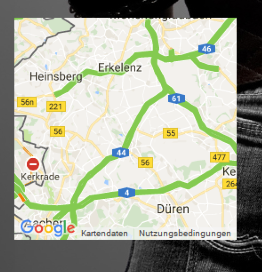
-
n,o not in the config.
u need to edit the js file (MMM-GoogleMapsTraffic.js)if u want just replace ur js with the code i use
/* global Module */ /* Magic Mirror * Module: MMM-GoogleMapsTraffic * * By Victor Mora * MIT Licensed. */ Module.register("MMM-GoogleMapsTraffic", { // Module config defaults defaults : { lat: '', lng: '', height: '300px', width: '300px', zoom: 10, mapTypeId: 'roadmap', disableDefaultUI: true }, getDom: function() { var lat = this.config.lat; var lng = this.config.lng; var wrapper = document.createElement("div"); wrapper.setAttribute("id", "map"); wrapper.style.height = this.config.height; wrapper.style.width = this.config.width; var script = document.createElement("script"); script.type = "text/javascript"; script.src = "https://maps.googleapis.com/maps/api/js?key=" + this.config.key; document.body.appendChild(script); var self = this; script.onload = function () { var map = new google.maps.Map(document.getElementById("map"), { zoom: self.config.zoom, mapTypeId: self.config.mapTypeId, center: { lat: self.config.lat, lng: self.config.lng }, //disableDefaultUI: self.config.disableDefaultUI disableDefaultUI: true, styles: [ {elementType: 'geometry', stylers: [{color: '#242f3e'}]}, {elementType: 'labels.text.stroke', stylers: [{color: '#242f3e'}]}, {elementType: 'labels.text.fill', stylers: [{color: '#746855'}]}, { featureType: 'administrative.locality', elementType: 'labels.text.fill', stylers: [{color: '#d59563'}] }, { featureType: 'poi', elementType: 'labels.text.fill', stylers: [{color: '#d59563'}] }, { featureType: 'poi.park', elementType: 'geometry', stylers: [{color: '#263c3f'}] }, { featureType: 'poi.park', elementType: 'labels.text.fill', stylers: [{color: '#6b9a76'}] }, { featureType: 'road', elementType: 'geometry', stylers: [{color: '#38414e'}] }, { featureType: 'road', elementType: 'geometry.stroke', stylers: [{color: '#212a37'}] }, { featureType: 'road', elementType: 'labels.text.fill', stylers: [{color: '#9ca5b3'}] }, { featureType: 'road.highway', elementType: 'geometry', stylers: [{color: '#746855'}] }, { featureType: 'road.highway', elementType: 'geometry.stroke', stylers: [{color: '#1f2835'}] }, { featureType: 'road.highway', elementType: 'labels.text.fill', stylers: [{color: '#f3d19c'}] }, { featureType: 'transit', elementType: 'geometry', stylers: [{color: '#2f3948'}] }, { featureType: 'transit.station', elementType: 'labels.text.fill', stylers: [{color: '#d59563'}] }, { featureType: 'water', elementType: 'geometry', stylers: [{color: '#17263c'}] }, { featureType: 'water', elementType: 'labels.text.fill', stylers: [{color: '#515c6d'}] }, { featureType: 'water', elementType: 'labels.text.stroke', stylers: [{color: '#17263c'}] } ] }); var trafficLayer = new google.maps.TrafficLayer(); trafficLayer.setMap(map); }; return wrapper; } }); -
Great, that worked. Thank you.
Another question:
Do you think its possible to show the map just at specific times.
like in this module: https://github.com/jclarke0000/MMM-MyCommute
so you were able to show the map just at times u need to know the traffic situation. for example i just need it Mo-Fr between 05:00-07:00 am and on Fr between 02:00-08:00 pm and Sa-So between 09:00am-02:00pm.
its just an idea. Anyhow its a great module that worked now really fine for me :)
-
try mmm-scheduler . this is a modul which gives u the opportunity to schedule all modules to show and hide to a spedific time.
nice if u have not enough space on ur screen and want to switch between modules by time
-
Hi everybody,
Do you think it would be possible to include a marker on the map to see my house on the map I display?
Thanks -
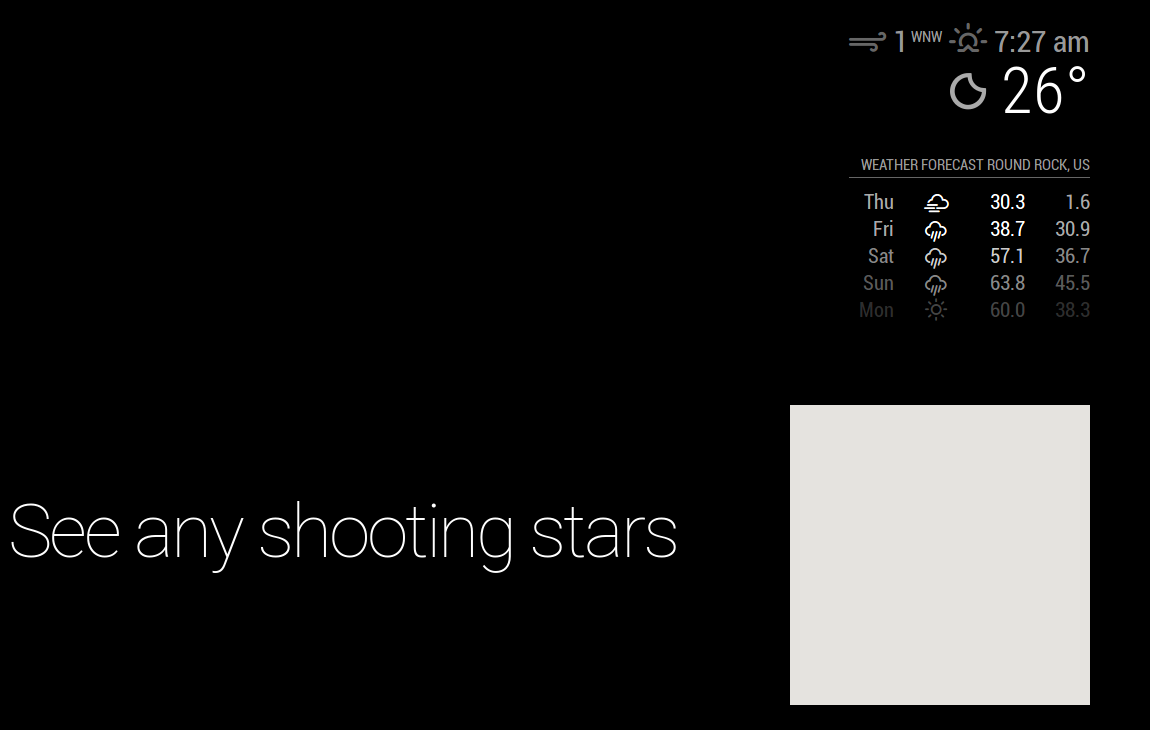
Anyone else having issues with the map rendering streets / traffic /actual data rather than a blank frame? I have tried several of the forks, and they all end the same way. I have confirmed by use of MMM-Traffic that my API key is valid.
config.js:
modules: [
		{
			module: "alert",
		},
		{
			module: "updatenotification",
			position: "top_bar"
		},
 // added Modules
                {
                        module: 'MMM-GoogleMapsTraffic',
                        position: 'bottom_right',
                        config: {
                                key: '************************',
                                lat: '30.00000',
                                lng: '-90.000000',
                                height: '300px',
                                width: '300px'
	  	            }
                },
		{
			module: 'MMM-Traffic',
			position: 'top_right',
			classes: 'dimmed medium', //optional, default is 'bright medium', only applies to commute info not route_name
			config: {
				api_key: '*******',
				mode: 'driving',
				origin: '**********',
				destination: '*********',
			//	mon_destination: '116th St & Broadway, New York, NY 10027',
			//	fri_destination: '1 E 161st St, Bronx, NY 10451',
				arrival_time: '0755', //optional, but needs to be in 24 hour time if used.
				route_name: 'Home to Work',
				changeColor: true,
				showGreen: false,
				limitYellow: 5, //Greater than 5% of journey time due to traffic
				limitRed: 20, //Greater than 20% of journey time due to traffic
				traffic_model: 'pessimistic',
				interval: 60000, //1 minutes
				showWeekend: false,
				allTime: false,
				startHr: 5,
				endHr:   10,
				hideOffHours: true
			}
		},

  //end of Module adds
		{
			module: "compliments",
			position: "lower_third"
		},
]
-
@sheddingmyskin said in MMM-GoogleMapsTraffic:
                            lat: '30.00000',
                            lng: '-90.000000',
This is wrong. Must look like this:
lat: 30.00000,
lng: -90.000000,
Without the ’

Hello! It looks like you're interested in this conversation, but you don't have an account yet.
Getting fed up of having to scroll through the same posts each visit? When you register for an account, you'll always come back to exactly where you were before, and choose to be notified of new replies (either via email, or push notification). You'll also be able to save bookmarks and upvote posts to show your appreciation to other community members.
With your input, this post could be even better 💗
Register Login