MagicMirror Forum
    • Recent
    • Tags
    • Unsolved
    • Solved
    • MagicMirror² Repository
    • Documentation
    • 3rd-Party-Modules
    • Donate
    • Discord
    • Register
    • Login
    A New Chapter for MagicMirror: The Community Takes the Lead
    Read the statement by Michael Teeuw here.

    MMM Remote dont work after update

    Scheduled Pinned Locked Moved Troubleshooting
    6 Posts 4 Posters 4.1k Views 4 Watching
    Loading More Posts
    • Oldest to Newest
    • Newest to Oldest
    • Most Votes
    Reply
    • Reply as topic
    Log in to reply
    This topic has been deleted. Only users with topic management privileges can see it.
    • S Offline
      shotput2017
      last edited by

      Hi!
      First off all… THX for this great software. I made a update today. The new fonts look great.

      Unfortunately the modul remote does not work anymore after the update. The Remotes page can no longer be called
      http: //xx.xx.xx.xx: 8080 / remote.html

      Please help.
      best regards
      shotput2017

      Mykle1M 1 Reply Last reply Reply Quote 0
      • S Offline
        shotput2017
        last edited by

        my IP White list:
        ipWhitelist: [
        “10.0.0.1/24”,
        “::ffff:10.0.0.1/120”,
        “127.0.0.1”,
        “::ffff:127.0.0.1”,
        “::1”

        1 Reply Last reply Reply Quote 0
        • randomnoiseR Offline
          randomnoise
          last edited by

          Due to a change in one of the default configuration items since the latest version came out you need to put

          address:“0.0.0.0”,

          As a config item (not in your whitelist… This is a new line for your config)

          Note, setting to 0.0.0.0 is telling the mirror to use any interface. If you want you could replace that with your mirror’s ip address.

          1 Reply Last reply Reply Quote 1
          • Mykle1M Offline
            Mykle1 Project Sponsor Module Developer @shotput2017
            last edited by Mykle1

            @shotput2017

            As @randomnoise pointed out, editing your config.js file like this will solve your connection problem to the Remote-Control module

            var config = {
            	address: "0.0.0.0", // "localhost", // Address to listen on, can be:
            

            You can see that it is running on my MacBuntu and my iPhone. To use it remotely you still have to use http://192.168.1.21:8080/remote.html as your url but to view the mirror itself remotely you need to use http://192.168.1.21:8080/, at least in my case.
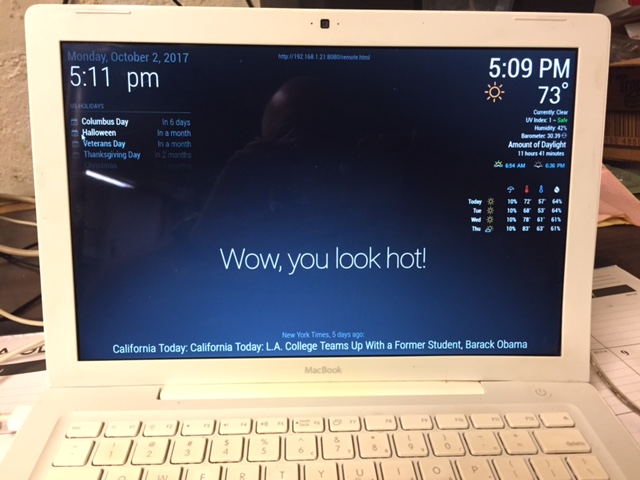
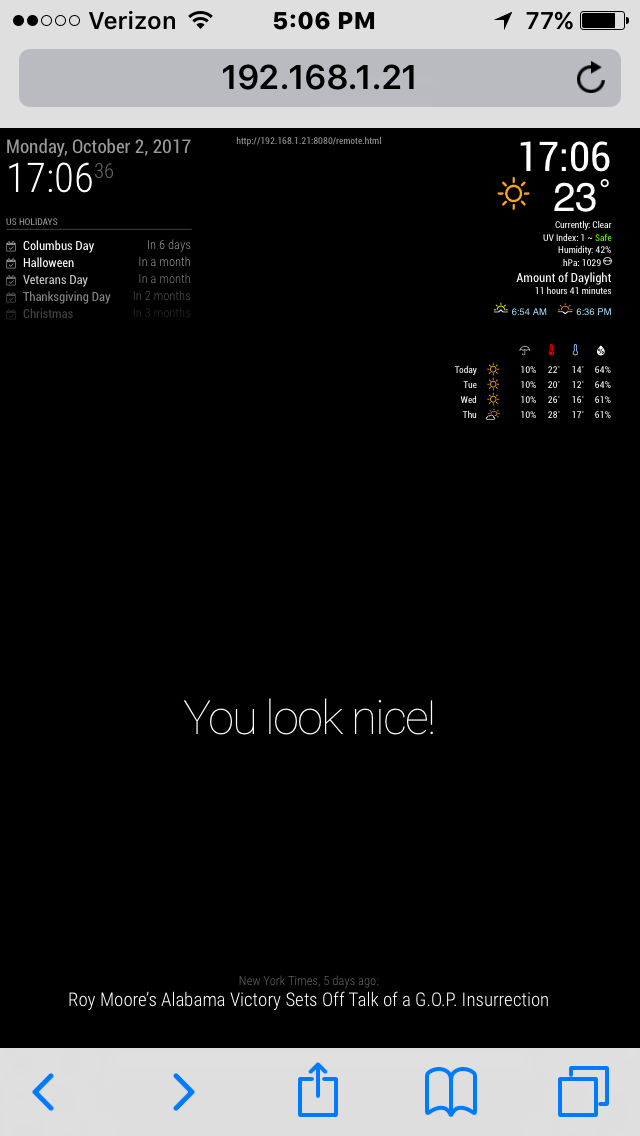
            0_1506983629998_IMG_2141.JPG
            0_1506983643020_IMG_2140.PNG

            Create a working config
            How to add modules

            1 Reply Last reply Reply Quote 1
            • S Offline
              shotput2017
              last edited by

              @Mykle1 said in MMM Remote dont work after update:

              address: “0.0.0.0”, // “localhost”, // Address to listen on, can be:

              hi mykle1 and randomnoise!
              thx for help. adding the adress line to config.js fixed the problem :-)

              greets
              shotput2017

              1 Reply Last reply Reply Quote 0
              • foxF Offline
                fox
                last edited by

                After update it started with the same problem at me.
                First remote was down, then i made the fix from @roramirez :
                https://forum.magicmirror.builders/post/28921
                and now my complete MM is crashed and i dont know how to solve it.
                Only blank screen, i did several times a

                git pull & npm install
                

                Dont update! Never touch a running system

                Issues With MMM-WatchDog known?

                https://forum.magicmirror.builders/post/29827

                Useful for PIR-Sensor: https://forum.magicmirror.builders/post/21299

                1 Reply Last reply Reply Quote 0

                Hello! It looks like you're interested in this conversation, but you don't have an account yet.

                Getting fed up of having to scroll through the same posts each visit? When you register for an account, you'll always come back to exactly where you were before, and choose to be notified of new replies (either via email, or push notification). You'll also be able to save bookmarks and upvote posts to show your appreciation to other community members.

                With your input, this post could be even better 💗

                Register Login

                • 1 / 1
                • First post
                  Last post
                Enjoying MagicMirror? Please consider a donation!
                MagicMirror created by Michael Teeuw.
                Forum managed by Sam, technical setup by Karsten.
                This forum is using NodeBB as its core | Contributors
                Contact | Privacy Policy