Read the statement by Michael Teeuw here.
MMM-AQI
-
Description
I was looking for a nice and simple module to display the air quality index (AQI), but all the modules I found were not really updated, or not using an API, or you couldn’t have several instances of it, or were not international, etc, so… I created my own.
This module gets the Air Quality Index (AQI) using the World Air Quality Index project API.
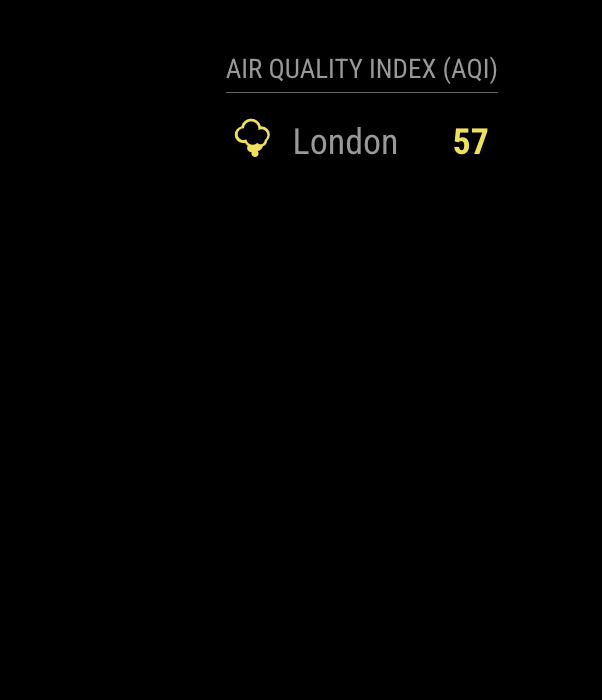
Screenshots:
Download:
[card:ryck/MMM-AQI]
-
Nice!
-
@ryck Great module.
One question: in your config.section, you wrote that is possible to insert the city_ID instead of the city_name. Where can I find the ID list? -
Yes, looks very nice. I love the minimalist presentation.
Was browsing over China… OMG! The sensors were overloaded showing 999 and far above 200 otehrwise. crazy! -
Hi great module !
But i have another city !!! when i write my city name i have another result “barrie in ontario” ???
where to find city ID ?
thanks -
To find the city id you can search for it using the API itself: http://aqicn.org/json-api/doc/#api-Search-SearchByName
The API is quite picky with the names, so in my experience is always better to use the id or just the keyword here -
@ryck AFAICT you can’t even search without an API key.
-
@E3V3A Yep, but you can use the same token you are using for the module, ie:
https://api.waqi.info/search/?token=TOKEN&keyword=croydon
(you can just type that URL in your browser)
-
Sorry but geoloc “here” is so bad !
name of city don’t work
and don’t understand how find @id … -
@Fonfon I added more info in the README, but is basically enter the URL above in your browser (using your token and your city, of course) an then just look for your city in the response and write down the “uid” value, that’s the id you are looking for.
-
@ryck ahh ok i understand…Thanks a lot ;)
-
Would you be willing to have/make an option to make the items horizontal instead of vertical? So to save space, since they are only numbers?
-
@E3V3A Yes, that’s a good idea, I’ll try to implement it as soon as I have some spare time!
-
Hi, nice module. One question, is it possible to filter some of the pollutants that I want to see? Right now, it just displays all of them.
-
i am a late comer, just starting to learn about the magicmirror
i do have a question about this nice module
is there a way to display tresholds?
for most people numbers say nothing, or you work with colors or display tresholds, how else can you know which pollutant is good or bad?
-
Thx, very good, but why the ‘header’ is not visible ?
-
-
```{ module: 'MMM-AQI', position: 'top_left', header: 'Polution', config: { token: "99860xxxxxxx", city: "@8xxx", iaqi: false, updateInterval: 30 * 60 * 1000, // Every half hour. initialLoadDelay: 0, animationSpeed: 1000, debug: false } }, -
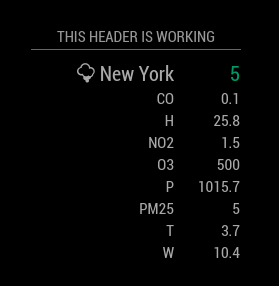
Hmm, odd. Your config looks good. Header SHOULD be showing. I just installed and ran it and my header appears as expected. Not sure why yours isn’t. My config:
{
        module: 'MMM-AQI',
        position: 'top center',
        header: 'This header is working',
        config: {
          token: "exxxxxxxxxxxxxxxxxxxxxxxxxxxxxxxxxxxxxx3",
          city: "here",
          iaqi: true,
          updateInterval: 30 * 60 * 1000, // Every half hour.
          initialLoadDelay: 0,
          animationSpeed: 1000,
          debug: false
        }
      },
Try using my config with your apiToken as a test.
-
The same, it’s stange, on others module, header are ok on screen…

Hello! It looks like you're interested in this conversation, but you don't have an account yet.
Getting fed up of having to scroll through the same posts each visit? When you register for an account, you'll always come back to exactly where you were before, and choose to be notified of new replies (either via email, or push notification). You'll also be able to save bookmarks and upvote posts to show your appreciation to other community members.
With your input, this post could be even better 💗
Register Login