Read the statement by Michael Teeuw here.
gauge.js
-
Hello guys, I’m trying to make working the gauge.js lib on my MM.
Nothing appears on the screen. No error in logs or the console.
Here is what I do, I just copied the content of the example available here.
getScripts: function() {
        return ["http://bernii.github.io/gauge.js/dist/gauge.min.js"];
    },

 getDom: function () {
        let wrapper = document.createElement("div");
        // add a gauge
        let opts = {
          angle: 0.15, /// The span of the gauge arc
          lineWidth: 0.44, // The line thickness
          pointer: {
            length: 0.9, // Relative to gauge radius
            strokeWidth: 0.035 // The thickness
          },
          colorStart: '#6FADCF',   // Colors
          colorStop: '#8FC0DA',    // just experiment with them
          strokeColor: '#E0E0E0'   // to see which ones work best for you
        };
        let target = document.createElement("canvas");
        let gauge = new Gauge(target).setOptions(opts); // create sexy gauge!
        gauge.maxValue = 3000; // set max gauge value
        gauge.setMinValue(0);  // set min value
        gauge.set(1250); // set actual value
        wrapper.appendChild(target);

       return wrapper;
}
Any idea of what I’m missing here?
Thanks a lot !
-
@sispheor Another wnaker repo talking about “cool looking JavaScript gauge” without a single picture on the page.
-
@E3V3A demo pictures are on the first link I left.
But yes, the GitHub repo should also contains some. -
You may need a start!
start: function () { }, -
@Charley yes, I haven’t shown it but it’s present.
-
What is the code in your start.
I expect you don’t add the wrapper to the dom -
-
@sispheor Is everything invisible or just the gauge?
Do you see pressure or temperatures?
What is in your console.log fromconsole.log('adafruit_python_bpm.py results: %j', results[0]); -
@Charley Yes the table is visible. Only the gauge doesn’t appear.
-
Okay I might have an idea
Change your createElement part to
let mycanvas = document.createElement("div"); mycanvas.id=("divcanvas") let target=document.getElementById("divcanvas") -
@Charley OK thanks, I’ll try this in a couple minutes.
-
@Charley Doesn’t work…
Uncaught TypeError: Cannot read property 'getContext' of null -
Maybe you could try this
let mycanvas = document.createElement("canvas");   // changed from div to canvas
mycanvas.id=("divcanvas")
let target=document.getElementById("divcanvas")
I made a typo yesterday
-
@Charley yes it’s what I tried…
-
I tried with another lib called canvas-gauges. It’s the same. The canvas doesn’t appear on the screen
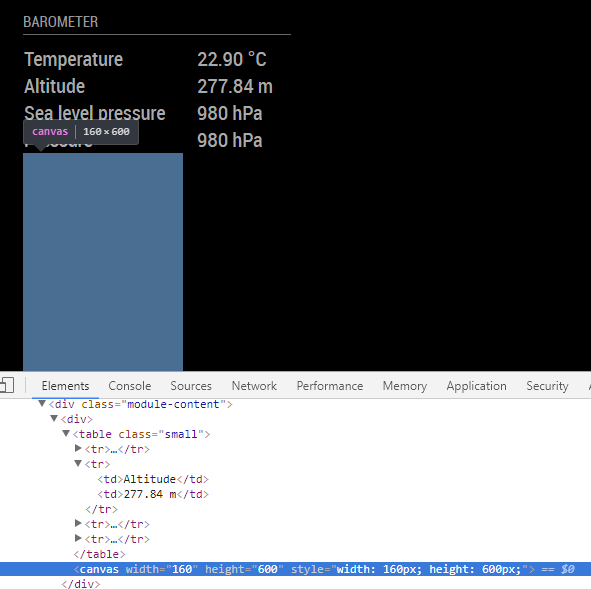
I’m wondering if a parent CSS config or something like could be the reason.
-
It’s good it works!! For the last lib I just forgot to call the draw method.
Hello! It looks like you're interested in this conversation, but you don't have an account yet.
Getting fed up of having to scroll through the same posts each visit? When you register for an account, you'll always come back to exactly where you were before, and choose to be notified of new replies (either via email, or push notification). You'll also be able to save bookmarks and upvote posts to show your appreciation to other community members.
With your input, this post could be even better 💗
Register Login