Read the statement by Michael Teeuw here.
Changing icons of the modules Current Weather and Weather Forecast
-
@philreis sounds great. Thanks!
-
I have add the other icons. But not all are properly positioned yet.
And a there is no icon for fog.
In the next few weeks I will position the icon correctly.
This solution is maybe not the best but it works!Picture:
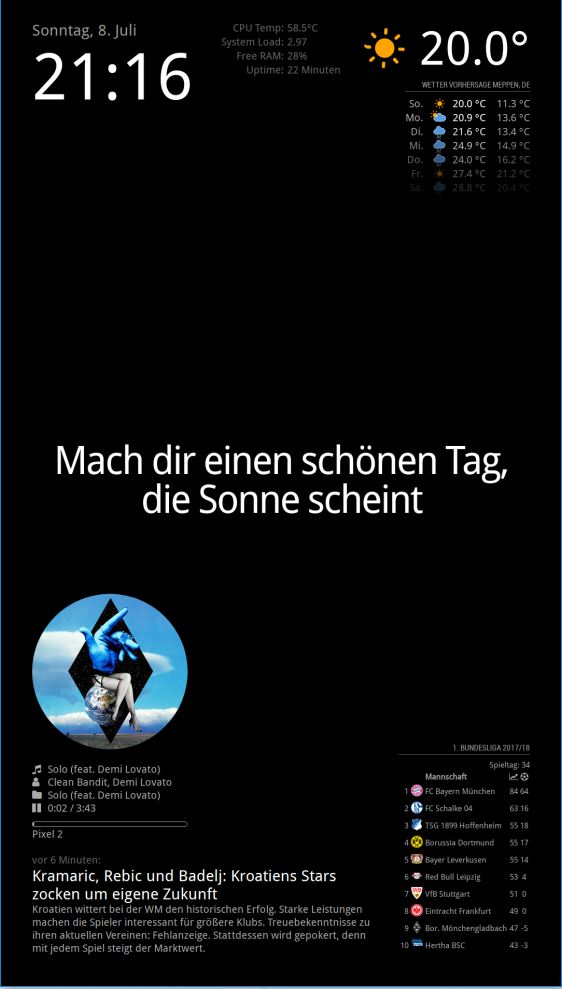
For this icons you need this icon package:
https://www.amcharts.com/free-animated-svg-weather-icons/Copy the icon from the folder “animated” to the folder “MagicMirror/css/icons”
Then you have to add this code to your “custom.css” file.
/* Aenderungen Wetter Icon */
/* Aenderungen aktuelles Wetter */

.currentweather .weathericon {
  position: absolute;
  z-index: 0;
  height: 200px;
  right: 180px;
  margin-top: -65px;
}

.currentweather .wi-day-sunny {
content: url("/css/icons/day.svg");
}

.currentweather .wi-day-cloudy {
content: url("/css/icons/cloudy-day-1.svg");
}

.currentweather .wi-rain {
content: url("/css/icons/rainy-6.svg");
}

.currentweather .wi-night-clear {
content: url("/css/icons/night.svg");
}

.currentweather .wi-night-cloudy {
content: url("/css/icons/cloudy-night-2.svg");
padding-right: 15px;
padding-top: 10px;
}

.currentweather .wi-cloudy {
content: url("/css/icons/cloudy.svg");
}

.currentweather .wi-showers {
content: url("/css/icons/rainy-7.svg");
}

.currentweather .wi-thunderstorm {
content: url("/css/icons/thunder.svg");
}

.currentweather .wi-snow {
content: url("/css/icons/snowy-6.svg");
}

.currentweather .wi-cloudy-windy {
content: url("/css/icons/cloudy-day-3.svg");
}

.currentweather .wi-night-rain {
content: url("/css/icons/rainy-6.svg");
}

.currentweather .wi-night-snow {
content: url("/css/icons/snowy-6.svg");
}

.currentweather .wi-night-thunderstorm {
content: url("/css/icons/thunder.svg");
}

.currentweather .wi-night-showers {
content: url("/css/icons/rainy-7.svg");
}

.currentweather .wi-fog {
content: url("/css/icons/cloudy.svg");
}

.currentweather .wi-night-alt-cloudy-windy {
content: url("/css/icons/cloudy-night-1.svg");
}

/* Aenderungen Wettervorhersage */

.weatherforecast .weathericon {
  position: absolute;
  left: 35px;
  z-index: 1;
  margin-top: -30px;
  height: 60px;
}

.weatherforecast .wi-day-sunny {
content: url("/css/icons/day.svg");
padding-left: 6px;
padding-top: 5px;
height: 50px;
}

.weatherforecast .wi-day-cloudy {
content: url("/css/icons/cloudy-day-1.svg");
}

.weatherforecast .wi-rain {
content: url("/css/icons/rainy-6.svg");
padding-left: 8px;
padding-top: 5px;
height: 45px;
}

.weatherforecast .wi-night-clear {
content: url("/css/icons/night.svg");
}

.weatherforecast .wi-night-cloudy {
content: url("/css/icons/cloudy-night-2.svg");
height: 50px;
padding-left: 5px;
padding-top: 7px;
}

.weatherforecast .wi-cloudy {
content: url("/css/icons/cloudy.svg");
}

.weatherforecast .wi-showers {
content: url("/css/icons/rainy-7.svg");
}

.weatherforecast .wi-thunderstorm {
content: url("/css/icons/thunder.svg");
}

.weatherforecast .wi-snow {
content: url("/css/icons/snowy-6.svg");
}

.weatherforecast .wi-cloudy-windy {
content: url("/css/icons/cloudy-day-3.svg");
height: 45px;
padding-left: 8px;
padding-top: 7px;
}

.weatherforecast .wi-night-rain {
content: url("/css/icons/rainy-6.svg");
padding-left: 8px;
padding-top: 5px;
height: 45px;
}

.weatherforecast .wi-night-snow {
content: url("/css/icons/snowy-6.svg");
}

.weatherforecast .wi-night-thunderstorm {
content: url("/css/icons/thunder.svg");
}

.weatherforecast .wi-night-showers {
content: url("/css/icons/rainy-7.svg");
}

.weatherforecast .wi-fog {
content: url("/css/icons/cloudy.svg");
}

.weatherforecast .wi-night-alt-cloudy-windy {
content: url("/css/icons/cloudy-night-1.svg");
height: 50px;
padding-left: 5px;
padding-top: 7px;
}
As I said not completely finished.
-
@philreis said in Changing icons of the modules Current Weather and Weather Forecast:
https://www.amcharts.com/free-animated-svg-weather-icons/
This looks great so far. I’ll give it a try -
Would be nice to find a free set of animated icons but anything worth having they are charging for sooooooooooooo…
-
@philreis ok got them changed, how did you get rid of the sun rise and sun rise time, along with wind speed, I tried a few custom.css codes but none seem to work
-
@solelo here is my currentweather config:
                {
                        "module": "currentweather",
                        "position": "top_right",
                        "config": {
                                "onlyTemp": "true",
                                "location": "Berlin",
                                "locationID": "1234567890",
                                "appid": "xxxxxxxxxxxxxxxxxxxxxxxxxxxxxxxxxxxxxxxxxx"
                                }
                },
You have to add only “onlyTemp”: “true” to your config.js
-
@solelo You have to create it, naviguate to css folder then execute “mkdir icon”, you’r done.
-
@philreis said in Changing icons of the modules Current Weather and Weather Forecast:
I have add the other icons. But not all are properly positioned yet.
And a there is no icon for fog.
In the next few weeks I will position the icon correctly.
This solution is maybe not the best but it works!Picture:
For this icons you need this icon package:
https://www.amcharts.com/free-animated-svg-weather-icons/Copy the icon from the folder “animated” to the folder “MagicMirror/css/icons”
Then you have to add this code to your “custom.css” file.
/* Aenderungen Wetter Icon */
/* Aenderungen aktuelles Wetter */

.currentweather .weathericon {
  position: absolute;
  z-index: 0;
  height: 200px;
  right: 180px;
  margin-top: -65px;
}

.currentweather .wi-day-sunny {
content: url("/css/icons/day.svg");
}

.currentweather .wi-day-cloudy {
content: url("/css/icons/cloudy-day-1.svg");
}

.currentweather .wi-rain {
content: url("/css/icons/rainy-6.svg");
}

.currentweather .wi-night-clear {
content: url("/css/icons/night.svg");
}

.currentweather .wi-night-cloudy {
content: url("/css/icons/cloudy-night-2.svg");
padding-right: 15px;
padding-top: 10px;
}

.currentweather .wi-cloudy {
content: url("/css/icons/cloudy.svg");
}

.currentweather .wi-showers {
content: url("/css/icons/rainy-7.svg");
}

.currentweather .wi-thunderstorm {
content: url("/css/icons/thunder.svg");
}

.currentweather .wi-snow {
content: url("/css/icons/snowy-6.svg");
}

.currentweather .wi-cloudy-windy {
content: url("/css/icons/cloudy-day-3.svg");
}

.currentweather .wi-night-rain {
content: url("/css/icons/rainy-6.svg");
}

.currentweather .wi-night-snow {
content: url("/css/icons/snowy-6.svg");
}

.currentweather .wi-night-thunderstorm {
content: url("/css/icons/thunder.svg");
}

.currentweather .wi-night-showers {
content: url("/css/icons/rainy-7.svg");
}

.currentweather .wi-fog {
content: url("/css/icons/cloudy.svg");
}

.currentweather .wi-night-alt-cloudy-windy {
content: url("/css/icons/cloudy-night-1.svg");
}

/* Aenderungen Wettervorhersage */

.weatherforecast .weathericon {
  position: absolute;
  left: 35px;
  z-index: 1;
  margin-top: -30px;
  height: 60px;
}

.weatherforecast .wi-day-sunny {
content: url("/css/icons/day.svg");
padding-left: 6px;
padding-top: 5px;
height: 50px;
}

.weatherforecast .wi-day-cloudy {
content: url("/css/icons/cloudy-day-1.svg");
}

.weatherforecast .wi-rain {
content: url("/css/icons/rainy-6.svg");
padding-left: 8px;
padding-top: 5px;
height: 45px;
}

.weatherforecast .wi-night-clear {
content: url("/css/icons/night.svg");
}

.weatherforecast .wi-night-cloudy {
content: url("/css/icons/cloudy-night-2.svg");
height: 50px;
padding-left: 5px;
padding-top: 7px;
}

.weatherforecast .wi-cloudy {
content: url("/css/icons/cloudy.svg");
}

.weatherforecast .wi-showers {
content: url("/css/icons/rainy-7.svg");
}

.weatherforecast .wi-thunderstorm {
content: url("/css/icons/thunder.svg");
}

.weatherforecast .wi-snow {
content: url("/css/icons/snowy-6.svg");
}

.weatherforecast .wi-cloudy-windy {
content: url("/css/icons/cloudy-day-3.svg");
height: 45px;
padding-left: 8px;
padding-top: 7px;
}

.weatherforecast .wi-night-rain {
content: url("/css/icons/rainy-6.svg");
padding-left: 8px;
padding-top: 5px;
height: 45px;
}

.weatherforecast .wi-night-snow {
content: url("/css/icons/snowy-6.svg");
}

.weatherforecast .wi-night-thunderstorm {
content: url("/css/icons/thunder.svg");
}

.weatherforecast .wi-night-showers {
content: url("/css/icons/rainy-7.svg");
}

.weatherforecast .wi-fog {
content: url("/css/icons/cloudy.svg");
}

.weatherforecast .wi-night-alt-cloudy-windy {
content: url("/css/icons/cloudy-night-1.svg");
height: 50px;
padding-left: 5px;
padding-top: 7px;
}
As I said not completely finished.
hey man, thanks a lot! this makes things much easier.
TY for sharing your work :) -
@philreis Thank you for taking the time to show your code! I copied and pasted your code exactly and made sure all of my folders holding the icons are in the right place. My “Current Weather” has the new icon, but for the life of me I cannot get the “Weather Forecast” to show the new icons. Was there another step to get it to work?
-
@philreis Thanks for code !
-
@mmille40 you must copy the icons in the CSS folder (/css/icons/) and add the code to your custom.css only.
But it works only with the standard weatherforecast module.Here is my current config for the custom icon.
/* Aenderungen Wetter Icon */ /* Aenderungen aktuelles Wetter */ .currentweather .weathericon { position: absolute; z-index: 0; height: 200px; right: 180px; margin-top: -65px; } .currentweather .wi-day-sunny { content: url("/css/icons/day.svg"); } .currentweather .wi-day-cloudy { content: url("/css/icons/cloudy-day-1.svg"); } .currentweather .wi-rain { content: url("/css/icons/rainy-6.svg"); } .currentweather .wi-night-clear { content: url("/css/icons/night.svg"); } .currentweather .wi-night-cloudy { content: url("/css/icons/cloudy-night-2.svg"); padding-right: 15px; padding-top: 10px; } .currentweather .wi-cloudy { content: url("/css/icons/cloudy.svg"); } .currentweather .wi-showers { content: url("/css/icons/rainy-7.svg"); } .currentweather .wi-thunderstorm { content: url("/css/icons/thunder.svg"); } .currentweather .wi-snow { content: url("/css/icons/snowy-6.svg"); } .currentweather .wi-cloudy-windy { content: url("/css/icons/cloudy-day-3.svg"); } .currentweather .wi-night-rain { content: url("/css/icons/rainy-6.svg"); } .currentweather .wi-night-snow { content: url("/css/icons/snowy-6.svg"); } .currentweather .wi-night-thunderstorm { content: url("/css/icons/thunder.svg"); } .currentweather .wi-night-showers { content: url("/css/icons/rainy-7.svg"); } .currentweather .wi-fog { content: url("/css/icons/cloudy.svg"); } .currentweather .wi-night-alt-cloudy-windy { content: url("/css/icons/cloudy-night-1.svg"); padding-right: 20px; padding-top: 10px; } /* Aenderungen Wettervorhersage */ .weatherforecast .weathericon { position: absolute; left: 35px; z-index: 1; margin-top: -30px; height: 60px; } .weatherforecast .wi-day-sunny { content: url("/css/icons/day.svg"); padding-left: 6px; padding-top: 5px; height: 50px; } .weatherforecast .wi-day-cloudy { content: url("/css/icons/cloudy-day-1.svg"); height: 45px; padding-left: 8px; padding-top: 10px; } .weatherforecast .wi-rain { content: url("/css/icons/rainy-6.svg"); padding-left: 8px; padding-top: 5px; height: 45px; } .weatherforecast .wi-night-clear { content: url("/css/icons/night.svg"); } .weatherforecast .wi-night-cloudy { content: url("/css/icons/cloudy-night-2.svg"); height: 45px; padding-left: 5px; padding-top: 7px; } .weatherforecast .wi-cloudy { content: url("/css/icons/cloudy.svg"); height: 50px; padding-left: 5px; padding-top: 7px; } .weatherforecast .wi-showers { content: url("/css/icons/rainy-7.svg"); } .weatherforecast .wi-thunderstorm { content: url("/css/icons/thunder.svg"); } .weatherforecast .wi-snow { content: url("/css/icons/snowy-6.svg"); } .weatherforecast .wi-cloudy-windy { content: url("/css/icons/cloudy-day-3.svg"); height: 45px; padding-left: 8px; padding-top: 7px; } .weatherforecast .wi-night-rain { content: url("/css/icons/rainy-6.svg"); padding-left: 8px; padding-top: 5px; height: 45px; } .weatherforecast .wi-night-snow { content: url("/css/icons/snowy-6.svg"); } .weatherforecast .wi-night-thunderstorm { content: url("/css/icons/thunder.svg"); } .weatherforecast .wi-night-showers { content: url("/css/icons/rainy-7.svg"); } .weatherforecast .wi-fog { content: url("/css/icons/cloudy.svg"); } .weatherforecast .wi-night-alt-cloudy-windy { content: url("/css/icons/cloudy-night-1.svg"); height: 50px; padding-left: 5px; padding-top: 7px; } -
@smotx you’re welcome, no problem
-
@philreis I’ll try that out, I’m unsure what you mean by “you must copy the icons in the CSS folder”. Thank you for your response!
-
@philreis wow man it’s beautiful!!! I have a question for you, I’ve been wondering if instead of having an svg it could be done via js and css, like this project here:
https://codepen.io/anon/pen/JmQqOw -
@tagriel i have used svg Icons because it was easier for me.
I can try to make a solution with the CSS Icons which you have linked here. -
@philreis I’m wondering because my raspberry heat goes way up after displaying the new weather icons. I thought it might be bc of the svg files, does it happen to you? (are you using a raspberry?). I also wanted to share something with you, if I don’t have any modules, lets say, on my top_left screen, the current weather module only displays the degree without any icons, and if I add any other module to the top-left screen, then I can see the icons, its pretty strange :( do you happen to know what might be happening? I’ve been reading the code almost line by line trying to find if there is a table or div anywhere missing but I can’t seem to find anything.
-
@tagriel i will test it.
-
Thanks man! I’ve also got a question for you, it’s breaking my head, I’ve given a lot of days of debugging and searching what might be happening but I don’t find an answer.
If I have my currentweather module on top_left alone, there’s no weather icon
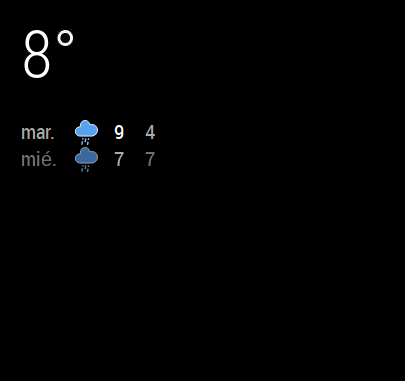
BUT if I put any other module on top_left below my current weather module, I can see the icon :'(
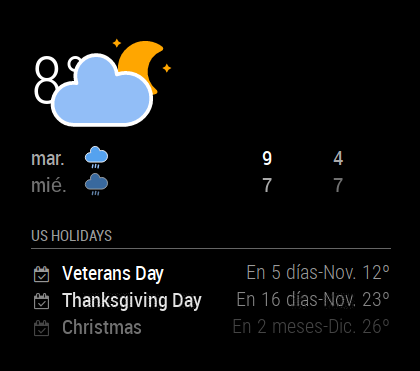
I just don’t understand what I’m doing wrong, do you have any ideas?
Thanks in advance!
-
Hi all,
I just found the issue. Just check there’s height and width on your custom.css
.currentweather .weathericon {
position: absolute;
z-index: 0;
height: 200px;
width: 400px
right: 180px;
margin-top: -65px;
margin-left: 30px;
} -
looks great, thanks so much


Hello! It looks like you're interested in this conversation, but you don't have an account yet.
Getting fed up of having to scroll through the same posts each visit? When you register for an account, you'll always come back to exactly where you were before, and choose to be notified of new replies (either via email, or push notification). You'll also be able to save bookmarks and upvote posts to show your appreciation to other community members.
With your input, this post could be even better 💗
Register Login