Read the statement by Michael Teeuw here.
Changing icons of the modules Current Weather and Weather Forecast
-
@manu85340 can u show us the stuff you added in custom.css
-
Hello @sdetweil and thank you for your response, I follow the lines that I added in the custom folder, I also have the impression that the icon download is not I did a git pull https ://www.amcharts.com/free-animated-svg-weather-icons/
and I put this in the custom:/* Aenderungen Wetter Icon */ /* Aenderungen aktuelles Wetter */ .currentweather .weathericon { position: absolute; z-index: 0; height: 200px; right: 180px; margin-top: -65px; } .currentweather .wi-day-sunny { content: url("/css/icons/day.svg"); } .currentweather .wi-day-cloudy { content: url("/css/icons/cloudy-day-1.svg"); } .currentweather .wi-rain { content: url("/css/icons/rainy-6.svg"); } .currentweather .wi-night-clear { content: url("/css/icons/night.svg"); } .currentweather .wi-night-cloudy { content: url("/css/icons/cloudy-night-2.svg"); padding-right: 15px; padding-top: 10px; } .currentweather .wi-cloudy { content: url("/css/icons/cloudy.svg"); } .currentweather .wi-showers { content: url("/css/icons/rainy-7.svg"); } .currentweather .wi-thunderstorm { content: url("/css/icons/thunder.svg"); } .currentweather .wi-snow { content: url("/css/icons/snowy-6.svg"); } .currentweather .wi-cloudy-windy { content: url("/css/icons/cloudy-day-3.svg"); } .currentweather .wi-night-rain { content: url("/css/icons/rainy-6.svg"); } .currentweather .wi-night-snow { content: url("/css/icons/snowy-6.svg"); } .currentweather .wi-night-thunderstorm { content: url("/css/icons/thunder.svg"); } .currentweather .wi-night-showers { content: url("/css/icons/rainy-7.svg"); } .currentweather .wi-fog { content: url("/css/icons/cloudy.svg"); } .currentweather .wi-night-alt-cloudy-windy { content: url("/css/icons/cloudy-night-1.svg"); } /* Aenderungen Wettervorhersage */ .weatherforecast .weathericon { position: absolute; left: 35px; z-index: 1; margin-top: -30px; height: 60px; } .weatherforecast .wi-day-sunny { content: url("/css/icons/day.svg"); padding-left: 6px; padding-top: 5px; height: 50px; } .weatherforecast .wi-day-cloudy { content: url("/css/icons/cloudy-day-1.svg"); } .weatherforecast .wi-rain { content: url("/css/icons/rainy-6.svg"); padding-left: 8px; padding-top: 5px; height: 45px; } .weatherforecast .wi-night-clear { content: url("/css/icons/night.svg"); } .weatherforecast .wi-night-cloudy { content: url("/css/icons/cloudy-night-2.svg"); height: 50px; padding-left: 5px; padding-top: 7px; } .weatherforecast .wi-cloudy { content: url("/css/icons/cloudy.svg"); } .weatherforecast .wi-showers { content: url("/css/icons/rainy-7.svg"); } .weatherforecast .wi-thunderstorm { content: url("/css/icons/thunder.svg"); } .weatherforecast .wi-snow { content: url("/css/icons/snowy-6.svg"); } .weatherforecast .wi-cloudy-windy { content: url("/css/icons/cloudy-day-3.svg"); height: 45px; padding-left: 8px; padding-top: 7px; } .weatherforecast .wi-night-rain { content: url("/css/icons/rainy-6.svg"); padding-left: 8px; padding-top: 5px; height: 45px; } .weatherforecast .wi-night-snow { content: url("/css/icons/snowy-6.svg"); } .weatherforecast .wi-night-thunderstorm { content: url("/css/icons/thunder.svg"); } .weatherforecast .wi-night-showers { content: url("/css/icons/rainy-7.svg"); } .weatherforecast .wi-fog { content: url("/css/icons/cloudy.svg"); } .weatherforecast .wi-night-alt-cloudy-windy { content: url("/css/icons/cloudy-night-1.svg"); height: 50px; padding-left: 5px; padding-top: 7px; } -
Sorry si not a « git pull » but a « git clone »
-
@manu85340 currentweather and weatherforecast were old modules no longer shipped.
so the class prefix won’t work.
I’m on my phone now. so it’s slow to figure out what it should be…
I would open the developers window and see what the class names used are
.see here for how to use the dev window -
@manu85340 change all the
. currentweather
and
. weatherforecastto
.weather -
@sdetweil thank you for your answer, I am in France and with the time difference I will try this tomorrow, thank you for your help
-
@sdetweil ello I tried to do what you told me but when I put these lines in the custom file I no longer have any icons at all, to summarize the situation I put the copy of the files that I have on the MM folder:
1 file with the “icons” folder that I created with an icons mkdir
2 the file with the animated icons
3 my ms.config for the weather part
4 the modified file (as you asked me)
I’m sorry to bother you but I’m lost and your help is precious
thanks in advance
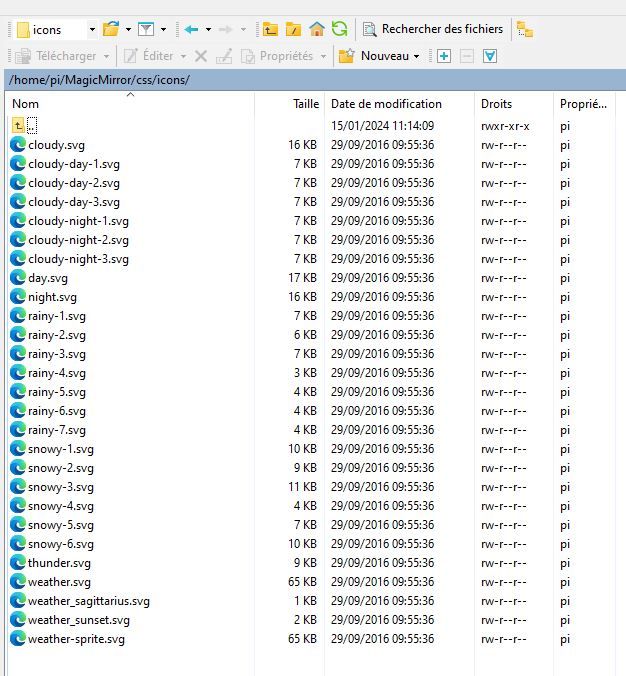
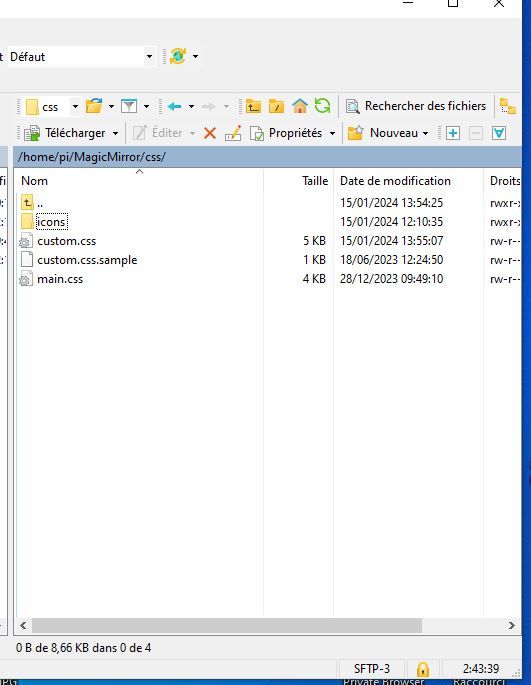
config.js :
{
			disabled: false,
			module: "weather",
			position: "top_right",
			header: "Meteo Ile d'Olonne",
			config: {
				weatherProvider: "openweathermap",
				type: "current",
				location: "Olonne-sur-Mer,France",
				locationID: "2989572", //ID from http://bulk.openweathermap.org/sample/city.list.json.gz; unzip the gz file and find your city
				apiKey: "	XXXXXXXXXXXXXXXXXXXXXXXXX"
			}
		},


		{
			disabled: false,
			module: "weather",
			position: "top_right",

			header: "Meteo",
			config: {
				weatherProvider: "openweathermap",
				type: "forecast",
				location: "Olonne-sur-Mer,France",
				locationID: "2989572", //ID from http://bulk.openweathermap.org/sample/city.list.json.gz; unzip the gz file and find your city
				apiKey: "XXXXXXXXXXXXXXXXXXXXXXXXXXX"
			}
		},
css custom:
/* Aenderungen Wetter Icon / / Aenderungen aktuelles Wetter */ .weather .weathericon { position: absolute; z-index: 0; height: 200px; right: 180px; margin-top: -65px; } .weather .wi-day-sunny { content: url(“/css/icons/day.svg”); } .weather .wi-day-cloudy { content: url(“/css/icons/cloudy-day-1.svg”); } .weather .wi-rain { content: url(“/css/icons/rainy-6.svg”); } .weather .wi-night-clear { content: url(“/css/icons/night.svg”); } .weather .wi-night-cloudy { content: url(“/css/icons/cloudy-night-2.svg”); padding-right: 15px; padding-top: 10px; } .weather .wi-cloudy { content: url(“/css/icons/cloudy.svg”); } .weather .wi-showers { content: url(“/css/icons/rainy-7.svg”); } .weather .wi-thunderstorm { content: url(“/css/icons/thunder.svg”); } .weather .wi-snow { content: url(“/css/icons/snowy-6.svg”); } .weather .wi-cloudy-windy { content: url(“/css/icons/cloudy-day-3.svg”); } .weather .wi-night-rain { content: url(“/css/icons/rainy-6.svg”); } .weather .wi-night-snow { content: url(“/css/icons/snowy-6.svg”); } .weather .wi-night-thunderstorm { content: url(“/css/icons/thunder.svg”); } .weather .wi-night-showers { content: url(“/css/icons/rainy-7.svg”); } .weather .wi-fog { content: url(“/css/icons/cloudy.svg”); } .weather .wi-night-alt-cloudy-windy { content: url(“/css/icons/cloudy-night-1.svg”); } /* Aenderungen Wettervorhersage */ .weather .weathericon { position: absolute; left: 35px; z-index: 1; margin-top: -30px; height: 60px; } .weather .wi-day-sunny { content: url(“/css/icons/day.svg”); padding-left: 6px; padding-top: 5px; height: 50px; } .weather .wi-day-cloudy { content: url(“/css/icons/cloudy-day-1.svg”); } .weather .wi-rain { content: url(“/css/icons/rainy-6.svg”); padding-left: 8px; padding-top: 5px; height: 45px; } .weather .wi-night-clear { content: url(“/css/icons/night.svg”); } .weather .wi-night-cloudy { content: url(“/css/icons/cloudy-night-2.svg”); height: 50px; padding-left: 5px; padding-top: 7px; } .weather .wi-cloudy { content: url(“/css/icons/cloudy.svg”); } .weather .wi-showers { content: url(“/css/icons/rainy-7.svg”); } .weather .wi-thunderstorm { content: url(“/css/icons/thunder.svg”); } .weather .wi-snow { content: url(“/css/icons/snowy-6.svg”); } .weather .wi-cloudy-windy { content: url(“/css/icons/cloudy-day-3.svg”); height: 45px; padding-left: 8px; padding-top: 7px; } .weather .wi-night-rain { content: url(“/css/icons/rainy-6.svg”); padding-left: 8px; padding-top: 5px; height: 45px; } .weather .wi-night-snow { content: url(“/css/icons/snowy-6.svg”); } .weather .wi-night-thunderstorm { content: url(“/css/icons/thunder.svg”); } .weather .wi-night-showers { content: url(“/css/icons/rainy-7.svg”); } .weather .wi-fog { content: url(“/css/icons/cloudy.svg”); } .weather .wi-night-alt-cloudy-windy { content: url(“/css/icons/cloudy-night-1.svg”); height: 50px; padding-left: 5px; padding-top: 7px; } -
@manu85340 said in Changing icons of the modules Current Weather and Weather Forecast:
“/css/icons/day.svg”
when I downloaded and unzipped the icons, they were in the css/icons/static folder
BUT make sure your " marks are vertical , not leaning
when I corrected them to vertical it worked , yoiu can see they were picked up from the custom.css
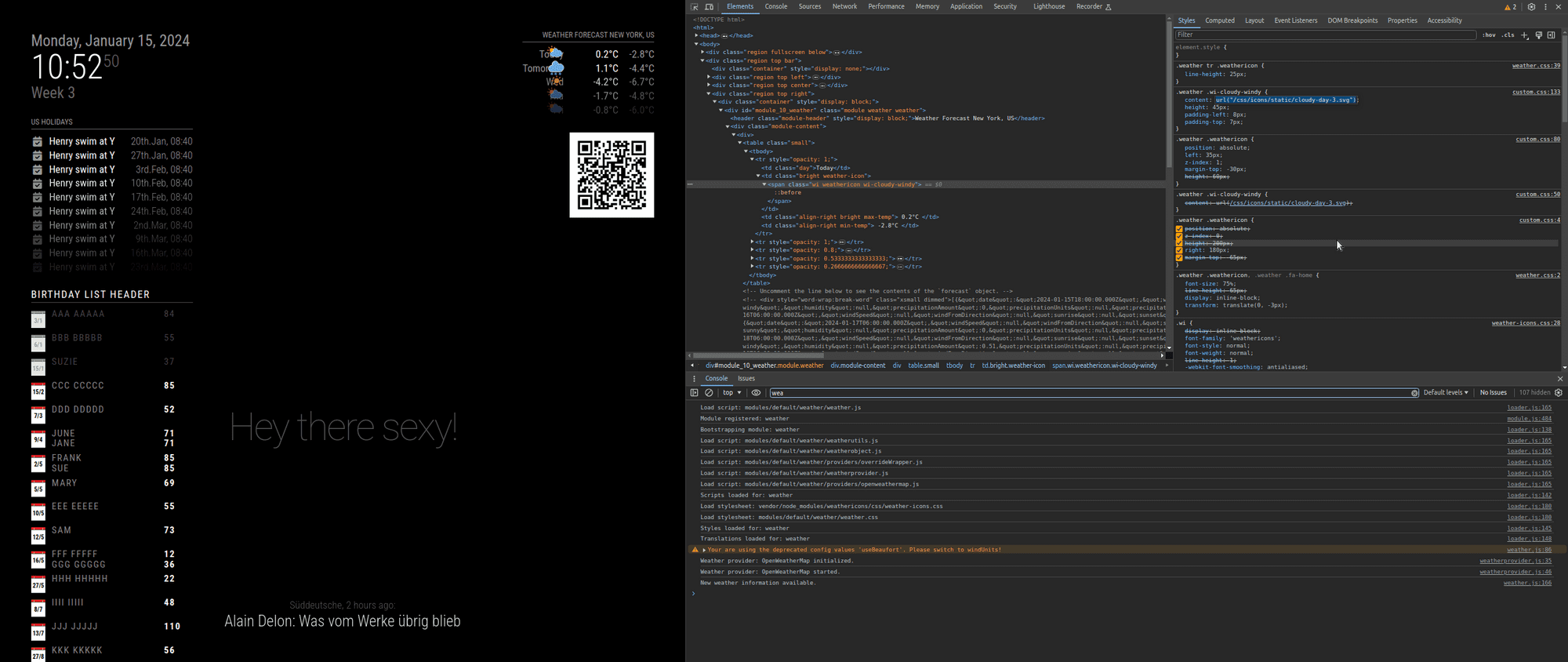
also, for all config or css info posted, please use the code block wrapper
paste the text into the editor
select all the text you pasted
hit the button </> -
@sdetweil thank you I will try, even if I admit that I have not understood everything, I will keep you informed of my progress, thank you again for your help
-
@sdetweil hello, I waited this morning to read your response and have clear ideas, but I do not have the level of knowledge required to do what you are asking me :-( , I have never used "code block wrapper " etc. and I have never coded, you are really very nice but this is beyond my skills, I managed to install the MM on my raspberry pi 3b+, I know how to install modules from github, make some adaptations in the custom css file by following tutorials but my skills stop there, initially I just wanted to change the icons of the weather module, the module is very good because the icons are not very pretty but I realize that it is not is not as simple as I thought, I am really sorry to have wasted your time and I thank you again for your patience and your sharing of knowledge, I have the temperament of a winner but in this specific case I reach my limits :-)
-
@Manu85 it’s ok, none of us knew much when we started. so take your time.
to use a code block in these messages
-
paste in your text (like from config.js)
-
then select all that text
-
and then push the button above the editor that looks like </>
I copied your pasted text into my custom.css
and the double quote marks became curved.
this is a special word processing quote mark, which is different that text mode quote mark
css needs the text type, straight up and down
(this is because of the lack of the code block wrapper)this prevented the css from being processed correctly
-
-
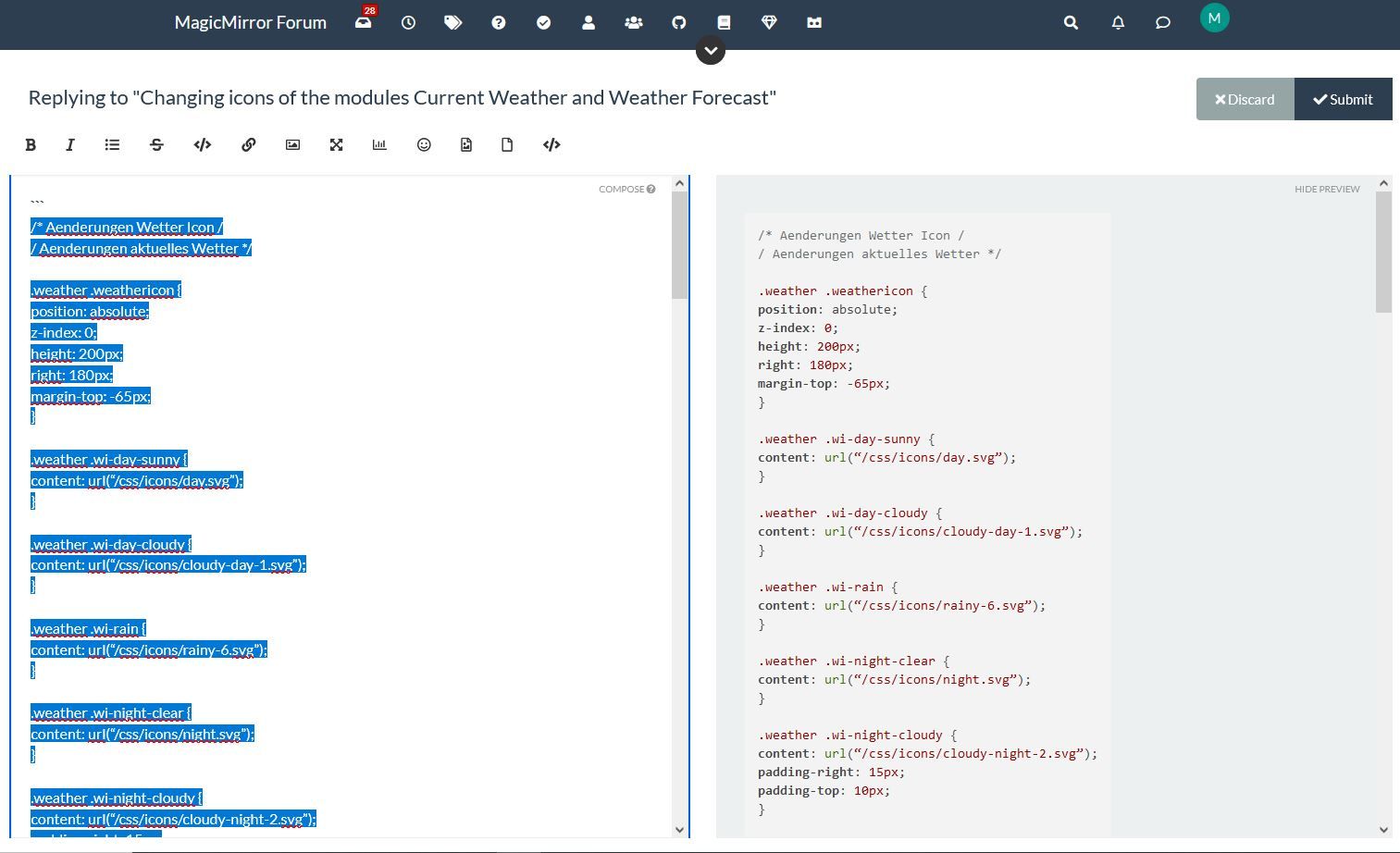
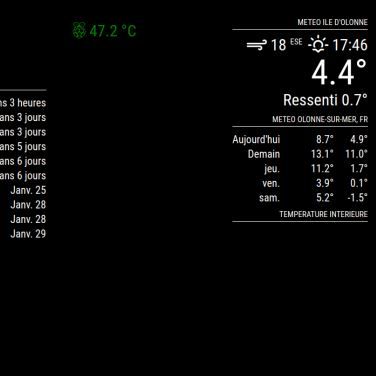
@sdetweil thank you for your patience and for your help, I copied all the lines for the custom css and I pasted it into the “site text editor” sorry for the terms but they are probably not good, then I selected the text, I pressed the </> button and on the other window I had the modified text (see screen copy) then I copied this new text and I copied it into the custom css and the original weather icons have disappeared but I don’t have any new icons, see the other screenshot, I will get there thanks to you :-)
-
@Manu85 the code block wrapper only matters here in the forums.
don’t use it anywhere else
I just wanted to tell you if you copied the css info from another place, to examine the shape of the double quotes. if they are curved
“
and not straight"then this will cause problems in the css file, it did for me.
-
@sdetweil I did the manipulation on this forum and the text that I copied into my custom css has this form:
.weather .wi-day-sunny {
content: url(“/css/icons/day.svg”);
} -
@Manu85 ok. if you zoom in on the double quotes in your last post, you will see they are curved
-
@sdetweil exactly right, but I no longer have weather icons :beaming_face_with_smiling_eyes:
-
@Manu85 show me a couple entries from you custom.css now
remember to use the code block
and the icons ARE in the css/icons folder, correct?
mine are in css/icons/static , as I unzipped the zip file from your link into the css/icons folder.weather .wi-day-sunny { content: url("/css/icons/static/day.svg"); } .weather .wi-day-cloudy { content: url("/css/icons/static/cloudy-day-1.svg"); } -
@sdetweil dans mon custom css j’ai fait ces entrées par exemple (je ne sais pas si c’est ce que vous voulez…):
/* * SONDE DHT 22 temperature interieur */ #dht_temp { font-size: 40px; /* * TEMPERATURE CPU */ } #pi_temp { font-size: 30px; } /* * CALENDRIER ICONES AGENDA */ .fa.fa-male { color: #2B60DE; /* Dodger Blue */ } .fa.fa-birthday-cake { color: #ff0000; /* Red */ } .fa.fa-trash-o { color: #00FF00; /* Green */ } .fa.fa-calendar { color: #F660AB; /* Hot Pink */ -
@Manu85 well, I meant the css info for the icons for weather
-
@sdetweil ah ok here are the entries in my custom css file for the weather, is this what you want?
.weather .wi-day-sunny {
content: url(“/css/icons/day.svg”);
}

.weather .wi-day-cloudy {
content: url(“/css/icons/cloudy-day-1.svg”);
}

.weather .wi-rain {
content: url(“/css/icons/rainy-6.svg”);
}

.weather .wi-night-clear {
content: url(“/css/icons/night.svg”);
}

.weather .wi-night-cloudy {
content: url(“/css/icons/cloudy-night-2.svg”);
padding-right: 15px;
padding-top: 10px;
}

.weather .wi-cloudy {
content: url(“/css/icons/cloudy.svg”);
}

.weather .wi-showers {
content: url(“/css/icons/rainy-7.svg”);
}

.weather .wi-thunderstorm {
content: url(“/css/icons/thunder.svg”);
}

.weather .wi-snow {
content: url(“/css/icons/snowy-6.svg”);
}

.weather .wi-cloudy-windy {
content: url(“/css/icons/cloudy-day-3.svg”);
}

.weather .wi-night-rain {
content: url(“/css/icons/rainy-6.svg”);
}

.weather .wi-night-snow {
content: url(“/css/icons/snowy-6.svg”);
}

.weather .wi-night-thunderstorm {
content: url(“/css/icons/thunder.svg”);
}

.weather .wi-night-showers {
content: url(“/css/icons/rainy-7.svg”);
}

.weather .wi-fog {
content: url(“/css/icons/cloudy.svg”);
}

.weather .wi-night-alt-cloudy-windy {
content: url(“/css/icons/cloudy-night-1.svg”);
}

/* Aenderungen Wettervorhersage */

.weather .weathericon {
position: absolute;
left: 35px;
z-index: 1;
margin-top: -30px;
height: 60px;
}

.weather .wi-day-sunny {
content: url(“/css/icons/day.svg”);
padding-left: 6px;
padding-top: 5px;
height: 50px;
}

.weather .wi-day-cloudy {
content: url(“/css/icons/cloudy-day-1.svg”);
}

.weather .wi-rain {
content: url(“/css/icons/rainy-6.svg”);
padding-left: 8px;
padding-top: 5px;
height: 45px;
}

.weather .wi-night-clear {
content: url(“/css/icons/night.svg”);
}

.weather .wi-night-cloudy {
content: url(“/css/icons/cloudy-night-2.svg”);
height: 50px;
padding-left: 5px;
padding-top: 7px;
}

.weather .wi-cloudy {
content: url(“/css/icons/cloudy.svg”);
}

.weather .wi-showers {
content: url(“/css/icons/rainy-7.svg”);
}

.weather .wi-thunderstorm {
content: url(“/css/icons/thunder.svg”);
}

.weather .wi-snow {
content: url(“/css/icons/snowy-6.svg”);
}

.weather .wi-cloudy-windy {
content: url(“/css/icons/cloudy-day-3.svg”);
height: 45px;
padding-left: 8px;
padding-top: 7px;
}

.weather .wi-night-rain {
content: url(“/css/icons/rainy-6.svg”);
padding-left: 8px;
padding-top: 5px;
height: 45px;
}

.weather .wi-night-snow {
content: url(“/css/icons/snowy-6.svg”);
}

.weather .wi-night-thunderstorm {
content: url(“/css/icons/thunder.svg”);
}

.weather .wi-night-showers {
content: url(“/css/icons/rainy-7.svg”);
}

.weather .wi-fog {
content: url(“/css/icons/cloudy.svg”);
}

.weather .wi-night-alt-cloudy-windy {
content: url(“/css/icons/cloudy-night-1.svg”);
height: 50px;
padding-left: 5px;
padding-top: 7px;
}
Hello! It looks like you're interested in this conversation, but you don't have an account yet.
Getting fed up of having to scroll through the same posts each visit? When you register for an account, you'll always come back to exactly where you were before, and choose to be notified of new replies (either via email, or push notification). You'll also be able to save bookmarks and upvote posts to show your appreciation to other community members.
With your input, this post could be even better 💗
Register Login