Read the statement by Michael Teeuw here.
MMM-voice
-
Hmm, I too am getting the ‘Error’ mic icon message, once it finishes its initialisation phase when the mirror starts up.
I’m started in dev mode - both the web and terminal consoles look clean - the last report I have in the terminal is 'MMM-voice: Starting pocketsphinx, so I don’t know if I should expect anything further messages in that console.
I’ve taken a look in the MMM-voice/error.log which contains the value ‘127’. It’s repeatable - if i stop the mirror, remove the error log and restart, I get the same results. As a test I’ve tried altering the microphone value in the config.js from it’s initially correct value of 1 - It doesn’t affect the error, which leads me to believe it may not be a hardware issue(?)
It’s such a shame - all steps reported to have completed okay, the microphone was detected - nothing looks to have been out of the ordinary.
Is there anything else I can do to test or anywhere else I can look, before I try flattening the SD card and reinstalling? -
progress of a sort…
tried a sudo apt-get update, followed by a rebootsame clean startups but between the ‘initialising’ and ‘error’ states I briefly get a ‘no mode found’ and the 127 error is gone - now I just get a 1 returned in the error log
-
@darrene no Mode found is the expected behaviour, you can also Enable debug:true this will give You an debug log
-
@strawberry-3.141 Thanks for following this up. That debug switch is a handy one to know :)
I’m now running with debug enabled and pouring over the debug log. Forcing a revisit of that portion of the config.js was the best thing I could have done - I realised that I’d left my Microphone testing value set incorrectly before catching some sleep.
Now that I’ve reset that to ‘1’ - my actual microphone value, as reported by the installer, I no longer get an error.log generated or the onscreen error icon - just the No Mode Detected which is the resting state without debug and an additional ‘undefined’ with debug
This leads me to believe my problem is a Raspian/hardware one, rather than with the module - If I go into the audio device settings in the desktop, I can see my Logitech USB microphone (ALSA mixer) in the selectable sound cards but am unable to make it the default, which stays as bcm2835 ALSA.
If I try arecord to test the mic from the terminal, I get
“arecord: main:682: audio open error No such file or directory”however, if I use 'arecord -D plughw:1,0 test.wav
I get a great wav file recording. Could this be related in some way? I don’t know enough about the code to poke around for the microphone details at this level, to figure out how the installer maps the input device values
-
@darrene you’re all good. just try to say your keyword and voice. then you switch from no mode detected to voice mode
i will propably change that message because you’re not the first one who is confused about no mode detected
Everyone can send me private messages to debug this module when he/she has a problem, we will then post the result here for everyone.
To sum up from the private messages I receive, I see a lot of people having issues, because they run the installer multiple times. Make sure you
remove ~/MagicMirror/modules/MMM-voice/node_modules, before you run the installer script again. -
Thank you! All good - I’m now gong through the words.json - fabulous!
-
Hi,
At present I try to install the MMM-voice module. I have everything done like it is written in the readme file on Github. Everthing is fine till step3 (installing Pocketsphinx. There is this error:
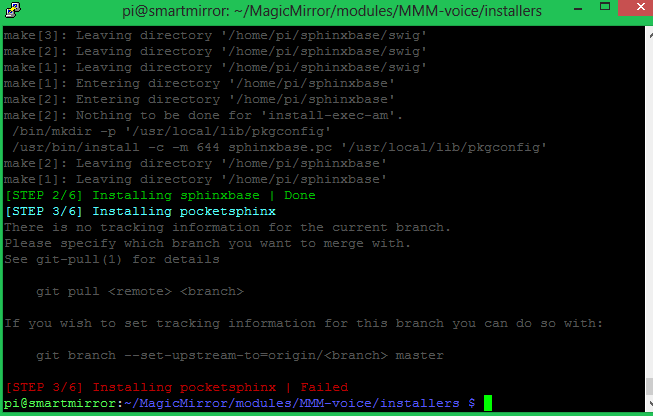 In a second try I try what @Nonamexp say (…I’ve tried the command ‘sudo chmod 777 /opt /home/pi/MagicMirror/modules/MMM-voice’ and than ‘bash dependencies.sh’ and it works!) BUT that didn’t work by me. Can someone explain me what happend and what I could do?
Greets gismo
-
@gismo2006 this sounds for me that you run the installer more than once right? There is a condition if the directory pocketsphinx exists do git pull and it seems that the branch doesn’t exist anymore. so try to delete the pocketsphinx directory and the node_modules directory in MMM-voice if you have one
-
@strawberry-3-141 Hi, sorry, but no :-) What Happyend at my First try. Then I try what @Nonamexp post and then I Try your installer again… there are the same problem.
But just in this moment durring I write this, I think you wasn`t wrong. I remember I have tested some days ago Alexander and Steven Hicksons Suite. And there I have to install it.
I will test, what you write today evening and will post an answer.
Thank you for your helping :-)
-
@gismo2006 delete pocketsphinx, sphinxbase and ~/MagicMirror/modules/MMM-voice/node_modules directories and run the installer again, otherwise write me a private message and we will get this running
-
This post is deleted! -
@strawberry-3-141
Hi,
I have tested your post an I will say Thnks!!! It has install correctly… Now i will test the module.But I have a little question, too. On Github I see some translation files for Englich and German. But how can I use your module in German? Have I antything to chance in module code?
greets gismo
-
@gismo2006 it’s not supported to recognize other language commands than english, just the messages are translated
-
@strawberry-3-141
Ok, no problem…
I have tested this module now for a several time. And I do not know what is wrong but I decieded to didn’t use it at the moment.
The install progress was fine, the config file was fine and the mirrror started. everything is displayed fine. But the behaviuor is the problem. Sometimes it didn’t regonize anything. Sometimes it will do at first nothing and then some minuts later suddenly the module, for example “hide modules”. Oh and in the error log was only 11111 written
Greets gismo
-
@gismo2006 here are some tips to improve the experience:
- it’s necessary to have a proper power supply, in order to decrease the response time, otherwise the cpu will be underclocked and this is contra productive for an cpu intensive task (for rpi 3 it’s recommended to use at least 2.5A for normal usage, I’m using 3A)
- look into the MMM-voice.dic file how you need to spell the words correctly, the language model is based for native speakers and dialects can lead to false positives.
- a cheap microphone can lead to false positive as well, by sending an unclean audio stream.
- speaking louder gave me better results.
- pocketsphinx also tries to match background noise to words, so short words like on, off, one, etc. are getting recognized without saying anything
- so those false positives get spread within your commands and will lead to unwanted actions e.g. you say
MAGIC MIRROR VOICEto enter the voice mode it propably recognizesMAGIC ON MIRROR VOICEand then the mirror wont start because the keyword must be recognized together without any other word between or it recognizesMAGIC MIRROR OF VOICEand then it will not switch to mode voice because the mode has to be right after the keyword or sentence - the error log gets created from pocketsphinx, so those numbers are not from my side
- in order to test what the mirror detects, you can use the config option
debug: truebut don’t use this in production it will generate a huge logfile over time
-
@strawberry-3-141 Thank you for your tipps. I didn’t mean anything angy. I know it is a hard work to code something like that. And I really happy and thankfull that there a coder like you which share it whit the community. And helping if there are any questions. :-)
I will test aggain at he few next day, and im sure there are somme new questions.
Greets gismo
-
I’ve the next problem: On the Mirror shows the message ‘Error’ , ‘No Moduls identified’.
in the Error Log: Error: spawn pocketsphinx_continuous ENOENT-2help me pls ;(
his problem was that somehow his
~/.bashrcfile got overwritten and then he missed the path to pocketsphinx files -
Hmm… getting errors when trying to install the dependencies … can you advise is this known?
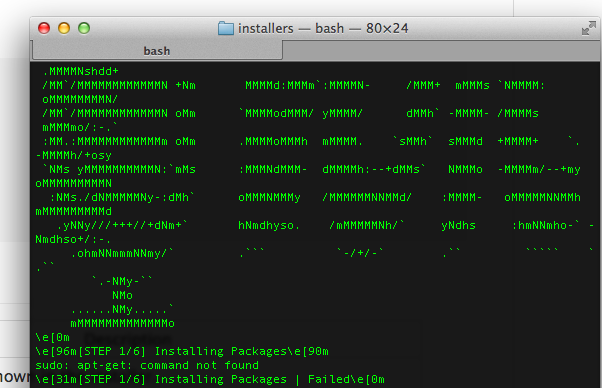
-
@wjdw87 Looks like you’er using a Mac. Not sure about Mac has a Package Manager as apt-get, the installer was Designed for raspbian
-
ah… yes using mac… (will move over to windows based later, but just getting all the customisation out of the way on here and learning how it all works before doing additional functions etc)… anyway… i take it there is no ‘easy/guided way to install on here?’
Thanks @strawberry-3-141

Hello! It looks like you're interested in this conversation, but you don't have an account yet.
Getting fed up of having to scroll through the same posts each visit? When you register for an account, you'll always come back to exactly where you were before, and choose to be notified of new replies (either via email, or push notification). You'll also be able to save bookmarks and upvote posts to show your appreciation to other community members.
With your input, this post could be even better 💗
Register Login