Read the statement by Michael Teeuw here.
MMM-AssistantMk2
-
@jomwells @Module-Developers
Did anyone figure out how to add led or sound, like a beep to show when google is listening and speaking. I dont think I’m good enough with linux to do this without a tutorial. Is it something that needs to be implemented in the module or can i learn how to do it from a simple aiy kit? -
@teitlebot
https://github.com/eouia/MMM-AssistantMk2#outgoing-notifications-as-assistant-response
Basic notifications will be emitted by its status.
And you can modify module for catching the status to do your specific job.
See https://github.com/eouia/MMM-AssistantMk2/blob/93d7eca6a3995987554d8deb4f4cd76b44e3f096/MMM-AssistantMk2.js#L264
In.socketNotificationReceived(), you can catch each Assistant status.Anyway, I’m considering to add simple ding-dong waves for convenience in next patch.
-
@sean I had to leave the assistant action part of the code out because it was causing errors in my config file.
-
Hi, I just tried installing MMM-AssistantMk2 by following the instruction. After saving the config.js (use default configuration) nothing shows up and all I can see is a black screen but a movable mouse pointer. I can’t even quit the mirror. I have no idea what do to now, do I have to start over from the very beginning? :loudly_crying_face:

-
@cola0927 many of us had this issue and thats why we run it in servomode
-
@Module-Developers Why do you set this up as a smart TV. Why cant it be set up as a google assistant with video like the new displays they sell now?
-
@teitlebot oh, ok, thanks. It’s my first mirror, no relative experience before. I’ll be more careful next time.
-
Dying to use this module, but im stuck on node auth_and_test.js i keep getting the GLIBBCXX_3.4.21 not found error. tried the solutions found on the module page and a few others spots. but to no avail. any suggestions?
-
@cola0927 said in MMM-AssistantMk2 & MMM-GAction:
Hi, I just tried installing MMM-AssistantMk2 by following the instruction. After saving the config.js (use default configuration) nothing shows up and all I can see is a black screen but a movable mouse pointer. I can’t even quit the mirror. I have no idea what do to now, do I have to start over from the very beginning? :loudly_crying_face:
Show me your error logs. there could be many reasons about that symptom.
-
@teitlebot said in MMM-AssistantMk2 & MMM-GAction:
@Module-Developers Why do you set this up as a smart TV. Why cant it be set up as a google assistant with video like the new displays they sell now?
Is there
a google assistant with videoat the setup moment? Wasn’t it on my development. If it exists, go ahead sure. -
dude try a: pm2 stop mm while ssh and then check your config. you are never stranded lol
-
@mirror-master said in MMM-AssistantMk2 & MMM-GAction:
Dying to use this module, but im stuck on node auth_and_test.js i keep getting the GLIBBCXX_3.4.21 not found error. tried the solutions found on the module page and a few others spots. but to no avail. any suggestions?
GLIBCXX problem shows your RPI doesn’t be running on
Raspbian Stretchor proper dev-modules are not installed. My suggestion is… to useStretch -
upgrading now in hopes. thanks my friend. i have several pi’s with diff versions . when i was paranoid and less exp’d i was cloning my pie config, but forgot that one was jessie , one is stretch and another is whatever the hell i installed. Im pretty sure this is the older OS. Thanks again
-
@sean Keyboard input or mouse clicking had no effect, maybe because I missed the “rebuild binaries” step.
So I started over again today and this time the microphone icon appeared after MMM-AssistantMk2 was installed, but couldn’t detect the voice, even after installed MMM-Hotword and MMM-NotificationTrigger.
Here is my config.js, basically used default values.
{
                        module: "MMM-AssistantMk2",
                        position: "lower_third",
                        config: {
                        }
                },
                {
                        module: "MMM-Hotword",
                        config: {
                        }
                },
                {
                        module: "MMM-NotificationTrigger",
                        config: {
                          triggers:[
                            {
                             trigger: "ASSISTANT_ACTION",
                             triggerSenderFilter: (sender) => {
                               console.log(sender)
                               if (sender.name == 'MMM-AssistantMk2') {
                                 return true
                               } else {
                                 return false
                               }
                              },
                             triggerPayloadFilter: (payload) => {
                               console.log(payload)
                               return true
                             },
                             fires: [
                               {
                                 fire:"SHOW_ALERT",
                                 payload: (payload) => {
                                   return {
                                     type: "notification",
                                     title: payload.type,
                                     message: payload.command
                                   }
                                 },
                               },
                             ],
                           },
                         ]
                       }

                },
Could you please let me know which part(s) I should modify? Thank you!
-
@cola0927
YourMMM-NotificationTriggerconfiguration is wrong.{ module: "MMM-NotificationTrigger", config: { triggers:[ { trigger: "HOTWORD_DETECTED", fires: [ { fire:"HOTWORD_PAUSE", }, { fire:"ASSISTANT_ACTIVATE", delay: 200, payload: function(payload) { return { "profile": payload.hotword } } }, ] }, { trigger: "ASSISTANT_DEACTIVATED", fires: [ { fire:"HOTWORD_RESUME" } ] }, ] } },Try this.
-
@sean Thank you for your prompt reply. I replaced my MMM-NotificationTrigger configuration, but still not working.
In the terminal, it shows that
assistant ready
Conversation Error: { Error: 14 UNAVAILABLE: Service unavailable.
    at Object.exports.createStatusError (/home/pi/MagicMirror/modules/MMM-AssistantMk2/node_modules/grpc/src/common.js:87:15)
    at ClientDuplexStream._emitStatusIfDone (/home/pi/MagicMirror/modules/MMM-AssistantMk2/node_modules/grpc/src/client.js:235:26)
    at ClientDuplexStream._receiveStatus (/home/pi/MagicMirror/modules/MMM-AssistantMk2/node_modules/grpc/src/client.js:213:8)
    at Object.onReceiveStatus (/home/pi/MagicMirror/modules/MMM-AssistantMk2/node_modules/grpc/src/client_interceptors.js:1290:15)
    at InterceptingListener._callNext (/home/pi/MagicMirror/modules/MMM-AssistantMk2/node_modules/grpc/src/client_interceptors.js:564:42)
    at InterceptingListener.onReceiveStatus (/home/pi/MagicMirror/modules/MMM-AssistantMk2/node_modules/grpc/src/client_interceptors.js:614:8)
    at /home/pi/MagicMirror/modules/MMM-AssistantMk2/node_modules/grpc/src/client_interceptors.js:1110:18
  code: 14,
  metadata: Metadata { _internal_repr: {} },
  details: 'Service unavailable.' }
Does it mean that something is incorrect in MMM-AssistantMk2?
-
@cola0927
I think that might be the same issue with this;
https://github.com/eouia/MMM-AssistantMk2/issues/16 -
@cola0927
Or most of those cases are caused by your mic setup. Check your configuration whetherrecord.devicehas a proper name. (If your mic is default device, leave that field asnullbut when your mic has another name likeplughw:1, set that field with it. -
@sean After I changed the device name in both MMM-AssistantMk2 and MMM-Hotword, the module worked partially. I had to hit microphone icon to let its start listen to me, but that was a one-time response.
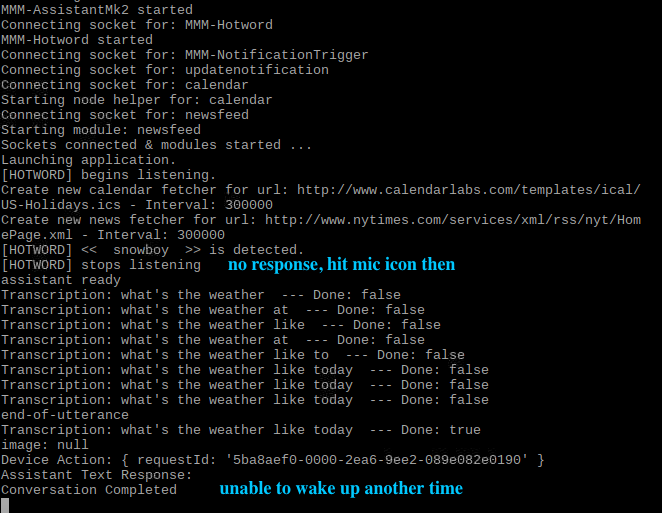
Do you have any idea what the problem is? Thank you so much. -
@cola0927
Show me your configuration related withMMM-NotificationTrigger. I think MMM-NotificationTrigger cannot relay the connection between Hotword and Assistant.
Hello! It looks like you're interested in this conversation, but you don't have an account yet.
Getting fed up of having to scroll through the same posts each visit? When you register for an account, you'll always come back to exactly where you were before, and choose to be notified of new replies (either via email, or push notification). You'll also be able to save bookmarks and upvote posts to show your appreciation to other community members.
With your input, this post could be even better 💗
Register Login