MagicMirror Forum
    • Recent
    • Tags
    • Unsolved
    • Solved
    • MagicMirror² Repository
    • Documentation
    • 3rd-Party-Modules
    • Donate
    • Discord
    • Register
    • Login
    A New Chapter for MagicMirror: The Community Takes the Lead
    Read the statement by Michael Teeuw here.

    MMM-GooglePhotos

    Scheduled Pinned Locked Moved Entertainment
    294 Posts 56 Posters 341.9k Views 59 Watching
    Loading More Posts
    • Oldest to Newest
    • Newest to Oldest
    • Most Votes
    Reply
    • Reply as topic
    Log in to reply
    This topic has been deleted. Only users with topic management privileges can see it.
    • T Offline
      teitlebot
      last edited by teitlebot

      @Sean
      Is there a way to use this as fullscreen and have all the other modules still readable by putting a dark mask behind them?

      ? 1 Reply Last reply Reply Quote 0
      • ? Offline
        A Former User @teitlebot
        last edited by

        @teitlebot set view position to “fullscreen_below” and modify css to add background to other modules.

        1 Reply Last reply Reply Quote 1
        • T Offline
          teitlebot @yupwho
          last edited by

          @yupwho any luck with the dithering issue? I seem to be getting them on specific pictures although im not sure why just those.

          1 Reply Last reply Reply Quote 0
          • B Offline
            BryceTalbot
            last edited by

            Hi Thank you so much for creating this module I have set it up and been loving it!

            The only issue I am having, however, is that when switching between images the module will fade to black for a second before going to the next photo.

            Is it possible to remove this behavior and instead fade directly to the next image?

            Thank you so much for the help!

            ? S 2 Replies Last reply Reply Quote 0
            • ? Offline
              A Former User @BryceTalbot
              last edited by

              @BryceTalbot
              Possible by modifying source (showImage() of MMM-GooglePhotos) but not recommended. Because each picture size would be different, So the transition will make some annoying distortion on showing/hiding.

              1 Reply Last reply Reply Quote 0
              • T Offline
                teitlebot
                last edited by

                @Sean
                Any idea how I can get the monitor to rotate like this guy did except I want to use google photos? He created the code for arduino to rotate but the pi has to send a signal based on rotation of the photo.
                https://hackaday.io/project/16291-flipframe

                S ? 2 Replies Last reply Reply Quote 0
                • S Do not disturb
                  sdetweil @teitlebot
                  last edited by

                  @teitlebot you would have to do the same for google photos download… he could have worked out the horizontal vs vertical alignment of the picture…

                  google search for the stepper motor , A4988 Stepper

                  Sam

                  How to add modules

                  learning how to use browser developers window for css changes

                  T 1 Reply Last reply Reply Quote 0
                  • S Do not disturb
                    sdetweil @BryceTalbot
                    last edited by sdetweil

                    @BryceTalbot I solved that problem a while back…

                    need to use an onload() handler to process after the image is loaded but before shown.

                    the key is to minimize the total change to the dom, to reduce screen flash and dead space showing thru

                    so I load the images hidden and when loaded, calculate the size to make it fit on the screen without any stretch or clip. contain and cover styles both alter the image display.

                    then in the module dom contribution i append the image… (there might already be one being displayed)
                    and mark the image to be shown, with fade in
                    then I check if there are two, and if so, hide the 1st (with fade out) and then delete it from the dom contribution, leaving one image.

                    m here is a variable holding the size of the top margin
                    var m = window.getComputedStyle(document.body,null).getPropertyValue(‘margin-top’);

                          // set the onload event handler
                          // the loadurl request will happen when the html is returned to MM and inserted into the dom. 
                          img.onload= function (evt) {
                    
                            // get the image of the event
                            var img = evt.currentTarget;
                            //Log.log("image loaded="+img.src+" size="+img.width+":"+img.height);
                    
                            // what's the size of this image and it's parent
                            var w = img.width;
                            var h = img.height;
                            var tw = document.body.clientWidth+(parseInt(this.m)*2);
                            var th = document.body.clientHeight+(parseInt(this.m)*2);
                    
                            // compute the new size and offsets
                            var result = this.self.ScaleImage(w, h, tw, th, true);
                    
                            // adjust the image size
                            img.width = result.width;
                            img.height = result.height;
                    
                            //Log.log("image setting size to "+result.width+":"+result.height);
                            //Log.log("image setting top to "+result.targetleft+":"+result.targettop);
                    
                            // adjust the image position
                            img.style.left = result.targetleft+"px";
                            img.style.top = result.targettop+"px";
                            img.style.opacity =	this.self.config.opacity;
                            img.style.transition = "opacity 1.25s";
                    
                            // if another image was already displayed
                            if( this.self.wrapper.firstChild!=this.self.wrapper.lastChild)
                            {
                              // hide it
                              this.self.wrapper.firstChild.style.opacity=0;
                              // remove the image element from the div
                              this.self.wrapper.removeChild(this.self.wrapper.firstChild);
                            }
                    
                          }.bind({self: this, m:m});
                    

                    I use this same methodology in a photo based calendar display module. it loads photos from google_drive, dropbox, and local file systems. But you cannot tell how big the image is (or its orientation) until AFTER it loaded.

                    Sam

                    How to add modules

                    learning how to use browser developers window for css changes

                    1 Reply Last reply Reply Quote 0
                    • T Offline
                      teitlebot @sdetweil
                      last edited by

                      @sdetweil I have the arduino and stepper motor all working and I see he has the orientation labeled in his javascript code but I have no idea how to get the mmm google photos JS to send a command to the arduino motor. Im not a real coder I can just play with other peoples code a bit.

                      S 1 Reply Last reply Reply Quote 0
                      • S Do not disturb
                        sdetweil @teitlebot
                        last edited by sdetweil

                        @teitlebot yeh, no idea either myself.
                        Maybe a web service on the Arduino callable from mm module

                        https://www.survivingwithandroid.com/2016/05/arduino-rest-api-iot.html/amp

                        another example, thinner, more local, esp8266 wifi…

                        https://mancusoa74.blogspot.com/2018/02/simple-http-rest-server-on-esp8266.html
                        using this second set of info, I was able to add a web server to my arduino ESP8266 sketch in 10 minutes…

                        Sam

                        How to add modules

                        learning how to use browser developers window for css changes

                        T 1 Reply Last reply Reply Quote 0
                        • ? Offline
                          A Former User @teitlebot
                          last edited by

                          @teitlebot
                          Interesting Job. I can add notifications for current photo direction.
                          The only problem is, If frame would be rotated, other MM modules are not rotated automatically.

                          T 2 Replies Last reply Reply Quote 0
                          • T Offline
                            teitlebot @Guest
                            last edited by

                            @Sean I dont care about the other modules as I would have them off during rotation. Can notifications be sent out of MM to an arduino?

                            1 Reply Last reply Reply Quote 0
                            • T Offline
                              teitlebot @sdetweil
                              last edited by

                              @sdetweil He just connects the arduino to the pi serial port. Or I can maybe use ifttt. thanks for the links though.

                              1 Reply Last reply Reply Quote 0
                              • T Offline
                                teitlebot @Guest
                                last edited by

                                @Sean I think I can access IFTTT or Webhooks from my arduino. Is it possible to send out notifications that way?

                                ? 2 Replies Last reply Reply Quote 0
                                • ? Offline
                                  A Former User @teitlebot
                                  last edited by

                                  @teitlebot yes but… image itself will not be rotated by frames direction. It should be rotated again by direction. Think about it. It is totally different work.

                                  1 Reply Last reply Reply Quote 0
                                  • ? Offline
                                    A Former User @teitlebot
                                    last edited by A Former User

                                    @teitlebot
                                    There could be some issues.

                                    Just rotation will not be what you expect
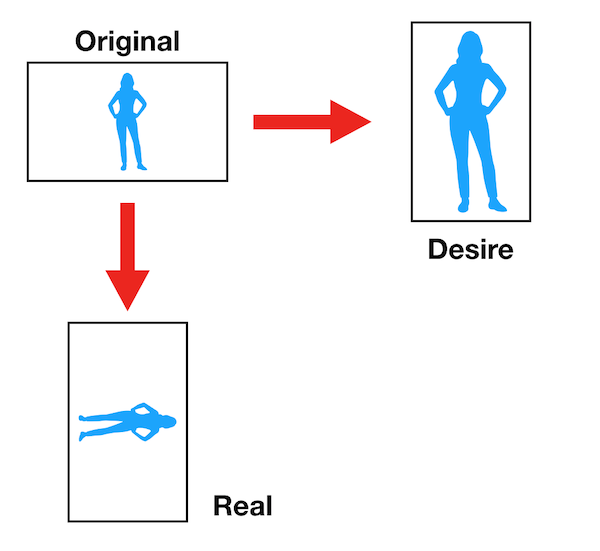
                                    0_1552636901030_t.png

                                    Unfortunately, as far as I know GooglePhotos remove all your EXIF and it’s metadata has no direction info. So cannot catch the photo direction.

                                    With local stored original photos (or in Dropbox), it might be able to be done.
                                    But it would be totally different program.

                                    T 1 Reply Last reply Reply Quote 0
                                    • T Offline
                                      teitlebot @Guest
                                      last edited by

                                      @Sean cant you also catch the direction by height/width?

                                      ? 1 Reply Last reply Reply Quote 0
                                      • ? Offline
                                        A Former User @teitlebot
                                        last edited by A Former User

                                        @teitlebot
                                        impossible only with width/height. Imagine some pictures in your mind and rotate it. :D
                                        Or…
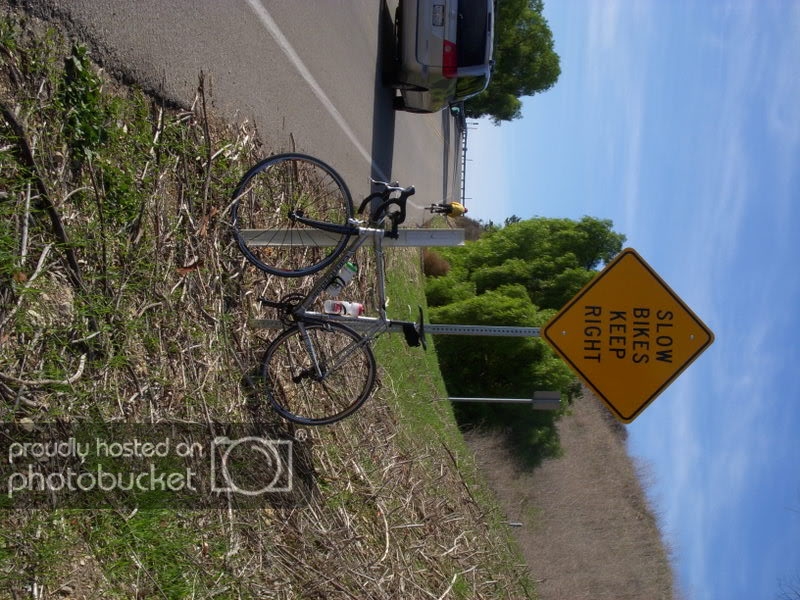
                                        0_1552665928446_DSCN0873.jpg
                                        Which direction should this photo be rotated? clockwise? counterclockwise? How can we know the direction with only width/height?

                                        T 1 Reply Last reply Reply Quote 0
                                        • T Offline
                                          teitlebot @Guest
                                          last edited by

                                          @Sean Interesting but Google Photos already rotates the picture correctly for us before it sends it to the mirror. So assuming it shows correct in the google photos album it will be correct in the mirror. Now take any picture that is width/height >1 and rotate the picture one way and rotate the screen in the opposite direction and it should work.

                                          ? 1 Reply Last reply Reply Quote 0
                                          • ? Offline
                                            A Former User @teitlebot
                                            last edited by

                                            @teitlebot
                                            If so, you can do that without notification. Just add eventlistener to target photo container element and check whether src be changed. Then you can activate xmlHTTPrequest to send request to your IFTTT server.

                                            T 1 Reply Last reply Reply Quote 0

                                            Hello! It looks like you're interested in this conversation, but you don't have an account yet.

                                            Getting fed up of having to scroll through the same posts each visit? When you register for an account, you'll always come back to exactly where you were before, and choose to be notified of new replies (either via email, or push notification). You'll also be able to save bookmarks and upvote posts to show your appreciation to other community members.

                                            With your input, this post could be even better 💗

                                            Register Login

                                            • 1
                                            • 2
                                            • 8
                                            • 9
                                            • 10
                                            • 11
                                            • 12
                                            • 13
                                            • 14
                                            • 15
                                            • 10 / 15
                                            • First post
                                              Last post
                                            Enjoying MagicMirror? Please consider a donation!
                                            MagicMirror created by Michael Teeuw.
                                            Forum managed by Sam, technical setup by Karsten.
                                            This forum is using NodeBB as its core | Contributors
                                            Contact | Privacy Policy