Read the statement by Michael Teeuw here.
MMM-Ruter (for Oslo and Akershus in Norway)
-
Hi @Cato sorry for the slow response.
I’ve pulled v 1.0.2 but haven’t changed my config file. It looks like this:
{
module: 'MMM-Ruter',
header: 'Ruter',
position: 'bottom_left',
config: {
showPlatform: false,
maxItems: 10,
stops: [
{
stopId: "3010430",
platforms: [ ]
}
]
}
},
In reply to your previous question: I haven’t changed the time settings on the module. The time in the default clock module is in 24 hour format. So is the Pi. Any guesses as to the reason? It’s not a big problem for me, or it wasn’t, until you pointed it out ;)
Two other comments:
The GUI visibly refreshes inconsistently (between every 5 and 20 seconds) but often. Often enough that it’s visually distracting. Not sure what is triggering the refresh - serviceReloadInterval or timeReloadInterval maybe? Have you changed these in your setup? If so maybe post the config so that I can copy those settings and see if the problem fixes.
See you have down as a point for future improvement the ability to run two instances of the module at the same time. I’d just like to second that! I’d like to have two instances running in two different corners of my mirror for the two nearest transport hubs we use. I would certainly make use of it if/when you get the time to add it.
Hope to be a bit more available in the week ahead if you have any other questions.
-
Hi @open_book, sorry for delay, I’ve been quite busy lately.
-
About the wrong time in your module: Have you configured “language” in the Magic Mirror config? If so, what setting?
-
The GUI refreshes if a change is triggered from the service with the interval defined in serviceReloadTime (default every 30 seconds) or by the GUI-side (when remaining minutes changes) with the interval of timeReloadTime (default every 1 second). Both service and GUI will only update if there IS a change. This is detected by comparing last output with current using a simple MD5 hash comparison.
The reason why I picked two intervals was that I wasn’t sure how often I could call Ruter API before they would, in the worst case, block me. I wanted to make sure GUI would show correct number of minutes all the time even if I didn’t call the Ruter API so often.
If you have many stops or display many items a change will of course happen more often. Could you record a movie if GUI updates even if there aren’t any changes (in remaining minutes, order of items etc)?
- Anyway, I will in near future re-write my backend to accommodate multiple instances of the module. Will then also reconsider how I update GUI.
< Cato /> -
-
Hi @Cato all good!
Default config language is “en” (english).
Here is a film demonstrating the refreshing issue:
https://www.dropbox.com/s/5n0lkx9z3lhznkn/2016-11-05 18.52.26.mp4?dl=0
I tried setting the animation speed to 10 to elimate the display flicker. It’s a simple hack, but worked fine. Now it’s barely noticeable.
:)
-
Hi @Cato ,
I’ve just updated with MM 2.1.0 and checked that I’m running the latest version of MMM-Ruter.
When I tried to run the module with two different stops, it crashed the config file.
´´´´javascript´´´´
{
module: ‘MMM-Ruter’,
header: ‘Ruter’,
position: ‘bottom_right’,
config: {
showPlatform: true,
maxItems: 10,
stops: [
{
stopId: “3010430”,
platforms: [ “1”, “2” ],
timetoThere: 2
}
{
stopId: “3010425”,
platforms: [ “1”, “2” ]
timetoThere: 2
}
]
}
},
´´´´javascript´´´´It runs fine with 1 stop. But I get a config error message with 2 stops. Even if I just copy the exact same information two times.
Is there an error in the config above? Let me know!
-
@open_book Seems you are missing a comma between the stops.
-
@Cato yes. yes I am. Thanks. That’s it!
-
Hi @Cato. Great work on this very practical module.
I am just getting into raspberry pi (3) and MM, so this is the first module i try to install. Unfortnatly when I run MM it goes black. I guess there is something with how I inserted the module in the config.js file.
This is how I did it.
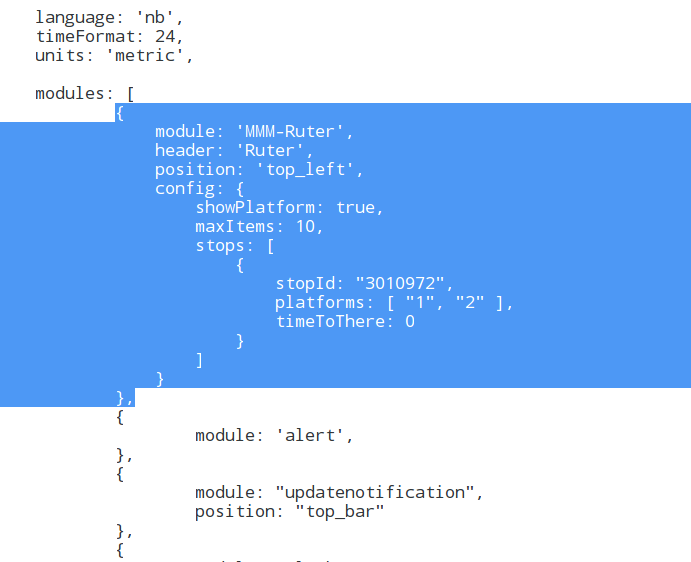
Also this is what the terminal with the same config.js file.
//pi@raspberrypi:~/MagicMirror $ npm start > magicmirror@2.1.0 start /home/pi/MagicMirror > electron js/electron.js Xlib: extension "RANDR" missing on display ":1.0". Starting MagicMirror: v2.1.0 Loading config ... Loading module helpers ... No helper found for module: MMM-Ruter. No helper found for module: alert. Initializing new module helper ... No helper found for module: clock. Initializing new module helper ... No helper found for module: compliments. No helper found for module: currentweather. No helper found for module: weatherforecast. Initializing new module helper ... All module helpers loaded. Starting server op port 8080 ... Server started ... Connecting socket for: updatenotification Connecting socket for: calendar Starting node helper for: calendar Connecting socket for: newsfeed Starting module: newsfeed Sockets connected & modules started ... Whoops! There was an uncaught exception... { Error: listen EADDRINUSE :::8080 at Object.exports._errnoException (util.js:1026:11) at exports._exceptionWithHostPort (util.js:1049:20) at Server._listen2 (net.js:1253:14) at listen (net.js:1289:10) at net.js:1399:9 at _combinedTickCallback (internal/process/next_tick.js:77:11) at process._tickCallback (internal/process/next_tick.js:98:9) at Module.runMain (module.js:592:11) at run (bootstrap_node.js:402:7) at startup (bootstrap_node.js:157:9) code: 'EADDRINUSE', errno: 'EADDRINUSE', syscall: 'listen', address: '::', port: 8080 } MagicMirror will not quit, but it might be a good idea to check why this happened. Maybe no internet connection? If you think this really is an issue, please open an issue on GitHub: https://github.com/MichMich/MagicMirror/issues Xlib: extension "XInputExtension" missing on display ":1.0". Xlib: extension "RANDR" missing on display ":1.0". Launching application. Xlib: extension "XInputExtension" missing on display ":1.0". Xlib: extension "XInputExtension" missing on display ":1.0". -
@LincolnClay The error indicates the port 8080 is in use. Did you install pm2? If so then Magic Mirror is already started when you run
npm start. Just restart it withpm2 restart mm -
@Cato Thanks for the prompt response. Yes I installed pm2, but when run
pm2 restart mmMM doesn’t open. I only get successful starts withnpm start.If I delete the insertion in config.js file from your module, mm starts normally without being all black. Do you spot any other errors?
-
@LincolnClay Well, I still don’t think it’s the module’s fault. I tried to replicate your exact configuration and it works.
What output do you get from
npm start? -
@Cato I’m sorry for the late reply, I had to figure out if there was any issues with my initial MM install. You where absolutely right, the issue had nothing to do with the module. I did a re-install and now the module works perfectly. Thanks for your help and your work on this module :)
-
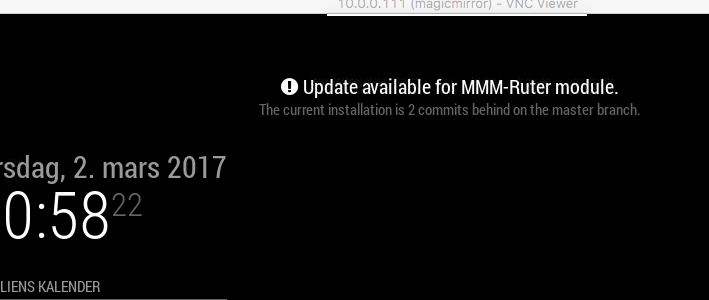
How do I get rid of this?
-
@laumb
cd ~/MagicMirror/modules/MMM-Ruterthengit pull -
@laumb you have to run
git pullin the modules directory.This is described in the Readme on GitHub.
-
Any chance you could possibly do this to support Skyss in bergen aswell? Would be really great!
-
@Kimzer I’m sorry, but I only make modules I need myself. If I move to Bergen, I let you know… ;-)
I did though do a quick search and it doesn’t seem that Skyss has any public API. Found a couple of unofficial/depricated onces, but that is not something I would support anyway…
-
Hi @Cato. Did something regarding the time change in the last update? Upgraded today and time format is set to 12 instead of 24 as it was before.
This is what is in my config file (have not changed that recently)
language: 'en', timeFormat: 24, units: 'metric', -
@amomat I have done nothing, and I can’t remember noticing that since I only use public transport in the morning. I will take a look tonight to make sure.
-
Hi @Cato. I’ve just installed your MMM-Ruter module, and I’m having issues with the time, it’s 12-hour…My Pi is 24 hour, my config is 24 hour…but the MMM-Ruter is 12 hour.
language: "nb",
timeFormat: 24,
units: "metric",
pi@MagicMirror_1:~/MagicMirror/config $ date Sun 13 Aug 15:26:42 CEST 2017Any idea how to fix this? :)
-
Think I found the “bug” (oversight from my end). New version is now available.



Hello! It looks like you're interested in this conversation, but you don't have an account yet.
Getting fed up of having to scroll through the same posts each visit? When you register for an account, you'll always come back to exactly where you were before, and choose to be notified of new replies (either via email, or push notification). You'll also be able to save bookmarks and upvote posts to show your appreciation to other community members.
With your input, this post could be even better 💗
Register Login