MagicMirror Forum
    • Recent
    • Tags
    • Unsolved
    • Solved
    • MagicMirror² Repository
    • Documentation
    • 3rd-Party-Modules
    • Donate
    • Discord
    • Register
    • Login
    A New Chapter for MagicMirror: The Community Takes the Lead
    Read the statement by Michael Teeuw here.

    MMM-Ruter (for Oslo and Akershus in Norway)

    Scheduled Pinned Locked Moved Transport
    34 Posts 13 Posters 31.1k Views 13 Watching
    Loading More Posts
    • Oldest to Newest
    • Newest to Oldest
    • Most Votes
    Reply
    • Reply as topic
    Log in to reply
    This topic has been deleted. Only users with topic management privileges can see it.
    • CatoC Offline
      Cato Module Developer @open_book
      last edited by

      @open_book Seems you are missing a comma between the stops.

      O 1 Reply Last reply Reply Quote 1
      • O Offline
        open_book @Cato
        last edited by

        @Cato yes. yes I am. Thanks. That’s it!

        sudo insert motivational.quote

        1 Reply Last reply Reply Quote 0
        • L Offline
          LincolnClay
          last edited by

          Hi @Cato. Great work on this very practical module.
          I am just getting into raspberry pi (3) and MM, so this is the first module i try to install. Unfortnatly when I run MM it goes black. I guess there is something with how I inserted the module in the config.js file.
          This is how I did it.
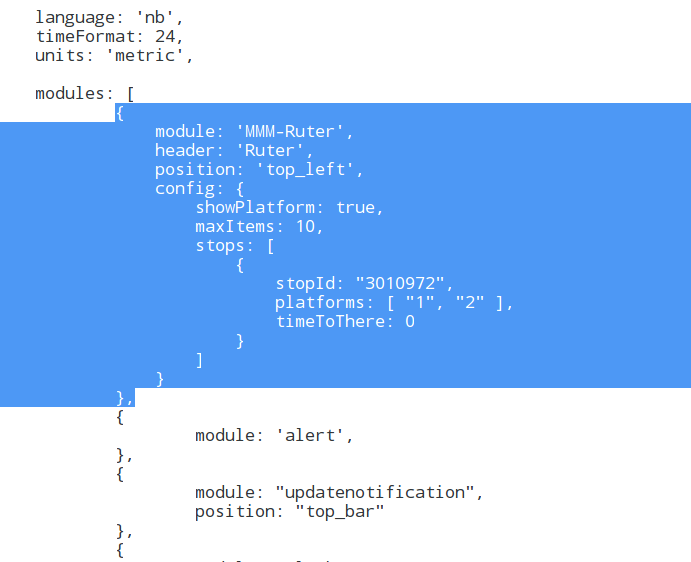
          0_1485001911821_321d.PNG

          Also this is what the terminal with the same config.js file.

          //pi@raspberrypi:~/MagicMirror $ npm start
          
          > magicmirror@2.1.0 start /home/pi/MagicMirror
          > electron js/electron.js
          
          Xlib:  extension "RANDR" missing on display ":1.0".
          Starting MagicMirror: v2.1.0
          Loading config ...
          Loading module helpers ...
          No helper found for module: MMM-Ruter.
          No helper found for module: alert.
          Initializing new module helper ...
          No helper found for module: clock.
          Initializing new module helper ...
          No helper found for module: compliments.
          No helper found for module: currentweather.
          No helper found for module: weatherforecast.
          Initializing new module helper ...
          All module helpers loaded.
          Starting server op port 8080 ... 
          Server started ...
          Connecting socket for: updatenotification
          Connecting socket for: calendar
          Starting node helper for: calendar
          Connecting socket for: newsfeed
          Starting module: newsfeed
          Sockets connected & modules started ...
          Whoops! There was an uncaught exception...
          { Error: listen EADDRINUSE :::8080
              at Object.exports._errnoException (util.js:1026:11)
              at exports._exceptionWithHostPort (util.js:1049:20)
              at Server._listen2 (net.js:1253:14)
              at listen (net.js:1289:10)
              at net.js:1399:9
              at _combinedTickCallback (internal/process/next_tick.js:77:11)
              at process._tickCallback (internal/process/next_tick.js:98:9)
              at Module.runMain (module.js:592:11)
              at run (bootstrap_node.js:402:7)
              at startup (bootstrap_node.js:157:9)
            code: 'EADDRINUSE',
            errno: 'EADDRINUSE',
            syscall: 'listen',
            address: '::',
            port: 8080 }
          MagicMirror will not quit, but it might be a good idea to check why this happened. Maybe no internet connection?
          If you think this really is an issue, please open an issue on GitHub: https://github.com/MichMich/MagicMirror/issues
          Xlib:  extension "XInputExtension" missing on display ":1.0".
          Xlib:  extension "RANDR" missing on display ":1.0".
          Launching application.
          Xlib:  extension "XInputExtension" missing on display ":1.0".
          Xlib:  extension "XInputExtension" missing on display ":1.0".
          
          
          CatoC 1 Reply Last reply Reply Quote 0
          • CatoC Offline
            Cato Module Developer @LincolnClay
            last edited by

            @LincolnClay The error indicates the port 8080 is in use. Did you install pm2? If so then Magic Mirror is already started when you run npm start. Just restart it with pm2 restart mm

            L 1 Reply Last reply Reply Quote 2
            • L Offline
              LincolnClay @Cato
              last edited by

              @Cato Thanks for the prompt response. Yes I installed pm2, but when run pm2 restart mm MM doesn’t open. I only get successful starts with npm start.

              If I delete the insertion in config.js file from your module, mm starts normally without being all black. Do you spot any other errors?

              CatoC 1 Reply Last reply Reply Quote 0
              • CatoC Offline
                Cato Module Developer @LincolnClay
                last edited by

                @LincolnClay Well, I still don’t think it’s the module’s fault. I tried to replicate your exact configuration and it works.

                What output do you get from npm start?

                L 1 Reply Last reply Reply Quote 1
                • L Offline
                  LincolnClay @Cato
                  last edited by LincolnClay

                  @Cato I’m sorry for the late reply, I had to figure out if there was any issues with my initial MM install. You where absolutely right, the issue had nothing to do with the module. I did a re-install and now the module works perfectly. Thanks for your help and your work on this module :)

                  1 Reply Last reply Reply Quote 0
                  • L Offline
                    laumb
                    last edited by

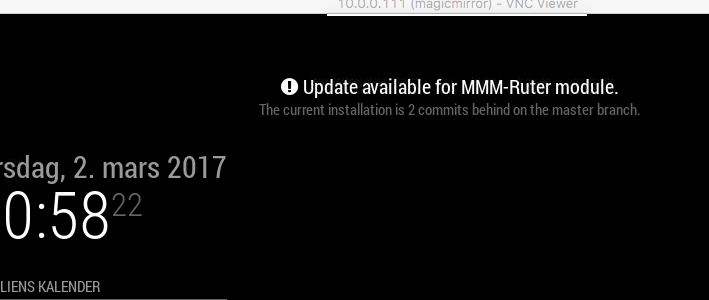
                    0_1488484734028_Skjermbilde 2017-03-02 kl. 20.58.19.png

                    How do I get rid of this?

                    strawberry 3.141S CatoC 2 Replies Last reply Reply Quote 0
                    • strawberry 3.141S Offline
                      strawberry 3.141 Project Sponsor Module Developer @laumb
                      last edited by

                      @laumb cd ~/MagicMirror/modules/MMM-Ruter then git pull

                      Please create a github issue if you need help, so I can keep track

                      1 Reply Last reply Reply Quote 2
                      • CatoC Offline
                        Cato Module Developer @laumb
                        last edited by

                        @laumb you have to run git pull in the modules directory.

                        This is described in the Readme on GitHub.

                        1 Reply Last reply Reply Quote 0
                        • KimzerK Offline
                          Kimzer
                          last edited by

                          Any chance you could possibly do this to support Skyss in bergen aswell? Would be really great!

                          CatoC 1 Reply Last reply Reply Quote 0
                          • CatoC Offline
                            Cato Module Developer @Kimzer
                            last edited by

                            @Kimzer I’m sorry, but I only make modules I need myself. If I move to Bergen, I let you know… ;-)

                            I did though do a quick search and it doesn’t seem that Skyss has any public API. Found a couple of unofficial/depricated onces, but that is not something I would support anyway…

                            1 Reply Last reply Reply Quote 0
                            • A Offline
                              amomat @Cato
                              last edited by

                              Hi @Cato. Did something regarding the time change in the last update? Upgraded today and time format is set to 12 instead of 24 as it was before.

                              This is what is in my config file (have not changed that recently)

                              language: 'en',
                              timeFormat: 24,
                              units: 'metric',
                              
                              CatoC 1 Reply Last reply Reply Quote 0
                              • CatoC Offline
                                Cato Module Developer @amomat
                                last edited by

                                @amomat I have done nothing, and I can’t remember noticing that since I only use public transport in the morning. I will take a look tonight to make sure.

                                1 Reply Last reply Reply Quote 0
                                • D Offline
                                  DeeWoo
                                  last edited by

                                  Hi @Cato. I’ve just installed your MMM-Ruter module, and I’m having issues with the time, it’s 12-hour…My Pi is 24 hour, my config is 24 hour…but the MMM-Ruter is 12 hour.

                                  language: "nb",
                                  timeFormat: 24,
                                  units: "metric",
                                  
                                  pi@MagicMirror_1:~/MagicMirror/config $ date
                                  Sun 13 Aug 15:26:42 CEST 2017
                                  

                                  Any idea how to fix this? :)

                                  CatoC 1 Reply Last reply Reply Quote 0
                                  • CatoC Offline
                                    Cato Module Developer @DeeWoo
                                    last edited by

                                    Think I found the “bug” (oversight from my end). New version is now available.

                                    D 1 Reply Last reply Reply Quote 2
                                    • D Offline
                                      DeeWoo @Cato
                                      last edited by

                                      @Cato said in MMM-Ruter (for Oslo and Akershus in Norway):

                                      Think I found the “bug” (oversight from my end). New version is now available.

                                      Just wanted to thank you for the lightning fast response!
                                      Now it shows 24h time. Cheers :)

                                      1 Reply Last reply Reply Quote 0
                                      • K Offline
                                        kj3rra
                                        last edited by

                                        Hei Cato!

                                        Great work with the this module. I have two problems:

                                        1. I cant get several stops on Frognerseterbanen (linje 1) to work (Vinderen (3012315), Gaustad (3012320) etc). It stops at ‘Loading’. Im trying in particular to get Vinderen T-bane. I have no other problems getting times from other stops, such as buses etc. Please see picture.
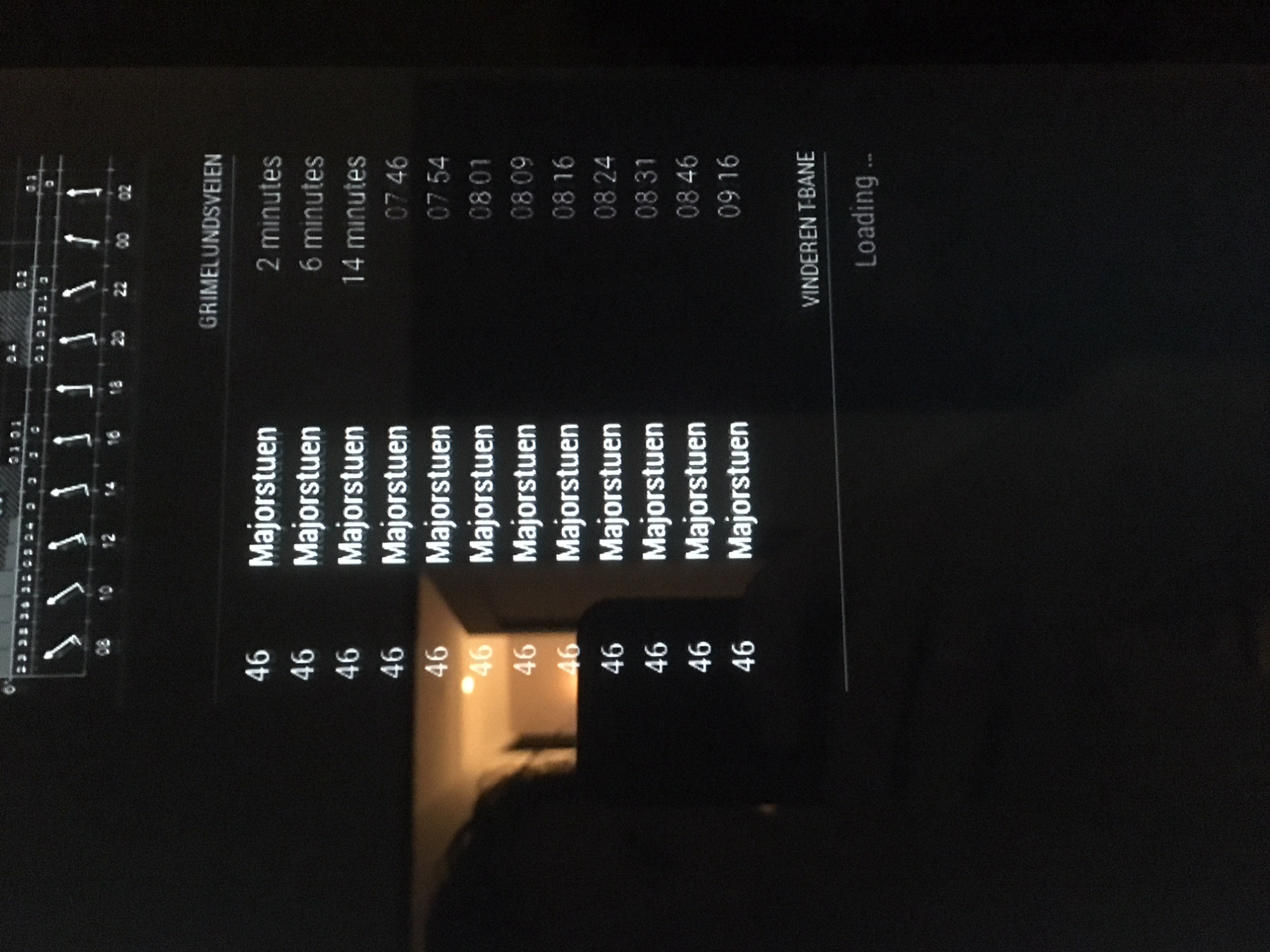
                                          0_1507061430183_IMG_3371.JPG

                                        2. How do I change the dimmed light on the time-text to be bright. Ive been through alle the files, but I cant find where you can change this. Im really quite new to this, but Ive managed to change text size and ‘dimmness’ on all other modules.

                                        Would be glad if you could help with these two! Thanks!

                                        J 1 Reply Last reply Reply Quote 0
                                        • J Offline
                                          jonaslaeret @kj3rra
                                          last edited by

                                          @kj3rra Did you manage to get those stops to work? I’m having the same problem. Some stops are working, but Vogts gate and Torshovparken recently (a couple of months ago) stopped working. Before that they were fine. I checked that the stop ID didn’t change.

                                          1 Reply Last reply Reply Quote 0
                                          • J Offline
                                            Jessendelft
                                            last edited by

                                            So, I tried installing this module yesterday evening, upon finding that I got the same ‘Loading…’ message as described by @kj3rra and @jonaslaeret . Today I spend several hours trying to figure out the problem. I ended up running the mirror in server mode, and found to my surprise that on my PC the Ruter information was showing without a problem.
                                            This told me that the problem was either with Chromium or with Electron. Running

                                            sudo apt-get update chromium-browser
                                            

                                            didn’t seem to do the trick.

                                            I dug into the Electron documentation and found that adding the following to the config.js file makes the Ruter information show in Electron:

                                            electronOptions: { 
                                            		webPreferences: {
                                            			webSecurity: false
                                            		},
                                            	},
                                            

                                            Now, I get data from both Møllefaret and Røa T-bane :D
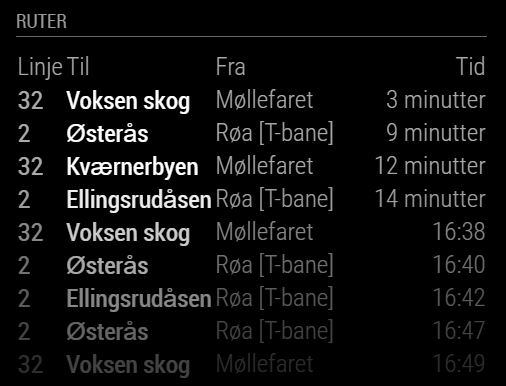
                                            0_1536675829578_Møllefaret.JPG

                                            1 Reply Last reply Reply Quote 1

                                            Hello! It looks like you're interested in this conversation, but you don't have an account yet.

                                            Getting fed up of having to scroll through the same posts each visit? When you register for an account, you'll always come back to exactly where you were before, and choose to be notified of new replies (either via email, or push notification). You'll also be able to save bookmarks and upvote posts to show your appreciation to other community members.

                                            With your input, this post could be even better 💗

                                            Register Login

                                            • 1
                                            • 2
                                            • 1 / 2
                                            • First post
                                              Last post
                                            Enjoying MagicMirror? Please consider a donation!
                                            MagicMirror created by Michael Teeuw.
                                            Forum managed by Sam, technical setup by Karsten.
                                            This forum is using NodeBB as its core | Contributors
                                            Contact | Privacy Policy