MagicMirror Forum
    • Recent
    • Tags
    • Unsolved
    • Solved
    • MagicMirror² Repository
    • Documentation
    • 3rd-Party-Modules
    • Donate
    • Discord
    • Register
    • Login
    A New Chapter for MagicMirror: The Community Takes the Lead
    Read the statement by Michael Teeuw here.

    Strip Down Guide for BenQ 28" VA Monitor GC2870H

    Scheduled Pinned Locked Moved Hardware
    61 Posts 10 Posters 68.3k Views 10 Watching
    Loading More Posts
    • Oldest to Newest
    • Newest to Oldest
    • Most Votes
    Reply
    • Reply as topic
    Log in to reply
    This topic has been deleted. Only users with topic management privileges can see it.
    • A Offline
      Adrien
      last edited by

      Well i’m not sure, i don’t use the magic mirror OS but home made application. I use a pir sensor, i would like to have instant poweron/poweroff without any OSD message on screen. So My question was if i cut the pin 3 or 4 on the backlight connector will it work ? To be clear when the PIR detect someone the relay connect the PIN (3 or 4) after few seconds relay disconnect the PIN (3 or 4)

      M 1 Reply Last reply Reply Quote 0
      • M Offline
        MadScientist @Adrien
        last edited by

        @adrien That should still be possible with the script method described in 5.1. Instead of the power lines for the controller board of the LCD you use the cables that lead to your backlight.

        I don’t know what LCD you have. Some have an extra inverter or LED driver board. You can take the cables from there. Some have a 40 pin LVDS cable (instead of 30 pin), so you have to check the datasheet which wires are for the backlight. I’d take the VCC wire for the backlight, snip it and connect both lose ends to the relay. That should work.

        Keep in mind that with this method the LCD is always on, only the backlight is off.

        1 Reply Last reply Reply Quote 0
        • A Offline
          Adrien
          last edited by Adrien

          Thanks for your help. I use the same model :BenQGC2870H. I would like to combine a solution where i have a minimum power consumption and fast without osd message boot.

          1 Reply Last reply Reply Quote 0
          • Y Offline
            yep_DD @Adrien
            last edited by

            @adrien Hi Adrien, that was my initial plan but I use the two relays now for my speakers to avoid the initial crack sound when powering on the amplifier und I use one relay for the monitor power supply and one for the amplifier.

            A 1 Reply Last reply Reply Quote 0
            • A Offline
              Adrien @yep_DD
              last edited by

              @yep_dd Hello, and thanks for your guide :) Did you try to do it ? do you confirm that could work ? Thanks

              1 Reply Last reply Reply Quote 0
              • Y Offline
                yep_DD
                last edited by yep_DD

                @Adrien No problem, I am pretty sure it should work but I have not tried it. I might in the future. I am working on a few other bugifxes as well (amplifier only turns on when sound is played and stuff like that). I also suggest to use the microwave / radar sensor instead of the PIR. it is much cleaner and can go behind the mirror.

                Regarding the OSD, instead of cutting wires to the backlight this seems like a valuable option. At the moment I can’t try this (I need a friend to help me take down the mirror as it is too heavy), but I will tomorrow: https://www.youtube.com/watch?v=y86AXOZwlgU (TL;DW: press menu button while turning monitor on and disable logo)

                1 Reply Last reply Reply Quote 0
                • A Offline
                  Adrien
                  last edited by

                  Interesting solution this is the hidden menu of the display. The problem is the boot time i feel like it takes a long time to boot no ? well i will also try to cut the wire if it doesn’t work properly i will solder them. About the microwave sensor i have a rcwl0516 to test but the problem is the range of detection it detect people from a very large range

                  Y 2 Replies Last reply Reply Quote 0
                  • Y Offline
                    yep_DD @Adrien
                    last edited by

                    @Adrien ah, okay I see… yes that might be a problem in my case it works just fine. I will see about the boot time tomorrow.

                    1 Reply Last reply Reply Quote 0
                    • Y Offline
                      yep_DD @Adrien
                      last edited by

                      @adrien Okay, so it is about 3 seconds boot time I am estimating. No logo anymore. Just the annoying “HDMI1” screen on the lower right. Let’s see if that satisfies me or I will cut the wires as well. Have you tried yet?

                      M A 2 Replies Last reply Reply Quote 0
                      • M Offline
                        MadScientist @yep_DD
                        last edited by

                        @yep_dd You could use relay with a small delay to power your backlight. So the screen will only be visible after the “HDMI1” box disappeared. Personally I wouldn’t bother with it, though.

                        Y 1 Reply Last reply Reply Quote 0
                        • A Offline
                          Adrien @yep_DD
                          last edited by

                          @yep_dd I have not yet try, i will do my test as soon as i receive my mirror, but 3 secs look not too long

                          1 Reply Last reply Reply Quote 0
                          • Y Offline
                            yep_DD @MadScientist
                            last edited by yep_DD

                            @madscientist okay, so after a couple of days I am absolutely satisfied. I turn on my monitor with a small httpserver python script whenever someone is at home and -if it is night- any HUE light is on. I am now thinking of changing this to different energy saving modes in my magicmirror:

                            • Always On
                            • On when someone is home
                            • On when someone is home and any light is on (turns off at night)
                            • Only on when activated by PIR / Radar Sensor
                            0_1540763201051_Screenshot 2018-10-28 at 22.46.15.png

                            1 Reply Last reply Reply Quote 0
                            • A Offline
                              Adrien
                              last edited by

                              Hi,

                              I have removed the boot logo, but it’s around 5 seconds to start the display and the “hdmi” message is there. I will try to cut the wire in the next days.

                              1 Reply Last reply Reply Quote 0
                              • D Offline
                                Daniel3490
                                last edited by

                                @yep_dd
                                Nice project, I got the same glass but a different monitor.
                                At my mirror the backlite seems to bright so it’s easy to locate the edge of the monitor.
                                Could you take some pictures for me to be sure it’s my monitor and not a general problem with the type of glas?
                                If it’s different to yours I might have to invest in a different monitor. 😅

                                Y 1 Reply Last reply Reply Quote 0
                                • Y Offline
                                  yep_DD @Daniel3490
                                  last edited by

                                  @daniel3490 hi Daniel, it is bit hard to take down the mirror by myself, i have to wait until I have a friend over to help me. I don’t really see the edges of my monitor unless it is really really dark.

                                  1 Reply Last reply Reply Quote 0
                                  • B Offline
                                    bachoo786
                                    last edited by

                                    Hi @yep_DD

                                    Fantastic Work !

                                    May I ask how did you connect your rcwl0516 sensor and what module did you use to integrate it with MM? Are there any instructions I can follow?

                                    Thanks.

                                    M Y 2 Replies Last reply Reply Quote 0
                                    • M Offline
                                      MadScientist @bachoo786
                                      last edited by

                                      @bachoo786 The sensor should have three pins: VCC, GND and signal out. You connect them the same way you connect a PIR sensor and it should also work with the same MM module MMM-PIR-Sensor.

                                      1 Reply Last reply Reply Quote 0
                                      • Y Offline
                                        yep_DD @bachoo786
                                        last edited by yep_DD

                                        Hi @bachoo786

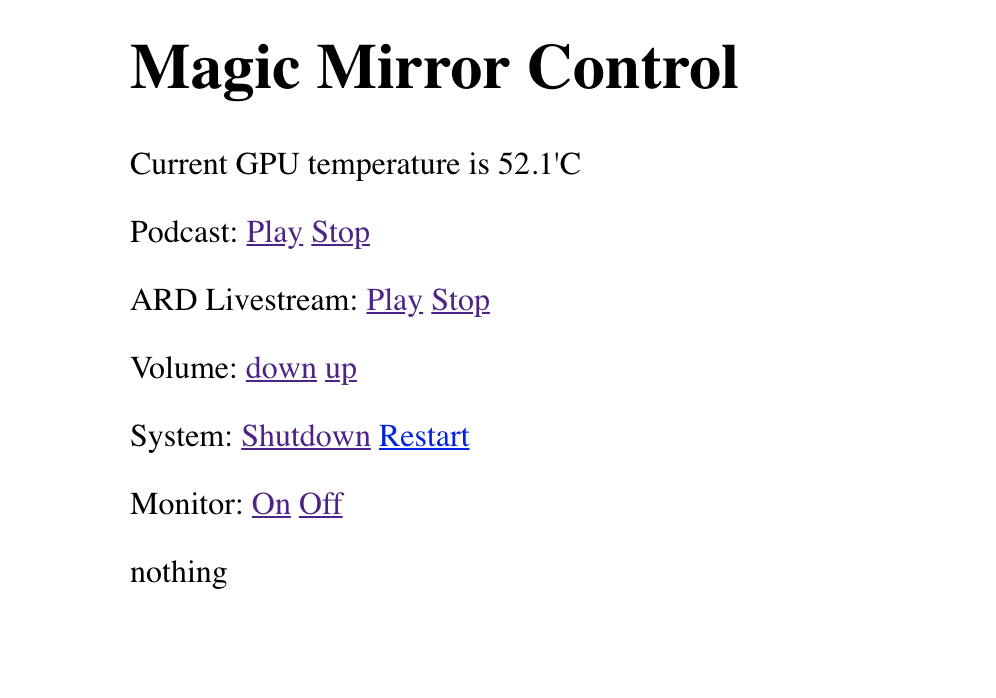
                                        thank you so much. As @MadScientist pointed out the three pins are connected directly to the Raspberry. For evaluating the state I use a small http server (see below). The important parts are where the you can find anything with

                                        monitorStatus
                                        

                                        If you want I can reduce the code to what is important for you. This is the complete server which allows control of

                                        • ARD Livestream
                                        • ARD Tagesschau
                                        • Lowering / Increasing volume
                                        • Radar Sensor (just the last couple lines of code (search for: GPIO.add_event_detect)
                                        • Powerin On / Off Monitor by http Request (used if no one is at home / and at night)

                                        For me the radar sensor is just a backup. I use the power control mainly like this:

                                        • If someone is at home and it is between sunrise / sunset, turn on the monitor(1)
                                        • If someone is at home but it is night and all lights are off, turn off the monitor(1)
                                        • If someone is in front of the monitor turn it on by radar

                                        (1) is done via FHEM (a home automation running on another raspberry, it calls my mirror like this: 10.0.1.49/on (monitor on) 10.0.1.49/off (monitor off) 10.0.1.49/up or /down (for volume) and so on.

                                        #!/usr/bin/python3 -u
                                        host_name = '10.0.1.49'  # Change this to your Raspberry Pi IP address
                                        host_port = 8000
                                        proc = ''
                                        monitorstatus = 'unknown'
                                        
                                        import RPi.GPIO as GPIO
                                        from pathlib import Path
                                        import os
                                        import subprocess
                                        import signal
                                        from subprocess import call
                                        from time import sleep
                                        from http.server import BaseHTTPRequestHandler, HTTPServer
                                        
                                        
                                        SENSOR_PIN = 24
                                        
                                        GPIO.setmode(GPIO.BCM)  
                                        GPIO.setup(SENSOR_PIN, GPIO.IN) 
                                        
                                        class MyServer(BaseHTTPRequestHandler):
                                        
                                            def monitor_on(channel): #define initial status of Monitor
                                                if monitorstatus!="on":
                                                    status='Monitor on by Radar Sensor'
                                                    #monitorstatus='on'
                                                    subprocess.Popen(["/usr/bin/vcgencmd", "display_power", "1"], preexec_fn=os.setsid)
                                        
                                            def do_HEAD(self):
                                                self.send_response(200)
                                                self.send_header('Content-type', 'text/html')
                                                self.end_headers()
                                        
                                            def do_GET(self):
                                                global proc
                                                global monitorstatus
                                                html = '''
                                                   <html>
                                                   <body style="width:960px; margin: 20px auto;">
                                                   <h1>Magic Mirror Control</h1>
                                                   <p>Current GPU temperature is {}</p>
                                                   <p>Podcast: <a href="/play">Play</a> <a href="/stop">Stop</a></p>
                                                   <p>ARD Livestream: <a href="/ard">Play</a> <a href="/stop">Stop</a></p>
                                                   <p>Volume: <a href="/down">down</a> <a href="/up">up</a></p>
                                                   <p>System: <a href="/shutdown">Shutdown</a> <a href="/restart">Restart</a></p>
                                                   <p>Monitor: <a href="/on">On</a> <a href="/off">Off</a></p>
                                                   <div id="podcast-status"></div>
                                                   <script>
                                                       document.getElementById("podcast-status").innerHTML="{}";
                                                   </script>
                                                   </body>
                                                   </html>
                                                '''
                                                temp = os.popen("/opt/vc/bin/vcgencmd measure_temp").read()
                                                self.do_HEAD()
                                                status = ''
                                                if self.path=='/':
                                                    #GPIO.setmode(GPIO.BCM)
                                                    #GPIO.setwarnings(False)
                                                    #GPIO.setup(17, GPIO.IN)
                                                    status='nothing'
                                                elif self.path=='/play':
                                                    if proc=='':
                                                        my_file = Path("/home/pi/MagicMirror/video.mp4")
                                                        if my_file.is_file():
                                                            statinfo = os.stat('/home/pi/MagicMirror/video.mp4')
                                                            if statinfo.st_size > 0:
                                                                proc = subprocess.Popen(["omxplayer", "-o", "alsa:hw:ALSA", "--no-osd", "/home/pi/MagicMirror/video.mp4"], preexec_fn=os.setsid)
                                                                status='Playing Podcast'
                                                            else:
                                                                proc = subprocess.Popen(["omxplayer", "-o", "alsa:hw:ALSA", "--no-osd", "/home/pi/MagicMirror/Loading.mp4"], preexec_fn=os.setsid)
                                                                status='Not yet available'
                                                        else:
                                                            proc = subprocess.Popen(["omxplayer", "-o", "alsa:hw:ALSA", "--no-osd", "/home/pi/MagicMirror/Loading.mp4"], preexec_fn=os.setsid)
                                                            status='Not yet available'
                                                    else:
                                                        status='Stopping Podcast'
                                                        os.killpg(os.getpgid(proc.pid), signal.SIGTERM)
                                                        proc=''
                                                elif self.path=='/ard':
                                                    if proc=='':
                                                        proc = subprocess.Popen(["livestreamer", "hlsvariant://daserste_live-lh.akamaihd.net/i/daserste_de@91204/master.m3u8", "best", "-vnp", "omxplayer -o alsa:hw:ALSA --no-osd --timeout 20"], preexec_fn=os.setsid)
                                                        status='Playing ARD Livestream'
                                                    else:
                                                        status='Stopping Stream'
                                                        os.killpg(os.getpgid(proc.pid), signal.SIGTERM)
                                                        proc=''
                                                elif self.path=='/stop':
                                                    if proc!='':
                                                        status='Stopping Podcast'
                                                        os.killpg(os.getpgid(proc.pid), signal.SIGTERM)
                                                        proc=''
                                                    else:
                                                        status='Nothing to stop'
                                                elif self.path=='/shutdown':
                                                    status='Shutdown'
                                                    subprocess.Popen(["sudo", "shutdown", "-h", "now"], preexec_fn=os.setsid)
                                                elif self.path=='/restart':
                                                    status='Restart'
                                                    subprocess.Popen(["sudo", "reboot"], preexec_fn=os.setsid)
                                                elif self.path=='/down':
                                                    status='Volume down'
                                                    subprocess.Popen(["amixer", "set", "Master", "8%-"], preexec_fn=os.setsid)
                                                elif self.path=='/up':
                                                    status='Volume up'
                                                    subprocess.Popen(["amixer", "set", "Master", "8%+"], preexec_fn=os.setsid)
                                                elif self.path=='/on':
                                                    if monitorstatus!="on": #switch on Monitor if status was off (by httpRequest NOT Radar)
                                                        status='Monitor on'
                                                        monitorstatus='on'
                                                        subprocess.Popen(["/usr/bin/vcgencmd", "display_power", "1"], preexec_fn=os.setsid)
                                                elif self.path=='/off':
                                                    if monitorstatus!="off": #switch off Monitor if status was on  (by httpRequest NOT Radar)
                                                        status='Monitor off'
                                                        monitorstatus='off'
                                                        subprocess.Popen(["/usr/bin/vcgencmd", "display_power", "0"], preexec_fn=os.setsid)
                                                self.wfile.write(html.format(temp[5:], status).encode("utf-8"))
                                        
                                        
                                        if __name__ == '__main__':
                                            http_server = HTTPServer((host_name, host_port), MyServer)
                                            print("Server Starts - %s:%s" % (host_name, host_port))
                                        
                                            try:
                                                GPIO.add_event_detect(SENSOR_PIN , GPIO.RISING, callback=MyServer.monitor_on) #detect radar sensor and enable Monitor
                                                http_server.serve_forever()
                                            except KeyboardInterrupt:
                                                http_server.server_close()
                                        GPIO.cleanup()
                                        
                                        
                                        1 Reply Last reply Reply Quote 0
                                        • B Offline
                                          bachoo786
                                          last edited by

                                          @MadScientist @yep_DD Thanks for the replies. Is there anyway to limit the distance that the radar sensor senses? I have my magic mirror in the bath room and it faces the wooden door which I believe will be detecting motion through it and I don’t want that.

                                          Y 1 Reply Last reply Reply Quote 0
                                          • M Offline
                                            MadScientist
                                            last edited by

                                            I have a sensor that allows changing the sensitivity but for me the lowest was still to much as it got triggered when somebody walked by outside my house. I am using a PIR-Sensor now.

                                            1 Reply Last reply Reply Quote 0

                                            Hello! It looks like you're interested in this conversation, but you don't have an account yet.

                                            Getting fed up of having to scroll through the same posts each visit? When you register for an account, you'll always come back to exactly where you were before, and choose to be notified of new replies (either via email, or push notification). You'll also be able to save bookmarks and upvote posts to show your appreciation to other community members.

                                            With your input, this post could be even better 💗

                                            Register Login

                                            • 1
                                            • 2
                                            • 3
                                            • 4
                                            • 2 / 4
                                            • First post
                                              Last post
                                            Enjoying MagicMirror? Please consider a donation!
                                            MagicMirror created by Michael Teeuw.
                                            Forum managed by Sam, technical setup by Karsten.
                                            This forum is using NodeBB as its core | Contributors
                                            Contact | Privacy Policy