MagicMirror Forum
    • Recent
    • Tags
    • Unsolved
    • Solved
    • MagicMirror² Repository
    • Documentation
    • 3rd-Party-Modules
    • Donate
    • Discord
    • Register
    • Login
    A New Chapter for MagicMirror: The Community Takes the Lead
    Read the statement by Michael Teeuw here.

    MMM-CalendarExt2

    Scheduled Pinned Locked Moved Utilities
    486 Posts 83 Posters 942.3k Views 83 Watching
    Loading More Posts
    • Oldest to Newest
    • Newest to Oldest
    • Most Votes
    Reply
    • Reply as topic
    Log in to reply
    This topic has been deleted. Only users with topic management privileges can see it.
    • F Offline
      fedale
      last edited by

      How to get quicker update of the google calendar in Magic mirror?

      S 1 Reply Last reply Reply Quote 0
      • S Do not disturb
        sdetweil @fedale
        last edited by

        @fedale u can change the updateInterval… but note that too fast might get you denied for a while…

        Sam

        How to add modules

        learning how to use browser developers window for css changes

        F 1 Reply Last reply Reply Quote 0
        • F Offline
          fedale @sdetweil
          last edited by

          @sdetweil I tried that earlier without any result. And seemed like the only thing updating was the screen flickering

          I put it under the module config in the config.js was that the correct postion?

          S 1 Reply Last reply Reply Quote 0
          • S Do not disturb
            sdetweil @fedale
            last edited by

            @fedale ok, in the calendar its

            fetchInterval

            sorry,

            doc always wins!

            https://docs.magicmirror.builders/modules/calendar.html#configuration-options

            Sam

            How to add modules

            learning how to use browser developers window for css changes

            F 1 Reply Last reply Reply Quote 0
            • F Offline
              fedale @sdetweil
              last edited by

              @sdetweil I tried the fetchInterval. But have not been sucessfull with that one.

              But everytime i save my config file it update at once.

              Is there somewhere else than in the config.js file i need to change the fetchInterval?

              S 1 Reply Last reply Reply Quote 0
              • S Do not disturb
                sdetweil @fedale
                last edited by

                @fedale that is inside the config:{} section of the calendar module, yes,
                and NOT in the place where url: is

                Sam

                How to add modules

                learning how to use browser developers window for css changes

                BKeyportB F 2 Replies Last reply Reply Quote 0
                • BKeyportB Offline
                  BKeyport Module Developer @sdetweil
                  last edited by

                  This works. URL Blanked to prevent private data.

                  		{
                  			module: "MMM-CalendarExt2", // https://github.com/MMM-CalendarExt2/MMM-CalendarExt2
                  			config: {
                  				calendars : [
                  					{
                  						url: "",
                  						name: "Main", // Optional, Recommended
                  						maxItems: 1,
                  						scanInterval: 1000*60*.5, // every 30 seconds, Appt Book, needs this speed
                  						beforeDays: 0,
                  						afterDays: 2,
                  						forceLocalTZ: false,
                  					},
                  	...
                  

                  The "E" in "Javascript" stands for "Easy"

                  F 1 Reply Last reply Reply Quote 0
                  • F Offline
                    fedale @sdetweil
                    last edited by fedale

                    This post is deleted!
                    1 Reply Last reply Reply Quote 0
                    • F Offline
                      fedale @BKeyport
                      last edited by

                      @BKeyport This solved the problem. Thank you

                      1 Reply Last reply Reply Quote 0
                      • F Offline
                        fedale
                        last edited by

                        How can i have week numbers as an own colum?
                        Showing the weeks separerat in its own colum?
                        And the yellow marking accross the week for the current week?
                        Like in this picture https://imgur.com/mwwPwEl

                        Today i have it in the first day of the week. Due to a small screen its not showing all the calendar inputs as it takes up a row by itself. limiting the amount of events i could have

                        1 Reply Last reply Reply Quote 0
                        • N Offline
                          nschertz
                          last edited by

                          Great Module!! I started customizing a CSS file to enhance the display. I was able to do everything I wanted to do except one mod. I’m trying to make the calendar title font larger on each of 2 calendars, but can’t seem to find where this property is set. Looking for help with this.

                          Thx Norb

                          S 1 Reply Last reply Reply Quote 0
                          • S Do not disturb
                            sdetweil @nschertz
                            last edited by

                            @nschertz I don’t know, but you can learn the css settings by using the developers window

                            see
                            https://forum.magicmirror.builders/topic/14862/help-with-a-couple-css-issues?_=1650761970911

                            Sam

                            How to add modules

                            learning how to use browser developers window for css changes

                            N 1 Reply Last reply Reply Quote 0
                            • N Offline
                              nschertz @sdetweil
                              last edited by

                              @sdetweil Thanks. That redirect was very helpful. Problem solved.

                              1 Reply Last reply Reply Quote 1
                              • H Offline
                                hrmax23
                                last edited by

                                I’ve added a border around today’s date in the month view but I can’t seem to figure out how to adjust the actual events to not overlap the left border. Anyone know how to do this?
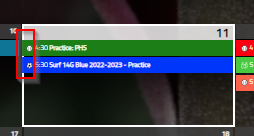
                                2022-05-11 11_21_17-MagicMirror².png

                                1 Reply Last reply Reply Quote 0
                                • F Offline
                                  fedale
                                  last edited by

                                  How do i get an extra colium for week numbers? Today its in the field for monday in my calendar.How do i specify this in css?
                                  I have the weeksmark added. But unsure how to resolve this into its own colum. Any one have a surgestion?

                                  S 1 Reply Last reply Reply Quote 0
                                  • S Do not disturb
                                    sdetweil @fedale
                                    last edited by

                                    @fedale use MMM-CalendarExt3.

                                    ext2 is no longer supported

                                    Sam

                                    How to add modules

                                    learning how to use browser developers window for css changes

                                    F 1 Reply Last reply Reply Quote 0
                                    • F Offline
                                      fedale @sdetweil
                                      last edited by

                                      @sdetweil okay thanks. I did not know that.

                                      1 Reply Last reply Reply Quote 0
                                      • J Offline
                                        justbob
                                        last edited by justbob

                                        How can I make the calendar show more than two lines of text for each event?

                                        I’ve had start and end times set up, but that would leave room for a few letters and it would look like:
                                        ‘08:00-09:30 Ext…’

                                        Then I’ve used this:
                                        .CX2 .weekSlot .event:not(.fullday) .eventMain {
                                        height: auto;
                                        flex-wrap: wrap;
                                        flex-grow: 0;
                                        overflow: visible;
                                        }

                                        and it allowed me to have time in one row, and text in another, however if the text alone is more than what could be fit in a single row, again I get 3 dots instead of having the box adjust to the size of the text.

                                        It would look like this:
                                        ‘08:00-09:30
                                        Extended line of t…’

                                        Also, whenever I have two enlarged boxes in the same day, the second one would partially go over the previous one, as if the previous one wasn’t enlarged.

                                        Any ideas how I could solve these two issues?

                                        BKeyportB M 2 Replies Last reply Reply Quote 0
                                        • BKeyportB Offline
                                          BKeyport Module Developer @justbob
                                          last edited by

                                          @justbob I’d switch to CX3agenda, to be honest. Much better.

                                          The "E" in "Javascript" stands for "Easy"

                                          1 Reply Last reply Reply Quote 0
                                          • M Offline
                                            MMRIZE @justbob
                                            last edited by MMRIZE

                                            @justbob
                                            That module doesn’t be designed like that. Of course, a heavy tweak of CSS could be the solution, but not recommended.

                                            First, unpretty.
                                            Second, The purpose of the module is to glance at outlines at once. Multi lines are not so easy to scan. I recommend transforming the title abbreviately or using color/symbol to distinguish the points rapidly.
                                            Third, technically not so easy to align the event cells with different lines(heights) in the same row. To accomplish it, that will inevitably waste space. So I haven’t designed so.

                                            1 Reply Last reply Reply Quote 0

                                            Hello! It looks like you're interested in this conversation, but you don't have an account yet.

                                            Getting fed up of having to scroll through the same posts each visit? When you register for an account, you'll always come back to exactly where you were before, and choose to be notified of new replies (either via email, or push notification). You'll also be able to save bookmarks and upvote posts to show your appreciation to other community members.

                                            With your input, this post could be even better 💗

                                            Register Login

                                            • 1
                                            • 2
                                            • 21
                                            • 22
                                            • 23
                                            • 24
                                            • 25
                                            • 24 / 25
                                            • First post
                                              Last post
                                            Enjoying MagicMirror? Please consider a donation!
                                            MagicMirror created by Michael Teeuw.
                                            Forum managed by Sam, technical setup by Karsten.
                                            This forum is using NodeBB as its core | Contributors
                                            Contact | Privacy Policy