Read the statement by Michael Teeuw here.
[MMM-Remote-Control](v2-dev) Extensible REST API, Dynamic Menus, and Socket Communications, plus other updates
-
@Cr4z33 indeed, strange, I will check my code this evening (I did it by “memory” since this morning…).
-
@bolish in addition to what I wrote in my last post I forgot that I actually have entered the custom commands in the module config section so it is twice weird as it should execute those commands.
-
@Cr4z33 said in [MMM-Remote-Control](v2-dev) Extensible REST API, Dynamic Menus, and Socket Communications, plus other updates:
@mohace huh?
I don’t have those menu’s entries at all.
Are you using a custom version of the module or? :confused_face:Not at all. You can see same pic in shbatm second post, after the first one you replyed.
@shbatm said in [MMM-Remote-Control](v2-dev) Extensible REST API, Dynamic Menus, and Socket Communications, plus other updates:
Additional Features Added:
- Dynamic Module Control menu – uses the new API to create a Module Control menu on the remote page to control other modules via notifications.
- Custom Menu – ability to specify your own custom menu items from a file (for advanced users)
- Use PM2 API to control restarts/stops of MM. Can also support starting/stopping other PM2 scripts by passing processName: “scriptToUse” in the query payload.
Example Dynamic Menu for MMM-Carousel w/ Navigation
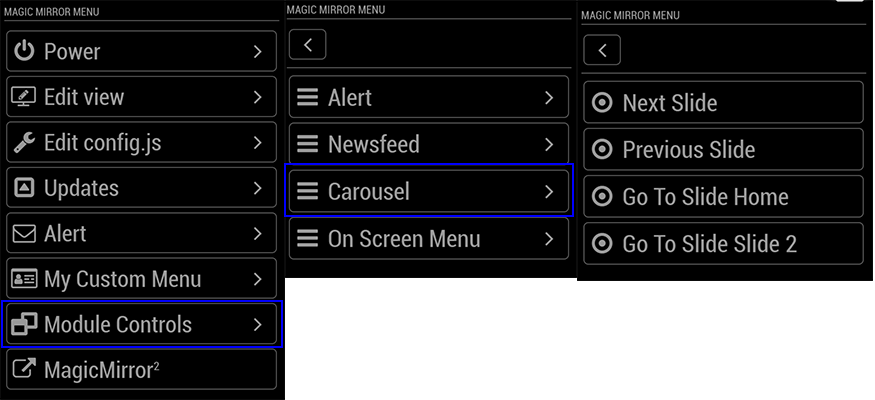
It seems that you need activate some features in modules to show them in this menu. But I don’t know what needs Newsfeed, for to have active his entry.
-
@mohace Oh yes you are correct I forgot that we can have custom entries indeed.
Well in my case Newsfeed is showing up by default without having to enable manually something. :man_shrugging_light_skin_tone:
-
I don’t have these entries
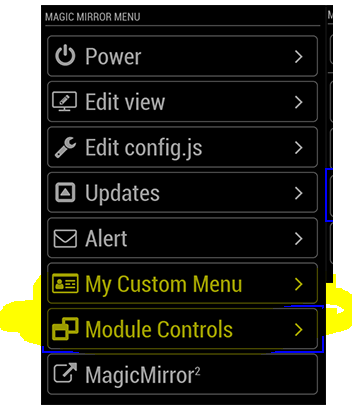
reinstalled twice the module without luck.
when i first installed this module the entries was there .
my config.js
{ module: 'MMM-Remote-Control', position: 'bottom_left', config: { customCommand: {}, customMenu: 'custom_menu.json', showModuleApiMenu: true, apiKey: '' } }, -
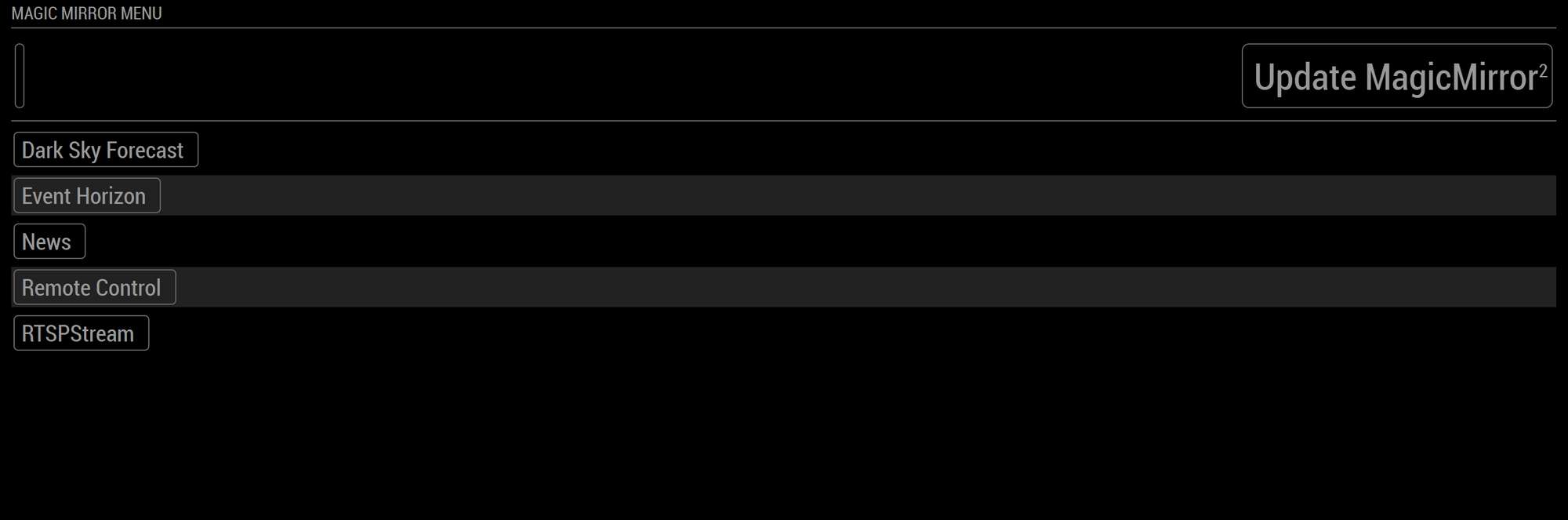
Any idea why my remote control looks like this? It’s lacking the right buttons etc…
-
I need to add some custom commands to control MMM-RTSPStream streams like if they were tv channel buttons, but I am not skilled enough to understand the interested readme section. :smiling_face_with_open_mouth_cold_sweat:
@shbatm could you please help me adding one stream button (as example for all the others to add)?
All I need is to run a combo of ‘RTSP-STOP all’ first (I am using OMXplayer therefore I prefer to kill any running stream first) and ‘RTSP-PLAY streamX’ immediately after.
-
When I press Restart MagicMirror it doesn’t restart…if I hit Refresh Browser the browser refreshes. Any idea why Restart MagicMirror command doesn’t work? Running latest updates on all platforms.
-
@swvalenti Yeah, same here. Would really like to find an answer for this…
-
@Cr4z33 said in [MMM-Remote-Control](v2-dev) Extensible REST API, Dynamic Menus, and Socket Communications, plus other updates:
I need to add some custom commands to control MMM-RTSPStream streams like if they were tv channel buttons, but I am not skilled enough to understand the interested readme section. :smiling_face_with_open_mouth_cold_sweat:
@shbatm could you please help me adding one stream button (as example for all the others to add)?
All I need is to run a combo of ‘RTSP-STOP all’ first (I am using OMXplayer therefore I prefer to kill any running stream first) and ‘RTSP-PLAY streamX’ immediately after.
@shbatm you there mate please? :smiling_face_with_halo:
-
@Cr4z33 said in [MMM-Remote-Control](v2-dev) Extensible REST API, Dynamic Menus, and Socket Communications, plus other updates:
I need to add some custom commands to control MMM-RTSPStream streams like if they were tv channel buttons, but I am not skilled enough to understand the interested readme section. :smiling_face_with_open_mouth_cold_sweat:
@shbatm could you please help me adding one stream button (as example for all the others to add)?
All I need is to run a combo of ‘RTSP-STOP all’ first (I am using OMXplayer therefore I prefer to kill any running stream first) and ‘RTSP-PLAY streamX’ immediately after.
It looks like @shbatm is not following this forum since many months.
Therefore @bolish or someone else could you please post your custom menu entries code so that I can better figure out how to enter that MMM-RTSPStream code?
The related README section didn’t make so much sense to me. :man_shrugging_medium_skin_tone:
-
Using Raspberry Pi Zero W with latest version of Buster. MM2 working . used command in first post to install MMM-RemoteControl. Used Master Branch and not Dev. Module directory created sucessfully. Edited config.js with appropriate entries. I dont have anything displaying on screen besides the clock and Holidays .
Its supposed to display the default webpage in the center of the screen. I dont see that . Just black in that area.
Here is the config.js
code_tvar config = { address: "localhost", // Address to listen on, can be: // - "localhost", "127.0.0.1", "::1" to listen on loopback interface // - another specific IPv4/6 to listen on a specific interface // - "", "0.0.0.0", "::" to listen on any interface // Default, when address config is left out, is "localhost" port: 8080, ipWhitelist: ["127.0.0.1", "::ffff:127.0.0.1", "::1"], // Set [] to allow all IP addresses // or add a specific IPv4 of 192.168.1.5 : // ["127.0.0.1", "::ffff:127.0.0.1", "::1", "::ffff:192.168.1.5"], // or IPv4 range of 192.168.3.0 --> 192.168.3.15 use CIDR format : // ["127.0.0.1", "::ffff:127.0.0.1", "::1", "::ffff:192.168.3.0/28"], language: "en", timeFormat: 12, units: "imperial", // serverOnly: true/false/"local" , // local for armv6l processors, default // starts serveronly and then starts chrome browser // false, default for all NON-armv6l devices // true, force serveronly mode, because you want to.. no UI on this device modules: [ { module: 'MMM-Remote-Control', // uncomment the following line to show the URL of the remote control on the mirror // position: 'bottom_left', // you can hide this module afterwards from the remote control itself config: { apiKey: '56cab4b5d5e24cfea8c436ac591d722c' } }, { module: "alert", }, { module: "updatenotification", position: "top_bar" }, { module: "clock", position: "top_left" }, { module: "calendar", header: "US Holidays", position: "top_left", config: { calendars: [ { symbol: "calendar-check", url: "webcal://www.calendarlabs.com/ical-calendar/ics/76/US_Holidays.ics" } ] } }, ] }; /*************** DO NOT EDIT THE LINE BELOW ***************/ if (typeof module !== "undefined") {module.exports = config;} ext -
@BD0G gotta have a position setting
-
@sdetweil Damn you are helpful!
I forgot to uncomment the position setting. Duh. Man little things just slip by. :) -
That works. Now I am struggling with understanding the IP Whitelist area . I want to open up access to all IP Addresses internally between 192.168.1.2 and 192.168.1.254 as I am unsure which of those IP addresses will be dynamically assigned to the device I use to access the MMM-Remote-Control app.
ipWhitelist: ["127.0.0.1", "::ffff:127.0.0.1", "::1"], // Set [] to allow all IP addresses // or add a specific IPv4 of 192.168.1.5 : // ["127.0.0.1", "::ffff:127.0.0.1", "::1", "::ffff:192.168.1.5"], // or IPv4 range of 192.168.3.0 --> 192.168.3.15 use CIDR format : // ["127.0.0.1", "::ffff:127.0.0.1", "::1", "::ffff:192.168.3.0/28"], -
@BD0G so, i just clear the whitelist, and allow anyone on my network to connect… (its only me,inside my house)
ipWhitelist: [],you will also have to open up the address block
address: [] or [0.0.0.0]otherwise it means ONLY the same machine can talk to the mirror…
-
Hi. There is a way to call, i.e, module controls/carousel/next slide from url?
-
This post is deleted!


Hello! It looks like you're interested in this conversation, but you don't have an account yet.
Getting fed up of having to scroll through the same posts each visit? When you register for an account, you'll always come back to exactly where you were before, and choose to be notified of new replies (either via email, or push notification). You'll also be able to save bookmarks and upvote posts to show your appreciation to other community members.
With your input, this post could be even better 💗
Register Login