Read the statement by Michael Teeuw here.
[MMM-Dreambox] to connect a Dreambox or a Enigma2 Receiver (like VU or VU+) to MagicMirror and stream stations via omxplayer
-
Here is my second module.
Description
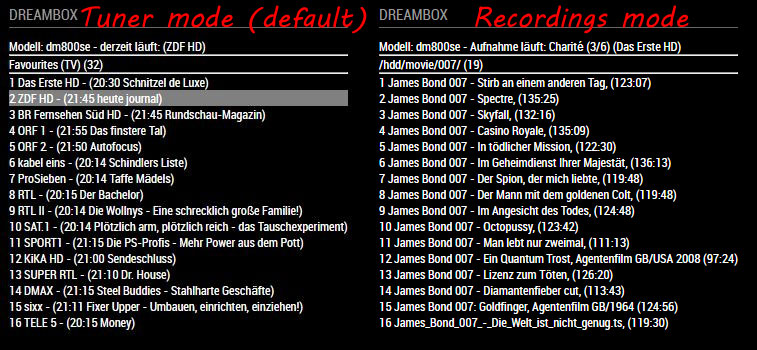
A module to connect a Dreambox or a Enigma2 Receiver (like VU or VU+) to MagicMirror. You can select services of your dreambox and stream them via omxplayer. The module shows some further informations like:- model of your dreambox
- which service is tuned right now / are there active timer
- epg for the services with its starting time
Download
[card:Ax-LED/MMM-Dreambox]Please let me know what you think.
AxLED
-
@axled I put the IP and WebIf port of my Vu+ Duo², but then… how do I stream something? :smiling_face_with_smiling_eyes:
I thought I was supposed to enter some M3U channel IPs or?
-
@AxLed
I get “Modell: dm7020hd - dezeit läuft: (RTL7 HD)”, meaning that I did something right, but nothing streams; just a black box.
Little Typo there, but German is difficult :-)
The bRef and sRef give output in the browser, so that seems okay.When I use port 80, the MM log shows:
0|mm  | Whoops! There was an uncaught exception...
0|mm  | MagicMirror will not quit, but it might be a good idea to check why this happened. Maybe no internet connection?
0|mm  | If you think this really is an issue, please open an issue on GitHub: https://github.com/MichMich/MagicMirror/issues
0|mm  | TypeError: Cannot read property 'code' of null
0|mm  |     at Request._callback (/home/pi/MagicMirror/modules/MMM-Dreambox/node_helper.js:110:36)
0|mm  |     at Request.self.callback (/home/pi/MagicMirror/node_modules/request/request.js:185:22)
0|mm  |     at emitTwo (events.js:126:13)
0|mm  |     at Request.emit (events.js:214:7)
0|mm  |     at Request.<anonymous> (/home/pi/MagicMirror/node_modules/request/request.js:1161:10)
0|mm  |     at emitOne (events.js:116:13)
0|mm  |     at Request.emit (events.js:211:7)
0|mm  |     at IncomingMessage.<anonymous> (/home/pi/MagicMirror/node_modules/request/request.js:1083:12)
0|mm  |     at Object.onceWrapper (events.js:313:30)
0|mm  |     at emitNone (events.js:111:20)
Without port (URL only) I get:
0|mm | Starting node helper for: MMM-DreamboxBut I do not see any stream nor a list of stations.
pm2 list shows that no omxplayer stream is active.
Can you tell me which parameters in the config are the most important and what I should see when I open those ‘personal’ URL’s in a browser ?
-
@cr4z33 said in [MMM-Dreambox] to connect a Dreambox or a Enigma2 Receiver (like VU or VU+) to MagicMirror and stream stations via omxplayer:
@axled I put the IP and WebIf port of my Vu+ Duo², but then… how do I stream something?
I thought I was supposed to enter some M3U channel IPs or?@Cr4z33
In my case (Dreambox DM800se) i just entered the IP-Adress without port. You can crosscheck this with your browser: are you able to reach the webfrontend of your receiver with the IP-Adress you entered?The module works as follows (very short description): It reads the xml file of
.../web/getallservices, build a list of the services and stations. The commandDB-PLAYpasses the selectede2servicereferenceto omxplayer.AxLED
-
1. @evroom
Thanks for your logs, i fixed the errorhandling and that typo.
Please do agit pullnow you should get detailed errors shown on the module in MM.2. How the module works (in the background).
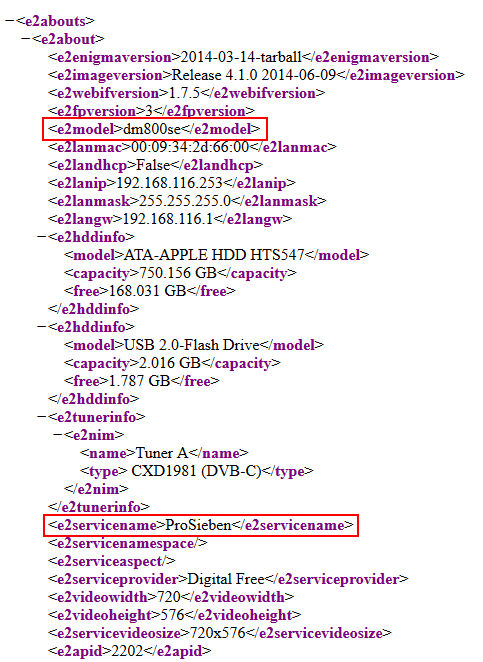
2.1 apiabout (About):
Samplelink: http://dm800se.fritz.box/web/about
I am reading two values, the model and what service is running (can be a station or playing a recorded movie).
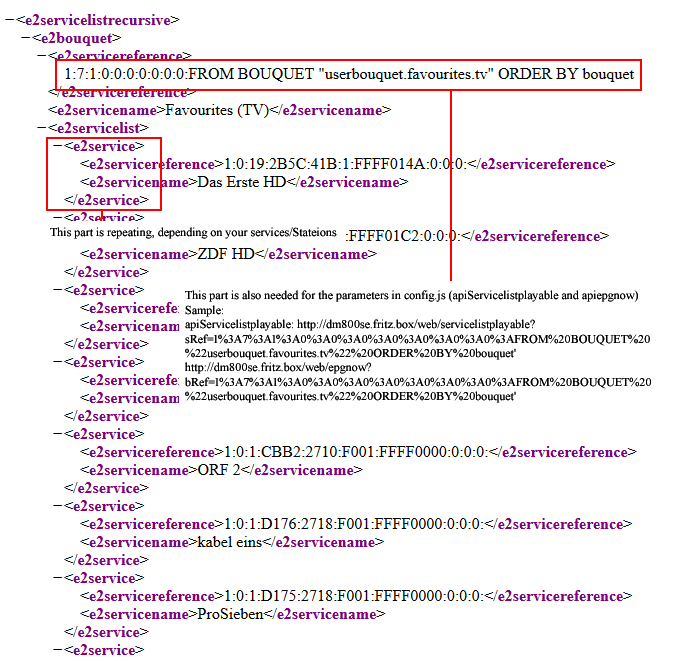
2.2 apiservices (Services):
Samplelink: http://dm800se.fritz.box/web/getallservices
I am reading all services (stations) of the receiver.
Important: The part1%3A7%3A1%3A0%3A0%3A0%3A0%3A0%3A0%3A0%3AFROM%20BOUQUET%20%22userbouquet.favourites.tv%22%20ORDER%20BY%20bouquet(your string might/will look different) is also needed for the parameters in config.js (apiServicelistplayable and apiepgnow).
Sample:
apiServicelistplayable: http://dm800se.fritz.box/web/servicelistplayable?sRef=1%3A7%3A1%3A0%3A0%3A0%3A0%3A0%3A0%3A0%3AFROM BOUQUET "userbouquet.favourites.tv" ORDER BY bouquet
apiepgnow: http://dm800se.fritz.box/web/epgnow?bRef=1%3A7%3A1%3A0%3A0%3A0%3A0%3A0%3A0%3A0%3AFROM BOUQUET "userbouquet.favourites.tv" ORDER BY bouquet
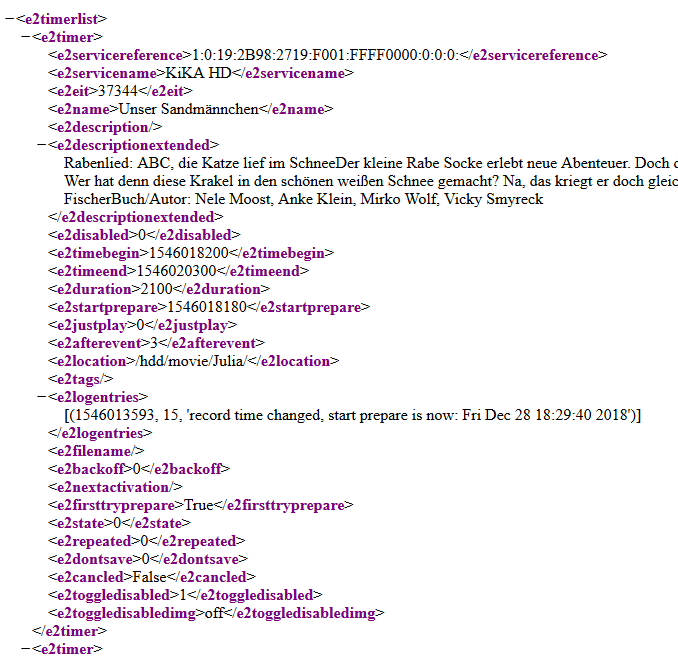
3. apiTimerlist (Timerlist):
Samplelink: http://dm800se.fritz.box/web/timerlist
I am reading if any timers are active, so i can show it in the module.
4. apiServicelistplayable (Servicelistplayable):
Samplelink: http://dm800se.fritz.box/web/servicelistplayable?sRef=1%3A7%3A1%3A0%3A0%3A0%3A0%3A0%3A0%3A0%3AFROM BOUQUET "userbouquet.favourites.tv" ORDER BY bouquet
I am reading which stations are on the same bouquet, this is important, if any active timers are running. As timers have priority. All stations with the value false will be shown in a different css-style (gray and italic).
Important: Check the following part with the one you get from http://dm800se.fritz.box/web/getallservices1%3A7%3A1%3A0%3A0%3A0%3A0%3A0%3A0%3A0%3AFROM%20BOUQUET%20%22userbouquet.favourites.tv%22%20ORDER%20BY%20bouquet(your string might/will look different).
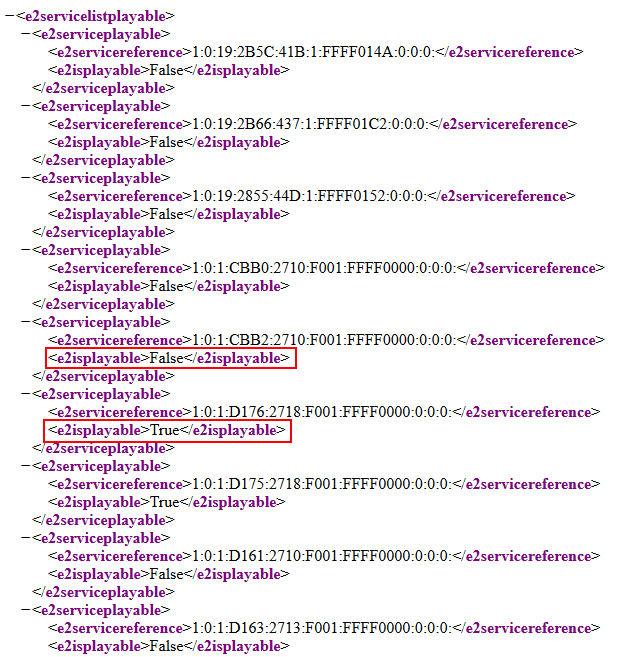
5. apiepgnow (Epgnow):
Samplelink: http://dm800se.fritz.box/web/epgnow?bRef=1%3A7%3A1%3A0%3A0%3A0%3A0%3A0%3A0%3A0%3AFROM BOUQUET "userbouquet.favourites.tv" ORDER BY bouquet
I am reading the epg of my favorites (same source as servicelist), so i can write the beginning time and tite of the actual running program.
Important: Check the following part with the one you get from http://dm800se.fritz.box/web/getallservices1%3A7%3A1%3A0%3A0%3A0%3A0%3A0%3A0%3A0%3AFROM%20BOUQUET%20%22userbouquet.favourites.tv%22%20ORDER%20BY%20bouquet(your string might/will look different).
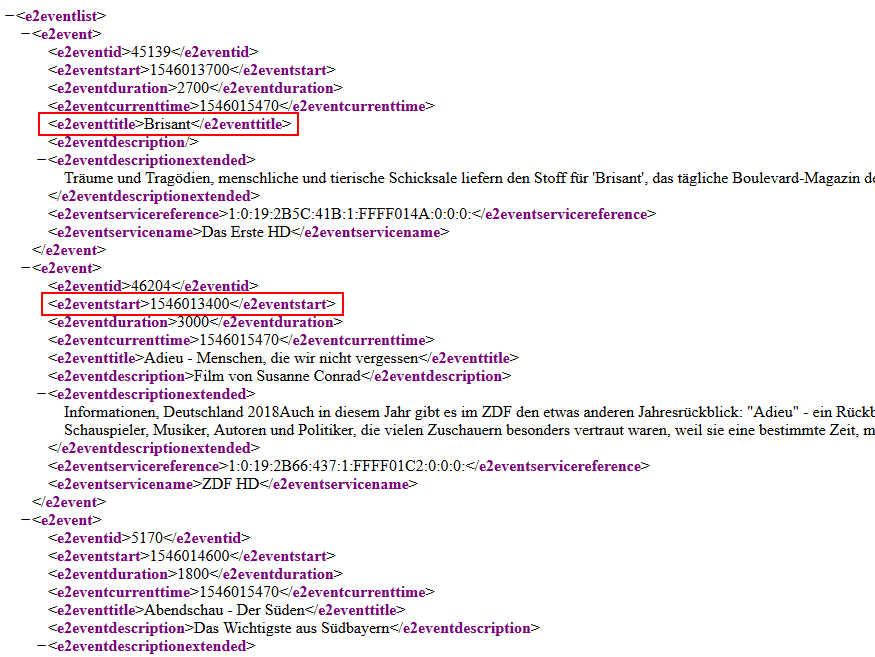
Maybe this helps to find some configuration problems for the right link parameters.
Regards
AxLED
-
@AxLed
So I guess we need to get a list displayed first, before sending the DB-PLAY command, right ?
I have set “apiBase: ‘http://192.168.178.28’,” in the config, but it only shows the channel that is currently running on my box.
No error in pm2 logs, just the “Starting node helper for: MMM-Dreambox”.
The URL http://192.168.178.28/web/getallservices gives a list in XML style.(the code button </> does not work here)
This XML file does not appear to have any style information associated with it. The document tree is shown below.
1:7:1:0:0:0:0:0:0:0:FROM BOUQUET “userbouquet.favourites.tv” ORDER BY bouquet
etc, etc, etc. -
@evroom
to your 1st question: yes we need a list displayed and selected one entry first, otherwise DB-PLAY wont work.Tipp: To insert xml code in the forum, you have to replace < by (& # 6 0 ; ) without spaces and > by (& # 6 2 ; ) without spaces.
to your 2nd question: that http://192.168.178.28/web/getallservices is returning an xml file (if viewed in browser) is good.
-
Question: Did you make a
git pull, as i had some error in my errorhandling. If not, do git pull in the MMM-Dreambox folder first. -
Question: What is the xml showing under
<e2timerlist> <e2timer> <e2servicereference></e2servicereference>- Question: Same xml file, are there entries following (like my screenshot above?):
<e2servicelist>
 <e2service>
AxLED
-
-
-
Just did. No (visible) changes.
-
All my timed programs. Exactly like in your example.
3.All my bouquets with the services in it. Like in your example.
We have simular Dreamboxes, so simular output.
I have 3 bouquets (Favourites (TV), Nederland (TV), Duitsland (TV))
I use WebControl Dreambox (via the DM IP) to control the box.Unfortunate your tip with (& # 6 0 ; ) and (& # 6 2 ; ) is not working for me; it deletes everything between < and >:
(<)
(>)That is a major flaw of this forum, besides not really being iPad friendly.
-
-
Is the module now working or do you still have issues?
AxLED -
Same issues.
Do not see any services list, so can not play one.
All apiXXX settings in the config file work when pasted in the browser.
XML output is simular like yours.
I only left apizap empty.Perhaps you could output some ‘landmarks’ in the MM log, like:
About - okay / not okay
Services - okay / not okay
EPGNow - okay / not okay
Zap - okay / not okay
Servicelistplayable - okay / not okay
omxplayer started -
- You can try another
git pullof the master branch and test, as I found some more errors in my code (if not all of the 5 requests are successful). - You can try to delete the MMM-Dreambox folder an do
git clone --branch debug https://github.com/Ax-LED/MMM-Dreambox.git.
I made this debug branch for you, with a different node_helper.js, which no shows some ‘landmarks’ in PM2 logs.
AxLED
- You can try another
-
@axled maybe I am misunderstanding everything, but I need to understand whether it’s just a Dreambox information module or whether I can actually stream into an omxplayer iframe?
If that is what it can do then all I see right now is some information (and by the way in German) about the current channel playing on the VU+:
DREAMBOXModel Duo² - dezeit läuft: (Rai 3 HD)
Nothing else.
No streaming stuff going on. :smiling_face_with_open_mouth_smiling_eyes:Here’s my module config and yes I use a different port than 80 or 8080.
{ module: 'MMM-Dreambox', header: 'Dreambox', position: 'bottom_right', disabled: false, config: { apiBase: 'http://*.*.*.*:**', omxargs: ' --win 320,180,1600,900 -o both ', refreshInterval: 1000 * 30, //refresh every 30 seconds apiabout: '/web/about', apiservices: '/web/getallservices', apiepgnow: '/web/epgnow?bRef=1%3A7%3A1%3A0%3A0%3A0%3A0%3A0%3A0%3A0%3AFROM%20BOUQUET%20%22userbouquet.favourites.tv%22%20ORDER%20BY%20bouquet', apizap: '/web/zap?sRef=', apiTimerlist: '/web/timerlist', apiServicelistplayable: '/web/servicelistplayable?sRef=1%3A7%3A1%3A0%3A0%3A0%3A0%3A0%3A0%3A0%3AFROM%20BOUQUET%20%22userbouquet.favourites.tv%22%20ORDER%20BY%20bouquet' } }, -
-
Same result. No services list.
-
Same result. No services list. But …
0|mm  | Starting node helper for: MMM-Dreambox
0|mm  | MMM-Dreambox: 1. Request EPGNOW succeeded.
0|mm  | MMM-Dreambox: 2. Request ABOUT succeeded.
0|mm  | MMM-Dreambox: 3. Request Services succeeded.
0|mm  | MMM-Dreambox: 4. Request Timerlist succeeded.
0|mm  | MMM-Dreambox: 5. Request Servicelistplayable succeeded.
0|mm  | MMM-Dreambox: Notification FETCH_DATAreceived. New datas from dreambox should be pulled.
0|mm  | MMM-Dreambox: 2. Request ABOUT succeeded.
0|mm  | MMM-Dreambox: 5. Request Servicelistplayable succeeded.
0|mm  | MMM-Dreambox: 3. Request Services succeeded.
0|mm  | MMM-Dreambox: 1. Request EPGNOW succeeded.
0|mm  | MMM-Dreambox: 4. Request Timerlist succeeded.
So, we are getting somewhere :-)
In the debug branch, could you perhaps send the playable services list to the MM log ? -
-
I see in your code that the HTML requests are successful (status code 200), so next step is to determine if the parsing was successful.
I know how json parsing works using Perl, but in MM context I have no clue, so I am not much of help there. -
@cr4z33 said in [MMM-Dreambox] to connect a Dreambox or a Enigma2 Receiver (like VU or VU+) to MagicMirror and stream stations via omxplayer:
maybe I am misunderstanding everything, but I need to understand whether it’s just a Dreambox information module or whether I can actually stream into an omxplayer iframe?
@Cr4z33
Its an entertainment module, means it show informations of your receiver and you can stream the channels with the omxplayer as overlay on your monitor (monitor must be local connected to pi). The displayed informations are needed to control the dreambox/receiver.Your config looks ok.
Can you please answer following questions:
- do you have timers in your receiver (can be checked by http://IPofyourReceiver/web/timerlist)?
- what if you open MM in a browser in the same network and use F12. Are there any errors?
AxLED
-
@evroom
I think we are getting closer to a working module.
The 5 requests are successful, so config should be ok.Can you please answer following questions:
- do you have timers in your receiver (can be checked by http://IPofyourReceiver/web/timerlist)?
- what if you open MM in a browser in the same network and use F12. Are there any errors?
- Can you send me following 5 xml files: …/web/about, …/web/getallservices, …/web/timerlist, …/web/servicelistplayable, … /web/epgnow
After this i can modifiy the node_helper.js of
development branchfor further debugging.AxLED
-
- Yes
- Perhaps stupid, but do not how to do that. Cannot open MM using the MM IP.
- Yes. Probably by pm.
MagicMirror version: 2.37.0
Raspberry Pi 4 Model B Rev 1.5 (8 GB RAM)
Raspbian GNU/Linux 12 (bookworm) -
Can only upload pictures.
Do not see a pm option.
Hate it when you need to solve problems before you can solve problems. -
@evroom said in [MMM-Dreambox] to connect a Dreambox or a Enigma2 Receiver (like VU or VU+) to MagicMirror and stream stations via omxplayer:
Perhaps stupid, but do not how to do that. Cannot open MM using the MM IP.
My MM config.js for IP looks like
config = {
	address: "192.168.56.101",
	port: 8080,
	ipWhitelist: [], // Set [] to allow all IP addresses
So can can open a browser in the same network and enter
http://192.168.56.101:8080to open MM in my browser. F12 shows a console where you can filter for errors.Just send me the files by email ak10zeichen-xy@yahoo.de
AxLED
-
-
No timers are set right now.
-
Here is what it came out on the console running MM into Dev mode:
MMM-Dreambox.js:228 Uncaught TypeError: Cannot read property '0' of undefined at Class.socketNotificationReceived (MMM-Dreambox.js:228) at module.js:246 at r.<anonymous> (socketclient.js:25) at r.emit (index.js:133) at r.onevent (socket.js:270) at r.MMSocket.self.socket.onevent (socketclient.js:19) at r.onpacket (socket.js:228) at r.<anonymous> (index.js:21) at r.emit (index.js:133) at r.ondecoded (manager.js:345) socketNotificationReceived @ MMM-Dreambox.js:228 (anonymous) @ module.js:246 (anonymous) @ socketclient.js:25 r.emit @ index.js:133 r.onevent @ socket.js:270 MMSocket.self.socket.onevent @ socketclient.js:19 r.onpacket @ socket.js:228 (anonymous) @ index.js:21 r.emit @ index.js:133 r.ondecoded @ manager.js:345 (anonymous) @ index.js:21 r.emit @ index.js:133 s.add @ index.js:241 r.ondata @ manager.js:335 (anonymous) @ index.js:21 r.emit @ index.js:133 r.onPacket @ socket.js:456 (anonymous) @ socket.js:273 r.emit @ index.js:133 r.onPacket @ transport.js:145 r.onData @ transport.js:137 ws.onmessage @ websocket.js:147 -


Hello! It looks like you're interested in this conversation, but you don't have an account yet.
Getting fed up of having to scroll through the same posts each visit? When you register for an account, you'll always come back to exactly where you were before, and choose to be notified of new replies (either via email, or push notification). You'll also be able to save bookmarks and upvote posts to show your appreciation to other community members.
With your input, this post could be even better 💗
Register Login