@Cr4z33
Yes.
A New Chapter for MagicMirror: The Community Takes the Lead
Read the statement by Michael Teeuw here.
Read the statement by Michael Teeuw here.
A
Offline
Posts
-
RE: [MMM-Dreambox] to connect a Dreambox or a Enigma2 Receiver (like VU or VU+) to MagicMirror and stream stations via omxplayer
Can you send me following 5 xml files: …/web/about, …/web/getallservices, …/web/timerlist, …/web/servicelistplayable, … /web/epgnow by email ak10zeichen-xy@yahoo.de
AxLED
-
RE: [MMM-Dreambox] to connect a Dreambox or a Enigma2 Receiver (like VU or VU+) to MagicMirror and stream stations via omxplayer
@evroom said in [MMM-Dreambox] to connect a Dreambox or a Enigma2 Receiver (like VU or VU+) to MagicMirror and stream stations via omxplayer:
Perhaps stupid, but do not how to do that. Cannot open MM using the MM IP.
My MM config.js for IP looks like
config = {
	address: "192.168.56.101",
	port: 8080,
	ipWhitelist: [], // Set [] to allow all IP addresses
So can can open a browser in the same network and enter
http://192.168.56.101:8080to open MM in my browser. F12 shows a console where you can filter for errors.Just send me the files by email ak10zeichen-xy@yahoo.de
AxLED
-
RE: [MMM-Dreambox] to connect a Dreambox or a Enigma2 Receiver (like VU or VU+) to MagicMirror and stream stations via omxplayer
@evroom
I think we are getting closer to a working module.
The 5 requests are successful, so config should be ok.Can you please answer following questions:
- do you have timers in your receiver (can be checked by http://IPofyourReceiver/web/timerlist)?
- what if you open MM in a browser in the same network and use F12. Are there any errors?
- Can you send me following 5 xml files: …/web/about, …/web/getallservices, …/web/timerlist, …/web/servicelistplayable, … /web/epgnow
After this i can modifiy the node_helper.js of
development branchfor further debugging.AxLED
-
RE: [MMM-Dreambox] to connect a Dreambox or a Enigma2 Receiver (like VU or VU+) to MagicMirror and stream stations via omxplayer
@cr4z33 said in [MMM-Dreambox] to connect a Dreambox or a Enigma2 Receiver (like VU or VU+) to MagicMirror and stream stations via omxplayer:
maybe I am misunderstanding everything, but I need to understand whether it’s just a Dreambox information module or whether I can actually stream into an omxplayer iframe?
@Cr4z33
Its an entertainment module, means it show informations of your receiver and you can stream the channels with the omxplayer as overlay on your monitor (monitor must be local connected to pi). The displayed informations are needed to control the dreambox/receiver.Your config looks ok.
Can you please answer following questions:
- do you have timers in your receiver (can be checked by http://IPofyourReceiver/web/timerlist)?
- what if you open MM in a browser in the same network and use F12. Are there any errors?
AxLED
-
RE: [MMM-Dreambox] to connect a Dreambox or a Enigma2 Receiver (like VU or VU+) to MagicMirror and stream stations via omxplayer
- You can try another
git pullof the master branch and test, as I found some more errors in my code (if not all of the 5 requests are successful). - You can try to delete the MMM-Dreambox folder an do
git clone --branch debug https://github.com/Ax-LED/MMM-Dreambox.git.
I made this debug branch for you, with a different node_helper.js, which no shows some ‘landmarks’ in PM2 logs.
AxLED
- You can try another
-
RE: [MMM-Dreambox] to connect a Dreambox or a Enigma2 Receiver (like VU or VU+) to MagicMirror and stream stations via omxplayer
Is the module now working or do you still have issues?
AxLED -
RE: [MMM-Dreambox] to connect a Dreambox or a Enigma2 Receiver (like VU or VU+) to MagicMirror and stream stations via omxplayer
@evroom
to your 1st question: yes we need a list displayed and selected one entry first, otherwise DB-PLAY wont work.Tipp: To insert xml code in the forum, you have to replace < by (& # 6 0 ; ) without spaces and > by (& # 6 2 ; ) without spaces.
to your 2nd question: that http://192.168.178.28/web/getallservices is returning an xml file (if viewed in browser) is good.
-
Question: Did you make a
git pull, as i had some error in my errorhandling. If not, do git pull in the MMM-Dreambox folder first. -
Question: What is the xml showing under
<e2timerlist> <e2timer> <e2servicereference></e2servicereference>- Question: Same xml file, are there entries following (like my screenshot above?):
<e2servicelist>
 <e2service>
AxLED
-
-
RE: [MMM-Dreambox] to connect a Dreambox or a Enigma2 Receiver (like VU or VU+) to MagicMirror and stream stations via omxplayer
1. @evroom
Thanks for your logs, i fixed the errorhandling and that typo.
Please do agit pullnow you should get detailed errors shown on the module in MM.2. How the module works (in the background).
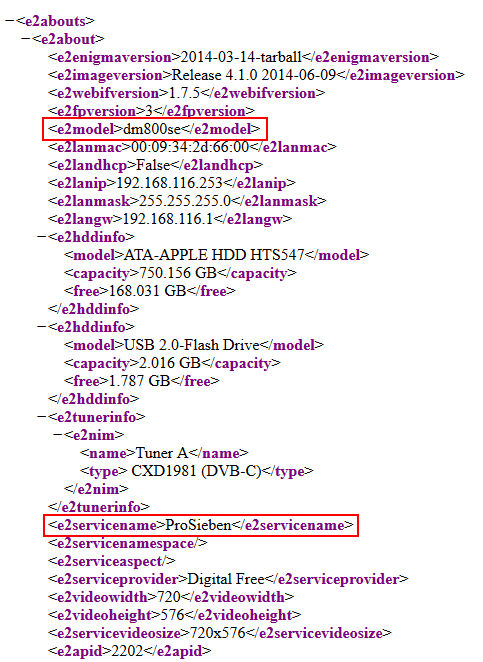
2.1 apiabout (About):
Samplelink: http://dm800se.fritz.box/web/about
I am reading two values, the model and what service is running (can be a station or playing a recorded movie).
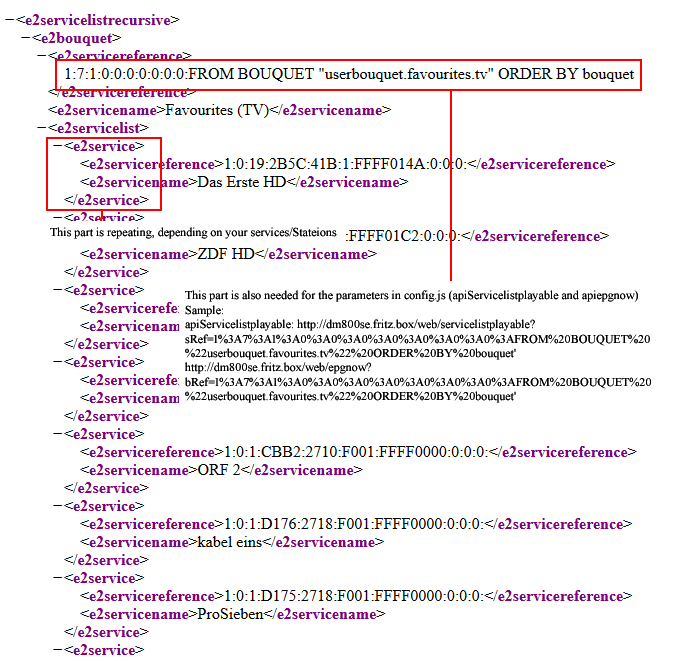
2.2 apiservices (Services):
Samplelink: http://dm800se.fritz.box/web/getallservices
I am reading all services (stations) of the receiver.
Important: The part1%3A7%3A1%3A0%3A0%3A0%3A0%3A0%3A0%3A0%3AFROM%20BOUQUET%20%22userbouquet.favourites.tv%22%20ORDER%20BY%20bouquet(your string might/will look different) is also needed for the parameters in config.js (apiServicelistplayable and apiepgnow).
Sample:
apiServicelistplayable: http://dm800se.fritz.box/web/servicelistplayable?sRef=1%3A7%3A1%3A0%3A0%3A0%3A0%3A0%3A0%3A0%3AFROM BOUQUET "userbouquet.favourites.tv" ORDER BY bouquet
apiepgnow: http://dm800se.fritz.box/web/epgnow?bRef=1%3A7%3A1%3A0%3A0%3A0%3A0%3A0%3A0%3A0%3AFROM BOUQUET "userbouquet.favourites.tv" ORDER BY bouquet
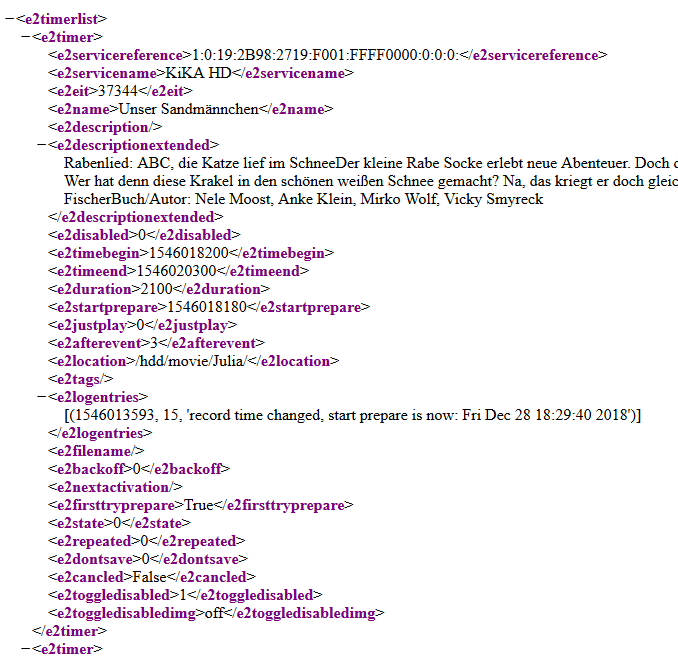
3. apiTimerlist (Timerlist):
Samplelink: http://dm800se.fritz.box/web/timerlist
I am reading if any timers are active, so i can show it in the module.
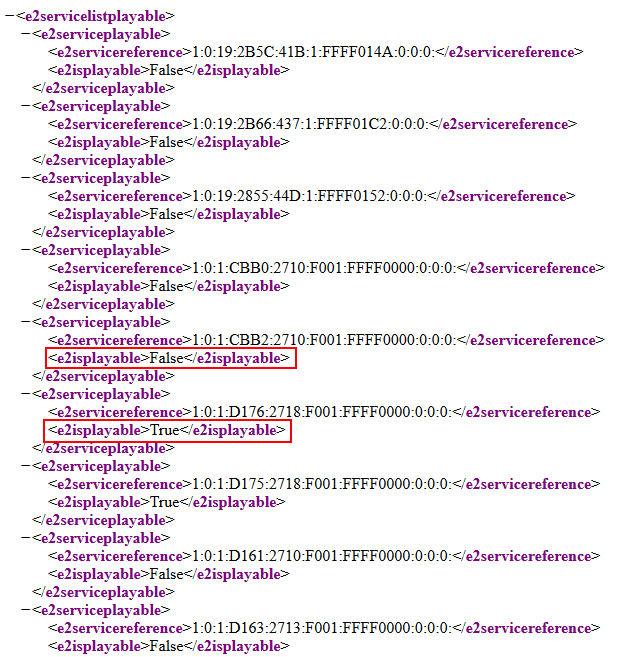
4. apiServicelistplayable (Servicelistplayable):
Samplelink: http://dm800se.fritz.box/web/servicelistplayable?sRef=1%3A7%3A1%3A0%3A0%3A0%3A0%3A0%3A0%3A0%3AFROM BOUQUET "userbouquet.favourites.tv" ORDER BY bouquet
I am reading which stations are on the same bouquet, this is important, if any active timers are running. As timers have priority. All stations with the value false will be shown in a different css-style (gray and italic).
Important: Check the following part with the one you get from http://dm800se.fritz.box/web/getallservices1%3A7%3A1%3A0%3A0%3A0%3A0%3A0%3A0%3A0%3AFROM%20BOUQUET%20%22userbouquet.favourites.tv%22%20ORDER%20BY%20bouquet(your string might/will look different).
5. apiepgnow (Epgnow):
Samplelink: http://dm800se.fritz.box/web/epgnow?bRef=1%3A7%3A1%3A0%3A0%3A0%3A0%3A0%3A0%3A0%3AFROM BOUQUET "userbouquet.favourites.tv" ORDER BY bouquet
I am reading the epg of my favorites (same source as servicelist), so i can write the beginning time and tite of the actual running program.
Important: Check the following part with the one you get from http://dm800se.fritz.box/web/getallservices1%3A7%3A1%3A0%3A0%3A0%3A0%3A0%3A0%3A0%3AFROM%20BOUQUET%20%22userbouquet.favourites.tv%22%20ORDER%20BY%20bouquet(your string might/will look different).
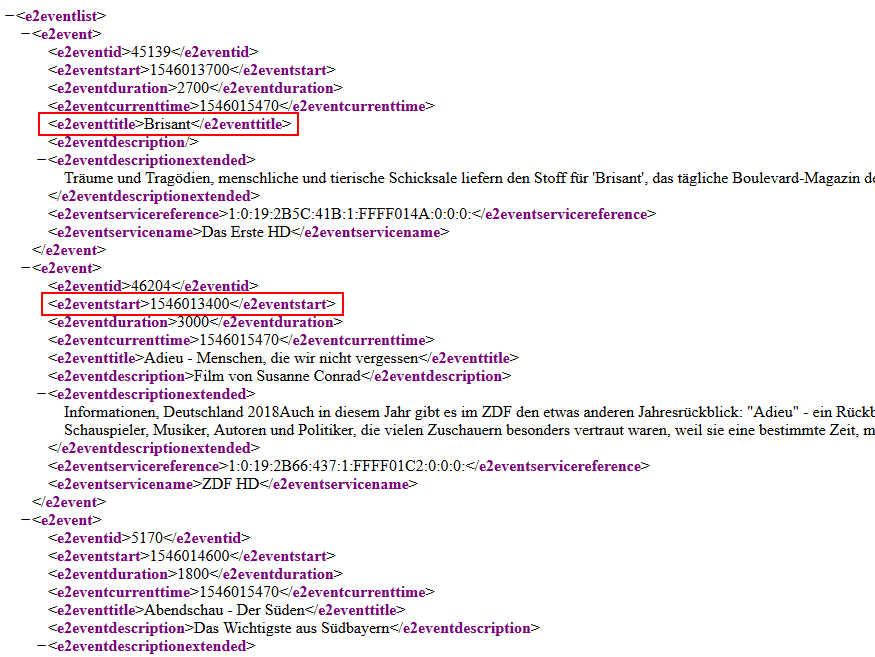
Maybe this helps to find some configuration problems for the right link parameters.
Regards
AxLED
-
RE: [MMM-Dreambox] to connect a Dreambox or a Enigma2 Receiver (like VU or VU+) to MagicMirror and stream stations via omxplayer
@cr4z33 said in [MMM-Dreambox] to connect a Dreambox or a Enigma2 Receiver (like VU or VU+) to MagicMirror and stream stations via omxplayer:
@axled I put the IP and WebIf port of my Vu+ Duo², but then… how do I stream something?
I thought I was supposed to enter some M3U channel IPs or?@Cr4z33
In my case (Dreambox DM800se) i just entered the IP-Adress without port. You can crosscheck this with your browser: are you able to reach the webfrontend of your receiver with the IP-Adress you entered?The module works as follows (very short description): It reads the xml file of
.../web/getallservices, build a list of the services and stations. The commandDB-PLAYpasses the selectede2servicereferenceto omxplayer.AxLED
-
RE: [MMM-RTSPStream] - Video Streaming from Live Feeds & Security Cameras
@evroom said in [MMM-RTSPStream] - Video Streaming from Live Feeds & Security Cameras:
Next thing I am trying to use MMM-RTSPStream for, is streaming sat-tv from a Dreambox & VU+ receivers.
I am able to stream a channel using:
omxplayer --vol -3000 --win “0 0 480 320” --live http://192.168.178.28:8001/1:0:19:283D:3FB:1:C00000:0:0:0:@evroom
Maybe my new module is something for you:
MMM-DreamboxRegards
AxLED
-
RE: TV Tuner
@richland007 said in TV Tuner:
@pbrunson I read your post and it peaked my interest … the other guys have it easy with the Linux sat boxes that can stream directly Like Enigma Vu+… They brought me back memories of the DreamBox i had when i was living in Europe i used to stream all content i could get to my office.
@richland007
Maybe my new module is something for you:
MMM-DreamboxRegards
AxLED
-
[MMM-Dreambox] to connect a Dreambox or a Enigma2 Receiver (like VU or VU+) to MagicMirror and stream stations via omxplayer
Here is my second module.
Description
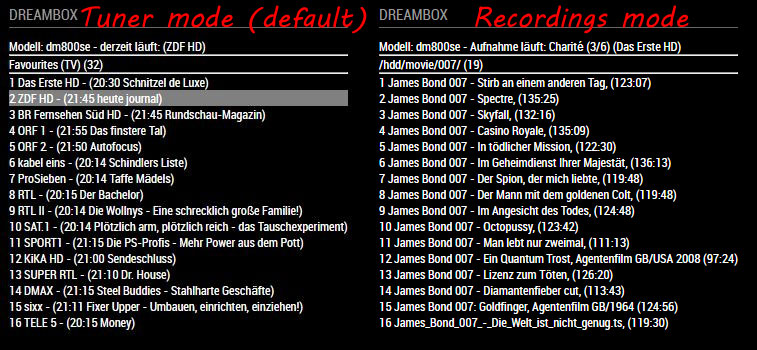
A module to connect a Dreambox or a Enigma2 Receiver (like VU or VU+) to MagicMirror. You can select services of your dreambox and stream them via omxplayer. The module shows some further informations like:- model of your dreambox
- which service is tuned right now / are there active timer
- epg for the services with its starting time
Download
[card:Ax-LED/MMM-Dreambox]Please let me know what you think.
AxLED
-
RE: Method to use button to advance month view, toggle to day agenda
@bmfinn
i had the same need, but didnt have the time to move further, see https://forum.magicmirror.builders/topic/7500/calendar-module-interaction-scrollable-different-start-datesAxLED
-
RE: Help needed - getting informations from XML File
@Charley
Thanks for your reply and your code inxml2json.js.
Now i can get the requested values of my xml and can move forward in developing.If somebody knows a way to directly extract datas of xml could be an optimization afterwards, to reduce code.
Regards
AxLED
-
Help needed - getting informations from XML File
Hi to the java gurus,
i am having troubel to get to the right informations of an XML File.
I try to read a xml file of a TV set top box (Dreambox, Linux OS, Enigma2).
The xml file is provided by the webservice of the box in the same LAN (see sample below).
I already got following working reading the xml file into a variable (in node_helper.js) and sending this to the module.js.
I have to useJSON.stringify(xml)instead ofJSON.parse(xml)otherwise i got an error of some special charachters found in xml.Sample of XML
<?xml version="1.0" encoding="UTF-8"?>
<e2servicelistrecursive>
	<e2bouquet>
		<e2servicereference>1:7:1:0:0:0:0:0:0:0:FROM BOUQUET "userbouquet.favourites.tv" ORDER BY bouquet</e2servicereference>
		<e2servicename>Favourites (TV)</e2servicename>
		<e2servicelist>
			<e2service>
				<e2servicereference>1:0:19:2B5C:41B:1:FFFF014A:0:0:0:</e2servicereference>
				<e2servicename>Das Erste HD</e2servicename>
			</e2service>
			<e2service>
				<e2servicereference>1:0:19:2B66:437:1:FFFF01C2:0:0:0:</e2servicereference>
				<e2servicename>ZDF HD</e2servicename>
			</e2service>
		</e2servicelist>
	</e2bouquet>
</e2servicelistrecursive>
If i send the content of xml to
console.logit shows me the right content, but the whole xml file.Now i want to get only some datas out of the xml file, but the following didnt work:
this.reference = xml.e2servicereference;
this.e2servicelist = xml.e2servicelist;
this.reference = xml.e2servicereference[0];
this.e2servicelist = xml.e2servicelist[0];
I get an error that
xml.whateveritrytoectractis undefined.I tried to use code samples of MMM-RNV which unfortuantelly didnt work, but he is using
JSON.parse(xml)instead ofJSON.stringify(xml).Does anybody has useful tipps for me?
I am looking forward to your answers.
Best regards
AxLED
-
RE: MagicMirror will not start after update 2.5.0
@Blackmirror
Can you please post the output when you try to start the mirror bynpm startin the magicmirror folder?
Your post only shows the warnings after installing/updating your magicmirror.AxLED
-
RE: Problem: Magic Mirror Module MMM-pages/MMM-page-indicator
@cjmaverick
There are to many] modules: [in your config.js.
There should be only one timemodules: [somewhere in the beginning of your config.js and one time
]near the end of config.js
GreetingsAxLED
-
RE: script or bash to exit MM and exit GUI and run a command in TTY mode
@Ramez
Thanks for your reply, i want to have only one app (either mm or Retropie/Emulationstation) run at one time due the pi ressources.But i will try your approach.
AxLED
-
RE: script or bash to exit MM and exit GUI and run a command in TTY mode
Hi to all interested,
i testet some hours and made little progress.
There are following requirements:
Tools:- pm2
- xdotool
Starting MagicMirror from Retropie works somehow, see the following lines:
- add a MagicMirror.sh file in the fork folder of retropie with the following code
#!/bin/bash echo "starting MagicMirror" sudo service lightdm start #to start GUI #pm2 stop emulationstation, final commands missing so far pm2 start mm #to start MagicMirror xdotool key Ctrl+Alt+F7 #to change to tty7 = Gui- make this file executable
Starting Retropie from MagicMirror works somehow, see the following lines:
-
editing file /opt/retropie/supplementary/runcommand/runcommand.sh, change links from tty to tty1. Make sure owner and group ist root after editing
-
add a es.sh file in a folder of your choice with the following code
#!/bin/bash echo 'starting Emulationstation/Retropie' sudo service lightdm stop #to quit GUI export DISPLAY=:0 emulationstation > /dev/tty1 #to execute this command in tty1 where emulationstation/retropie runs- make this file executable
- put this file into pm2
Difficulties:
I dont know how to put two .sh files into pm2 and set one to “start” and one to “stop”, if i only would have one of the to .sh files executed at one time (one .sh is for MagicMirror, second .sh is for emulationstation/retropie)AxLED