@Athlon
Very cool. I like that ! Then it already was worth it.
Yeah, feel free to edit the language part.
Maybe i’ll try to add a language feature.
@Athlon
Very cool. I like that ! Then it already was worth it.
Yeah, feel free to edit the language part.
Maybe i’ll try to add a language feature.
please do not use this thread for a complete other module and problem
I’m going to attempt to create a lite version of this module for Pi users when I get the opportunity. In actuality, I’d like to rebuild the module entirely as there’s a lot of code cleanup I’d like to do. Although Rob S was the original creator of the globe, he assisted me in making heavy changes to the code, and I had to make some additions to make it compatible with the MM framework. Unbelievably, this was actually heavier on processing prior to release. Performance improvements are at the top of my list, as are a few other things.
How is it ongoing with the lite module?
I would love to see your module on my mirror. Sadly nothing else then a RPi3 is possible at the moment.
Hi all,
what are your top3 modules you can’t live without?
Beside the very useful standard calendar and weather forecast module i love this three ones:
Please share your most important modules and strip it down to only 3.
too late. now i feel bad
;)
Already tested it on my Notebook, to see it in real. Very very nice. Thats why i asked.
i like the moving eye! (~30sec)
can i have that as a small module. please ;)
But i only have a Pi3.
Guess its a classical Copy&paste error.
One line above:
Get your free API key here
[https://newsapi.org/)
Wunderground would make no sense here, you are right.
I will give it a try. Looks nice.
great tutorial. Will give it a try later on.
I made the complicated way around it and created a VirtualMaschine with Debian, with a standalone MM installation.
This natively running thing is way better. Thanks
Thanks. I already fixed it at my mirror with
(config was already in 24hours mode)
changeing this line
//  time = time.toLocaleString('en-US', { hour: 'numeric',minute:'numeric', hour12: true });
       time = time.toLocaleString('de-DE', { hour: 'numeric',minute:'numeric', hour24: true });
which did the job
And for the sunset and sunrise i just changed to
H:mm
Ugly and hardcoded but worked for me. with my low programming skills.
How is the correct way to update the repository via git? I’m kind of new to this stuff.
working likea charm.
Thanks a lot.
Let’s see what the WAF barometer will say.
Nothing good i guess.
At least mit little daughter is still to little to see the scary eye ;)
Runs perfect on a Win 10 x64.
One thing for me is, i don’t like the fullscreen, because i want to test some stuff before i bring it to the real MM.
Try instead of
“npm start” a
“node serveronly”
This launches the MM not in full screen. You can point now to your browser and type
localhost:8080
This will show your MM installation in your favourit browser.
In my case, the better option :)
First step i would do, is a replacement with another power supply.
Does it have enough power. At least 2.5A is recommened i guess!?
I guess it is not related to the MM itself, its a Pi problem.
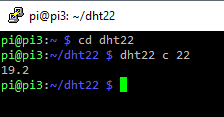
so you first installed the sensor and testet the output with
sudo ./dht22 c 22
and
sudo ./dht22 h 22
Please check if your wiring is correct in the wiringPi numbering.
If your sensor is connected to GPIO 22this should work.
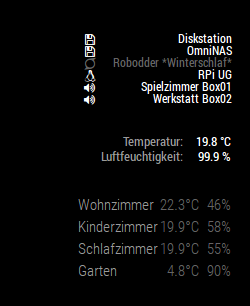
Mine does (exept the humidity mostly shows 99.9%, but seems like a sensor issue)
The tutorial you linked is way to complicated in our case. Just do it like it is described in
https://github.com/nebulx29/dht22
hmm. looks not so bad.
It can take some time to read the sensor (~3-5 sec). But i guess you waited longer after the command?
My DHT22 looks slightly different, an i had to solder a resistor between two pins.
Maybe yours is ready made.
Are you sure that 3.3V are enough? You could try to put your + line to pin 2 or 4 (right next to the ground)
Should look like this;)
hah, that would have been my next suggestion… take the xiaomi stuff.
You can jsut throw it everywhere in your house, and you don’t need a wired connection.
Here in the bottom.
As you can see the humidity from the sensor is not showing correctly. Need to buy another one or … even better take another Xiaomi sensor ;)
Don’t forget, that you need the Xiaomi Gateway in order to get the stuff to work
Usually the OS in the background should autodetect the resolution of the TFT.
If not and you are already autostarted the MM system, try to
pm2 stop
via SSH
and try to change the resolution manually on the running Linux.
(Maybe you can add temporarily a mouse to the pi or log in remotely via VNC)
VNC can be enabled via SSH within the console (sudo raspi-config)