@banbutcher yes, used screen and nethogs and tried lowering the refresh-rates of some modules and the data-usage dropped quickly
B
Offline
A New Chapter for MagicMirror: The Community Takes the Lead
Read the statement by Michael Teeuw here.
Read the statement by Michael Teeuw here.
Posts
-
RE: 2nd mirror! 175x45cm
-
RE: 2nd mirror! 175x45cm
@justbob
It’s currently laying on my desk :-(
Couldn’t find a proper way to detect new mail properly yet.
-
2nd mirror! 175x45cm
Hello!
My second mirror is almost finished and ready to be published :-)Hardware and data
- Raspberry Pi 4 2GB
- fan - Noctua 5v
- case - Miuzei Raspberry Pi 4 Case (modified to fit the noctua fan)
- monitor - Acer EB1 (EB321HQUC) 31,5"
- 172cm x 42cm glass from glas-star.de (4mm thickness)
- frame by carpenter
- sound - Trust Leto 2.0 USB
- brightnesssensor - GY-302 BH170
- motion sensor - HC-SR501
- microphone - Kinobo Mini Akiro
- total weight - 18.5kg
- MM Version 2.9.2
Functionality
- Google Assistant
- greeting with time when I arrive at home
- 3 Pages [usual; google maps with traffic; no sensitive data]
- Shows camera of frontdoor / balcony
- Activates house-door relay
- Turns on/off 3d printer (remote sockets and prior shutdown-command)
- Turns on TV, PC & soundbar
- Set of commands
- Turns on PC+TV
- Turns on PC+3d pinter
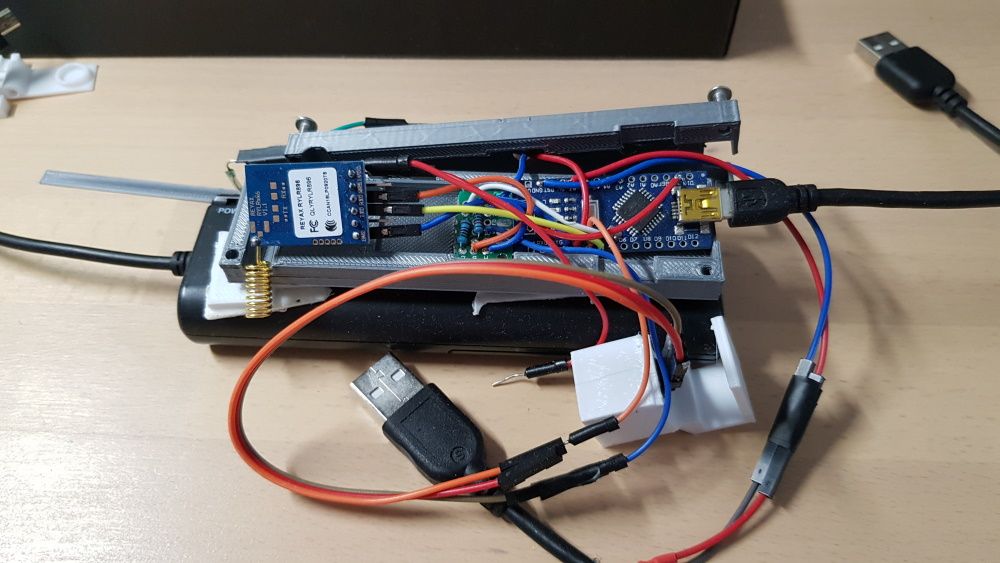
Mailbox - Remote connection (ryrl896) - if my physical mailbox lid is triggered, it will send a character (mail) to the mirror (5 floors above), opening the mailbox will sends(clear) + it sends once per day “alive” (still work in progress)
Modules
- calendar twice (Private & Work)
- MMM-MicrosoftToDo (Private & Work)
- MMM-SystemStats (modified)
- MMM-WienerLinien (modified)
- MMM-NetworkScanner (modified)
- MMM-COVID19 (modified)
- getPiTemps (own module: shows online raspberrypis in private network and their temperature)
- pdvDevices (own module: shows the status of the companies raspberrypis & esps)
- MMM-GoogleMapsTraffic
- clock
- weatherforecast
- currentweather
- newsfeed
- calendar_monthly
- MMM-pages
- MMM-Remote-Control
- MMM-AssistantMk2 (modified)
- MMM-Hotword (modified)
- notification (own module: helper for tasks, such as: display off, show only several modules, show voice commands)
- cam_street (own module: shows stream of balcony)
- cam_door (own module: shows stream of frontdoor)
- mailbox (own module: shows status & time of new mail in my physical mailbox)
- MMM-PilightTemp (own module: shows temperature of my rooms 433mhz temperature sensors connected to a different rpi)
- frame (own module: shows frame for “who is the fairest in the land” made for my sisters monitor: https://forum.magicmirror.builders/topic/12307/magicmirror-project-for-sister)
- logo (own module: shows company logo)
Voice commands
- where is my phone
- who’s the fairest in the land?
- display logo
- display security
- front door / off
- camera on / off (Funksteckdose)
- street on / off
- refresh yourself
- printer on / off
- turn light on / off
- open relay (activates relay controlled by selfmade home-alarm, open house-door)
- turn pc on (WOL)
- amazon on (fireTV stick attached to TV)
- tv on / off
- switch soundbar on / off
- go to sleep
- wake up
- reboot yourself
- shutdown yourself
- mirror off (monitor off)
- ignore (mutes sound)
- mute yourself (mutes sound)
- shut up (mutes sound)
- resume listening (volume 95%)
- protocol one (TV on - via fireTV stick & PC on - via WOL)
- protocol two (3d printer on - via remote sockets & PC on - via WOL)
- show page 1
- show page 2
- show first page
- show next page
- show previous page
- show last page
scripts running in background
- lightsensor which adjusts the monitors brightness
- motionsensor, turns monitor on
- welcome message after being long gone (Welcome home name, it is currenty time)
unsolved issues
- monitor is still visible when it gets darker, although the brightnesssensor-dimming solution made it way better
- microphone isn’t the best - is there an ‘alexa, google home’ like quality solution? (Tried a 4-way mic-array, kinda had worse experience)
- voice commands only work in a silent environment
todo
- update to newer version and install the newer voice related modules
- find out why/what causes about 500mb traffic per day
Mailbox (unfinished)
-
Sender - RYLR896+Arduino Nano
=> motionsensor for new mail
=> reedsensor for picking up mail
=> energy: “simple” usb powerbank with rechargeable AA batteries (does not shut off due to low power consumption) -
Receiver - RYLR986+ESP8266
=> energy via USB Port rasberry pi
Pictures :-)


-
RE: Clone the SD card?
- sudo raspi-config
- Advanced Options
- Expand Filesystem
- reboot
that might help :-)
-
RE: MagicMirror project for sister
@stro voice responses are downloaded from google translate :-)
http://translate.google.com/translate_tts?ie=UTF-8&client=tw-ob&q=hey, how are you&tl=En-us -
RE: MagicMirror project for sister
@phmandl hey, what do you mean by config-file? I’ve already uploaded the config.js to my google-drive: https://drive.google.com/drive/folders/16hNIqnGdpdmm9KeE-jcLGc0-fB80OpML
or do you mean the modul-files?
I have not changed any mmm-remote settings or module-code. -
RE: MagicMirror project for sister
@hayman thanks! Please keep in mind that I’m not using the newest version of AssistantMK2. I’ve changed the following lines in his code (commented as “NEW”), this way, it will only me shown, if MMM-Hotword detected the hotword:
prepareDom() { .... this.subdom.youtube = ytOutput this.subdom.wrapper = wrapper wrapper.style.display = "none" //NEW return wrapper } activate(profile, textQuery=null, sender=null, id=null, sayMode=false) { .... if (this.config.onActivate) { this.subdom.wrapper.style.display = "block" // NEW setTimeout(()=>{ this.doCommand(this.config.onActivate, "onActivate", "onActivate") }, this.config.onActivate.timer) } .... } deactivate(cb=()=>{}) { this.changeStatus("STANDBY") this.subdom.wrapper.style.display = "none" // NEW this.sendNotification(this.config.notifications.ASSISTANT_DEACTIVATED) this.quietRequest = false cb() } -
RE: MagicMirror project for sister
@bachoo786
I had no trouble reading the texts neither at night or day - you can easily adjust the brightness via MMM-Remote:
@phmandl bought at glas-star.de “Pilkington Mirropane Chrome Spy 4mm (Spy4) 0.3” : 82,00 € + 70,00€ shipping (:/)
-
RE: MagicMirror project for sister
@bachoo786
hey, as far as I can remember, the glass is slightly bigger than the monitor and the frame is also slightly bigger than the glass, no tape was used, since you only see the monitor in the frame and not the “frame” of the 27" monitor.tried to show it graphically with my old expanded notebookdisplay:

-
RE: MagicMirror project for sister
if your recoding is still quiet, even when you’ve raised the sensitivity, it’s mostlikly your microphone :/
I’ve bought this one https://www.amazon.de/Kinobo-Mini-Akiro-Mikrofon-Windows/dp/B00NSOWWIS
and also one that looked like 99% the same, was cheaper, but wayyy worse in comparison. -
RE: MagicMirror project for sister
hi, all I did is to set a higher but not too high sensitivity via alsa mixer or on desktop - right click on audio - audio input - input device settings and adjust the sesitivity:

did you test your mic? arecord test.wav -> aplay test.wav?
-
RE: MagicMirror project for sister
@bachoo786
sadly, I do not have more pictures or access to the mirror at the moment -
But I made 3d modell in tinkercad to show you the necessary construction:
front:

-> orange: mirrorglass (bigger than the hole)

-> monitor right onto the glass

backside:

the frame is massiv, about 2-2.5cm wood, I have absolutly no worries that this frame would brake by itself :)
and that’s basically how it’s mounted:

-
RE: MagicMirror project for sister
@banbutcher hey, I’m using Version 2 from https://github.com/eouia/MMM-AssistantMk2 and the newest version of https://github.com/eouia/MMM-Hotword. Removed the presence on the mirror of both when nothing is decected and I belive that’s all I’ve changed :)
-
RE: MagicMirror project for sister
sure :-)
Uploaded my config.js and custum.css files (https://drive.google.com/open?id=16hNIqnGdpdmm9KeE-jcLGc0-fB80OpML)You have to add your credit card to use googlemapstraffic, but you’ll have a free contingent per month which I never exceeded.
The ring my phone thingy is already implemented in the original google-assistant - as long as you use the same google account, you might have to grant the rights to use this function. -
RE: MagicMirror project for sister
sure, might not be great, but it works well for me: https://gist.github.com/blaukon/1e6c4c9ad6ae98ad62545e1659555ecd
Might not work with every smartphone, for example, it works well with my Samsung Galaxy S8, but not without turning deepsleep off at my parents S7. Also did not work properly on my Sisters Huawei P20. Tried every setting but Android does turn Wifi off although “keep wifi alive even in standby” setting is active.
Just added my sisters Laptop IP and so far, it’s working fine at her place.Added a picture of the mounted mirror: https://drive.google.com/open?id=1Qg0bFbfYzMh_SpuGu-rBGkeVRfeSMuOe
-
MagicMirror project for sister
I’ve recently finished my sister’s magicmirror running a 27" monitor and pilkington mirropane chrome spy 4mm glass.
Adopted many great modules (thank you authors!), added my own modules as well as embedded custom voice commands and a custom wake word.
Run into m a n y issues during the whole process until it finally hang at the desired wall. (3 1/2 years :/ due to stacked schedules)
Funniest problem was that the mirror wasn’t able to recognise my sister’s voice, but had no problem with my deeper voice.problems
- sdcard failure
solution: replaced sd card, frequent sdcard image backups after bigger software changes, removed auto-restart every day and replaced it with auto-reload MM instead - MMM-GoogleMapsTraffic crashing the software
solution: auto-reload MM twice a day - MMM-AssistantMk2 v2 having slow reaction time on first request (mirror start/reload)
solution: added useWelcomeMessage: “hi” and simultaneously mute the sound output and put it back on after 60seconds - voice of sister not being recognised
solution: raised mic sensitivity and added custom wakeword with her voice - performance and temperature
solution: used a stretch and buster version simultaneously and let it run for a month - stretch version was slower, hotter and crashed 3 times
buster was flawless and cooler / similar temperature (even without an active fan)
used modules
- weatherforecast by MichMich
- currentweather by MichMich
- mmm-systemtemperature by MichMich
- compliments by MichMich
- newsfeed by MichMich
- calendar by MichMich 3x (customized)
- MMM-pages by edward-shen
- MMM-Remote-Control by Jopyth
- MMM-AssistantMk2 by eouia (customized)
- MMM-Hotword by eouia (customized)
- MMM-Wunderlist by paviro (customized)
- MMM-NetworkScanner by ianperrin (customized)
- MMM-cryptocurrency by matteodanelli (customized)
- calendar_monthly by KirAsh4 (customized)
- MMM-GoogleMapsTraffic by sdetweil (customized)
- custom modules:
logo
notification
frame
MMM-Page has 3 pages configured - normal screen | fullscreen google maps | “guest screen”, hiding calendar, todo,… - module is controlled by MMM-AssistantMk2
currently running beside the MM software
- flask webserver
- openvpn for maintenance
- python script that searches for devices in her network (smartphone, notebook) to detect if someone’s home and therefore turns the display on - otherwise display is off
- the same script also restarts the mirror in case of getting 80 degrees and restarts the openvpn connection on failure
hardware
- Raspberry Pi 3b+
- Transcend Ultimate microSDHC 8GB Class 10 UHS-I
- kinobo mini akiro usb microphone
- 27" fullhd monitor AOC i2770PQ
- spy-mirror-glass Pilkington Mirropane Chrome Spy 4mm
enough issues, here’s the mirror and a live demonstration:


Pictures and Files:
https://drive.google.com/open?id=16hNIqnGdpdmm9KeE-jcLGc0-fB80OpMLvideo was recorded with the stretch version and rpi3b
https://youtu.be/fZR0dvKM5q8I am also running a “terminal” on my desk with an old netbook display and MM software and will soon finish my own mirror.
- sdcard failure
-
RE: Multiple requests within one function
yeey, I got it working, although I don’t know why :P
 var NodeHelper = require("node_helper");
 var request = require('request');
 var Promise = require("promise");

 var result = new Array();

 module.exports = NodeHelper.create({
    start: function() {
        console.log("Starting node_helper for module [" + this.name + "]");
    },
    // subclass socketNotificationReceived
    socketNotificationReceived: function(notification, payload){
        if (notification === 'get_values') {
            this.getJSON(payload);
        }
    },


	requestp: function(url, key, name) {
		return new Promise(function (resolve, reject) {
			request({url:url, method: 'GET'}, function (err, res, body) {
				if (err) {
					return reject(err);
				} else if (res.statusCode !== 200) {
					err = new Error("Unexpected status code: " + res.statusCode);
					err.res = res;
					return reject(err);
				}

				result.push({url: url, name: name, temp: body});
				resolve(body);
			});
		});
	},

    getJSON: function(object) {
        var self = this;

		for (var key in object) {
			//console.log(object[key]);

			self.requestp(object[key].url, key, object[key].name).then(function (info) {
					//console.log(info);
				}, function (err) {
					console.error("%s; %s", err.message, url);
					console.log("%j", err.res.statusCode);
			});

		}
		//console.log(result);
		self.sendSocketNotification('received_values', result);
		result = [];
    }
 });
I wasn’t able to add a “temp” property to the original object - it was actually added, but it did not want to work outside the .then function :(
-
Multiple requests within one function
Hello community :-)
I’m kinda despairing with this problem :-(
The idea: requesting the system temperatures of all raspberrys listed in the config file (they are all running a flask server)
But I can’t get the object working.node_helper gets the object from my config file:
 {
                        module: 'getTemps',
                        header: 'RPi Temperatures',
                        position: 'top_right',
                        config: {
                                 devices: [
                                             {
                                                  url: 'http://10.0.0.83:2222/temp',
                                                  name: 'Alarmpi'
                                             },
                                             {
                                                  url: 'http://10.0.0.25:2222/temp',
                                                  name: 'Mediapi'
                                             },
                                             {
                                                  url: 'http://10.0.0.25:2222/temp',
                                                  name: 'Camerapi'
                                             }
                                ]
                        }
                },
my node_helper.js:
    getJSON: function(object) {
        var self = this;
        var data = object;
        console.log(data);
        for (var key in data) {
                console.log(data[key]);
                request({url: data[key].url, method: 'GET'}, function(error, response, body)
                {
                        if (!error && response.statusCode == 200)
                        {
                                data[key].temp=body;
                                console.log(body);
                                console.log(data);
                        }
                        else
                        {
                                console.log(" Error: " + response.statusCode);
                                data[key].temp = 'offline';
                        }
                });
        }
        console.log(data);
        self.sendSocketNotification('received_values', data);
    }
just one run creates two outputs and the final content of “data” is missing the temperature values.
And as shown in the console output, the received temperature value is always added (it looks like temporary) to the last object in the list.[ { url: ‘http://10.0.0.83:2222/temp’, name: ‘Alarmpi’ },
{ url: ‘http://10.0.0.25:2222/temp’, name: ‘Mediapi’ },
{ url: ‘http://10.0.0.25:2222/temp’, name: ‘Camerapi’ } ]
{ url: ‘http://10.0.0.83:2222/temp’, name: ‘Alarmpi’ }
{ url: ‘http://10.0.0.25:2222/temp’, name: ‘Mediapi’ }
{ url: ‘http://10.0.0.25:2222/temp’, name: ‘Camerapi’ }
[ { url: ‘http://10.0.0.83:2222/temp’, name: ‘Alarmpi’ },
{ url: ‘http://10.0.0.25:2222/temp’, name: ‘Mediapi’ },
{ url: ‘http://10.0.0.25:2222/temp’, name: ‘Camerapi’ } ]
51.0
[ { url: ‘http://10.0.0.83:2222/temp’, name: ‘Alarmpi’ },
{ url: ‘http://10.0.0.25:2222/temp’, name: ‘Mediapi’ },
{ url: ‘http://10.0.0.25:2222/temp’,
name: ‘Camerapi’,
temp: ‘51.0’ } ]
51.5
[ { url: ‘http://10.0.0.83:2222/temp’, name: ‘Alarmpi’ },
{ url: ‘http://10.0.0.25:2222/temp’, name: ‘Mediapi’ },
{ url: ‘http://10.0.0.25:2222/temp’,
name: ‘Camerapi’,
temp: ‘51.5’ } ]
59.1
[ { url: ‘http://10.0.0.83:2222/temp’, name: ‘Alarmpi’ },
{ url: ‘http://10.0.0.25:2222/temp’, name: ‘Mediapi’ },
{ url: ‘http://10.0.0.25:2222/temp’,
name: ‘Camerapi’,
temp: ‘59.1’ } ](Mediapi and Camerapi have the same IP in this example)
thanks for your help :-)

