@LeashP15 you’re welcome! :)
A New Chapter for MagicMirror: The Community Takes the Lead
Read the statement by Michael Teeuw here.
Read the statement by Michael Teeuw here.
 Offline
Posts
-
RE: Editing Default Settings
@LeashP15 that’s odd, it shouldn’t be empty unless your sample file is empty.
do this first
rm config/config.js(It’s to remove the empty config.js file)and then do the copy again
cp config/config.js.sample config/config.js -
RE: Editing Default Settings
to copy and rename the config.js.sample file you write
cp config/config.js.sample config/config.jsto edit using nano with sudo
sudo nano config/config.jsbased on that you are in the MagicMirror folder to start with.
-
RE: Editing Default Settings
@LeashP15 did you copy the sample config file first? ( So you have config.js instead of config.js.sample)?
Are you using the nano text editor to edit the file?
Have you gotten your own api-key for the weather modules?
-
RE: Cant figure out how to install a module in the config.js
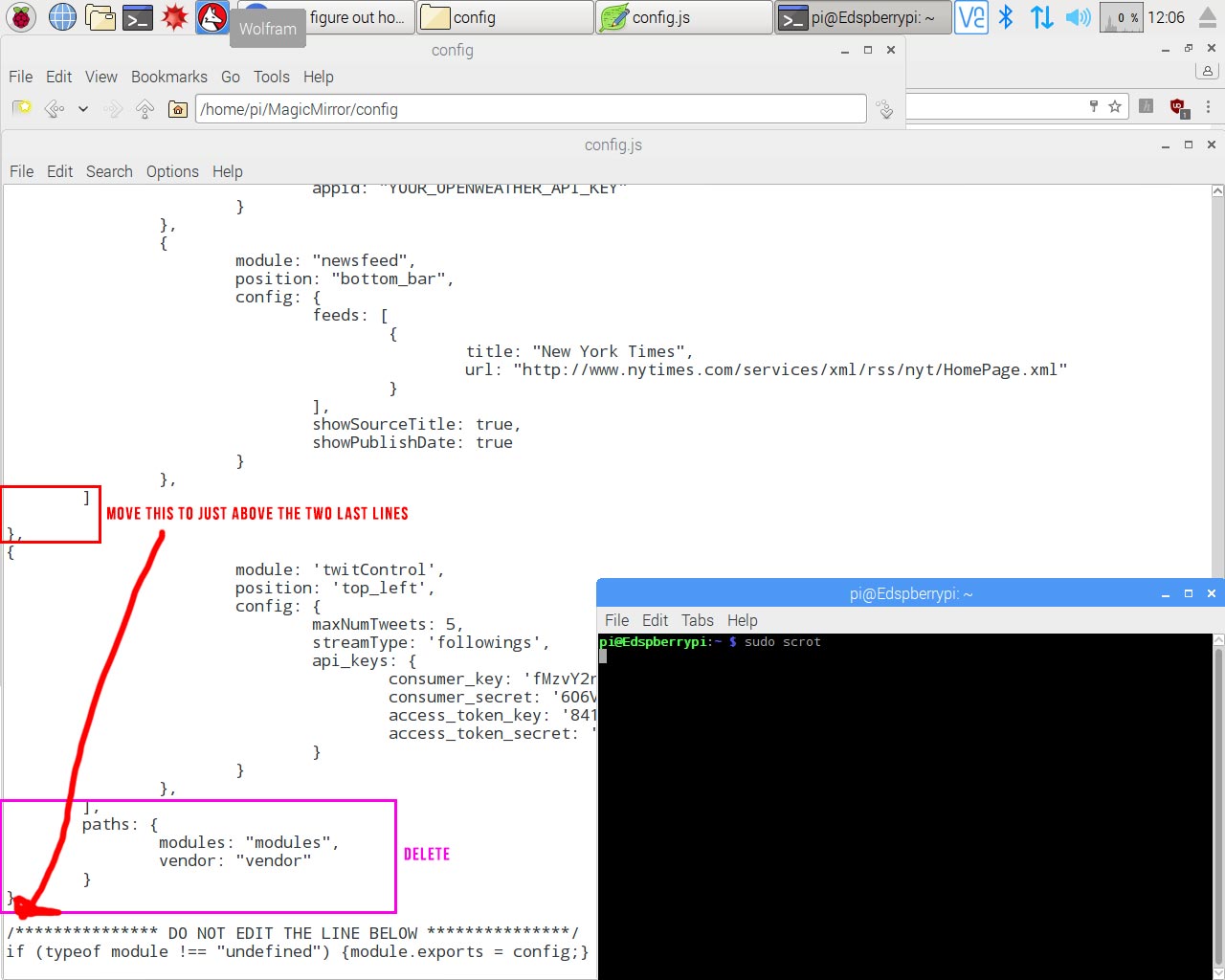
@Edswald you have to place the modules within the brackets
If you go back to the picture where I marked that you should move two brackets you will see which ones I mean.
And when you post your config files delete your sensitiv data (like api-keyes)
-
RE: Anyone try dual loading mm and openframe?
@soqueen should be easy to just use a picture module in the fullscren region and then use the pir sensor or a cam to hide the picture modul and display the regular modules.
-
RE: How to get Panel to show
to get the cursor visible when MM is running add
html {
  cursor: default;

}
in the custom.css file (that can be found in the css folder)
And you can add
electronOptions : { autoHideMenuBar: false },in the config file (place under the line that says “units”)
-
RE: Cant figure out how to install a module in the config.js
You are using the wrong quotations,
you are using
’when you should use'
and“when you should use"so first of change
ipWhitelist: [“127.0.0.1”, “::ffff:127.0.0.1”, “::1”], // Set [] to allow all IP addresses.to
ipWhitelist: ["127.0.0.1", "::ffff:127.0.0.1", "::1"], // Set [] to allow all IP addresses.and
{
module: ‘twitControl’,
position: ‘top_left’,
config: {
maxNumTweets: 5,
streamType: ‘followings’,
api_keys: {
consumer_key: ‘ ’,
consumer_secret: ‘ ’,
access_token_key: ‘ ’,
access_token_secret: ‘ ’
}
}
},
to
{
module: "twitControl",
position: "top_left",
config: {
maxNumTweets: 5,
streamType: 'followings',
api_keys: {
consumer_key: ' ' ,
consumer_secret: ' ',
access_token_key: ' ' ,
access_token_secret: ' '
}
}
},
And do edit your post above to remove your personal keys!
-
RE: Cant figure out how to install a module in the config.js
@Edswald post it as text. can’t help you with only a screenshot
-
RE: Bathroom - 30" MagicMirror
I’ve read an article a while back, they tried a bunch of different mirrors with a few light transmissions variations (1%, 12% 20% and 40% If I remember correctly). Their conclusion was that 12% was okey and 20% was the best of them all.
And with the combined information I’ve read (not tested in real life however!) is that the general guide line is :
Anything below 3% will not be useful, I would say 5% would be absolutely minimum.
8-10% for darker rooms with no windows and limited lighting
15-20% for normal lighting and not placed next to windows and/or in sunlight
40% for bright rooms with lots of daylightDo note, that higher light transmission also makes your screen edges more visible, this is due to the backlight of the monitor. so if you have a 40% mirror in a bright room and then turn the lights down the edges of the screen will be clearly visible.
-
RE: Cant figure out how to install a module in the config.js
And for future reference, past the contents of the config in text format on the forum, it will be easier to see all of the config file then.
-
RE: Remove module configuration from config/config.js
@thiagolocatelli Well, all you would do is disperse a lot of settings/options in to each module instead of having the settings centralized in one file as it is now.
however, a “scraper” script would be good for the newbies, i.e a script that scans the modules folder, adds each module and retrieves all config-defaults from each module and puts it all in a new config file.
This way you will get all the settings that can be changed within the module (since every module has it’s own) readily displayed in the right format just for the user to alter.
-
RE: Bathroom - 30" MagicMirror
@kclemen 15% is close to the best “all-around” light transmission, will not work well next to a window during sunny days. 40% is recommended in really bright rooms.
Bathrooms however isn’t usually superbright, so will work nicely. (mine is only 3% and I can’t do thin texts and lines, I have to beef up everything in size and use bold fonts) -
RE: ERROR ON START UP
@jhlas22 a remote terminal, but that is a no then.
-
RE: ERROR ON START UP
@jhlas22 are you trying to start the mirror via SSH? Did you run
npm installin the magicmirror folder? -
RE: Bathroom - 30" MagicMirror
@kclemen I do believe there is one user on here that made a bathroom mirror with those, I’ll try to find the thread.
Edit : Can’t find it, but I remember it looked quite sharp with the aluminium top and bottom!
-
RE: MMM-TextClock, number blind? No worries, you can now read the time!
@yawns Yeah, that would be a nice weekend project! :D
Okey, small update, fixed some format-errors with the night hours in the 24h/12h text line layout.
-
RE: Bathroom - 30" MagicMirror
If you are placing 2way mirrors on all 3 sections (I would suggest this since normal mirrors and most 2way mirrors have a different amount of reflection and different colors, it will cost more but look better)
Blacking out the back of the 2way mirrors on the side is easily done with vinyl (the kind used to make vehicle decals and wrapping cars with).
And I do believe @Goldjunge_Chriz had some good “tape” to make the mirror stay in place. Something similar to the sticky stuff they apply car windshields with I suppose?
-
RE: Does an iPhone notifications module exist?
I’m not sure if it works as well with Android, but Pushbullet (the app used for the current phone notification module) also exists for apple ios (here : https://itunes.apple.com/se/app/pushbullet/id810352052?mt=8).
You never know 100% until you try it :)