The existing Olympics modules are several years old. Anyone working on an updated module for the this year’s Olympics?
C
Offline
A New Chapter for MagicMirror: The Community Takes the Lead
Read the statement by Michael Teeuw here.
Read the statement by Michael Teeuw here.
Posts
-
Updated Olympics module?
-
RE: Weather module not showing temperature in Celsius
@wenike I’m in California but I’m a transplant from Australia and I still cannot get used to Fahrenheit ! :). So I need to use a different provider? I tried using OpenWeatherMap but I found that their forecast is not very accurate.
I switched it over to Weatherbit and am getting the temperature in Celsius now. Thanks for pointing me in the right direction!
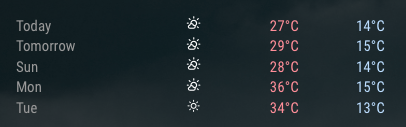
-
Weather module not showing temperature in Celsius
How can I get the weather module to show the forecast in Celsius? The values below are in Fahrenheit not Celsius otherwise we would be fried.
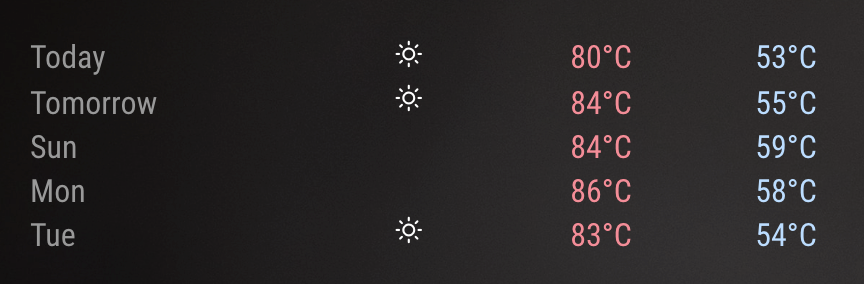
{ module: "weather", position: "top_left", config: { type: 'forecast', weatherProvider: 'weathergov', apiBase: 'https://api.weather.gov/points/', weatherEndpoint: '/forecast', units: 'metric', updateInterval: 180000, timeFormat: 12, degreeLabel: true, colored: true, fade: false, roundTemp: true, showPrecipitationAmount: true, appendLocationNameToHeader: false, initialLoadDelay: 5000, lat: XX, // your latitude lon: XX, // your longitude } }, -
RE: MMM-SleepWake turn off but not turn on
@krosamont said in MMM-SleepWake turn off but not turn on:
Hello @chanster,
How do you run your magic mirror project please?I have a script that starts Motion whenever my Rpi restarts :
#!/bin/bash
cd /home/pi/.motion/
sudo motion &
You need to make sure that you are running Motion in the directory where it installed ie “.motion”. If you start motion outside of this directory, it’ll use a generic motion config not your config in the “.motion” directory.
If Motion is detecting motion properly, you see lines like these in your motion log :
motion_detected: Motion detected - starting event 1
mlp_actions: End of event 1
event_newfile: File of type 8 saved to: /home/pi/Pictures/motion/02-20210109005258.mkv
The directory where these files are being saved to is what you define in your motion config. Look in that folder to make sure you have files showing up there. If you don’t see any files being saved in that directory, it means Motion is not using your motion config but the generic motion config. Refer to my bolded comments above.
Hopefully this helps.
-
RE: MMM-MyStandings
Love this module ! Instead of grouping by divisions, is there a way group by conference instead for NBA?
-
RE: MagicMirror by Luc3as
Very post ! Can you please share with MM modules you have used ?
-
RE: disable the header in the Weather Forecast module
@ftap Have you tried adding “appendLocationNameToHeader: false” to the config block ?
{ module: "weather", position: "top_left", config: { type: 'forecast', weatherProvider: "openweathermap", weatherEndpoint: "/onecall", apiKey: "***", // your OpenWeatherMap API key windUnits: "imperial", updateInterval: 180000, timeFormat: 12, showPeriod: true, showHumidity: true, degreeLabel: true, colored: true, fade: false, roundTemp: true, showPrecipitationAmount: true, appendLocationNameToHeader: false, lat: ***, // your latitude lon: ***, // your longitude } }, -
RE: Help with MMM-SleepWake
@sdetweil said in Help with MMM-SleepWake:
@chanster ok, my module doc gives u the new lines for motion.conf
Yes, nothing wrong with your docs at all.
-
RE: Help with MMM-SleepWake
@sdetweil It was in the sample config file for Motion. It’s a rookie mistake that I should have replaced “value” and not merely append to this line :
# Command to be executed when an event starts. (default: none) # An event starts at first motion detected after a period of no motion defined by event_gap ; on_event_start value # Command to be executed when an event ends after a period of no motion # (default: none). The period of no motion is defined by option event_gap. ; on_event_end value -
RE: Help with MMM-SleepWake
@sdetweil Thank you !! I’m so stupid. Removing “value” did the trick ! Thank you for this module. Works perfectly.
-
RE: Help with MMM-SleepWake
These are the two lines I updated in motion.conf
# Command to be executed when an event starts. (default: none)
# An event starts at first motion detected after a period of no motion defined by event_gap

on_event_start value /home/pi/MagicMirror/modules/MMM-SleepWake/external_motion started

# Command to be executed when an event ends after a period of no motion
# (default: none). The period of no motion is defined by option event_gap.

on_event_end value /home/pi/MagicMirror/modules/MMM-SleepWake/external_motion ended
I noticed something else. Last night, before I went to bed, I turned motion off (I was just running it from the command line, not as a service). This morning my display was in power saving mode again (yellow light) and I couldn’t get it to wake up. I had to manually run this command from the command line to get the screen to turn on again :
/opt/vc/bin/tvservice -p && sudo chvt 6 && sudo chvt 7It’s strange that your module had put my screen to sleep even though there was no motion even to trigger it.
-
Help with MMM-SleepWake
@sdetweil I’m hoping you can help me out with this. I have installed the Motion package and confirm that it works - I can view the livestream etc and it’s recording mkv files to the motion folder that I’ve defined when motion is detected.
I see these entries in motion.log :
[1:ml1] [NTC] [EVT] [Jan 09 01:19:36] event_newfile: File of type 8 saved to: /home/pi/Pictures/motion/01-20210109011936.mkv
[1:ml1] [NTC] [ALL] [Jan 09 01:19:36] motion_detected: Motion detected - starting event 1
[1:ml1] [NTC] [ALL] [Jan 09 01:21:26] mlp_actions: End of event 1
[1:ml1] [NTC] [EVT] [Jan 09 01:21:28] event_newfile: File of type 8 saved to: /home/pi/Pictures/motion/02-20210109012128.mkv
[1:ml1] [NTC] [ALL] [Jan 09 01:21:28] motion_detected: Motion detected - starting event 2
[1:ml1] [NTC] [ALL] [Jan 09 01:24:01] mlp_actions: End of event 2
[1:ml1] [NTC] [EVT] [Jan 09 01:24:18] event_newfile: File of type 8 saved to: /home/pi/Pictures/motion/03-20210109012418.mkv
[1:ml1] [NTC] [ALL] [Jan 09 01:24:18] motion_detected: Motion detected - starting event 3
[1:ml1] [NTC] [ALL] [Jan 09 01:33:05] mlp_actions: End of event 3
Your module did put my display to sleep but it didn’t wake it up. I tested these commands manually and they work to turn the HDMI on and off :
/opt/vc/bin/tvservice -p && sudo chvt 6 && sudo chvt 7
/opt/vc/bin/tvservice -o
I edited the motion.conf file to call your module when motion event starts / ends.
I notice this however in the motion log after I added the event calls to your module :
[30500488:motion] [NTC] [ALL] conf_load: Processing thread 0 - config file /home/pi/.motion/motion.conf
[30500488:motion] [NTC] [ALL] motion_startup: Motion 4.1.1 Started
[30500488:motion] [NTC] [ALL] motion_startup: Logging to file (/var/log/motion/motion.log)
 &: 1:  &: value: not found
 &: 1:  &: value: not found -> this keeps repeating until I stop motion
I commented out the motion event calls and these messages stop. So they seem to be related to these two configuration entries :
on_event_start /home/pi/MagicMirror/modules/MMM-SleepWake/external_motion started
on_event_start /home/pi/MagicMirror/modules/MMM-SleepWake/external_motion ended
I noticed you mention that there should be two files in the motion directory under MMM-SleepWake but in my case, I do not see any files in that directory.
In my config.js, I just have this :
        {
            module: 'MMM-SleepWake',
            config:{
                delay: 15,
                mode: 'PI'
            }
        },
Sorry for the long message, I hope you can suggest what I may have done incorrectly.
Thanks!
-
RE: Working Weather Underground module?
@Saabman That’s great! Once I got my MQTT feed up, this module worked very well to display the data from my PWS.
-
RE: Working Weather Underground module?
@Saabman Thanks again for all the work you have put into updating this module. Have you checked out MMM-Currentweather-MQTT ? I got it to work with my PWS. It takes an interesting approach of blending in data from PWS where available and supplements it with data from OpenWeather. It does require your PWS to publish its data via MQTT.
-
RE: made a fresh install with magic mirror os, how to refresh after update config.js file
I normally either hit “Control R” if I’m in a VNC session or “pm2 restart mm” if I’m logged in via ssh.
-
RE: Working Weather Underground module?
@sdetweil Thanks ! That did the trick!
-
RE: Working Weather Underground module?
I’m pretty I’m running @Saabman 's fork now but I’m still running into a blank screen when MM loads. Here’s what I can see in the console :
Load script: modules/MMM-WunderGround//MMM-WunderGround.js module.js:513 Module registered: MMM-WunderGround loader.js:148 Bootstrapping module: MMM-WunderGround loader.js:236 File already loaded: moment.js loader.js:153 Scripts loaded for: MMM-WunderGround loader.js:236 File already loaded: weather-icons.css loader.js:195 Load stylesheet: vendor/node_modules/weathericons/css/weather-icons-wind.css loader.js:195 Load stylesheet: modules/MMM-WunderGround/MMM-WunderGround.css loader.js:155 Styles loaded for: MMM-WunderGround translator.js:102 MMM-WunderGround - Load translation fallback: translations/en.json localhost/:2 Uncaught SyntaxError: Unexpected token / in JSON at position 4 at JSON.parse (<anonymous>) at XMLHttpRequest.xhr.onreadystatechange (translator.js:22) -
RE: Working Weather Underground module?
-
RE: Working Weather Underground module?
@Saabman Thank you for doing this! When I tried out your version of the module, my MM loads with a blank screen. Actually I ran into this same problem when I tried to modify the modules myself a couple of days ago using the new API documentation that you found.
When I manually try using the API via the URL, it seems to return data (I’ve *** some data for privacy) ie
{"observations":[{"stationID":"***","obsTimeUtc":"2021-01-03T18:43:34Z","obsTimeLocal":"2021-01-03 10:43:34","neighborhood":"***","softwareType":null,"country":"US","solarRadiation":252.0,"lon":-121.763,"realtimeFrequency":null,"epoch":1609699414,"lat":37.32,"uv":0.7,"winddir":22,"humidity":85,"qcStatus":1,"metric":{"temp":12,"heatIndex":12,"dewpt":9,"windChill":12,"windSpeed":0,"windGust":3,"pressure":1024.38,"precipRate":0.00,"precipTotal":0.00,"elev":150}}]}I cannot see anything in the logs that is helpful :(
[2021-01-03 10:39:25.741] [LOG] Module helper loaded: MMM-WunderGround [2021-01-03 10:39:27.778] [LOG] Connecting socket for: MMM-WunderGround [2021-01-03 10:39:27.779] [LOG] MMM-WunderGround helper started ... [2021-01-03 10:39:27.829] [LOG] Sockets connected & modules started ... -
Combining keybindings and telegram bot?
I have both MMM-KeyBindings and MMM-TelegramBot installed and working well. Is there a way to have telegram simulate key presses for MMM-KeyBindings to respond to?
My scenario is this : I have MMM-Carousel set up to cycle through two pages but sometimes I want to manually advance the page. The only way MMM-KeyBindings works is when I’m connected to my Rpi using VNC. So that’s not very practical. If I can trigger a virtual keypress via MMM-TelegramBot, that would be awesome.
Has anyone tried this?