We have two MM’s, one in the kitchen and one downstairs. The downstairs MM doesn’t have to be involved, only if it makes things easier.
What I would like to do is display the basement temperature on the kitchen MM. Is this possible somehow?
 C
Offline
C
Offline
We have two MM’s, one in the kitchen and one downstairs. The downstairs MM doesn’t have to be involved, only if it makes things easier.
What I would like to do is display the basement temperature on the kitchen MM. Is this possible somehow?
I have no idea how I did this. From MM, I press ctrl-q, the screen goes black, and then pm2 dutifully restarts MM. Using Alt File/Quit also just gives a black screen.
Any insights as to how to restore my system screen greatly appreciated.
@sdetweil Oops. Raspberry Pi 3b+. Just recently did the update using:
bash -c “$(curl -sL https://raw.githubusercontent.com/sdetweil/MagicMirror_scripts/master/upgrade-script.sh)” apply
The update completes without an error.
I get a message that MMM-Multimonth and MMM-Wallpaper need updating.
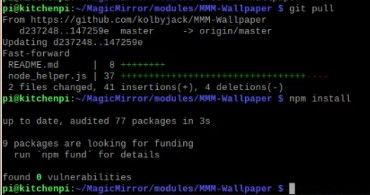
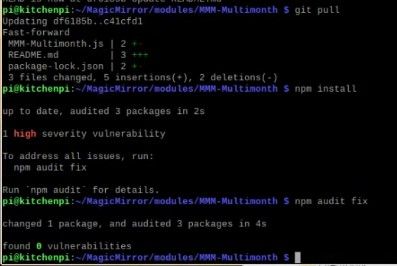
I open a console window, go into each module folder and enter:
git pull
npm install
No errors. I restart MM and no message. After a few hours the messages are back as if I never updated them.
I must be doing something wrong.
@MMRIZE MMM-CalendarExtMiniMonth is exactly what I’m looking for. Thanks!
@Mykle1 Thanks for your help on the DISPLAY issue. I changed the line in packages.json file to:
“start”: “node_modules/.bin/electron js/electron.js”,
I get the following error message back:
> magicmirror@2.20.0 start
> node_modules/.bin/electron js/electron.js

'node_modules' is not recognized as an internal or external command,
operable program or batch file.
@Mykle1 First off, thanks so much for a great guide. I’m having what is likely a simple issue, but I can’t figure out how to resolve it. I am getting the following error message with the npm start command. Not concerned about the warnings, but how do resolve the DISPLAY issue?
$ npm start
npm WARN config global `--global`, `--local` are deprecated. Use `--location=global` instead.

> magicmirror@2.20.0 start
> DISPLAY="${DISPLAY:=:0}" ./node_modules/.bin/electron js/electron.js

'DISPLAY' is not recognized as an internal or external command,
operable program or batch file.

cliff@BNC-LAB01 MINGW64 ~/MagicMirror (master)
$
@MMRIZE Also good to know. Thanks!
@sdetweil said in Possible to show Month View in lower corner?:
CalendarExt3
Thanks. I’ll take a look.
Currently, I am only using core features, but I’m fine with using a third party if I need to. What I would like is to display a small month view in the lower corner of the screen. Is this possible somehow?
@sdetweil Right there in front of me. Thanks!
I can’t find it in the documentation anywhere. How do I increase the size of upcoming events text? I assume it’s some kind of custom css?
Thanks in advance.
@sdetweil Thank you again! I’ll give it a try.
The code executes fine on startup. It also updates fine on another Pi3b also running on Wifi. Daily temperature updates just fine. So the question is two-fold. Is there something I can change so the events are updated as they change?
Or alternatively, is it okay to plug the pi into a smart plug that cycles daily?
{
			module: "calendar",
			header: "Upcoming Events",
			position: "top_left",
			config: {
				fade: false,
				displaySymbol: true,
				MaxTitleLength: 30,
				fetchInterval: 10000,
				displayRepeatingCountTitle: false,
				colored: true,
				calendars: [
					{
						maximumNumberOfDays: 22,
						symbol: "Cleaning",
						color: "#00ffff",
						url: "https://calendar.google.com/calendar/ical/3macalester%40gmail.com/private-69b6bd37705fa371daed31b164fac4fb/basic.ics"
					},

					{
						symbol: "calendar-check",
						symbol: "Home",
						url: "https://calendar.google.com/calendar/ical/xxxxxx%40gmail.com/private-33242322e68764d9cdxxxxxxxx2/basic.ics"
					},
					{
						maximumNumberOfDays: 22,
						symbol: "Jets",
						color: "#FFFF00",
						// blue is 0066CC
						url: "http://sync.roktcalendar.com/webcal/bf459b5e-d2e6-"
					},
					{
						maximumNumberOfDays: 22,
						symbol: "holidays",
						color: "#009900",
						// blue is 0066CC
						url:"https://calendar.google.com/calendar/ical/en.canadian%23holiday%40group.v.calendar.google.com/public/basic.ics"
					}

				]
			}
I’m having issues with a calendar module not updating. Is there a way to schedule a restart of MagicMirror? Something that would exit MM at 3am, and then pm2 would restart it.
Thanks!
@sdetweil I did not know that was possible. Another thanks!
@sdetweil Thanks for the quick reply. I use your upgrade script and it is nothing short of amazing. I’ll take your advice and do updates with the script.
The problem I constantly battle is pm2 is just a little aggressive on restarting MM, and it takes me many tries to finally do a ‘pm2 stop all’ so I can have a command line. I wish I knew how to increase the time for pm2 restarts.