MagicMirror Forum
    • Recent
    • Tags
    • Unsolved
    • Solved
    • MagicMirror² Repository
    • Documentation
    • 3rd-Party-Modules
    • Donate
    • Discord
    • Register
    • Login
    1. Home
    2. cruunnerr
    3. Posts
    A New Chapter for MagicMirror: The Community Takes the Lead
    Read the statement by Michael Teeuw here.
    Offline
    • Profile
    • Following 3
    • Followers 7
    • Topics 14
    • Posts 279
    • Groups 0

    Posts

    Recent Best Controversial
    • RE: SSH & VNC & Alexa disconnected after a brief moment of MagicMirror startup

      I have a wifi watchdog installed because my wifi connection sometimes breaks off.
      It automatically turn the wifi controller off and on again, when the pi can’t ping my router. Maybe u should check this out:

      http://alexba.in/blog/2015/01/14/automatically-reconnecting-wifi-on-a-raspberrypi/

      I just replaced the used IP Adresse from this Tutorial with my routers IP adress.

      Brainstorming again. Maybe your Pi doesnt have enough power for the wifi controller when u turn on your alexa, magicmirror and such other stuff.
      So it cannot hold the connection with the -71db. Maybe a repeater would help, so with e.g. -49db the wifi Controller doesnt need too much power

      posted in Bug Hunt
      cruunnerrC
      cruunnerr
    • RE: My First Mirror... until now ^^

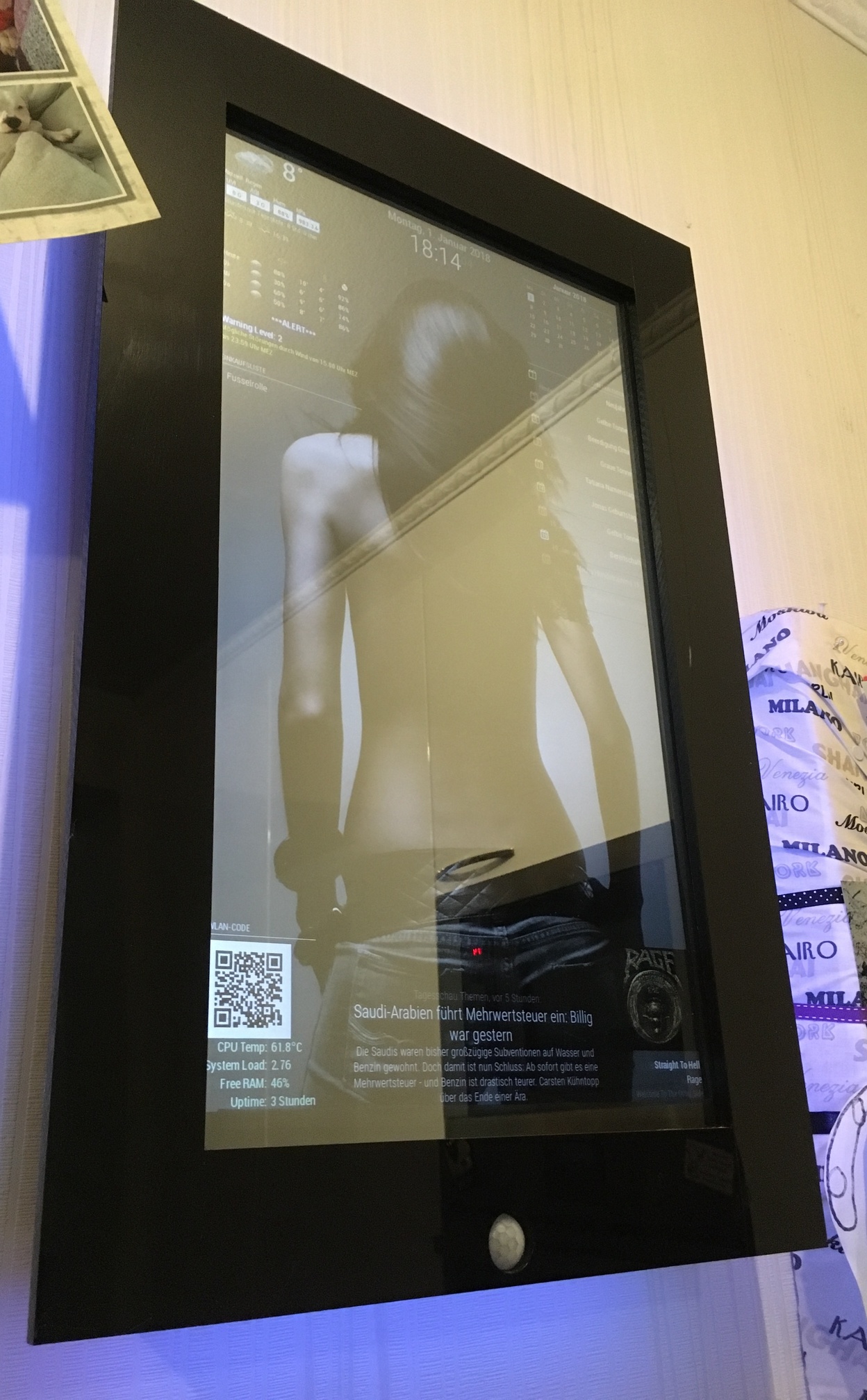
      0_1514954682191_IMG_2076_low_quality.jpg

      Very tinkered cause i am experimenting a lot ^^

      posted in Show your Mirror
      cruunnerrC
      cruunnerr
    • RE: My First Mirror... until now ^^

      @doubleT said in My First Mirror... until now ^^:

      The rest is a little bit too much “screen” (as opposed to mirror) for me, but I can see the appeal.

      i know what you mean ^^
      But since i found out how many things can be shown with the MM, i couldn’t let it be :D
      Maybe the background is “too much”, but i like it anyhow XD
      but if i turn on the room lights, its bright enough to use it as a mirror :P

      posted in Show your Mirror
      cruunnerrC
      cruunnerr
    • RE: SSH & VNC & Alexa disconnected after a brief moment of MagicMirror startup

      First to check: what power supply u use? Use a wrong or “low level” power supply can bring some strange issues.

      check if there are shown any errors while booting the pi.

      try

      sudo iwlist wlan0 scan | egrep "Cell|ESSID|Signal|Rates"
      

      to show wifi strength.

      the port forwarding has nothing to say when you try to connect in your local wifi (when same wifi and ip-adress/subnet is in use).

      how did u set up your network on the pi? in what file u put in your data and do u use DHCP or static ip? if using DHCP try to disable.

      When the problem is being there, try to ping an external gateway like “www.google.de” via the local terminal on the pi. if that isn’t working there is such a problem with general ip-config.
      Maybe check if the problem comes up when using an ethernet cable.

      if this works try the following:
      type in the terminal “ifconfig” on your pi. also try “service sshd status” and “service ssh status” and wrote here what it throws out. thats to check, if the ssh daemon is running.
      Also check “sudo netstat -tulpen” to show if the pi is waiting for a request on the right port.

      try that all first. i am just brainstorming, but its a little bit strange that the problem comes up when alexa starts.
      does the problem comes up when you just boot up the pi without using alexa??

      posted in Bug Hunt
      cruunnerrC
      cruunnerr
    • RE: MMM-CalendarExt cant get the calendar to show

      yeah, its all discussed in this thread: https://forum.magicmirror.builders/topic/4684/electron-cpu-usage?page=1

      I had the problem, too. CPU Usage above 80%.
      When i downgrade to electron 1.4.15 the CPU usage went to nearly 0% !

      But then i went to the Problem that the CalendarExt Module only shows in an external web browser and not on the MM itself.

      Think we have to hope, that Sean will find a solution. :D
      (Or the electron Problem is gone…)

      posted in Troubleshooting
      cruunnerrC
      cruunnerr
    • RE: SSH & VNC & Alexa disconnected after a brief moment of MagicMirror startup

      Does your Router gives any information about the connection status of the pi? Maybe u can see, if it disconnects some time.
      Also u could use an local Keyboard or mouse when the problem starts and watch the IP connection status.
      Do you use DHCP or static IP?
      what kind of Raspbian?

      posted in Bug Hunt
      cruunnerrC
      cruunnerr
    • RE: My First Mirror... until now ^^

      Thanks for the compliments.

      You can add a background with your custom.css like the link u posted, yawns.

      My custom.css looks like this:

      /*****************************************************
       * Magic Mirror                                      *
       * Custom CSS                                        *
       *                                                   *
       * By Michael Teeuw http://michaelteeuw.nl           *
       * MIT Licensed.                                     *
       *                                                   *
       * Add any custom CSS below.                         *
       * Changes to this files will be ignored by GIT. *
       *****************************************************/
      
       body {
      	background-image: url("background9.jpg");
      	background-size: cover;
      	margin-left: 0px;
      	margin-right: 30px;
      	margin-top: 15px;
      	margin-bottom: 15px;
        	position: absolute;
        	height: calc(100% - 28px);
        	width: calc(100% - 22px);
      }
      .MMM-SystemStats  {
              color: #CEF6CE;
              } 
      .MMM-MyCalendar {
        max-width: 300px;
      }
      

      The image is called “background9.jpg” and has been placed in the “home/pi/MagicMirror/css” folder.

      I needed to play a little bit with the margin’s, until it fits perfect. Keep in mind that your picture should fit the screen resolution. It shouldn’t be smaller. if it is, you should take a look at the MMM-ProfilePicture module.

      @nikobelohlav
      I just used the MMM-PIR module for it. It turns the HDMI signal off, and my monitor recognized that via HDMI-CEC/ARC and turns off. When the signal comes back the motor turns on within 2 seconds. thats quick enough i think.
      I don’t know if it is possible to change the MMM-Pir-Sensor.js so that not the command “tvservice …” is executed, but a notification will be sent to other modules like the profile-switcher. Maybe you should open a new thread, even if I don’t quite understand why you don’t want to turn off your monitor.

      The scrobbler module was a little bit tricky. First you need to register your apps, to share the current playing music with last.fm.
      I actually just use Spotify, so in the Spotify-settings of my phone, tablet and macbook i needed to login to last.fm via the Spotify app.
      Sometimes i got the same problem as you, but its not a failure of the module. I played music and checked on last.fm if there is actually scribbling something, but there wasn’t. Then i turn back to my Spotify app and just log out and log in again (to last.fm in the Spotify settings) and that brings the scrobbling back.
      So its more a bug, that happens sometimes, cause Spotify didn’t correctly streams to last.fm i think.
      When u don’t pause the music it should scrobble continuous.

      Also keep in mind:

      When is a scrobble a scrobble?
      A track should only be scrobbled when the following conditions have been met:

      The track must be longer than 30 seconds.
      And the track has been played for at least half its duration, or for 4 minutes (whichever occurs earlier.)
      As soon as these conditions have been met, the scrobble request may be sent at any time. It is often most convenient to send a scrobble request when a track has finished playing.

      @barnosch
      Ja im Winter ist es manchmal schlimm mit den Hundis ^^

      posted in Show your Mirror
      cruunnerrC
      cruunnerr
    • RE: MMM-CalendarExt cant get the calendar to show

      Significantly Changes in the new update is the use of electron 1.4.15.
      I used it already before the update, but i don’t want to update (cause of the CPU trouble thing…) to check if it is the reason.
      but that is the only thing that comes to my mind, since you both got the problem when updating to the newest MM-Version

      posted in Troubleshooting
      cruunnerrC
      cruunnerr
    • My First Mirror... until now ^^

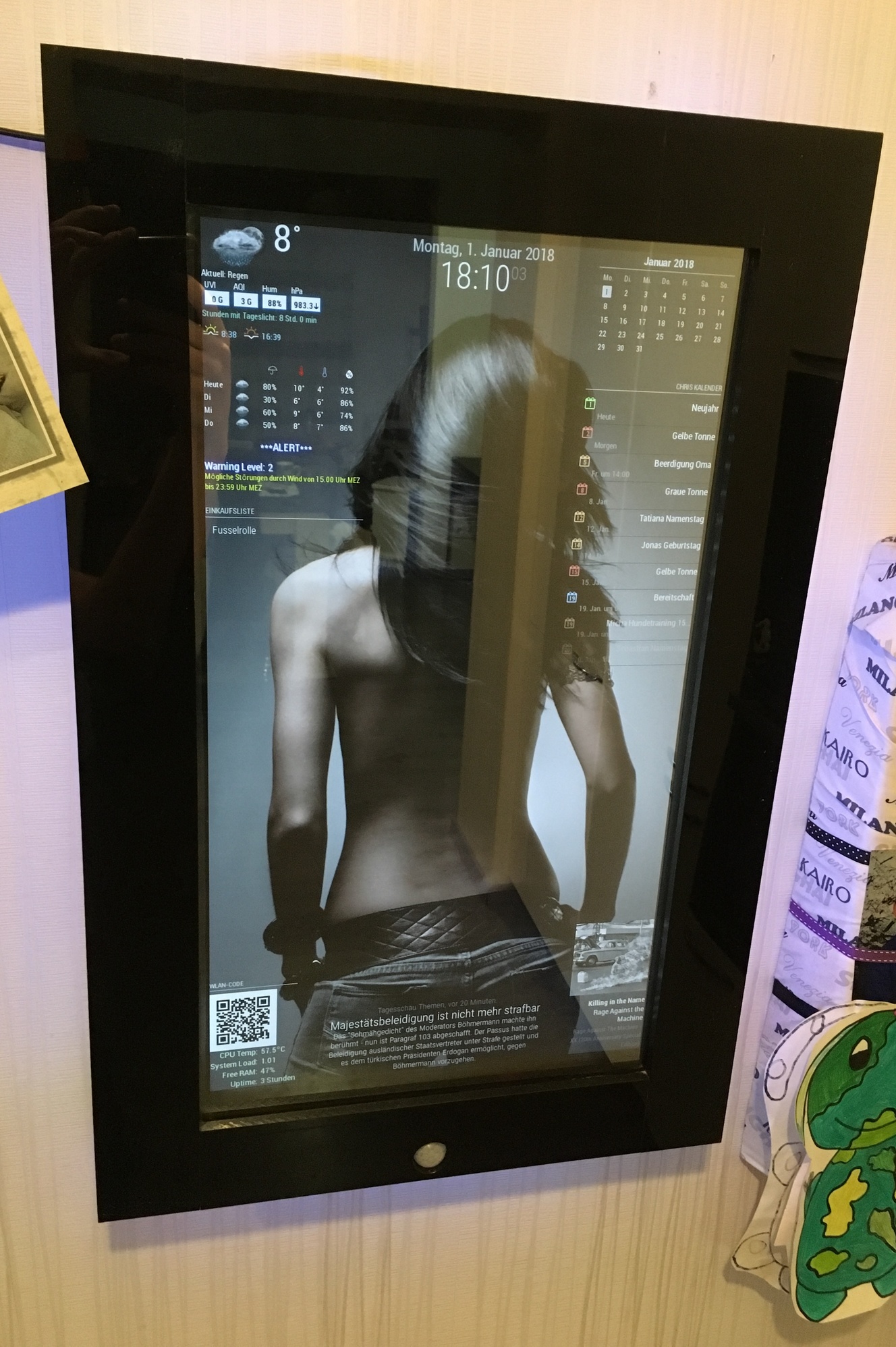
      Hey all,

      first i want to say, that this is a great community and it makes fun to be a part of it.

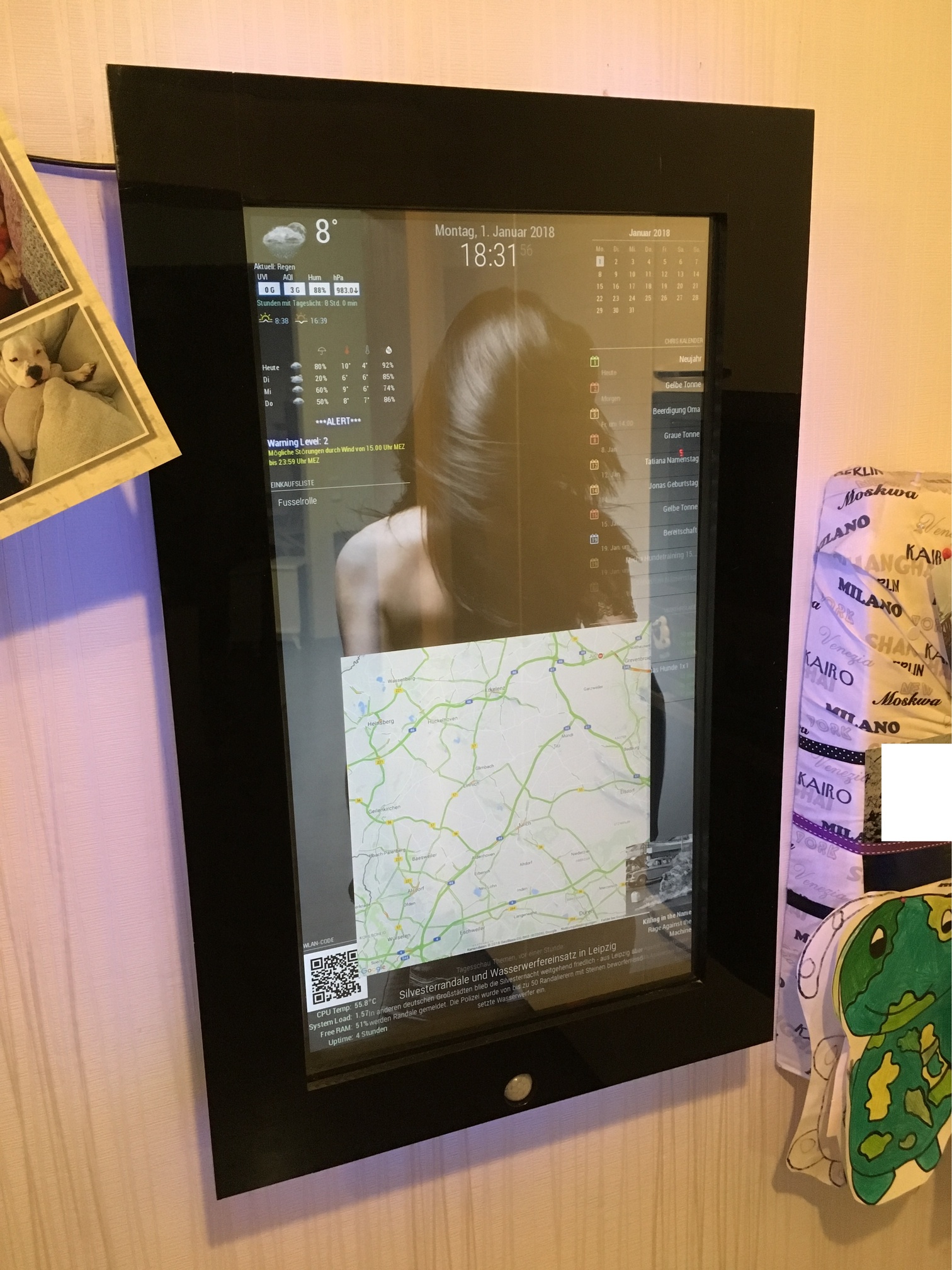
      Since i decided to build a MagicMirror i was more and more interested what you can do with it. So now i want to show you my first exemplar. At least one more is in planning.

      The original plan was to install the mirror, so that you can only see the front frame. I had to postpone that later. That’s why he’s hanging on the wall now.

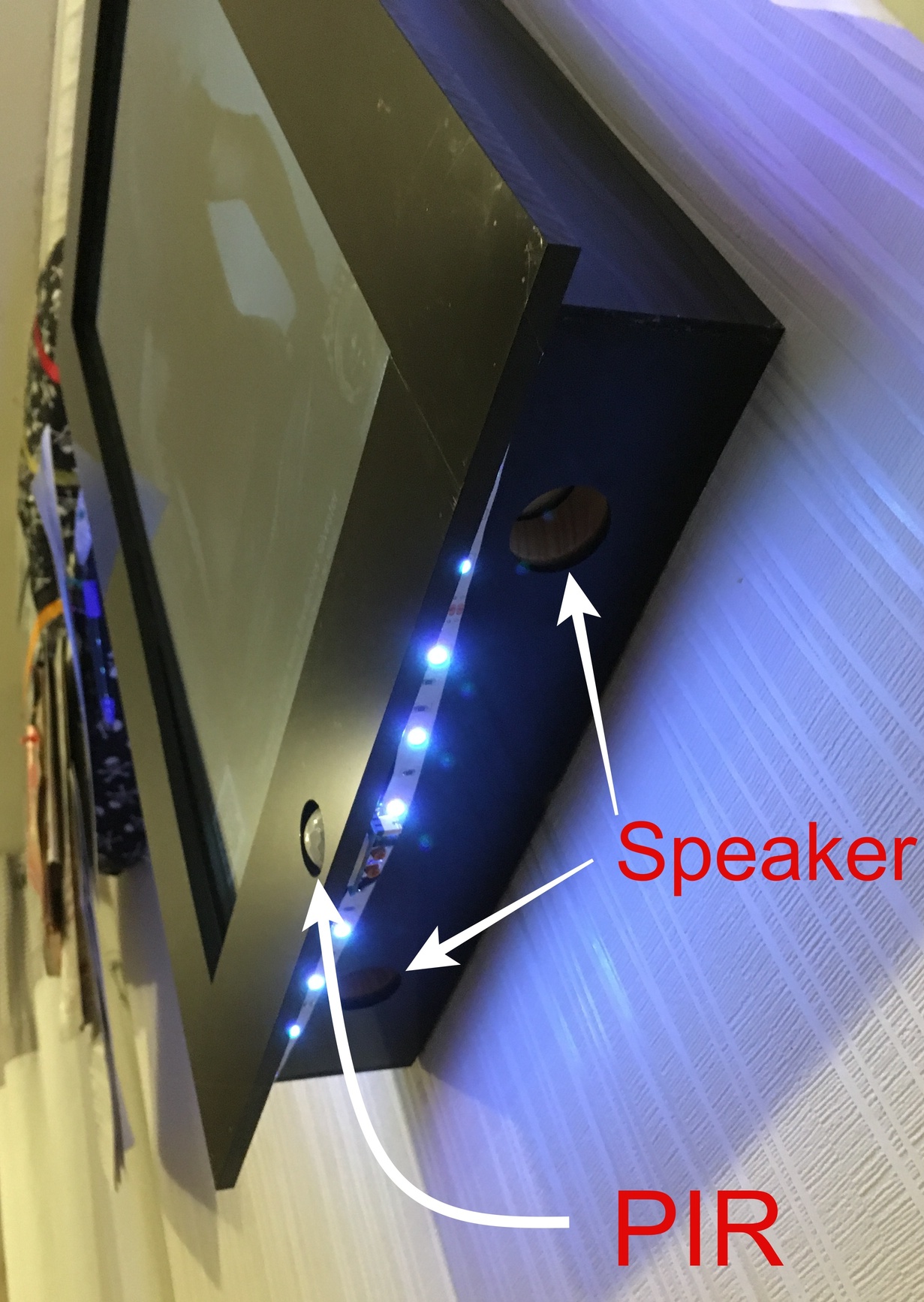
      I build the frame with wood, but i put some acrylic glass on the front and on the sides.
      I drilled a hole in the middle for the PIR.
      In addition, speakers are installed, but are not yet in operation (I still explore the applications / modules and think about what I still want to process)

      Fun fact: Because the PIR always detected the movement of my dog i put some clear nail polish on the lower half of the PIR :) Works great.

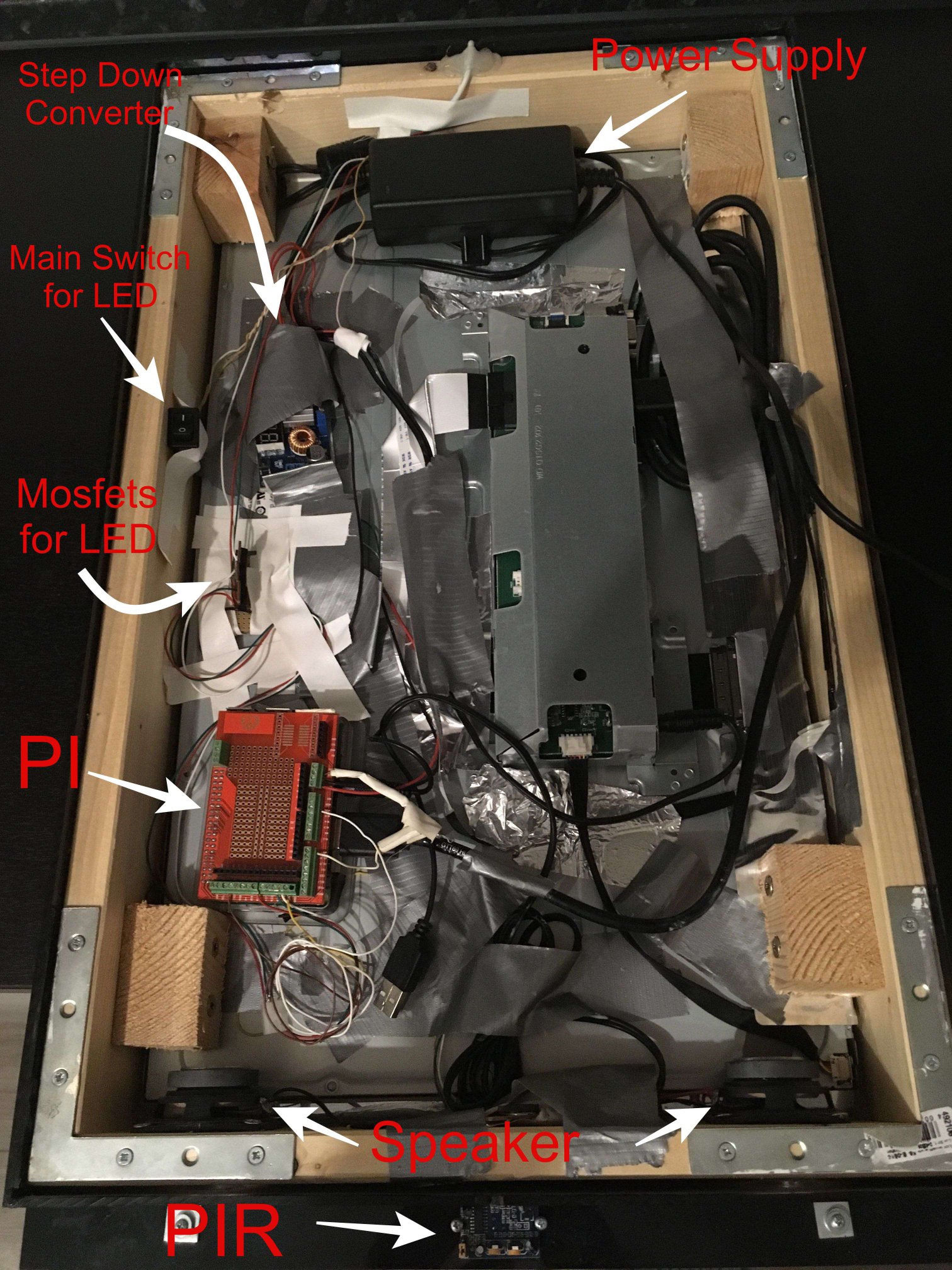
      I just used one 12V / 5A power supply. The 12V is used for the 23" Monitor and the LED Stripe. For the rPi i used a Step Down Converter and put it to 5.1V

      Next time i hang the mirror up, i will take some pics from behind ;)

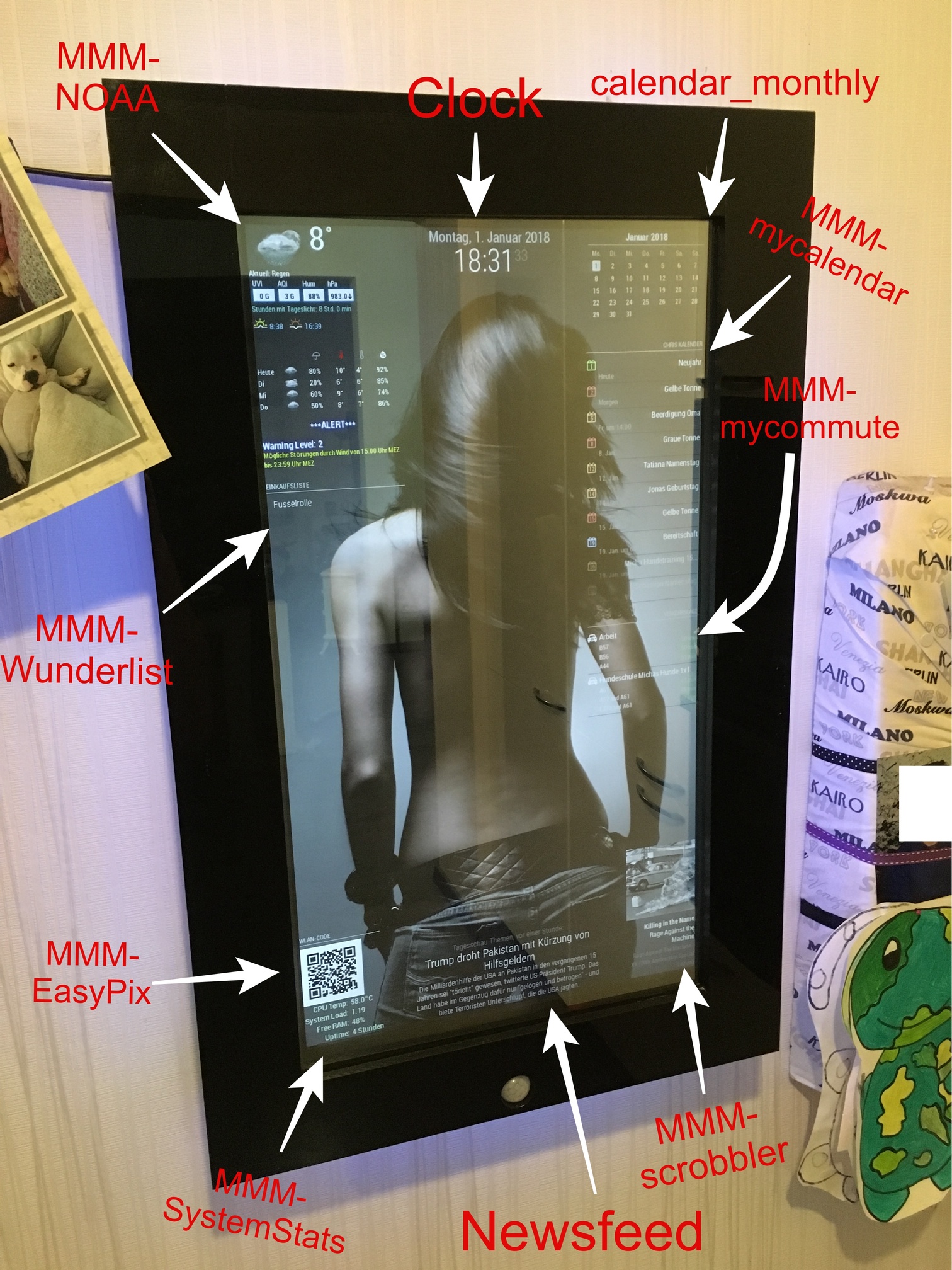
      Installed modules:

      calendar_monthly
      MMM-EasyPix (for Wifi-QR-Code)
      MMM-GoogleMapsTraffic
      MMM-MyCalendar
      MMM-PIR-Sensor
      MMM-MyCommute
      MMM-NOAA
      MMM-Scrobbler
      MMM-Remote-Control
      MMM-Remote-Control-Repository
      MMM-SystemStats
      MMM-Watchdog
      MMM-Wunderlist
      MMM-internet-monitor (not visible)

      I also have a wifi watchdog installed because my wifi connection sometimes breaks off.
      It automatically turn the wifi controller off and on again, when the pi can’t ping my router.

      I found the LED Stripe somewhere in my house. It is a RGB Stripe 5050.
      Since there is no Module for this Stripe i used some mosfet’s and an external Application and wrote a script to turn it slowly on and off when movement is detected by the PIR.

      For the Wifi-QR code i used this guide and let the picture show via MMM-EasyPix (thanks to @mykle1 ;) ).

      For the background image i used the custom.css

      Hope you enjoy :)

      https://youtu.be/DHIKPTTG0q4

      0_1514833163710_IMG_2072JPG.jpg

      0_1514833178666_IMG_2073JPG.jpg

      0_1514833197194_IMG_2068JPG.jpg

      0_1514833215032_IMG_2064JPG.jpg

      0_1514833239937_IMG_2071JPG.jpg

      posted in Show your Mirror
      cruunnerrC
      cruunnerr
    • RE: MMM-Wifi_QR-Code

      @Mykle1 said in MMM-Wifi_QR-Code:

      @cruunnerr said in MMM-Wifi_QR-Code:

      yeah, i searched all “noteworthy” developers

      Well, that leaves me out! ;-)

      No way!
      Just fail to see this module ;)
      You are a great developer and such a great teacher

      posted in Requests
      cruunnerrC
      cruunnerr
    • 1 / 1