@sdetweil Seems to be working great! Thank you very much for taking the time to make this a multi-instance module! Also great that you eliminated the need for npm install node-fetch@2. Even though I don’t know very much about java script, I understand it much better than these horoscopes :grinning_squinting_face:
D
Offline
A New Chapter for MagicMirror: The Community Takes the Lead
Read the statement by Michael Teeuw here.
Read the statement by Michael Teeuw here.
Posts
-
RE: Delay loading of one instance of a module and not another
-
RE: Delay loading of one instance of a module and not another
Thank you for the advice. I looked at your module and some others that allow for multiple instances but could not get it to work. I looked at some of the requests for multiple instances in the original (https://github.com/morozgrafix/MMM-horoscope) and the author commented that it would require rebuilding the entire module.
As a work around, I cloned a second MMM-horoscope module and renamed the folder to MMM-horoscope2. Then renamed MMM-horoscope.js and MMM-horoscope.css to MMM-horoscope2.js and MMM-horoscope2.css. Then renamed all the .MMM-horoscope in the css to .MMM-horoscope2. Finally, I ran npm install in MMM-horoscope2 folder followed by npm install node-fetch@2. -
Delay loading of one instance of a module and not another
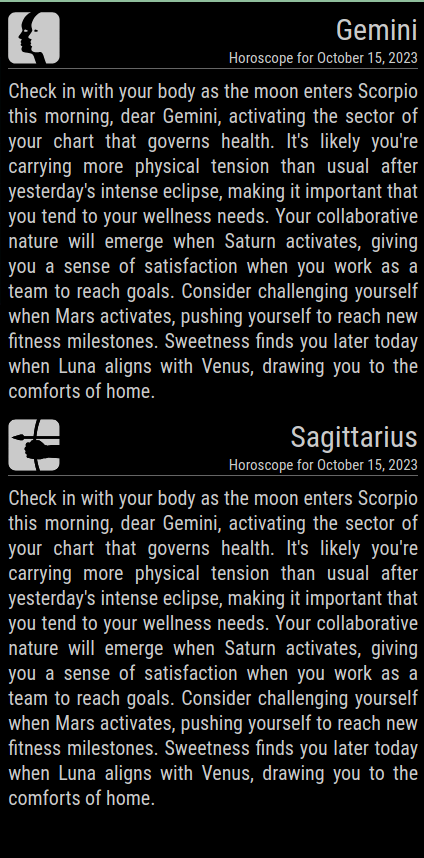
I am trying to use two instances of https://github.com/philking98/MMM-horoscope to display the horoscope for Gemini and Sagittarius. I get the different signs displayed but the Gemini horoscope is duplicated under Sagittarius. I tried adding a delay but both of the instances appear to load at the same time. Is there a trick to slow one of them down so that hopefully it will pull the correct data? Thank you for taking a look at this.
{ // MMM-horoscope Gemini
        module: 'MMM-horoscope',
	position: 'top_right',
	config: {
		initialLoadDelay: 5000,
		sign: 'gemini', // Zodiac sign
		useTextIcon: false
	}
},
{ // MMM-horoscope Sagittarius
	module: 'MMM-horoscope',
	position: 'top_right',
	config: {
		sign: 'sagittarius', // Zodiac sign
		useTextIcon: false
	}
},
-
RE: MMM-AlexaControl not changing MMM-Carousel pages anymore
@sdetweil Thank you for taking a look at this. I was getting odd info from MMM-Notifications so I changed all the OnOff 's to false in the notification section and it started working.
-
MMM-AlexaControl not changing MMM-Carousel pages anymore
MMM-AlexaControl was working great changing pages of Sbatm’s MMM-Carousel but stopped a couple of months ago. The Wemo devices are present in the Alexa App and show as connected but tapping the power button or speaking the command does not result in a page change anymore. I’m using a Raspberry Pi for the Magic Mirror. Here is my MMM-AlexaControl config. I would really appreciate some help in troubleshooting this. Thanks!
{ // MMM-AlexaControl module: 'MMM-AlexaControl', //disabled: true, position: 'top_center', config: { deviceName: "Magic Mirror", image: false, width: 100, height: 100, pm2ProcessName: "mm", vcgencmd: "vcgencmd", monitorToggle: true, notifications: [ { name: 'CarouselNext', port: 11101, OnOff: true, notification: ["CAROUSEL_NEXT"] }, { name: 'Main', port: 11107, OnOff: true, notification: ["CAROUSEL_GOTO", 1] }, { name: 'Calendar', port: 11108, OnOff: true, notification: ["CAROUSEL_GOTO", 2] }, { name: 'Weather', port: 11109, OnOff: true, notification: ["CAROUSEL_GOTO", 3] }, ] } }, -
RE: MMM-Gas
@sdetweil That fixed it! Thank you! Looking back, I see that the module css has .xxsmall and the font size is determined by .xsmall. My brain glossed over that extra ‘x’. Maybe’s it’s a typo in the css because changing it does not seem to affect anything?
-
RE: Electron screen becomes blank after a period of time
@karsten13 You might have something there. I changed the source in MMM-Wallpaper from the HD NASA to regular NASA and it took several hours or more for it to go blank. I have had the same problem with other modules as well that seem to resolve when I make the update interval longer. I’ve stopped using the MMM-Wallpaper at this point but I’m hoping there is some further troubleshooting to identify if the Pi is the problem and explore for a solution.
-
RE: MMM-Gas
@sdetweil There are two of them: MMM-Gas.css and MMM-Gas1.css. MMM-Gas did not seem to do anything and I was able to make some changes with MMM-Gas1 but not to the font size. Both css files have:
.MMM-Gas .xxsmall{
	font-size: 12px;
Changing it has no effect.
In dev mode, changing.xsmall { font-size: var(--font-size-xsmall); }from main.css does change the font size. I assume that this will affect any other module that uses the xsmall font.
Is there a way through my css to set the font size for this module only? -
Region, module, and module content alignment
I am struggling to get region right, the modules, and the module content in it aligned to my liking. In the image, the orange outline is region top right. The green outline is the weather module (only the bottom is visible since it lines up nicely with the region). I would like to get region right moved over so it is just right of region center and the content inside the weather module right justified. Also, if someone could explain what the horizontal position of the regions mean- left: 0-834, center: 630-204, and right: 834-0; that might help me going forward. Please let me know if I can provide some more code to help to help with my formatting. I appreciate the help.
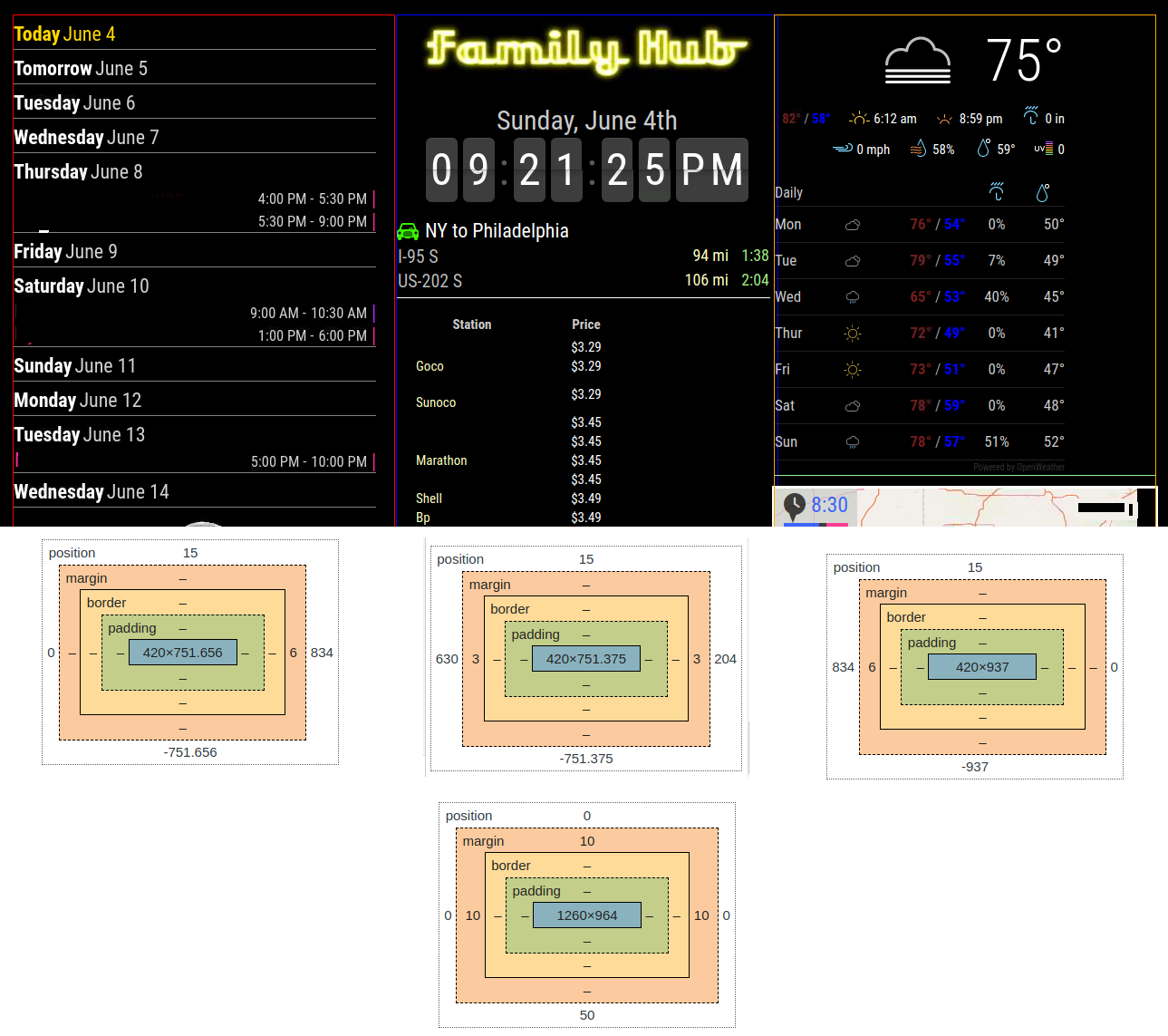
In my custom.css:root { --color-text: #ccc; --color-text-dimmed: #999; --color-text-bright: #fff; --color-background: black; --font-primary: "Roboto Condensed"; --font-secondary: "Roboto"; --font-size: 20px; --font-size-small: 0.75rem; --gap-body-top: 10px; --gap-body-right: 10px; --gap-body-bottom: 10px; --gap-body-left: 10px; --gap-modules: 15px; --highTempColor: rgb(115,30,30); --lowTempColor: blue; --My-zoom: 100%; } body { /* zoom: var(--My-zoom); /**/ } .region.left { width: 420px; margin-right: 6px; } .region.center { width: 420px; margin-left: 3px; margin-right: 3px; } .region.right { width: 420px; margin-left: 6px; } -
RE: Electron screen becomes blank after a period of time
@MMRIZE I updated MMCalendarExt3* and am not getting those messages. Thank you! I have done the troubleshooting you recommended and have discovered that it is MMM-Wallpaper when set to display NASA’s Astronomy Picture of the Day. The black screen does not occur when I set the wallpaper to Met Museum or Firetv. Should I start a new post on troubleshooting MMM-Wallpaper?
-
RE: Electron screen becomes blank after a period of time
@sdetweil These are the only messages and probably not actually a problem:
Your are using the deprecated config values ‘colored’. Please switch to ‘coloredSymbol’ & ‘coloredText’!
start @ calendar.js:100[CX3] Module is not prepared yet, wait a while.
getDom @ MMM-CalendarExt3Agenda.js:193[CX3] Module is not prepared yet, wait a while.
getDom @ MMM-CalendarExt3.js:228If electron stops with Dev window closed, I cannot open it. If electron stops with Dev window open, there is a message “DevTools was disconnected from the page…”
If this is not a clue to aid in the troubleshooting, please let me know what to try next to get you some more info. Thanks! -
Electron screen becomes blank after a period of time
I am running MM 2.23.0 on a Pi 2 Model B Rev 1.2 with Bullseye and after about 15-20 minutes, the electron screen becomes blank. Output in the terminal around the time that this happens is just normal calendar [info] and MMM-Gas [log] messages about gas prices. I use VNC to access the Pi and start the mirror. I can still access the mirror in a browser when the electron screen goes blank. I do get the following errors when starting MM:
[12932:0530/114907.863519:ERROR:gpu_memory_buffer_support_x11.cc(44)] dri3 extension not supported.
[12904:0530/114907.961672:ERROR:command_buffer_proxy_impl.cc(128)] ContextResult::kTransientFailure: Failed to send GpuControl.CreateCommandBuffer.Please let me know what further info I can provide to help troubleshoot. Thank you for taking a look at this.
-
RE: MM screen doesn't start but can access through web browser
@sdetweil Thanks! I’ll keep an eye out for a solution.
-
RE: MM screen doesn't start but can access through web browser
@sdetweil It looks like electron.js in 2.23.0 already has those changes except for
let config = await core.start()https://forum.magicmirror.builders/topic/17807/config-template-file-not-exists-no-ensubst/7?_=1685358870752 had the default settings for address and ipWhitelist. The new problem arises when I add my information.
Changing config toaddress: "0.0.0.0", ipWhitelist: [],results in a blank electron screen:
npm run startmagicmirror@2.23.0 start
.\node_modules.bin\electron js\electron.js[29.05.2023 11:15.38.750] [LOG] Starting MagicMirror: v2.23.0
[29.05.2023 11:15.38.760] [LOG] Loading config …
[29.05.2023 11:15.38.764] [DEBUG] config template file not exists, no envsubst
[29.05.2023 11:15.38.772] [LOG] Loading module helpers …
[29.05.2023 11:15.38.772] [LOG] No helper found for module: alert.
[29.05.2023 11:15.38.791] [LOG] Initializing new module helper …
[29.05.2023 11:15.38.792] [LOG] Module helper loaded: updatenotification
[29.05.2023 11:15.39.107] [LOG] Initializing new module helper …
[29.05.2023 11:15.39.107] [LOG] Module helper loaded: calendar
[29.05.2023 11:15.39.617] [LOG] Initializing new module helper …
[29.05.2023 11:15.39.618] [LOG] Module helper loaded: MMM-Wallpaper
[29.05.2023 11:15.39.619] [LOG] No helper found for module: MMM-CalendarExt3Agenda.
[29.05.2023 11:15.39.623] [LOG] Initializing new module helper …
[29.05.2023 11:15.39.623] [LOG] Module helper loaded: MMM-MoonPhase
[29.05.2023 11:15.39.623] [LOG] No helper found for module: MMM-FlipClock.
[29.05.2023 11:15.40.400] [LOG] Initializing new module helper …
[29.05.2023 11:15.40.400] [LOG] Module helper loaded: MMM-Gas
[29.05.2023 11:15.40.515] [LOG] Initializing new module helper …
[29.05.2023 11:15.40.515] [LOG] Module helper loaded: MMM-OpenWeatherForecast
[29.05.2023 11:15.40.516] [LOG] No helper found for module: MMM-CalendarExt3.
[29.05.2023 11:15.40.517] [LOG] No helper found for module: MMM-Carousel.
[29.05.2023 11:15.40.517] [LOG] All module helpers loaded.
[29.05.2023 11:15.40.534] [LOG] Starting server on port 8080 …
[29.05.2023 11:15.40.560] [WARN] You’re using a full whitelist configuration to allow for all IPs
[29.05.2023 11:15.40.575] [LOG] Server started …
[29.05.2023 11:15.40.576] [LOG] Connecting socket for: updatenotification
[29.05.2023 11:15.40.576] [LOG] Starting module helper: updatenotification
[29.05.2023 11:15.40.576] [LOG] Connecting socket for: calendar
[29.05.2023 11:15.40.577] [LOG] Starting node helper for: calendar
[29.05.2023 11:15.40.577] [LOG] Connecting socket for: MMM-Wallpaper
[29.05.2023 11:15.40.577] [LOG] Starting node helper for: MMM-Wallpaper
[29.05.2023 11:15.40.578] [LOG] Connecting socket for: MMM-MoonPhase
[29.05.2023 11:15.40.578] [LOG] Starting module helper: MMM-MoonPhase
[29.05.2023 11:15.40.578] [LOG] Connecting socket for: MMM-Gas
[29.05.2023 11:15.40.578] [LOG] Starting module: MMM-Gas
[29.05.2023 11:15.40.579] [LOG] Connecting socket for: MMM-OpenWeatherForecast
[29.05.2023 11:15.40.579] [LOG] ====================== Starting node_helper for module [MMM-OpenWeatherForecast]
[29.05.2023 11:15.40.579] [LOG] Sockets connected & modules started …
[29.05.2023 11:15.40.708] [LOG] Launching application.
[29.05.2023 11:15.41.834] [ERROR] (node:6304) electron: Failed to load URL: http://0.0.0.0:8080/ with error: ERR_ADDRESS_INVALID
(Useelectron --trace-warnings ...to show where the warning was created) -
MM screen doesn't start but can access through web browser
On a Win10 machine, MM doesn’t display the screen but I can access it through a web browser. Let me know if I can provide further info that will help troubleshoot this. Thank you for taking a look at this issue.
let config = {
    address: ["localhost", "192.168.100.11"],
    port: 8080,
    basePath: "/",
    ipWhitelist: ["127.0.0.1", "::ffff:127.0.0.1", "::1", "::ffff:192.168.100.0/24"]
$ npm run start
magicmirror@2.23.0 start
.\node_modules.bin\electron js\electron.js[28.05.2023 23:56.25.585] [LOG] Starting MagicMirror: v2.23.0
[28.05.2023 23:56.25.593] [LOG] Loading config …
[28.05.2023 23:56.25.597] [DEBUG] config template file not exists, no envsubst
[28.05.2023 23:56.25.607] [LOG] Loading module helpers …
[28.05.2023 23:56.25.607] [LOG] No helper found for module: alert.
[28.05.2023 23:56.25.627] [LOG] Initializing new module helper …
[28.05.2023 23:56.25.628] [LOG] Module helper loaded: updatenotification
[28.05.2023 23:56.25.945] [LOG] Initializing new module helper …
[28.05.2023 23:56.25.945] [LOG] Module helper loaded: calendar
[28.05.2023 23:56.26.443] [LOG] Initializing new module helper …
[28.05.2023 23:56.26.444] [LOG] Module helper loaded: MMM-Wallpaper
[28.05.2023 23:56.26.447] [LOG] No helper found for module: MMM-CalendarExt3Agenda.
[28.05.2023 23:56.26.500] [LOG] Initializing new module helper …
[28.05.2023 23:56.26.501] [LOG] Module helper loaded: MMM-MoonPhase
[28.05.2023 23:56.26.502] [LOG] No helper found for module: MMM-FlipClock.
[28.05.2023 23:56.27.283] [LOG] Initializing new module helper …
[28.05.2023 23:56.27.284] [LOG] Module helper loaded: MMM-Gas
[28.05.2023 23:56.27.399] [LOG] Initializing new module helper …
[28.05.2023 23:56.27.399] [LOG] Module helper loaded: MMM-OpenWeatherForecast
[28.05.2023 23:56.27.400] [LOG] No helper found for module: MMM-CalendarExt3.
[28.05.2023 23:56.27.401] [LOG] No helper found for module: MMM-Carousel.
[28.05.2023 23:56.27.401] [LOG] All module helpers loaded.
[28.05.2023 23:56.27.418] [LOG] Starting server on port 8080 …
[28.05.2023 23:56.27.441] [LOG] Server started …
[28.05.2023 23:56.27.442] [LOG] Connecting socket for: updatenotification
[28.05.2023 23:56.27.443] [LOG] Starting module helper: updatenotification
[28.05.2023 23:56.27.443] [LOG] Connecting socket for: calendar
[28.05.2023 23:56.27.443] [LOG] Starting node helper for: calendar
[28.05.2023 23:56.27.444] [LOG] Connecting socket for: MMM-Wallpaper
[28.05.2023 23:56.27.444] [LOG] Starting node helper for: MMM-Wallpaper
[28.05.2023 23:56.27.445] [LOG] Connecting socket for: MMM-MoonPhase
[28.05.2023 23:56.27.445] [LOG] Starting module helper: MMM-MoonPhase
[28.05.2023 23:56.27.446] [LOG] Connecting socket for: MMM-Gas
[28.05.2023 23:56.27.446] [LOG] Starting module: MMM-Gas
[28.05.2023 23:56.27.446] [LOG] Connecting socket for: MMM-OpenWeatherForecast
[28.05.2023 23:56.27.446] [LOG] ====================== Starting node_helper for module [MMM-OpenWeatherForecast]
[28.05.2023 23:56.27.447] [LOG] Sockets connected & modules started …
[28.05.2023 23:56.27.600] [LOG] Launching application. -
RE: Config template file not exists, no ensubst
@sdetweil The temp fix worked. Thank you!
-
RE: Config template file not exists, no ensubst
@sdetweil
User@Win10 MINGW64 /c/MagicMirror
$ npm run startmagicmirror@2.23.0 start
.\node_modules.bin\electron js\electron.js[27.05.2023 14:49.18.622] [LOG] Starting MagicMirror: v2.23.0
[27.05.2023 14:49.18.638] [LOG] Loading config …
[27.05.2023 14:49.18.638] [DEBUG] config template file not exists, no envsubst
[27.05.2023 14:49.18.654] [LOG] Loading module helpers …
[27.05.2023 14:49.18.654] [LOG] No helper found for module: alert.
[27.05.2023 14:49.18.669] [LOG] Initializing new module helper …
[27.05.2023 14:49.18.676] [LOG] Module helper loaded: updatenotification
[27.05.2023 14:49.18.676] [LOG] No helper found for module: clock.
[27.05.2023 14:49.19.008] [LOG] Initializing new module helper …
[27.05.2023 14:49.19.008] [LOG] Module helper loaded: calendar
[27.05.2023 14:49.19.008] [LOG] No helper found for module: compliments.
[27.05.2023 14:49.19.008] [LOG] No helper found for module: weather.
[27.05.2023 14:49.19.039] [LOG] Initializing new module helper …
[27.05.2023 14:49.19.039] [LOG] Module helper loaded: newsfeed
[27.05.2023 14:49.19.039] [LOG] All module helpers loaded.
[27.05.2023 14:49.19.070] [LOG] Starting server on port 8080 …
[27.05.2023 14:49.19.209] [LOG] Launching application.
[27.05.2023 14:49.19.391] [LOG] Server started …
[27.05.2023 14:49.19.391] [LOG] Connecting socket for: updatenotification
[27.05.2023 14:49.19.391] [LOG] Starting module helper: updatenotification
[27.05.2023 14:49.19.391] [LOG] Connecting socket for: calendar
[27.05.2023 14:49.19.400] [LOG] Starting node helper for: calendar
[27.05.2023 14:49.19.400] [LOG] Connecting socket for: newsfeed
[27.05.2023 14:49.19.400] [LOG] Starting node helper for: newsfeed
[27.05.2023 14:49.19.400] [LOG] Sockets connected & modules started … -
RE: Config template file not exists, no ensubst
@sdetweil Thank you for taking a look at this. I forgot to put in the first post that the MM screen doesn’t start. If that message does not indicate an error, then I have another problem. Please let me know what else to try or what further info I can provide. Thanks!
-
Config template file not exists, no ensubst
Today I installed the current version of MM on Win10 in C:\MagicMirror. I had a previous version running without issue in C:\Users. I did not re-install Node. I am getting this message “Config template file not exists, no ensubst”. The rest of the loading messages seem normal with the last message being “Sockets connected and modules started”. Config:check does not find any errors. Here is my config.js
let config = {
	address: "localhost",	// Address to listen on, can be:
							// - "localhost", "127.0.0.1", "::1" to listen on loopback interface
							// - another specific IPv4/6 to listen on a specific interface
							// - "0.0.0.0", "::" to listen on any interface
							// Default, when address config is left out or empty, is "localhost"
	port: 8080,
	basePath: "/",			// The URL path where MagicMirror² is hosted. If you are using a Reverse proxy
					  		// you must set the sub path here. basePath must end with a /
	ipWhitelist: ["127.0.0.1", "::ffff:127.0.0.1", "::1"],	// Set [] to allow all IP addresses
															// or add a specific IPv4 of 192.168.1.5 :
															// ["127.0.0.1", "::ffff:127.0.0.1", "::1", "::ffff:192.168.1.5"],
															// or IPv4 range of 192.168.3.0 --> 192.168.3.15 use CIDR format :
															// ["127.0.0.1", "::ffff:127.0.0.1", "::1", "::ffff:192.168.3.0/28"],

	useHttps: false, 		// Support HTTPS or not, default "false" will use HTTP
	httpsPrivateKey: "", 	// HTTPS private key path, only require when useHttps is true
	httpsCertificate: "", 	// HTTPS Certificate path, only require when useHttps is true

	language: "en",
	locale: "en-US",
	logLevel: ["INFO", "LOG", "WARN", "ERROR"], // Add "DEBUG" for even more logging
	timeFormat: 12,
	units: "imperial",

	modules: [
		{ // clock
			module: "clock",
			position: "top_left"
		},

	]
};

/*************** DO NOT EDIT THE LINE BELOW ***************/
if (typeof module !== "undefined") {module.exports = config;}
I would appreciate some help in troubleshooting this. Thank you for taking a look.