Just FYI, I declare(d) more parameters than really necessary and actually used, in order to allow for more counters to display.
For example a gauge for each panel; more details on the energy production of each panel; etc.
I will make a remark about this in the code.
Read the statement by Michael Teeuw here.
Posts
-
RE: MMM-Hoymiles-Wifi
-
RE: MMM-Hoymiles-Wifi
First of all, those are details I need to have a look at now that the basis is there.
Perhaps there are other values and queries that make sense and that I can use. Like dtu_power and dtu_daily_energy.
Also saving some data to not have counters showing 0 when the invertor is inactive needs to be implemented.
During testing I found out that the pv_data for port 1 and 2 were different sometimes and that is why I needed to add those checks.
And they can never hurt. Better to be safe than sorry.
Furthermore, when you have only 1 panel connected, it is needed anyway. -
RE: MMM-Hoymiles-Wifi
Christian,
This is on the TODO list:
change pv_data to dtu date for combined output of inverterBut I do not really understand what you mean by it.
Do you mean combined output of 2 panels iso just 1 ?Please elaborate.
E.J.
-
RE: MMM-Hoymiles-Wifi
Hi there,
I made some major changes to the code and hopefully did all the GitHub stuff correct in order to allow persons interested to give it a (new) try.
https://github.com/schris88/MMM-Hoymiles-Wifi
There is still a lot to do (see ‘TODO’ in the README file), but I think the basis provided by Christian (@schris88) has been strengthened.
Best regards,
E.J.
-
RE: Changing table cell in calendar module using custom.css
That did the trick !
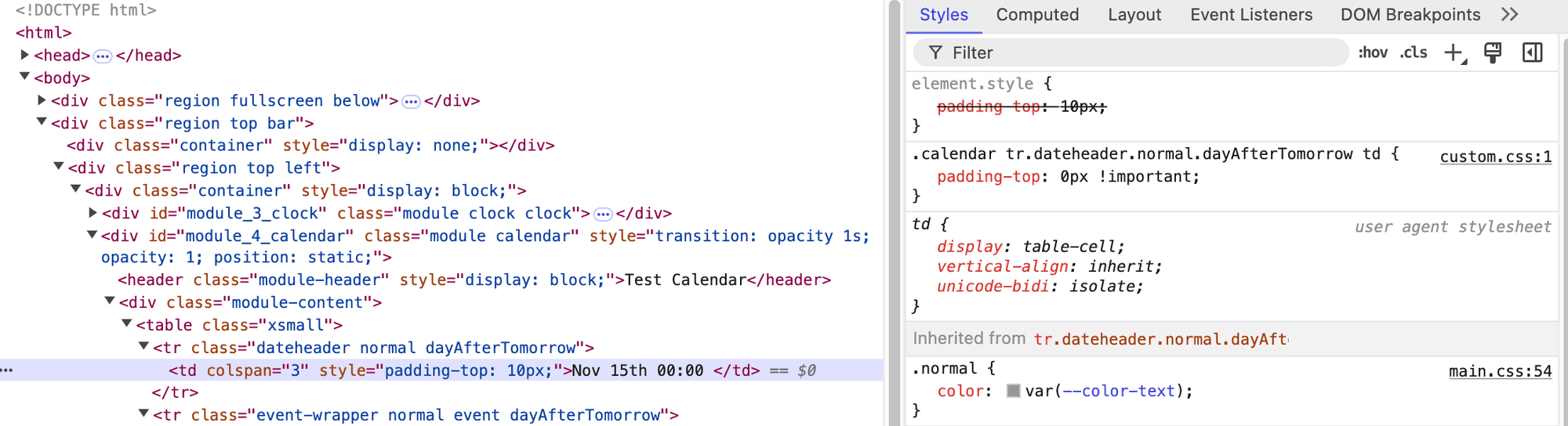
I must say that the Elements tab is confusing, as it looks like the value did not change.
Probably this is the state before custom.css is applied.

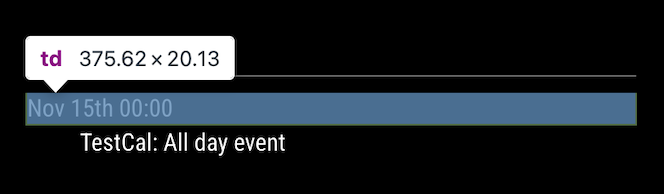
The padding has gone (this was my goal):

An additional question.
How to change the class, as in this example ?$('.calendar table') <table class="xsmall"><tr class="dateheader normal dayAfterTomorrow"><td colspan="3" style="padding-top: 10px;">Nov 15th 00:00 </td></tr><tr class="event-wrapper normal event dayAfterTomorrow"><td> </td><td class="title bright align-left" colspan="2">TestCal: All day event</td></tr></table>.calendar .table { class: "small" !important; }It says
Unkown property name, which makes sense.

E.J.
-
RE: Changing table cell in calendar module using custom.css
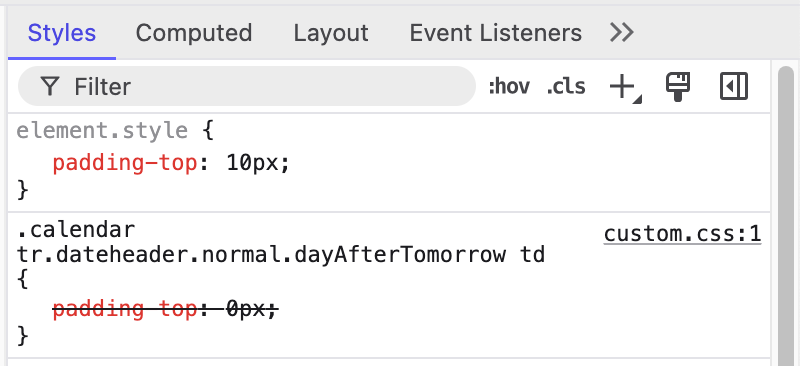
Yes, I can:

But is stricken through.
So somebody high-jacked it probably.Look like I am going somewhere, but now the finishing touch.
-
RE: Changing table cell in calendar module using custom.css
parens, not braces
Yes, those who can read have a clear advantage. :-)
$('.calendar tr .dateheader.normal.dayAfterTomorrow td') null $('.calendar tr.dateheader.normal.dayAfterTomorrow td') <td colspan="3" style="padding-top: 10px;">Nov 15th 00:00 </td> $('.calendar .dateheader.normal.dayAfterTomorrow td') <td colspan="3" style="padding-top: 10px;">Nov 15th 00:00 </td>custom.css:
.calendar .dateheader.normal.dayAfterTomorrow td { padding-top: 0px; } .calendar tr.dateheader.normal.dayAfterTomorrow td { padding-top: 0px; }Both do no work.
Either the selection is wrong, or perhaps it has to do with
style="padding-top: 10px;".
Or both.Will continue tomorrow.
E.J.
-
RE: Changing table cell in calendar module using custom.css
@sdetweil said in Changing table cell in calendar module using custom.css:
@evroom did you get this resolved?
No, I did not and even with your additional tutorial I am hitting a black spot.
I see this at the bottom:

This corresponds with:
<div class="module-content" ><table class="xsmall"> <tr class="dateheader normal dayAfterTomorrow"> <td colspan="3" style="padding-top: 10px;">Nov 15th 00:00 </td> </tr> <tr class="event-wrapper normal event dayAfterTomorrow"> <td> </td> <td class="title bright align-left" colspan="2">TestCal: All day event</td> </tr> </table> </div>So I should have all info available to build the CSS entry, you would think.
Right ?And the console does not like my input:
${'calendar .event'} VM2076:1 Uncaught SyntaxError: Unexpected token '{' ${'.calendar .event'} VM2080:1 Uncaught SyntaxError: Unexpected token '{' ${'.calendar .event .time'} VM2146:1 Uncaught SyntaxError: Unexpected token '{'I cannot even make a CSS entry to change this:
<table class="xsmall">, that is how lost I am :-)Need to study the existing tutorials some more.
E.J.
-
RE: Contributing to a GitHub repository - a bit stuck
@mumblebaj said in Contributing to a GitHub repository - a bit stuck:
Make sure it is set to bash.
It is set to zsh.
No issue to change it to bash, but is there a reasoning behind it ?Stupidly enough I had this Terminal open the whole time.
I just did ‘Commit’ from within VS Code and then did ‘Sync Changes’.
Result:
% git status On branch evroom Your branch is up to date with 'origin/evroom'. nothing to commit, working tree cleanSo that works just fine.
I also made a change using the Terminal and then did the add and commit from the Terminal.
In the Source Control pane you can see what you do on the command line in real time. -
RE: Contributing to a GitHub repository - a bit stuck
Great!
Then a final question:
In short:
I program using in VS Code and here is Source Control active.
Can I use the GitHub CLI and the Visual Studio Code like together, or will they bite each other ?A bit longer, with an example:
I have edited
HoymilesWifi.shin VS Code.
On my machine, I see:% git status On branch evroom Your branch is up to date with 'origin/evroom'. Changes not staged for commit: (use "git add <file>..." to update what will be committed) (use "git restore <file>..." to discard changes in working directory) modified: HoymilesWifi.sh no changes added to commit (use "git add" and/or "git commit -a")On VS Code I see:
V Commit Changes $ HoymilesWifi.shCan I Commit it from within VS Code, or is it safer to use the GitHub CLI as I have done for the README.md file previously ?
-
RE: Contributing to a GitHub repository - a bit stuck
Sam,
I think I ‘pulled’ it off.
Thanks a lot for that.Now I am here:
On https://github.com/schris88/MMM-Hoymiles-Wifi I now see:
Pull requests: 1Click on ‘Pull requests’
1 Open Major edit of README file. #5 opened 2 minutes ago by evroomNow it is up to Christian to approve this request, right ?
What does he need to do ?
And if he will give me write access, I can do this myself, right ?Of course I now need to make my changes to my repository, but would be nice how one completes this procedure.
-
Contributing to a GitHub repository - a bit stuck
Hi,
Trying to contribute to MMM-Hoymiles-Wifi, using GitHub.
Sam gave me directions (thanks!), but of course this Noob cannot get it done.What I did so far:
% git clone https://github.com/schris88/MMM-Hoymiles-Wifi % cd MMM-Hoymiles-Wifi % git branch * master % git checkout -b evroom Switched to a new branch 'evroom' % git branch * evroom masterUpdated README.md file.
% git add README.md % git commit On branch evroom nothing to commit, working tree clean % git push fatal: The current branch evroom has no upstream branch. To push the current branch and set the remote as upstream, use git push --set-upstream origin evroom To have this happen automatically for branches without a tracking upstream, see 'push.autoSetupRemote' in 'git help config'. % git push --set-upstream origin evroom remote: Permission to schris88/MMM-Hoymiles-Wifi.git denied to evroom. fatal: unable to access 'https://github.com/schris88/MMM-Hoymiles-Wifi/': The requested URL returned error: 403Using an old Mac mini with macOS Sequoia Version 15.1.
Develop with Visual Studio Code (that has Source Control too).Regards,
E.J.
-
RE: MMM-Hoymiles-Wifi
@sdetweil said in MMM-Hoymiles-Wifi:
git commit
git push // to add to github forkI am stuck here.
Will open a new topic for it … -
RE: MMM-Hoymiles-Wifi
@schris88 said in MMM-Hoymiles-Wifi:
This is true, it´s a hacked proof of concept, nothing to be proud of at the moment :D
Not sure how much time I have for it till end of year, I can grant write access to anyone who´s willing to help.
Not to worry. You sparked an idea.
I have some modifications ready (I forked it), but fighting with github to get it synced (github wants to delete all my modifications when I try).
Perhaps granting me access (evroom) wil make it easier.
Although it is not really the way to use github, I guess.E.J.
-
RE: MMM-Hoymiles-Wifi
@sdetweil said in MMM-Hoymiles-Wifi:
i bet the config is already passed to the node helper which execs the python script.
Actually the python script is being executed via a shell script (in order to make it running using pm2).
I do not see anything in thenode_helper.jsfile.This is mainly due to the fact that the developer of the module used
MMM-HTMLSnippetas basis and concentrated more on the data that he wanted to display.The challenge is now to have everything running inside the module, without this ‘external’ stuff.
As all modules tend to do. -
RE: MMM-Hoymiles-Wifi
Hi, question,
do you live somewhere sunny ?
Could you try the run this and share the output ?
hoymiles-wifi --host 192.168.178.114 get-real-data-newYou’ll need to change the IP to the IP of your DTU.
E.J.
-
RE: MMM-Hoymiles-Wifi
@sdetweil said in MMM-Hoymiles-Wifi:
sounds like a new config parm so you don’t have to edit the file
(pass as a parameter on /hoymiles_data.py start)Exactly!
I did change
hoymiles_data.pyto be able to refrain from hard-coding it:
python hoymiles_data.py --dtu_ip_address 192.168.178.114--debug
The next thing would be to pass the parameter(s) from the configuration (to be coded in theMMM-Hoymiles-Wifi.jsfile).As I never made a module myself, I would need to find out how.
Any suggestions are much appreciated!
E.J.
-
RE: MMM-Hoymiles-Wifi
Just FYI.
I am currently busy making some changes to the module.
As there is no sunshine due to the current weather conditions, it is a bit difficult to have real measurements.
Trying to add a test using a JSON dataset.
Hope to be able to present it a.s.a.p.E.J.
-
RE: MMM-Hoymiles-Wifi
@SuVo said in MMM-Hoymiles-Wifi:
What can I try?
Have you any idea what could be wrong?You have to edit
~/MagicMirror/modules/MMM-Hoymiles-Wifi/hoymiles_data.py
Change this line to the address of your DTU:
dtu = DTU("192.168.178.114")And I had to change
width: "288px", height: "360px",in the
~/MagicMirror/config/config.jsfile.This is my config:
{ module: "MMM-Hoymiles-Wifi", header: "MMM-Hoymiles-Wifi", disabled: false, position: "top_left", config: { width: "288px", height: "360px", updateInterval: 60000, // in milli seconds frames : [ { src: 'http://127.0.0.1:5000' }, ] }, }, -
Changing table cell in calendar module using custom.css
Hi,
I saw some CSS topics recently and would like to add my issue to the list.
I read a few tutorials / explanations, but I cannot get that mapped to my issue.Trying to add an entry in custom.css to change
padding-top: 10px;topadding-top: 0px;Using the browsers elements inspector I was able to find what should be changed:


Now the question is how to translate this to the wanted CSS entry.
This is an attempt, but of course wrong:.calendar .div.module-content .table.xsmall .tr.dateheader.normal .td .element.style { padding-top: 0px; }Any help is much appreciated.
E.J.