MagicMirror Forum
    • Recent
    • Tags
    • Unsolved
    • Solved
    • MagicMirror² Repository
    • Documentation
    • 3rd-Party-Modules
    • Donate
    • Discord
    • Register
    • Login
    1. Home
    2. HALPi-Thousand
    3. Posts
    A New Chapter for MagicMirror: The Community Takes the Lead
    Read the statement by Michael Teeuw here.
    H
    Offline
    • Profile
    • Following 0
    • Followers 0
    • Topics 5
    • Posts 18
    • Groups 0

    Posts

    Recent Best Controversial
    • RE: MagicMirror Voice Control with Siri and Google Assistant

      @doctorwhen

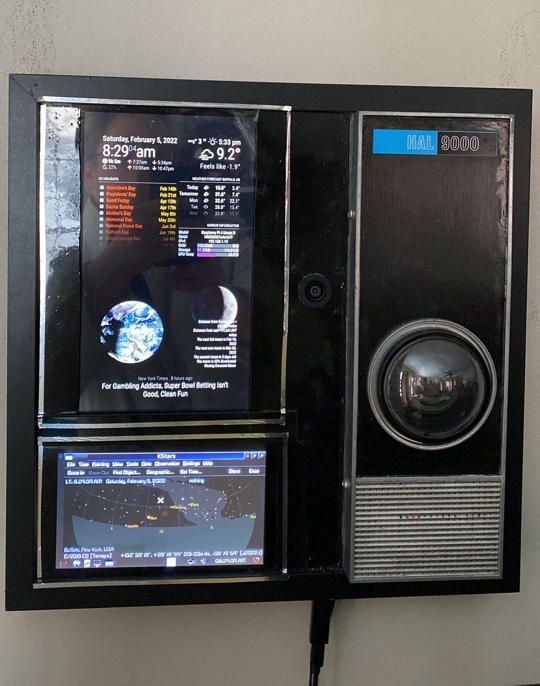
      Like I mentioned to the other guy, I’ve been wanting to get voice command gong on my latest project, which is this:

      HAL Pi.JPG

      Being a relative newbie to this, I’m hoping it’s not too complicated for me. Before I get started, I was wondering: there’s no mention of the Raspberry Pi in the Siri section. Is that because it won’t work on the Pi, or just it didn’t get mentioned?

      Also, you may have noticed my project’s appearance. Any chance I could get this, either as Siri or Google, to answer to “Okay, HAL,” and maybe use a voice approximating our favorite kill-happy computer?

      Thanks for putting this package together, hopefully I can get this project closer to where I want it.

      I may have other questions later.

      posted in General Discussion
      H
      HALPi-Thousand
    • RE: MagicMirror Voice Control with Siri and Google Assistant

      @bugsounet

      I’m actually glad he posted this. I’ve been wanting to set up some sort of voice command with my Magic Mirror install, Alexa or Google are okay, Siri would be even better if I can pull it off. This looks like its exactly what I wanted.

      posted in General Discussion
      H
      HALPi-Thousand
    • RE: MM Config check goes bad

      @sdetweil

      Well, whatever I did, it worked enough to get the message about the QR code where it should be. Now to see if I can actually get the webpage to behave as well.

      posted in Troubleshooting
      H
      HALPi-Thousand
    • RE: MM Config check goes bad

      @sdetweil said in MM Config check goes bad:

      @halpi-thousand what position is it configured for? I don’t see it on screen.

      Exactly the problem, it doesn’t show up. It’s set up for upper left, last in line so it should be below the holidays and above the Earth. I copy/pasted right from your page instructions, and I kept an eye out for that bit with the missing bracket error I made in that other thing, so I figure it should be happy. Except for some reason it isn’t. I have no idea what it could be.

      posted in Troubleshooting
      H
      HALPi-Thousand
    • A Brag and a Question

      I’ve created something I think is really awesome: I call it the HAL Pi-Thousand.
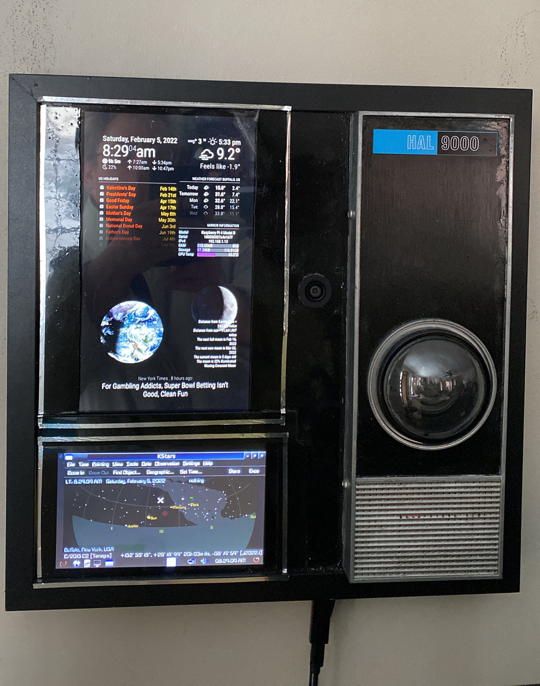
      HAL Pi.JPG

      A Pi 4b, a USB WebCam/Mic combo, two touchscreen displays, the native RasPi 7" and a decent 10.1" I found on Amazon, a nice picture frame, a powered USB Hub on the side, and of course a HAL 9000 model. And a wireless keyboard/trackpad combo for control, or a VNC connection once it’s fully completed and no longer right at my computer desk.

      Here’s my question: it has two displays. I had thought to find some way to make a sort of ten to fifteen-virtual button interface for the bottom one, assuming there’s a way to do that at the Newbie/kinda-interested-but-no-Python-experience-to-speak-of stage.

      Alternately, I’d like to give it a second Magic Mirror for the bottom display, you know, have a bit more info on display. It’d have to be a second incarnation of MM, because the two are slightly different sizes, which apparently is enough to prevent the MM on the 10" display from extending through to the 7".

      So, does this sound in any way doable? Or on the other hand, is there some way to get MM to extend to the 7 after all? Or on the other other hand…
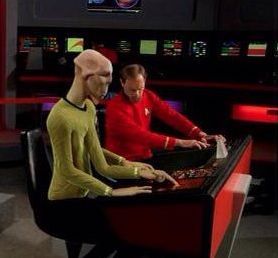
      Arex.jpg
      is there some relatively idiot-resistant way to set up those virtual buttons I mentioned, either in MM or some other app?

      This is what I had in mind for the virtual buttons:
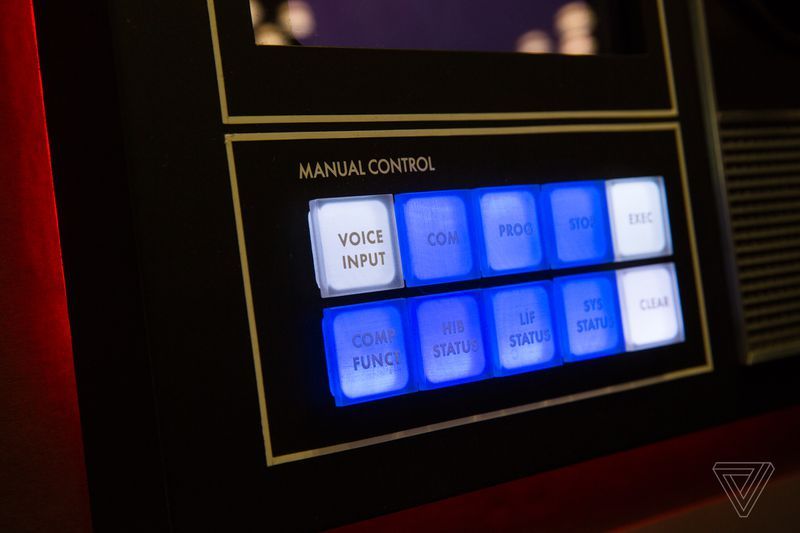
      akrales_181005_2999_0155.jpg

      See, I got the idea for the overall layout and design from something I found while playing the Google lottery: a company had planned to sell a sort of Alexa/HAL thing a few years ago, but it never got off the ground beyond the example stage. Also, the thing would have cost about $1,000, which not a lot of folks would be ready to pony up, no matter how cool it looks. I’d considered trying to find some light-up buttons for the lower section early on, but didn’t see anything that was quite right, and besides I already had the 7". Plus, this way it can have more functions than just being a button section. I figure it’d be a good place to use for a Teams or other video area (did I mention this runs Teams? Well, it runs Teams. And I’m hoping to incorporate Alexa or Google Assistant or that Voice thing in the 3rd party section, but that’s another subject), so a graphical Virtual button setup seems the way to go.

      Anyway, that’s where I’m at right now. So, any thoughts on these options, guys? Run a second MM, extend the first MM, Virtual buttons, or maybe virtual buttons at the bottom of an extended MM?

      I appreciate any advice from People Who Know Stuff. Thanks
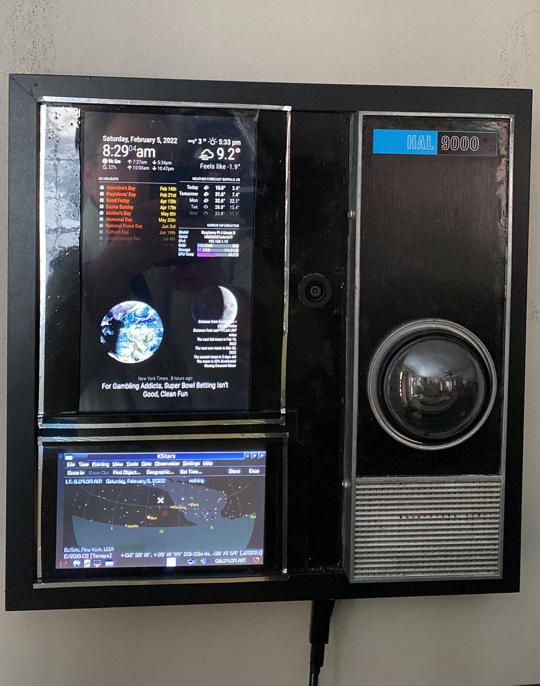
      posted in Show your Mirror
      H
      HALPi-Thousand
    • RE: MM Config check goes bad

      @sdetweil said in MM Config check goes bad:

      @halpi-thousand if the mm config says
      address:“localhost”,
      the Only apps INSIDE the pi can connect

      if u want to connect from outside the pi (phone, tablet, ??? )
      then u have to change address and ipWhitelist
      to allow outside machines anto connect

      it’s showQR not ShowQR

      case matters in MagicMirror, everywhere

      I checked, and it’s set up as localhost. That shouldn’t be a problem, this one isn’t headless. Two displays and a wireless keyboard/trackpad.

      HAL Pi.JPG
      Also, showQR is correct spelling and case.

      posted in Troubleshooting
      H
      HALPi-Thousand
    • RE: MM Config check goes bad

      @sdetweil said in MM Config check goes bad:

      @halpi-thousand if you use showQR:true

      then there will be a qr code to use from outside

      the default port on mm is 8080

      the doc (readme.md) says what link to use if not using the qr code

      Right, the link where you substitute the IP and Port for that one part

      http://MM_IP_Address:MM_Port/modules/MMM-Config/review

      I tried the Pi’s IP and Port 8080, and got this error:

      Unable to connect
      Firefox can’t establish a connection to the server
      at 192.168.1.13:8080.
      The site could be temporarily unavailable or
      too busy. Try again in a few moments.
      If you are unable to load any pages, check
      your computer’s network connection.
      • If your computer or network is protected by
      a firewall or proxy, make sure that Firefox is
      permitted to access the Web.

      I also tried adding in that ShowQR: true line; it didn’t give me a QR.

      Any ideas where I might be getting it wrong?

      posted in Troubleshooting
      H
      HALPi-Thousand
    • RE: MM Config check goes bad

      @sdetweil said in MM Config check goes bad:

      @halpi-thousand said in MM Config check goes bad:

      Geany

      ?

      it did report, that somewhere further down it lost the structure

      deducing where it was caused is a fun time project.

      I wrote a module for this kind of problem, that presents a form. no more config editing

      funny it’s called MMM-Config!

      https://github.com/sdetweil/MMM-Config

      :astonished_face: And just like that, you’re my new best MagicMirror friend - I’ve been wanting something like this to make working on this stuff easier. Love this idea. Looks like it should be a fair bit more Newb-friendly than fiddling around in the config file tends to be.

      One thing: it apparently requires the Pi IP address and Port ID. The IP address wasn’t a problem, but I don’t know where or what to look for to get the Port ID. Or did I just miss something somewhere?

      Thanks again

      posted in Troubleshooting
      H
      HALPi-Thousand
    • RE: MM Config check goes bad

      @sdetweil

      That helps, thanks.

      Why doesn’t Geany tell me these things? Granted, I’m only getting started learning about this, and maybe I missed something somewhere but I would think that at least for little stuff - missing parentheses and so forth - it could manage to tell me what’s missing.

      Or is it that it probably did, and I just didn’t notice?

      posted in Troubleshooting
      H
      HALPi-Thousand
    • MM Config check goes bad

      So, I wanted to get rid of the compliments module. I don’t mind a respectful computer, but I don’t care for the obsequious toadying and so forth. And I wanted to take a swing at adding modules.

      So, I went with MMM-BinaryClock. Simple, nothing too weird, what could possibly go wrong, right?

      Blank screens on MM, that’s what. I ran npm run config:check like it said I should. This is what it said:

      Your configuration file contains syntax errors :(
      [30.01.2022 14:11.12.180] [ERROR] Line 71 column 3: Parsing error: Unexpected token {
      

      I guess by column 3 it means the third tab out.

      Thing is, that’s exactly where it was with the compliments thing.

      Here’s what it was:

      	url: "webcal://www.calendarlabs.com/ical-calendar/ics/76/US_Holidays.ics"
      					}
      				]
      			}
      		},
      		{
      			module: "compliments",
      			position: "lower_third"
      		},
      		{
      			module: "weather",
      

      Here it is after I changed it:

      url: "webcal://www.calendarlabs.com/ical-calendar/ics/76/US_Holidays.ics"
      					}
      				]
      			}
      		},
      		{
      			module: 'MMM-BinaryClock',
      			position:"lower_third",
      			config: {
      				size: 30
      		},
      		{
      			module: "weather",
      

      I don’t see any difference between the two starts and ends. It has the same number of tab spaces as the previous one. I don’t see what the problem is. Granted, I don’t know a whole lot about this stuff.

      Here’s what the page wants:

      var config = {
          modules: [
              {
                  module: 'MMM-BinaryClock',
                  position:"top_left",
                  config: {
                      size: 30
                      }
              }
          ]
      }
      

      Obviously, a bit of a difference, but since in mine it isn’t the first one at the top, I didn’t figure that leaving out the stuff from the beginning should be a problem.

      So, any ideas on what the problem might be? I really don’t want to go through this every time I ad a module, because there are a few I;'ve got my eye on.

      Thanks

      posted in Troubleshooting
      H
      HALPi-Thousand
    • RE: I changed text in a module, now I don't get the module

      @sdetweil said in I changed text in a module, now I don't get the module:

      NEVER edit the module source code
      ALL config goes in config.js
      to recover a shipped mm file do( from the mm folder)
      git status

      Thanks, that did the trick.

      But how can I change things like the compliments text and opening greetings and such, things that aren’t in the main config file? Or am I just stuck with a very obsequious Pi?

      posted in Troubleshooting
      H
      HALPi-Thousand
    • I changed text in a module, now I don't get the module

      So, I’ve got MM on a Pi 4b. I installed Magic Mirror, and changed a few things - measurements from Metric to Imperial, being American and behind the times, and weather locations. So far so good.

      Then I went and changed the compliments (because I don’t need a computer to tell me I’m sexy), and the opening messages (because I do want it to know I’m the boss and tell me it does).

      Now it doesn’t do either one. just a big blank space. I was going to just toss it and re-install it, but that would just mean it would happen again next time.

      So, I think I’d like to know how to prevent it instead. Obviously, other people manage to do this, so I’d like to know where I’m getting it wrong.

      I opened the xxx.js files in the desktop environment; it opened them automatically with Mousepad, which I gather is the Pi’s text editing app. Should I have used something else? Maybe open it in the Terminal, and if so, how? Or is there something else I’m missing?

      Thanks, guys

      posted in Troubleshooting
      H
      HALPi-Thousand
    • RE: Looking for package.json in all the wrong places

      @sdetweil

      So, I tried using that install script, ran into a few problems.

      First I should mention that I did have a successful install of Magic Mirror at one point recently. Found Mystic Mirror, which apparently includes Alexa, which I want, so I deleted Magic and went to install Mystic, but ran into a bit of trickiness, so I installed Magic (or thought I did) until I could work out what to do with Mystic. And that’s around when I started running into this npm problem. Might have skipped something somewhere or gotten somethign wrong, I really don’t recall.

      —edit----
      You were about to be wading through a ton of text copied from the Terminal, but I somehow managed to figure out the right thing to google, and realizing that node.js was the first thing it had problems with, found out how to get rid of it. That worked. I did the full Magic Mirror installation again, and it’s happy. Just thought I’d mention the solution here.

      I’ll take a swing at using your install scripts in a bit, but for now the main problem is solved. Victory!

      posted in Troubleshooting
      H
      HALPi-Thousand
    • RE: Looking for package.json in all the wrong places

      @sdetweil

      I’m still running Buster; tried Bullseye, ran into issues. Decided to wait a few versions. Will your script work with Buster as well, or just Bullseye?

      Thanks

      posted in Troubleshooting
      H
      HALPi-Thousand
    • RE: Looking for package.json in all the wrong places

      @mumblebaj

      I think I’ve found the cuse of the problem. it begins at the npm install part:

      pi@HALpiThousand:~/MagicMirror $ npm install
      npm WARN read-shrinkwrap This version of npm is compatible with **lockfileVersion@1**, but package-lock.json was generated for **lockfileVersion@2**. I'll try to do my best with it!
      

      So, it looks like, for whatever reason, it keeps doing that, and that results in it having problems trying to use it.

      So, I guess the question is, what exactly is lockfile, what’s the deal with it putting this package in V@2 instead of V@1, and how can I get it to do what it’s supposed to do with it?

      posted in Troubleshooting
      H
      HALPi-Thousand
    • RE: Looking for package.json in all the wrong places

      @mumblebaj

      Funny thing, after I wrote that, I deleted and reinstalled Magic Mirror, then remembered that during an earlier install, I might not have done that directory change.

      So now, it may be that it’s looking in the main Pi home folder, even though I’ve installed it the right way twice or three times since then.

      So, I guess the question is, how do I let it know that the file is where it should be? Is there something else I should delete from somewhere else? Something that got installed in the main home folder and is probably still there?

      Also, on this last install, I got this message:

      pi@HALpiThousand:~/MagicMirror $ npm install
      npm WARN read-shrinkwrap This version of npm is compatible with lockfileVersion@1, but package-lock.json was generated for lockfileVersion@2. I'll try to do my best with it
      
      > playwright@1.17.1 install /home/pi/MagicMirror/node_modules/playwright
      > node install.js
      
      internal/util.js:220
          throw new errors.TypeError('ERR_INVALID_ARG_TYPE', 'original', 'Function');
          ^
      
      TypeError [ERR_INVALID_ARG_TYPE]: The "original" argument must be of type Function
          at promisify (internal/util.js:220:11)
          at Object.<anonymous> (/home/pi/MagicMirror/node_modules/playwright-core/node_modules/extract-zip/index.js:11:18)
          at Module._compile (module.js:649:30)
          at Object.Module._extensions..js (module.js:660:10)
          at Module.load (module.js:561:32)
          at tryModuleLoad (module.js:501:12)
          at Function.Module._load (module.js:493:3)
          at Module.require (module.js:593:17)
          at require (internal/module.js:11:18)
          at Object.<anonymous> (/home/pi/MagicMirror/node_modules/playwright-core/lib/utils/browserFetcher.js:9:42)
      npm WARN optional SKIPPING OPTIONAL DEPENDENCY: fsevents@2.3.2 (node_modules/fsevents):
      npm WARN notsup SKIPPING OPTIONAL DEPENDENCY: Unsupported platform for fsevents@2.3.2: wanted {"os":"darwin","arch":"any"} (current: {"os":"linux","arch":"arm"})
      
      npm ERR! code ELIFECYCLE
      npm ERR! errno 1
      npm ERR! playwright@1.17.1 install: `node install.js`
      npm ERR! Exit status 1
      npm ERR! 
      npm ERR! Failed at the playwright@1.17.1 install script.
      npm ERR! This is probably not a problem with npm. There is likely additional logging output above.
      
      npm ERR! A complete log of this run can be found in:
      npm ERR!     /home/pi/.npm/_logs/2022-01-28T17_50_58_671Z-debug.log


      Does this help any with that question?

      Thanks

      posted in Troubleshooting
      H
      HALPi-Thousand
    • Looking for package.json in all the wrong places

      Hi, Guys -
      I’m trying to run Magic Mirror on a Pi 4b. I followed the install instructions perfectly, but I keep getting this error:

      pi@HALpiThousand:~ $ npm start
          npm ERR! **path /home/pi/package.json**
          npm ERR! code ENOENT
          npm ERR! errno -2
          npm ERR! syscall open
          npm ERR! enoent ENOENT: **no such file or directory, open '/home/pi/package.json'**
          npm ERR! enoent **This is related to npm not being able to find a file.** 
      

      So, it can’t find the file. I found the file. It’s in the Magic Mirror folder, right where it should be. For whatever reason, MM hasn’t thought to look there. Any idea on how to teach it geography?

      Fair warning, I am somewhere on the opposite end of the programming spectrum from anyone who knows what they’re doing.

      Thanks

      posted in Troubleshooting
      H
      HALPi-Thousand
    • install script fail error

      Hi -
      I’ve been trying to install Magic Mirror. I’m on a Pi 4B, running Buster because the more recent update doesn’t seem to get along too well right now.

      I’ve installed it, had to delete and start again because something somewhere went wrong in the last install, or maybe somewhere along the way when I tried changing a compliment or hte weather settings or something.

      ANyway, now I keep getting this error:

      Failed at the playwright@1.17.1 install script

      the full text looks like this:

      pi@HALpiThousand:~/MagicMirror $ npm install
      npm WARN read-shrinkwrap This version of npm is compatible with lockfileVersion@1, but package-lock.json was generated for lockfileVersion@2. I'll try to do my best with it!
      
      > playwright@1.17.1 install /home/pi/MagicMirror/node_modules/playwright
      > node install.js
      
      internal/util.js:220
          throw new errors.TypeError('ERR_INVALID_ARG_TYPE', 'original', 'Function');
          ^
      
      TypeError [ERR_INVALID_ARG_TYPE]: The "original" argument must be of type Function
          at promisify (internal/util.js:220:11)
          at Object.<anonymous> (/home/pi/MagicMirror/node_modules/playwright-core/node_modules/extract-zip/index.js:11:18)
          at Module._compile (module.js:649:30)
          at Object.Module._extensions..js (module.js:660:10)
          at Module.load (module.js:561:32)
          at tryModuleLoad (module.js:501:12)
          at Function.Module._load (module.js:493:3)
          at Module.require (module.js:593:17)
          at require (internal/module.js:11:18)
          at Object.<anonymous> (/home/pi/MagicMirror/node_modules/playwright-core/lib/utils/browserFetcher.js:9:42)
      npm WARN optional SKIPPING OPTIONAL DEPENDENCY: fsevents@2.3.2 (node_modules/fsevents):
      npm WARN notsup SKIPPING OPTIONAL DEPENDENCY: Unsupported platform for fsevents@2.3.2: wanted {"os":"darwin","arch":"any"} (current: {"os":"linux","arch":"arm"})
      
      npm ERR! code ELIFECYCLE
      npm ERR! errno 1
      npm ERR! playwright@1.17.1 install: `node install.js`
      npm ERR! Exit status 1
      npm ERR! 
      npm ERR! Failed at the playwright@1.17.1 install script.
      npm ERR! This is probably not a problem with npm. There is likely additional logging output above.
      
      npm ERR! A complete log of this run can be found in:
      npm ERR!     /home/pi/.npm/_logs/2022-01-23T22_07_13_111Z-debug.log


      So, obviously something somewhere is going screwy. I don’t know what or where, and not exactly being a master coder - more on the complete opposite end of that skill scale - even if I did in some vague way, I would have no idea why probably or what to do to make it behave.

      That said, I can follow directions as easily as the next above-average IQ guy, so… Does anyone have an idea of what the problem is, and how I might fix it?

      thanks

      posted in Troubleshooting installation error npm issues
      H
      HALPi-Thousand
    • 1 / 1