@ashishtank Nice job.
But the Vin-number is not from a valid MB car. so I think the data is random and only for developer use or testing material.
I’m not a programmer so I’m hoping so badly that there is someone who wil and can fix this.
 Offline
@ashishtank Nice job.
But the Vin-number is not from a valid MB car. so I think the data is random and only for developer use or testing material.
I’m not a programmer so I’m hoping so badly that there is someone who wil and can fix this.
Anyone interested in making a module for Mercedes me.connect? I’ve been looking around, trying to find any pre-existing modules without luck. It would be nice to be able to check the battery status, and available distance for the car. Refreshing the info either by timer every xxx minutes, or manually. If possible also status of the heater/fan (active/inactive) and ability to start the heater.
What I have found is an api that maybe could be used; https://forum.magicmirror.builders/topic/1011/order-closed-two-way-mirror-order-in-germany/540?page=54
and
https://developer.mercedes-benz.com/?retry=11
Anyone interested? I’m from Holland.
Hello,
I want a second page on my mirror, and place there the 4 images of the secureti cam’s of the House.
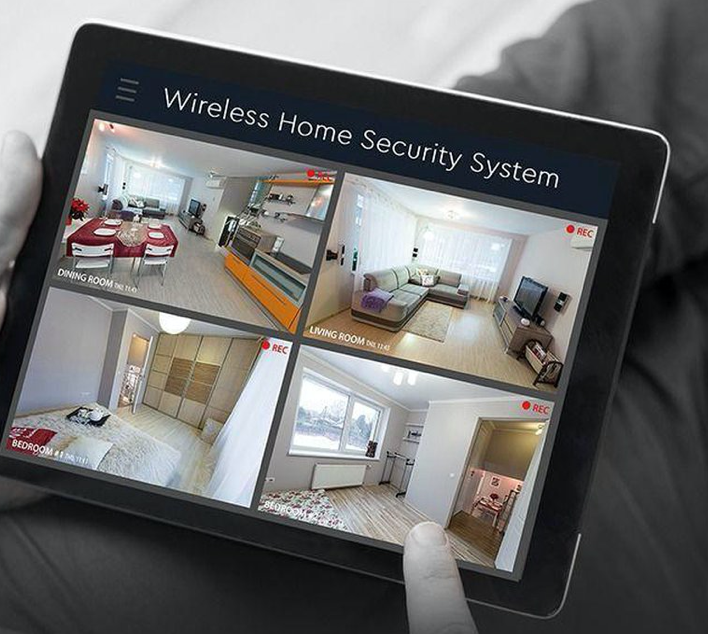
Someting like this.
I only get 2 screens under each other.
	{
			module: "MMM-RTSPStream",
			position: "middle",  //"top", "middle", "bottom"
			config: {
				autoStart: true,
				rotateStreams: false,
				rotateStreamTimeout: 20,
				moduleWidth: 568,
				moduleHeight: 320,
				localPlayer: "omxplayer",
				remotePlayer: 'none',
				showSnapWhenPaused: false,
				remoteSnaps: false,
				  stream1: {
					name: 'Garage Botter Acker',
					url: 'rtsp://user:pass@ipadress:poort/cam/realmonitor?channel=1&subtype=1',
					protocol: "tcp",
					frameRate: 25,
					muted: true,
				},
				  stream2: {
					name: 'Steeg Garage',
					url: 'rtsp://user:pass@ipadress:poort/cam/realmonitor?channel=2&subtype=1',
					protocol: "tcp",
					frameRate: 25,
					muted: true,
				},
	}},
@CyruS1337 said in MMM-RTSPStream:
Thats the way I have don’t
{
    module: "MMM-RTSPStream",
    position: "top_left",
    config: {
        autoStart: true,
        rotateStreams: true,
        rotateStreamTimeout: 10,
        moduleWidth: 354,
        moduleHeight: 240,
        localPlayer: 'omxplayer',
        remotePlayer: 'none',
        showSnapWhenPaused: true,
        remoteSnaps: true,
        stream1: {
            name: 'Wald',
            url: 'rtsp://IPCAM/42z4585742524dud1h',
            frameRate: 'undefined',
            snapshotType: 'url',
            snapshotRefresh: 10,
            width: undefined,
            height: undefined,
            },
        stream2: {
                    name: 'Einfahrt',
                    url: 'rtsp://IPCAM/F5478u56hngdyzEYHt',
                    frameRate: 'undefined',
                    snapshotType: 'url',
                    snapshotRefresh: 10,
        	    width: undefined,
                    height: undefined,
                    },
}},@maxs
Thanks, Yes that works fine. But now it’s not tracing not anymore. Only if I zoom out bij VNC connection and sure for the device on the map.
When I use the mmm-taccar module i’t was tracing bij i’ts self.
@alpyapple putt 12V led tv. “Nikkei Mobile TV NL22FMBK 12 Volt 22 Inch LED TV met DVB-S2 Fastscan en DVB-T2”
@levente82
The Problem is solved… a corrupt or bad CVS file was the problem.
And the config file a small chance dateFormat: “dddd D MMMM” instead of "dateFormat: “MM/DD/YY” :) :)
So maybe @crush i’t for you also the issue :)
edit: /home/pi/MagicMirror/modules/MMM-MyGarbage/garbage_schedule.csv
your must edit i’t on de mirror self. not bij Excel or notepad
and i’t looks like this
WeekStarting,green,gray,blue,orange
11/18/20,0,1,0,1
11/25/20,1,0,0,0
12/02/20,0,1,0,0
12/09/20,1,0,0,0
12/16/20,0,1,0,1
12/23/20,1,0,0,0
12/30/20,0,1,0,0
01/06/21,1,0,0,0
01/13/21,0,1,0,1
01/20/21,1,0,0,0
01/27/21,0,1,0,0
02/03/21,1,0,0,0
02/10/21,0,1,0,1
02/17/21,1,0,0,0
I’m from holland so sorry for my bad English
Hello, we have a Mercedes B250E and would like to have the connection with the Mercedes.me
I saw that you were working on it. Did it finally work at the end?
Can you help us out whit this?
Dankjewel Thanks frome Holland