@sean
Thank you…that did the trick.
@sean
Thank you…that did the trick.
@sean
I have attached a screen shot of the output of one of my calendars:
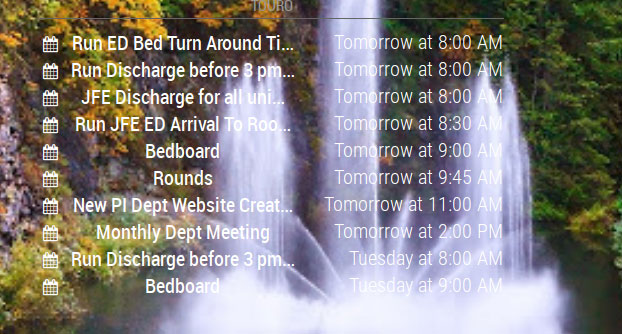
I would like to be able to have the “background” of the calendar a shade of a transparent gray so that I am able to read the text but still be able to tell what is under the gray “background”.
I hope I did a better job of explaining what I am attempting to do. I know it is very important that the appropriate verbiage is used when attempting to explain an issue. Otherwise everyone remains confused.
Again…
Thanks for all you help.
Johnny
@sean
Thank you for the examples. However neither of the two worked. If you think of anything else to try, I will implement.
Again, thank you for all of your help.
Johnny
@sean said in How add transparent background to modules:
@johnny_swindle
@Sean
Thank you for the info. I added the code to the custom CSS and nothing changed. I even changed the alpha to 1.0 with no effect.
I am using MMM-GooglePhotos for back ground images. Do you think that this module that I am using for the backgrounds is some how “over riding” the custom CSS?
background-color: rgba(red, green, blue, alpha);
- red,green,blue : 0 ~ 255
- alpha : 0 ~ 1 (0:transparent, 1:opaque)
ex)
background-color: rgba(255,255,255, 0.5)
I have read many posts describing how this should be done, but I am failing at every turn. I what to add a transparent background to many of my modules so that the information is easier to read. I have various images that appear as a background.
This is what I have tried in the custom CSS:
{
 .calendar {
  background-color:rgba(117, 124, 138, 1);
  opacity: 0.6;
}
}
Would someone help me out and show me what I am doing wrong?
Thanks…
Johnny
I did realize that there were windows packages…will have to investigate that option to try out new modules.
Thanks…
Thank you for suggestion. I reached out to the developer and I have been able to resolve 99% of the issues. I will post my config once I have it all working. I was aware that you may not be able to see the changes via VNC. I stop MM via putty, make the changes using Nano (via putty) and then restart.
I then walk into the next room to check the results. I will probably have to unearth my laptop and sit in front the MM to make my life easier.
Johnny
Thanks for all the suggestions.
I did in fact do a npm install in the MMM-RTSPStream folder.
I played around with the config using your example, but the best I got was a blank frame (that was progress, but that was the best so far.
Open to any and all suggestions.
Johnny
Thanks for your reply.
Sorry I confused the issue with my description of the camera and rPi 3…yes…it is a normal combination (probably like yours).
The URL plays correctly in VLC. I will follow your suggestion and try around with setting similar to yours.
Johnny
OK…this is what is displaying on the terminal when I launch MMM-RTSPStream and it issues and error. How and where do I address this error?
Whoops! There was an uncaught exception...
TypeError: `port` or a `server` must be provided
    at new WebSocketServer (/home/pi/MagicMirror/modules/MMM-RTSPStream/node_modules/node-rtsp-stream-es6/node_modules/ws/lib/WebSocketServer.js:44:11)
    at VideoStream.startListener (/home/pi/MagicMirror/modules/MMM-RTSPStream/node_modules/node-rtsp-stream-es6/src/videoStream.js:32:24)
    at Class.startListener (/home/pi/MagicMirror/modules/MMM-RTSPStream/node_helper.js:49:32)
    at Class.socketNotificationReceived (/home/pi/MagicMirror/modules/MMM-RTSPStream/node_helper.js:257:22)
    at Socket. (/home/pi/MagicMirror/modules/node_modules/node_helper/index.js:113:11)
    at emitTwo (events.js:106:13)
    at Socket.emit (events.js:191:7)
    at /home/pi/MagicMirror/node_modules/socket.io/lib/socket.js:513:12
    at _combinedTickCallback (internal/process/next_tick.js:67:7)
    at process._tickCallback (internal/process/next_tick.js:98:9)
Thanks…
Johnny
@johnny_swindle said in MMM-RTSPStream issues:
Ok…the missing comma was part of the issue. Now MM load and I see a message that says Loading MMM-RTSPStream.
This camera is wireless…talking to a wirless rPi 3 if that is any help resolving the issue I am seeing.
I have an issue getting MMM-RTSPStream to work. I did the install and ran the configuration tool. But when I include the generated code in my config…MM will not run. I feel like a big dummy since there is a config tool that does all of the hard work.
Here is the code that I am adding:
{
    module: "MMM-RTSPStream",
    position: "bottom_left",
    config: {
        autoStart: true,
        rotateStreams: true,
        rotateStreamTimeout: 30,
        moduleWidth: 354,
        moduleHeight: 240,
        localPlayer: 'omxplayer',
        remotePlayer: 'ffmpeg',
        showSnapWhenPaused: false,
        remoteSnaps: false,
        stream1: {
            name: 'Front Door',
            url: 'rtsp://Administrator:!Password@192.168.0.31:88/videoMain',
            frameRate: 'undefined',
            width: undefined,
            height: undefined,
            },
        }
}
Thanks for any help in advance.
Johnny
I am following the instructions outlined here: https://github.com/MichMich/MagicMirror/wiki/Auto-Starting-MagicMirror
When I paste in the suggested code provided by PM2 an error is returned. I am a total Noob and not sure how to proceed. Here is the error:
pi@mm1:~/MagicMirror $ sudo env PATH=$PATH:/usr/bin /usr/lib/node_modules/pm2/bin/pm2 startup systemd -u pi --hp /home/pi
[PM2] Init System found: systemd
Platform systemd
Template
[Unit]
Description=PM2 process manager
Documentation=https://pm2.keymetrics.io/
After=network.target

[Service]
Type=forking
User=pi
LimitNOFILE=infinity
LimitNPROC=infinity
LimitCORE=infinity
Environment=PATH=/usr/bin:/bin:/usr/local/sbin:/usr/local/bin:/usr/sbin:/usr/bin
Environment=PM2_HOME=/home/pi/.pm2
PIDFile=/home/pi/.pm2/pm2.pid

ExecStart=/usr/lib/node_modules/pm2/bin/pm2 resurrect
ExecReload=/usr/lib/node_modules/pm2/bin/pm2 reload all
ExecStop=/usr/lib/node_modules/pm2/bin/pm2 kill

[Install]
WantedBy=multi-user.target

Target path
/etc/systemd/system/pm2-pi.service
Command list
[ 'systemctl enable pm2-pi',
  'systemctl start pm2-pi',
  'systemctl daemon-reload',
  'systemctl status pm2-pi' ]
[PM2] Writing init configuration in /etc/systemd/system/pm2-pi.service
[PM2] Making script booting at startup...
>>> Executing systemctl enable pm2-pi
[DONE]
>>> Executing systemctl start pm2-pi
Job for pm2-pi.service failed because the control process exited with error code.
See "systemctl status pm2-pi.service" and "journalctl -xe" for details.
[ERROR] Exit code : 1
[PM2][ERROR] systemctl start pm2-pi failed, see error above.
Thanks in advance for any and all assistance.
Johnny
OK…new display up and running…and the issue with color icons solved. A trailing comma was missing from coloricon option.
Working now…thanks everyone.
@johnny_swindle said in MMM-MyWeather and coloricon option:
@NoNameRo
@fabbr
I will be a couple of days before I can post my config/error message…display went out. Will have to get another one.Thanks for everyone’s help.
Johnny
I will post what the error message looks like later this evening after I get home from work.
Thanks…
@NoNameRo
I will later this evening after I get home from work.
Thanks…
Thank you for the example. However, when I add the last line, that is when mm fails to load and generates the error message. I am open to any and all suggestions.
Thanks…
I am slowing getting my mm configured. I am using MMM-MyWeather. Each time I attempt to add the coloricon option, I get an error and mm will not start.
Would someone be so kind as to post sample code showing the proper way to use this option?
Thank you.